
WEB-101 · Lesson 12 of 12 · 18 min
Capstone: a multi-page responsive site
▶ Video coming soon A video version of this lesson is on the way.
By Friday, November 13, 2026, the new Riverside Community Food Hub site was finished and approved. It had six pages, Home, Programs, Volunteer, Donate, Contact and a page for addresses that do not exist, plus a privacy page and an accessibility statement. It passed Sana's accessibility review, the HTML and CSS validators, and a week of testing by Food Hub staff and volunteers. Launch was planned for Monday, December 7, the first day of the holiday food drive. This capstone lesson walks through how Mira and the Brightwater team put the whole site together, so that you can build a site of your own the same way.
The capstone project for this course asks you to build a small multi-page site, at least four pages, for a real or invented organization, in hand-written HTML and CSS, responsive from 320 pixels upwards and meeting WCAG 2.2 AA. The lesson's sections follow the order of the work: plan, structure the files, build shared parts, write the CSS in layers, set a performance budget, test against checklists, and prepare the launch.
Plan the site
Every project began with a sitemap: a diagram of the pages and how they link. Mira drew the Food Hub's from four years of front-desk questions. The three questions people asked most, when is the grocery program open, how do I volunteer and can I donate online, each got a page one click from the home page, and the opening hours also appeared on the home page itself.
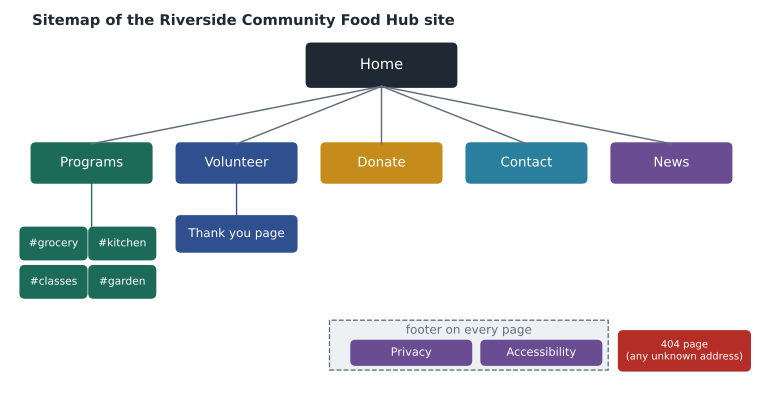
Planning also meant writing the content first, with the Food Hub's staff, rather than designing around placeholder text. Dev Bhatt rewrote each page in plain language, aiming for text that a reader in grade 8 could follow, because many of the Food Hub's visitors read English as a second language. Short sentences and common words help everyone; WCAG's Level AAA criterion 3.1.5 Reading Level describes the same goal.
Structure the files
A consistent folder structure makes a site easy to maintain and makes relative paths predictable. File and folder names should be lower case, with hyphens instead of spaces, because URLs are case-sensitive and spaces must be encoded.
riverside-food-hub/
  index.html
  programs.html
  volunteer.html
  volunteer-thanks.html
  donate.html
  contact.html
  privacy.html
  accessibility.html
  404.html
  css/
    site.css
  fonts/
    atkinson-hyperlegible-regular.woff2
    atkinson-hyperlegible-bold.woff2
  images/
    logo.svg
    kitchen-400.webp
    kitchen-800.webp
    ...
  media/
    youth-garden.mp4
    youth-garden.en.vtt
Theo configured the server so that each page could be reached without its .html ending, so /volunteer serves volunteer.html, and so that requests for the old site's addresses returned a 301 redirect to the matching new page. He listed 38 old addresses that other sites linked to, from the Food Hub's own social media posts back to 2015, and mapped each one.
const oldToNew = {
  '/volunteer.html': '/volunteer',
  '/donate_now.php': '/donate',
  '/about-us/contact.htm': '/contact',
  '/Programs/Kitchen.html': '/programs#kitchen',
  '/news/2016/slideshow.html': null
};

for (const [oldPath, newPath] of Object.entries(oldToNew)) {
  if (newPath === null) {
    console.log(oldPath + ' -> 410 Gone (no replacement)');
  } else {
    console.log(oldPath + ' -> 301 to ' + newPath);
  }
}/volunteer.html -> 301 to /volunteer /donate_now.php -> 301 to /donate /about-us/contact.htm -> 301 to /contact /Programs/Kitchen.html -> 301 to /programs#kitchen /news/2016/slideshow.html -> 410 Gone (no replacement)
What this code does
The object maps each old address to its new one. Object.entries turns it into a list of pairs, and the loop prints the response the server should give: a 301 redirect for pages that moved, and 410 Gone, which tells search engines that a page has been removed on purpose, for the old slideshow, which has no replacement. A real server reads a list like this from its configuration; writing it out first made sure nothing was missed.
Build the shared parts once, then copy
Every page shares the same head, header, menu and footer. On a static site of hand-written HTML, those parts must be copied into each file, so Mira built and tested them completely on the home page before making the other pages from it. Any later change to the menu means editing every page, which is manageable for nine pages and one reason larger sites use templates; the PHP courses later replace the copies with a single included file.
The menu marks the current page with aria-current="page", so screen readers announce "current page" and CSS can style it. That one attribute differs on each page; everything else in the header is identical.
<a class="skip-link" href="#main">Skip to main content</a>
<header class="site-header">
  <a class="logo" href="/">
    <img src="/images/logo.svg" alt="Riverside Community Food Hub home" width="180" height="48">
  </a>
  <nav aria-label="Main">
    <ul class="menu">
      <li><a href="/programs">Programs</a></li>
      <li><a href="/volunteer" aria-current="page">Volunteer</a></li>
      <li><a href="/donate">Donate</a></li>
      <li><a href="/contact">Contact</a></li>
    </ul>
  </nav>
</header>
<main id="main">
  <h1>Volunteer with us</h1>
  ...
</main>
Root-relative paths, starting with a slash, let the same header work on every page whatever folder it is in. The skip link is the first element in the body, and main has the id it points to.
Write the CSS in layers
One stylesheet served the whole site, about 9 kilobytes before compression. Gareth's rule was to organize it from general to specific, so that the cascade from Lesson 6 works with the file's order rather than against it.
| Section of site.css | What it holds | Specificity |
|---|---|---|
| 1. Custom properties | Colors, font stacks, spacing steps on :root | (0,1,0) once |
| 2. Base | box-sizing, body text, headings, links, images, focus styles | Mostly type selectors, (0,0,1) |
| 3. Layout | The page grid, header and footer Flexbox, media queries | Single classes, (0,1,0) |
| 4. Components | Buttons, cards, the urgent-needs box, forms, tables | Single classes, (0,1,0) to (0,1,1) |
| 5. Utilities | visually-hidden, skip-link, reduced motion and print rules | Single classes, some !important where justified |
Class names describe what a component is, not how it looks: .card, .urgent and .button rather than .green-box or .big-text, so that a redesign changes the CSS without renaming anything in the HTML. Variants add a second class, such as .button.button-secondary.
Set a performance budget
A performance budget sets limits that every page must stay within, agreed before building, so that speed is designed in rather than hoped for. Given Dev's statistics on phone visitors, the team agreed a budget for every page: no more than 15 requests and 1,000 kilobytes transferred on a first visit, with the HTML and CSS under 60 kilobytes together.
Worked problem
Checking the home page against the budget
On a first visit, the new home page transfers: HTML 14 kB, CSS 9 kB, two font files of 26 kB each, the logo SVG 4 kB, a hero photo of 118 kB, four card photos of 38 kB each, and a favicon of 2 kB. Does it meet the budget of 15 requests and 1,000 kB? How does it compare with the old home page's 61 requests and 6.4 MB from Lesson 1?
Show solution
- Count the requests.
- \[1 + 1 + 2 + 1 + 1 + 4 + 1 = 11 \text{ requests}\]
- Add the sizes.
- \[14 + 9 + 2(26) + 4 + 118 + 4(38) + 2 = 351 \text{ kB}\]
- Compare with the old page, taking 6.4 MB as 6,400 kB.
- \[351 \div 6{,}400 \approx 0.055\]
Answer: The page makes 11 requests and transfers 351 kB, well within the budget. It is about 1/18 of the old page's size, and on the 4-megabit connection from Lesson 1 it transfers in about 0.7 seconds instead of 12.8.
Gareth also ran Lighthouse, the performance audit built into Chrome's developer tools, on a simulated slow phone. The largest piece of content, the hero photo, appeared in 1.6 seconds, and nothing on the page shifted while it loaded, because every image had width and height attributes.
Test against checklists
Before calling any page done, Mira worked through Brightwater's checklists. They gather the rules from the whole course, so they make a useful self-review for your own capstone.
- HTML: doctype, lang, charset, viewport and a specific title on every page; one h1 and no skipped heading levels; landmarks; valid markup in the Nu HTML Checker; unique ids.
- Links and media: descriptive link text; working relative paths; alt text that fits each image's purpose; width and height on images; captions and a transcript for video.
- Forms: a label for every control; fieldset and legend for groups; correct input types and autocomplete; text error messages linked with aria-describedby; the newsletter as a separate unticked opt-in; only the personal information needed.
- CSS: border-box sizing; rem text sizes; no IDs in selectors; no inline styles; a valid stylesheet.
- Responsive: works from 320 pixels with no sideways scrolling; breakpoints in em chosen by the content; targets at least 24 pixels and main controls about 44; reduced motion respected.
- Accessibility: contrast of 4.5 to 1 for text and 3 to 1 for controls and focus; everything works by keyboard with visible, unobscured focus; tested with a screen reader and at 200 and 400 percent zoom.
- Performance: within the request and size budget; images sized for their display.
Prepare the launch
Launch is mostly server work, and Theo prepared it in the days after the course's final review. A week before December 7, he planned to lower the DNS TTL on the www record to 300 seconds. The new host already had a TLS certificate for the domain, and every http:// request would redirect to https://. On the morning of launch, he would point the DNS records at the new server, test every redirect from his list, and check the Network panel for any 404 errors. The custom 404 page would catch anything missed.
The privacy page explained what the volunteer form collects, why, who sees it and how long it is kept, and how to ask for a copy or a correction. The accessibility statement named WCAG 2.2 AA as the target, which includes the WCAG 2.1 AA level that ADA settlements usually require, and gave a phone number and email address for reporting problems and asking for alternative formats.
Finally, the whole site went into a version control repository with Git, which records every change with a message and lets the team undo mistakes. Mira's first commit message on the project read "Add home page skeleton", dated September 28. Her last, on November 13, read "Darken focus outline for contrast". The JavaScript and PHP courses that follow will add the volunteer shift booking system to the same repository.
<!DOCTYPE html>
<html lang="en">
<head>
  <meta charset="utf-8">
  <meta name="viewport" content="width=device-width, initial-scale=1">
  <title>Page not found | Riverside Community Food Hub</title>
  <link rel="stylesheet" href="/css/site.css">
</head>
<body>
  <a class="skip-link" href="#main">Skip to main content</a>
  <header class="site-header">
    <a class="logo" href="/"><img src="/images/logo.svg" alt="Riverside Community Food Hub home" width="180" height="48"></a>
  </header>
  <main id="main">
    <h1>We can't find that page</h1>
    <p>The page may have moved when we rebuilt our website. Try one of these:</p>
    <ul>
      <li><a href="/programs">Programs and opening hours</a></li>
      <li><a href="/volunteer">Volunteer with us</a></li>
      <li><a href="/donate">Donate</a></li>
      <li><a href="/contact">Contact us</a></li>
    </ul>
  </main>
</body>
</html>
Common mistakes
MistakeDesigning pages around placeholder text.
InsteadWrite the real content first, with the people who know the subject.
MistakeUsing spaces and capital letters in file names.
InsteadUse lower case and hyphens so URLs are predictable.
MistakeEditing the shared header on one page and forgetting the others.
InsteadFinish the shared parts on one page before copying, and check every page after any change.
MistakeLeaving old addresses to return 404 after a rebuild.
InsteadMap every old address that others link to, and redirect it with 301.
MistakeServing the 404 page with a 200 status.
InsteadSend the custom page with a real 404 status.
MistakeTreating speed as something to fix after launch.
InsteadAgree a performance budget before building and check each page against it.
Practice problems
Work each problem on paper first, then reveal the answer to check.
Your capstone site has a page at /about/team.html that links to the stylesheet with css/site.css. Why does it appear unstyled, and what are two ways to fix it?
Show answer
The relative path looks for /about/css/site.css, which does not exist. Use ../css/site.css or the root-relative /css/site.css.
A page loads 18 requests against a budget of 15. Name two likely ways to reduce the count.
Show answer
Remove unused scripts or fonts (for example, drop a font weight that is rarely used), combine small decorative images into CSS or inline SVG, or lazy-load images below the fold so they are not part of the first view.
Why does the menu use aria-current="page" rather than only a CSS class to mark the current page?
Show answer
aria-current is announced by screen readers, so blind users also know which page they are on; it can still be styled with an attribute selector in CSS.
Try it yourself
Check a page against the budget
The array files lists the sizes in kilobytes of everything a page loads.
Print the number of requests, the total size, and within budget if there are at most 15 requests and at most 1,000 kB in total, or over budget otherwise.
const files = [12, 9, 26, 26, 4, 240, 180, 180, 180, 2];
// your code here
Summary and key terms
- Plan with a sitemap and real content; put the most-asked questions one click from the home page.
- Use a predictable folder structure with lower-case, hyphenated names.
- Redirect every old address with 301 (or 410 for removed pages) and serve a helpful 404 page with a real 404 status.
- Build and test the shared header, menu and footer once, then copy; mark the current page with aria-current.
- Organize one stylesheet from custom properties to base, layout, components and utilities, keeping specificity low.
- Agree a performance budget for requests and bytes before building.
- Test every page against HTML, links and media, forms, CSS, responsive, accessibility and performance checklists.
- Prepare the launch: lower the DNS TTL, confirm HTTPS, test redirects, publish privacy and accessibility statements, and keep the site in version control.
- Sitemap
- A diagram of a site's pages and how they link.
- Performance budget
- Agreed limits on requests, bytes or loading time that every page must meet.
- 301 redirect
- A response telling clients that a page has moved permanently to a new address.
- 410 Gone
- A status saying a resource was removed on purpose and has no replacement.
- aria-current
- An attribute marking the current item, such as the current page in a menu.
- Accessibility statement
- A page stating the accessibility standard a site aims for, known limitations and how to give feedback.
- Version control
- A system, such as Git, that records every change to a project's files.
- Lighthouse
- An audit tool in Chrome's developer tools that measures performance, accessibility and other qualities.
Lesson quiz · 5 questions
Score 60% or more to complete this lesson.
Create a free account to save your progress, take quizzes and earn a certificate.