
WEB-101 · Lesson 1 of 12 · 25 min
How the web works: clients, servers and HTTP
▶ Video coming soon A video version of this lesson is on the way.
Mira Castellanos started at Brightwater Web Studio in Madison on Monday, September 14, 2026. For four years she had worked the front desk at the Riverside Community Food Hub, where she kept the volunteer schedule in a tangle of spreadsheets and answered the same three questions on the phone every morning: when is the grocery program open, how do I volunteer, and can I donate online? The Food Hub's website could not answer any of them well. It was built in 2014 from a template, it was hard to read on a phone, and the volunteer form was a PDF that people printed, filled in by hand and dropped off at the desk. When the Food Hub hired Brightwater to rebuild the site, Rhea Bastien, the studio's owner, offered Mira an apprenticeship on the project.
Her mentor, Gareth Lindqvist, began on the first morning with a question rather than a code editor. "When someone types the Food Hub's address into a phone and the home page appears," he asked, "what actually happens?" Mira guessed that the phone "goes to the website." Gareth smiled. "Nothing goes anywhere. Your phone sends a short text message to a computer it has never met, and that computer sends some text back. Everything else is detail. This course is about the detail."
This lesson explains the parts of that exchange: the difference between the internet and the web, the client and server roles, the HTTP messages they trade, the status codes and headers in those messages, and how HTTPS protects them. Every later lesson builds on this picture, because every HTML page, stylesheet and image you write will travel as an HTTP response.
The internet and the web are not the same thing
The internet is a global network of networks: cables, wireless links, routers and the agreed rules, called protocols, that let any connected computer send data to any other. It carries email, video calls, online games, file transfers and much more. The World Wide Web is one service that runs on top of the internet. It was proposed by Tim Berners-Lee at CERN in 1989 and is built from three ideas that are still at its core today: documents written in HTML, addresses called URLs that name each document, and a protocol called HTTP that a program uses to ask for a document and receive it.
A useful comparison is the road system and a delivery company. The internet is the roads; the web is one company's way of packaging, addressing and delivering parcels on those roads. Other services, such as email, use the same roads with different packaging rules.
Clients and servers
Every web exchange has two sides. The client is the program that asks for something. Most of the time it is a browser such as Chrome, Edge, Firefox or Safari, but it can also be a search engine's crawler, a phone app, a screen reader working through a browser, or a command-line tool. The server is the program that waits for requests and answers them. The word is used both for the software (a web server program such as Apache, nginx or the server built into a hosting service) and for the computer it runs on.
The roles describe behavior, not hardware. Mira's laptop can run a small web server during development, and then it is a server and a client at the same time: the browser on the laptop asks, the server on the same laptop answers. Brightwater's back-end developer, Theo Marchetti, would later put the finished Food Hub site on a hosting company's server, where it would answer requests from thousands of clients it would never see.
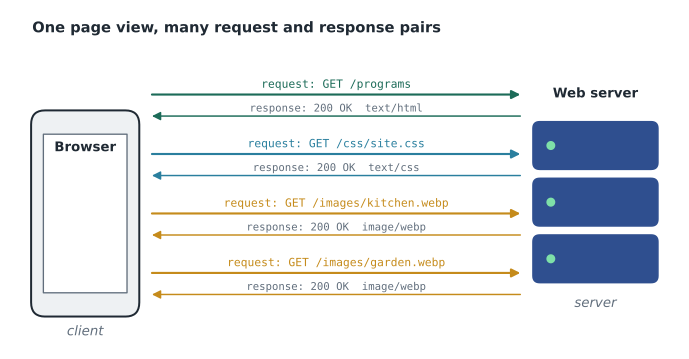
The exchange always starts with the client. A server never sends a page to a browser that did not ask for it. That rule explains a great deal: a page cannot update itself unless the browser asks again, and a server cannot know who is reading a page unless the browser tells it with each request.
HTTP: the conversation
HTTP, the Hypertext Transfer Protocol, defines the messages that clients and servers exchange. The current definition of its meaning is RFC 9110, HTTP Semantics, published by the Internet Engineering Task Force in 2022, with separate documents for each version's wire format. The good news for a beginner is that the basic messages are plain, readable text. A request has a request line, some header lines, a blank line, and sometimes a body. A response has a status line, header lines, a blank line and usually a body.
GET /programs HTTP/1.1
Host: riverside-food-hub.example
User-Agent: Mozilla/5.0 (Android 15; Mobile)
Accept: text/html
Accept-Language: en-CA,en;q=0.9HTTP/1.1 200 OK
Content-Type: text/html; charset=utf-8
Content-Length: 18342
Cache-Control: max-age=600
Last-Modified: Fri, 13 Nov 2026 16:20:00 GMT
<!DOCTYPE html>
<html lang="en">
...The request line has three parts. The method says what the client wants to do, the path names the resource on that server, and the version says which edition of HTTP the client speaks. The Host header names the site, because one server computer often hosts hundreds of sites at the same address. The other headers describe the client and what it can accept.
Methods
HTTP defines a small set of methods. A beginner meets two of them constantly and the rest later, when building applications in the JavaScript and PHP courses.
| Method | Meaning | Typical use on the Food Hub site |
|---|---|---|
| GET | Retrieve a resource; should not change anything on the server | Loading the Programs page, a stylesheet or a photo |
| POST | Send data for the server to process | Submitting the volunteer sign-up form |
| HEAD | Like GET, but return only the headers | A link checker testing whether a page still exists |
| PUT | Replace a resource with the data sent | Updating a volunteer profile in a later web application |
| PATCH | Change part of a resource | Changing one shift time in a later application |
| DELETE | Remove a resource | Canceling a shift booking in a later application |
GET is described as safe: asking for a page should not change anything, so a browser, a search engine or a link checker can repeat it freely. That is why a form that creates or changes data should use POST. A "delete this volunteer" link that used GET could be triggered by a crawler following links, which has happened to real sites.
Status codes
Every response begins with a three-digit status code and a short reason phrase. The first digit gives the class of the answer, so a developer can read the general meaning of any code at a glance.
| Class | Meaning | Codes you will see often |
|---|---|---|
| 1xx | Informational: the request was received, carry on | 103 Early Hints |
| 2xx | Success | 200 OK, 201 Created, 204 No Content |
| 3xx | Redirection: look elsewhere | 301 Moved Permanently, 302 Found, 304 Not Modified |
| 4xx | Client error: the request was wrong | 400 Bad Request, 401 Unauthorized, 403 Forbidden, 404 Not Found |
| 5xx | Server error: the request was fine but the server failed | 500 Internal Server Error, 503 Service Unavailable |
Two codes matter a great deal for the Food Hub rebuild. The old site had addresses such as /volunteer.html and /donate_now.php that other organizations had linked to for years. When the new site moved those pages, Theo would answer requests for the old addresses with 301 Moved Permanently and a Location header naming the new address, so that visitors and search engines followed the move instead of meeting a 404 Not Found. A friendly 404 page, with links back to the main sections, was also on the project list.
const response = 'HTTP/1.1 301 Moved Permanently\nLocation: /volunteer\nContent-Length: 0';

const lines = response.split('\n');
const statusParts = lines[0].split(' ');
console.log('Version: ' + statusParts[0]);
console.log('Code: ' + statusParts[1]);
console.log('Reason: ' + statusParts.slice(2).join(' '));

for (const line of lines.slice(1)) {
  const colon = line.indexOf(':');
  const name = line.slice(0, colon);
  const value = line.slice(colon + 1).trim();
  console.log('Header ' + name + ' = ' + value);
}Version: HTTP/1.1 Code: 301 Reason: Moved Permanently Header Location = /volunteer Header Content-Length = 0
What this code does
The program stores a short HTTP response as one string, with \n marking each line break. It splits the string into lines, then splits the first line at the spaces to get the version, the status code and the reason phrase (which can contain spaces, so the remaining parts are joined back together). For each header line it finds the first colon, takes the text before it as the header name and the trimmed text after it as the value, and prints both. A browser does the same job, much faster, for every response it receives.
function statusClass(code) {
  const first = Math.floor(code / 100);
  if (first === 2) return 'success';
  if (first === 3) return 'redirect';
  if (first === 4) return 'client error';
  if (first === 5) return 'server error';
  return 'informational';
}

for (const code of [200, 304, 404, 503, 103]) {
  console.log(code + ' is a ' + statusClass(code));
}200 is a success 304 is a redirect 404 is a client error 503 is a server error 103 is a informational
What this code does
The function divides the status code by 100 and rounds down with Math.floor, which leaves the first digit: 404 divided by 100 is 4.04, which rounds down to 4. It then returns a word for each class. The loop calls the function for five codes and prints a sentence for each. Monitoring tools use exactly this test to decide whether a page is healthy.
Headers
Headers are name and value pairs that carry information about the message. Names are not case-sensitive, so Content-Type and content-type mean the same thing. A handful appear in almost every exchange.
- Content-Type tells the receiver what kind of data the body holds, using a media type such as text/html, text/css, image/png or application/json, often with a character set such as utf-8. A browser decides how to treat the body from this header, not from the file name.
- Content-Length gives the size of the body in bytes.
- Cache-Control tells browsers and other caches whether and for how long they may keep a copy. With max-age=600, a browser may reuse its copy for 600 seconds without asking again.
- Location gives the new address in a redirect.
- Set-Cookie (in a response) and Cookie (in later requests) let a server recognise a returning browser.
Caching explains the 304 Not Modified status. When a cached copy is old, the browser can ask "has this changed since Friday at 16:20?" If the answer is no, the server sends 304 with no body, and the browser uses the copy it already has. On a phone with a slow connection, this saves real time.
HTTP is stateless
Each HTTP request stands alone. The server does not remember, from the protocol itself, that the same browser asked for the home page a moment ago. This statelessness makes the web easy to scale, because any of several servers can answer any request, but it means anything that needs memory, such as a signed-in volunteer or a donation in progress, needs an extra mechanism. Cookies are the usual one: the server sends a small named value with Set-Cookie, and the browser sends it back with every later request to that site. Cookies that identify or track people raise privacy questions that Lesson 5 and Lesson 11 return to.
HTTPS and the versions of HTTP
Plain HTTP travels as readable text, so anyone on the path, such as the operator of a café's Wi-Fi network, could read or alter it. HTTPS is HTTP sent inside an encrypted connection made with TLS, Transport Layer Security. TLS does three jobs: it encrypts the messages, it detects tampering, and it lets the browser check the server's certificate, which a certificate authority issues to prove that the server really controls the domain name. Browsers now mark plain HTTP pages as not secure, many features only work over HTTPS, and free certificates are widely available, so every site Brightwater builds uses HTTPS, with requests for plain http:// addresses redirected to https://.
HTTP has also changed underneath the readable messages shown above. HTTP/1.1, from the late 1990s, sends one request at a time on each connection. HTTP/2 (2015) sends many requests and responses at once over a single connection, in a compact binary format. HTTP/3 (2022) runs over QUIC, a newer transport that copes better with lost packets and changing networks, which helps phones moving between Wi-Fi and mobile data. The methods, status codes and headers are the same in all three, so everything in this lesson applies whichever version the browser and server agree on.
Static and dynamic pages
A static page is a file that the server sends exactly as stored: the same HTML for every visitor. A dynamic page is built by a program on the server for each request, for example a page listing the shifts still open this week, drawn from a database. The first phase of the Food Hub rebuild, the one Mira worked on in this course, is a static site of hand-written HTML and CSS. The later phases, in the JavaScript and PHP courses, add the dynamic parts. To the browser the difference is invisible: either way it receives an HTTP response with a Content-Type of text/html.
Watching it happen
Every major browser has built-in developer tools, usually opened with F12 or a right-click and Inspect. The Network panel lists every request a page makes, with its method, status code, type, size and time. Gareth had Mira open the old Food Hub home page with the Network panel showing. It made 61 requests: the HTML, four stylesheets, nine scripts (three of them for a slideshow nobody had touched since 2016), a web font in four weights, and 42 images, several of them photographs over two megabytes each. "Every one of those is a round trip," Gareth said. "On a bus with one bar of signal, that is the difference between a page that loads and a page people give up on."
Worked problem
How long does the old home page take to download?
The old Food Hub home page transfers 6.4 megabytes in total. A visitor on a slow mobile connection gets an average of 4 megabits per second. Ignoring the time spent setting up connections, how long does the transfer take? How long would a rebuilt page of 0.9 megabytes take on the same connection?
Show solution
- A byte is 8 bits, so convert megabytes to megabits first.
- \[6.4 \text{ MB} \times 8 = 51.2 \text{ megabits}\]
- Divide by the speed of the connection.
- \[51.2 \div 4 = 12.8 \text{ seconds}\]
- Repeat for the rebuilt page.
- \[0.9 \times 8 = 7.2 \text{ megabits}, \quad 7.2 \div 4 = 1.8 \text{ seconds}\]
Answer: The old page needs about 12.8 seconds just to transfer, before the browser has drawn anything; the rebuilt page needs about 1.8 seconds. Real loads take longer still, because each request also waits for a round trip to the server, which is why cutting the number of requests matters as well as cutting bytes.
Mira wrote the numbers on a sticky note and put it on her monitor: 61 requests, 6.4 megabytes. By the end of the project, the new home page would make 11 requests and transfer under a megabyte.
Common mistakes
MistakeSaying "the internet" and "the web" as if they were the same thing.
InsteadThe internet is the network; the web is one service on it, built from HTML, URLs and HTTP.
MistakeThinking the server pushes pages to visitors.
InsteadThe client always asks first; the server only answers requests.
MistakeUsing a GET link to delete or change data.
InsteadGET should be safe to repeat; use POST (or later, DELETE and PATCH) for changes.
MistakeTreating every non-200 status as an error.
Instead3xx codes are normal redirects and 304 means the cached copy is still good; only 4xx and 5xx signal errors.
MistakeMoving a page and letting the old address return 404.
InsteadAnswer the old address with a 301 redirect to the new one.
Practice problems
Work each problem on paper first, then reveal the answer to check.
A student says, "My laptop can't be a server because it isn't a big machine in a data center." What is wrong with this?
Show answer
Client and server are roles played by programs. A laptop running web server software is a server while it answers requests, whatever its size.
A page returns status 503 during a busy food drive. Whose problem is it, the visitor's or the site's, and what does it mean?
Show answer
It is a 5xx code, a server error: the request was fine, but the server was temporarily unable to handle it, often because it was overloaded or under maintenance.
Why does an HTML form that signs up a volunteer use POST rather than GET?
Show answer
Signing up changes data on the server. GET is meant to be safe and may be repeated by browsers, caches and crawlers; POST signals that the request has effects and keeps the form data out of the address.
A response has the header Cache-Control: max-age=3600. What may the browser do?
Show answer
It may reuse its stored copy for 3,600 seconds (one hour) without asking the server again.
Try it yourself
Describe a status code
Write a function describe(code) that returns the text CODE: class, where class is success for 2xx codes, redirect for 3xx, client error for 4xx and server error for 5xx.
Call it for 201, 301 and 404 and print each result on its own line.
function describe(code) {
  // your code here
}

console.log(describe(201));
console.log(describe(301));
console.log(describe(404));
Summary and key terms
- The internet is the global network; the web is a service on it built from HTML documents, URL addresses and the HTTP protocol.
- A client, usually a browser, sends requests; a server waits for requests and answers them. The roles belong to programs, not machines.
- An HTTP request has a method, a path, a version and headers; a response has a status code, headers and usually a body.
- GET retrieves and should be safe; POST sends data that changes something.
- Status classes: 2xx success, 3xx redirect, 4xx client error, 5xx server error. Use 301 when a page moves.
- Headers such as Content-Type, Cache-Control and Location describe the message; cookies add memory to a stateless protocol.
- HTTPS wraps HTTP in TLS for encryption, integrity and server identity; HTTP/2 and HTTP/3 change transport, not meaning.
- The browser's Network panel shows every request a page makes, with its status, size and time.
- Internet
- The global network of networks that carries data between connected computers.
- World Wide Web
- A service on the internet made of HTML documents linked by URLs and delivered with HTTP.
- Client
- A program, usually a browser, that sends requests to a server.
- Server
- A program, or the computer running it, that waits for requests and sends responses.
- HTTP
- Hypertext Transfer Protocol, the rules for web requests and responses.
- Method
- The word in a request that says what the client wants, such as GET or POST.
- Status code
- The three-digit number at the start of a response that says how the request went.
- Header
- A name and value pair that carries information about a request or response.
- Stateless
- Treating each request on its own, with no built-in memory of earlier requests.
- HTTPS
- HTTP sent over an encrypted TLS connection.
- TLS
- Transport Layer Security, the protocol that encrypts and authenticates HTTPS connections.
Lesson quiz · 5 questions
Score 60% or more to complete this lesson.
Create a free account to save your progress, take quizzes and earn a certificate.