
PYTH-120 · Lesson 7 of 12 · 25 min
Managing users and permissions with scripts
▶ Video coming soon A video version of this lesson is on the way.
Every person who uses a computer system needs an account, and every account needs the right permissions: enough to do the job, and no more. At Ridgeline, new baristas join each season and need a login on the office computer for the schedule and training videos; Theo needs access to the stock files; Kai needs to upload roast logs to the server; and when someone leaves, their access must end the same day. Mei has been doing this by hand, which means it happens late and inconsistently. This lesson shows how scripts create, change and remove accounts on Linux and Windows, how file permissions work, and how to audit both so that mistakes are caught.
Creating real accounts needs administrator rights on a real system, so the Linux and Windows commands on this page are for reading. The Python exercises practice the logic those scripts depend on: generating usernames, reading account lists and translating permission bits, which are the parts that most often go wrong.
Users and groups
Both Linux and Windows organize access around users and groups. A user account represents one person or one service, with a name, a numeric identifier, a home folder and a password or key. A group is a named set of users; permissions are usually given to groups rather than to individuals, so that adding someone to the roasting group gives them everything roasters need in one step, and removing them takes it all away. Services, such as the web server, run under their own accounts with very limited rights, so that a fault in one service cannot touch everything else.
On Linux, accounts are listed in the file /etc/passwd, one per line, with seven fields separated by colons: the username, a placeholder for the password (the real password hashes live in the protected /etc/shadow), the user ID, the primary group ID, a comment such as the person's full name, the home folder and the login shell. Ordinary people usually have user IDs from 1000 up, while lower numbers belong to the system and its services, many of which have the shell /usr/sbin/nologin so that nobody can log in as them.
passwd = """root:x:0:0:root:/root:/bin/bash
www-data:x:33:33:www-data:/var/www:/usr/sbin/nologin
jordan:x:1000:1000:Jordan Reyes:/home/jordan:/bin/bash
kai:x:1001:1001:Kai Nakamura:/home/kai:/bin/bash
backup:x:34:34:backup:/var/backups:/usr/sbin/nologin
theo:x:1002:1002:Theo Barnes:/home/theo:/bin/bash
"""
for line in passwd.splitlines():
    name, _pw, uid, gid, comment, home, shell = line.split(":")
    kind = "person" if int(uid) >= 1000 else "system"
print(f"{name:<9}{uid:>5} {kind:<7} {comment}")root 0 system root www-data 33 system www-data jordan 1000 person Jordan Reyes kai 1001 person Kai Nakamura backup 34 system backup theo 1002 person Theo Barnes
Windows keeps local accounts in its own database and, in organizations, uses Active Directory or Microsoft Entra ID to manage accounts centrally for many computers. The ideas are the same, with different tools: users, groups such as Administrators and Users, and permissions on files and folders. For an office the size of Ridgeline's, local accounts on each computer are enough, and PowerShell manages them with cmdlets such as New-LocalUser and Add-LocalGroupMember.
Try it yourself
People, not services
Write a function people(passwd_text) that reads /etc/passwd style text and returns a sorted list of the usernames of real people: user ID 1000 or more and a login shell that does not end in nologin or false. Skip blank lines.
For the sample text the result is ["jordan", "kai"].
passwd = """root:x:0:0:root:/root:/bin/bash
www-data:x:33:33:www-data:/var/www:/usr/sbin/nologin
jordan:x:1000:1000:Jordan Reyes:/home/jordan:/bin/bash
meilin:x:1003:1003:Mei Lin:/home/meilin:/usr/sbin/nologin
kai:x:1001:1001:Kai Nakamura:/home/kai:/bin/bash

"""

def people(passwd_text):
    return []

print(people(passwd))
Onboarding and offboarding scripts
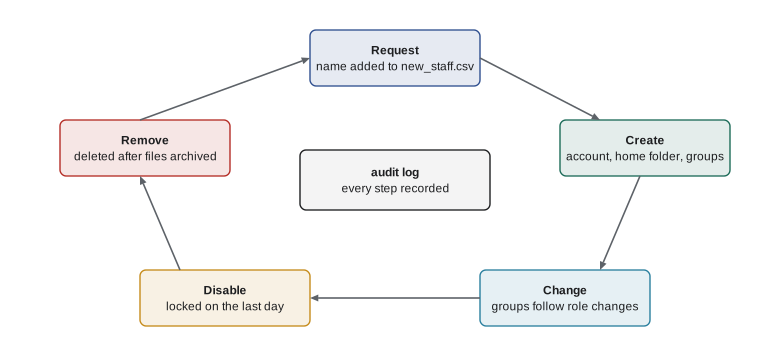
Adding a person by hand involves several steps in a particular order: create the account with a home folder, set an initial password that must be changed at first login, add the account to the right groups, and record what was done. Removing a person is just as structured: lock the account immediately, keep their files for a while in case something is needed, then delete. A script makes both procedures consistent, and it can take its list of people from a CSV file that Mei maintains.
#!/usr/bin/env bash
# add_staff.sh: create accounts listed in new_staff.csv (username,full name,group)
set -euo pipefail
while IFS=, read -r user full group; do
    [[ "$user" == "username" ]] && continue          # skip the header
    if id "$user" &>/dev/null; then
        echo "exists: $user"                          # idempotent: leave it alone
        continue
    fi
    sudo useradd --create-home --shell /bin/bash --comment "$full" "$user"
    sudo usermod --append --groups "$group" "$user"
    sudo passwd --expire "$user"                      # must set a password at first login
    echo "created: $user ($group)"
done < new_staff.csv
The check with id makes the script idempotent: run it again with the same file and existing users are left alone instead of causing an error. The --append flag on usermod matters: without it, --groups replaces all of a user's supplementary groups with the one given, quietly removing access they should keep. Offboarding uses usermod --lock or passwd --lock to disable the password at once, chage --expiredate to expire the account, and later userdel --remove to delete it with its home folder after the files have been archived.
# New-StaffAccount.ps1: create a local Windows account for a new barista
param(
    [Parameter(Mandatory)] [string]$UserName,
    [Parameter(Mandatory)] [string]$FullName,
    [string]$Group = 'Users'
)
$ErrorActionPreference = 'Stop'
if (Get-LocalUser -Name $UserName -ErrorAction SilentlyContinue) {
    Write-Output "exists: $UserName"
    return
}
$password = Read-Host -AsSecureString "Initial password for $UserName"
New-LocalUser -Name $UserName -FullName $FullName -Password $password
Add-LocalGroupMember -Group $Group -Member $UserName
Write-Output "created: $UserName in $Group"

# Offboarding: disable at once, remove later
# Disable-LocalUser -Name $UserName
Neither script contains a password. The Linux script forces the person to set one at first login, and the PowerShell script asks for it as a secure string that is never displayed or written to a file. Passwords and other secrets must never appear in scripts, in CSV files or in logs, because scripts are copied, shared and kept in version control, and anything written in them should be treated as public.
A consistent username scheme is part of onboarding. Ridgeline uses the first letter of the first name and the full last name in lower case, so Jordan Reyes is jreyes. When that name is already taken, a number is added, jreyes2, then jreyes3. Names with spaces, hyphens or accents need care, because many systems accept only plain letters and digits in usernames.
Try it yourself
Generate a username
Write a function make_username(first, last, existing) that returns the first letter of first followed by last, in lower case, with any characters that are not letters a to z removed (so "Mei", "Lin-Chen" gives mlinchen). If that name is in the set existing, add 2, then 3 and so on until the name is free.
For example, make_username("Jordan", "Reyes", {"jreyes"}) returns jreyes2.
def make_username(first, last, existing):
    return (first[0] + last).lower()

print(make_username("Jordan", "Reyes", {"jreyes"}))
File permissions
Accounts decide who someone is; permissions decide what they may do. On Linux every file and folder has an owner, a group and three sets of permission bits: one for the owner, one for members of the group and one for everyone else. Each set has three bits: r for read, w for write and x for execute, which on a folder means permission to enter it. The command ls -l shows them as a ten-character string such as -rwxr-x---, where the first character is the type (- for a file, d for a folder) and the rest are the three sets.
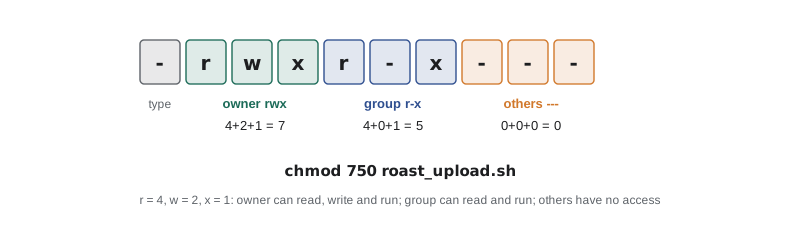
Each set of three bits is also written as a single digit, by adding 4 for read, 2 for write and 1 for execute. So rwx is 7, r-x is 5, rw- is 6 and r-- is 4, and the whole mode is written as three digits: chmod 750 roast.sh gives the owner full control, the group read and execute, and everyone else nothing. Common modes are 644 for ordinary files that everyone may read, 600 for private files such as keys, 755 for programs and shared folders, and 770 or 750 for team folders. chown changes a file's owner and group, and the umask setting decides the permissions new files start with.
import os, stat
from pathlib import Path

f = Path("roast_upload.sh")
f.write_text("#!/usr/bin/env bash\necho uploading\n", encoding="utf-8")
os.chmod(f, 0o750)                         # owner rwx, group r-x, others none
mode = f.stat().st_mode
print("octal:", oct(stat.S_IMODE(mode)))
print("string:", stat.filemode(mode))
print("group can write?", bool(mode & stat.S_IWGRP))
print("others can read?", bool(mode & stat.S_IROTH))octal: 0o750 string: -rwxr-x--- group can write? False others can read? False
In Python, octal numbers are written with the prefix 0o, so 0o750 is the mode in the chmod example. The stat module provides constants for each bit, such as S_IWGRP for group write, and stat.filemode turns a mode into the familiar string. Windows uses a richer model called access control lists, where each file has a list of entries granting or denying specific rights to users and groups; PowerShell's Get-Acl and Set-Acl, or the icacls command, manage them. The principle is the same everywhere: grant to groups, grant only what is needed.
Try it yourself
Octal mode to a permission string
Write a function mode_string(octal_text) that turns a three-digit mode such as "754" into the nine-character permission string "rwxr-xr--". Each digit is the sum of 4 (r), 2 (w) and 1 (x); a missing permission is written as -.
For example, mode_string("640") returns "rw-r-----".
def mode_string(octal_text):
    return ""

print(mode_string("754"))
Least privilege and auditing
The principle of least privilege says that every account, person or service, should have only the access its job needs. The barista accounts need the schedule folder, not the accounts folder; the backup script needs to read the till files and write to the backup drive, not to install software. Administrator rights should be used briefly, through sudo on Linux or a separate administrator account on Windows, rather than by logging in as root or using an administrator account for everyday work. Each time access is granted, ask what is the least that will do.
Permissions drift over time: someone makes a folder writable by everyone to fix a problem quickly and forgets to change it back, or a person changes role and keeps their old group. Regular audits catch the drift, and audits are a natural job for a script. A Linux audit might list accounts that have not logged in for 90 days, people in the sudo group, and files that anyone may write. The command find /srv -perm -o+w lists files writable by others, and Python can do the same check with os.walk and the stat bits.
import os, stat
from pathlib import Path

base = Path("srv_demo")
(base / "shop").mkdir(parents=True, exist_ok=True)
for name, mode in [("shop/index.html", 0o644), ("shop/upload.php", 0o666), ("notes.txt", 0o600)]:
    p = base / name
    p.write_text("x\n", encoding="utf-8")
    os.chmod(p, mode)

for root, dirs, files in os.walk(base):
    for name in sorted(files):
        p = Path(root) / name
        mode = p.stat().st_mode
        if mode & stat.S_IWOTH:                   # writable by others
print("world-writable:", p.relative_to(base), stat.filemode(mode))world-writable: shop/upload.php -rw-rw-rw-
An audit script should report rather than fix. Changing permissions automatically can break a service that genuinely needs them, so the script lists what it found, and a person decides. Run on a schedule, its output becomes a short list to review each week, and a sudden new entry is a reason to ask questions. Keeping each week's report also builds the record that auditors and insurers increasingly ask small businesses for.
Worked problem
Planning the offboarding procedure
A barista, account ndavis, is leaving on Friday. Mei asks Jordan to make offboarding a script so it is never missed. Plan what the script does, in order.
Show solution
- Lock the account at the end of the last shift: usermod --lock on the server and Disable-LocalUser on the office computer, so no new logins are possible.
- End active sessions and remove the account from groups such as baristas, keeping a list of what was removed in the log.
- Archive the home folder to a dated tar file in the protected archive area, readable only by administrators (mode 600).
- After the agreed holding period, for example 30 days, delete the account and home folder with userdel --remove.
- Write every step, with the date and who ran it, to the offboarding log, and make the script safe to rerun if it stops halfway.
Answer: Lock first, archive second, delete last, and log everything, so access ends immediately while files remain recoverable for a while.
Common mistakes
MistakeGiving permissions to individual users one by one.
InsteadGrant to groups and manage membership.
MistakeRunning usermod --groups without --append.
InsteadUse --append, or the user loses their other groups.
MistakePutting initial passwords in scripts or CSV files.
InsteadForce a change at first login or prompt for a secure string.
MistakeFixing a permission problem with chmod 777.
InsteadFind the right owner and group and give the least access that works.
MistakeDeleting a departing user's account and files on day one.
InsteadLock at once, archive the files, and delete after a holding period.
MistakeLetting audit scripts change permissions automatically.
InsteadReport findings and let a person decide.
Summary and key terms
- Users represent people and services; groups collect users so permissions can be granted once.
- /etc/passwd lists Linux accounts in seven colon-separated fields; people usually have IDs from 1000 up.
- Onboarding and offboarding scripts make account changes consistent, idempotent and logged, and never contain passwords.
- Linux permissions give read, write and execute to owner, group and others, written as rwx strings or octal modes.
- Least privilege and regular, report-only audits keep access matched to each person's job.
- user account
- An identity for one person or service on a system.
- group
- A named set of users that permissions can be granted to.
- user ID
- The number a system uses to identify an account.
- home folder
- A user's personal folder for files and settings.
- permission bits
- Read, write and execute flags for owner, group and others.
- octal mode
- Permissions written as three digits, such as 750.
- access control list
- A list of entries granting or denying rights to users and groups, used by Windows.
- least privilege
- Giving each account only the access its job needs.
- onboarding
- Setting up accounts and access for someone who joins.
- offboarding
- Removing access for someone who leaves.
Practice problems
Work each problem on paper first, then reveal the answer to check.
Which /etc/passwd field holds the login shell, and what shell prevents logins?
Show answer
The seventh; /usr/sbin/nologin or /bin/false.
Write the mode for a script the owner can edit and run, the group can run, and others cannot touch.
Show answer
750.
What does chmod 600 id_backup do?
Show answer
Makes the file readable and writable by its owner only.
Why should onboarding scripts check whether the account already exists?
Show answer
So rerunning them is harmless: existing accounts are left alone.
What is the safe first step when someone leaves?
Show answer
Lock or disable the account immediately.
What does find /srv -perm -o+w list?
Show answer
Files and folders under /srv that others may write to.
Lesson quiz · 5 questions
Score 60% or more to complete this lesson.
Create a free account to save your progress, take quizzes and earn a certificate.