
PYTH-120 · Lesson 12 of 12 · 34 min
Capstone: automating a weekly admin task
▶ Video coming soon A video version of this lesson is on the way.
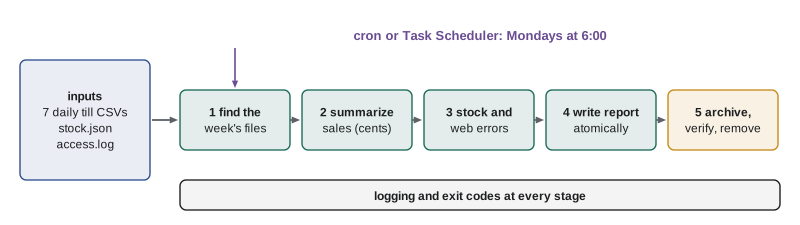
The capstone automates the chore that started the course: Theo's Monday report. Every Monday morning Theo spends about 45 minutes opening the till's daily exports, adding up the week's sales, checking the stock file for coffees that need reordering, glancing at the shop's web log for problems, and typing a summary for Rosa. Then Anita copies the week's files to the archive. Jordan's job is to replace all of that with one script that runs by itself at 6:00 every Monday, writes the report, archives the files safely, logs what it did, and makes noise if anything goes wrong. Along the way the capstone uses nearly every idea in the course: files and folders, parsing, error handling, logging, dry runs, scheduling and testing.
The script's pieces run on this page, in your browser's temporary file system, with a week of sample data created by the first listing. Run the listings in order, because later ones read the files that earlier ones create. Two listings, the main function and the final tests, combine functions from several earlier listings, so they are shown with their output for reading; the last exercise lets you build and run a complete, simplified version yourself.
The requirements
Before writing code, Jordan writes down what the script must do, agreed with Theo, Rosa and Anita. Writing requirements first is the step most often skipped and most often regretted: it is far cheaper to discover that Rosa wanted sales by day rather than by item before the script exists than after.
- Inputs: a folder of daily till exports named till-YYYY-MM-DD.csv with columns time, item, qty and price; the stock file stock.json mapping each coffee code to its name and bags in stock; and the shop's web log, access.log.
- Report: for the seven days starting on a given Monday, the number of sales lines, total revenue, revenue by day and the top five items; the coffees with fewer than 10 bags; and the count of server errors (status 500 and above) in the web log.
- Output: a plain-text report saved as report-YYYY-MM-DD.txt in a reports folder, named for the Monday the week started.
- Archive: after the report is written, the week's till files are zipped into archive/till-week-YYYY-MM-DD.zip, the zip is checked, and only then are the originals removed.
- Safety: a --dry-run option that writes nothing and deletes nothing; a log of every run; a non-zero exit code if anything fails or if any day's file is missing; and no secrets anywhere in the script.
Sample data for the week
A good way to build an automation script is against realistic test data that you control, so that you know the right answers before the script computes them. The first listing creates a week of till exports for the week starting Monday 2 November 2026, a stock file and a small web log. One deliberate gap, a missing Sunday file, lets the script's missing-file check be seen working; the listing after this one adds it back.
import csv, json, shutil
from pathlib import Path

root = Path("ridgeline")
shutil.rmtree(root, ignore_errors=True)                  # start from a clean slate each run
till = root / "till"
till.mkdir(parents=True, exist_ok=True)
menu = [("latte", 5.25), ("drip coffee", 3.25), ("cappuccino", 4.95), ("muffin", 3.75), ("mocha", 5.75)]
for d in range(2, 8):                                    # 2 to 7 November; Sunday the 8th is missing
    with (till / f"till-2026-11-{d:02d}.csv").open("w", newline="", encoding="utf-8") as f:
        w = csv.writer(f)
        w.writerow(["time", "item", "qty", "price"])
        for i, (item, price) in enumerate(menu):
            qty = 1 + (d + i) % 4
            w.writerow([f"{8 + i}:{10 + d:02d}", item, qty, price])
stock = {"RC-101": {"name": "Sunrise Blend", "stock": 42}, "RC-102": {"name": "Ethiopia Guji", "stock": 15},
         "RC-104": {"name": "Sumatra Dark", "stock": 9}, "RC-105": {"name": "Decaf Swiss Water", "stock": 6}}
(root / "stock.json").write_text(json.dumps(stock, indent=2), encoding="utf-8")
(root / "access.log").write_text(
    '203.0.113.42 - - [03/Nov/2026:08:14:07 -0800] "GET /shop HTTP/1.1" 200 5120 "-" "x"\n'
    '192.0.2.10 - - [04/Nov/2026:12:40:02 -0800] "POST /cart/checkout HTTP/1.1" 500 0 "-" "x"\n'
    '198.51.100.23 - - [05/Nov/2026:08:20:00 -0800] "GET /.env HTTP/1.1" 404 312 "-" "x"\n'
    '192.0.2.10 - - [06/Nov/2026:09:02:11 -0800] "POST /cart/checkout HTTP/1.1" 503 0 "-" "x"\n', encoding="utf-8")
print(sorted(p.name for p in till.iterdir()))['till-2026-11-02.csv', 'till-2026-11-03.csv', 'till-2026-11-04.csv', 'till-2026-11-05.csv', 'till-2026-11-06.csv', 'till-2026-11-07.csv']
Finding the week's files
The first function finds the seven daily files for a week, given the Monday it starts. Rather than trusting whatever files happen to be in the folder, it works out the seven expected names from the date and checks each one. That turns a silent gap, a day when the till's export failed, into an explicit, reported problem. The function returns both the files found and the dates missing, and leaves the decision about what to do to the caller.
from datetime import date, timedelta
from pathlib import Path

def week_files(folder, monday):
    """Return (files found, dates missing) for the 7 days starting on monday."""
    found, missing = [], []
    for i in range(7):
        day = monday + timedelta(days=i)
        path = Path(folder) / f"till-{day.isoformat()}.csv"
        if path.is_file():
            found.append(path)
        else:
            missing.append(day.isoformat())
    return found, missing

files, missing = week_files("ridgeline/till", date(2026, 11, 2))
print(len(files), "files found; missing:", missing)
# add Sunday's file, which arrived late, and check again
Path("ridgeline/till/till-2026-11-08.csv").write_text(
    "time,item,qty,price\n10:05,latte,4,5.25\n11:30,muffin,2,3.75\n", encoding="utf-8")
files, missing = week_files("ridgeline/till", date(2026, 11, 2))
print(len(files), "files found; missing:", missing)6 files found; missing: ['2026-11-08'] 7 files found; missing: []
Try it yourself
Find the week's files
Write week_files(folder, monday) returning a pair: a sorted list of the names of the files till-YYYY-MM-DD.csv that exist in folder for the seven days starting on the date monday, and a list of the ISO dates ("2026-11-08") for which the file is missing. A folder till with five of the seven days has been prepared, plus a file from the week before.
For Monday 2 November 2026, the files for 4 and 8 November are missing.
from datetime import date, timedelta
from pathlib import Path

def week_files(folder, monday):
    return [], []

print(week_files("till", date(2026, 11, 2)))
Summarizing sales, stock and the log
The summary functions each do one job and return plain data, which keeps them easy to test: summarize_sales reads the week's files into totals, low_stock reads the stock file, and server_errors counts failing requests in the web log. Money is added up in whole cents, because adding many prices as floats accumulates tiny rounding errors, and a report that must agree with the bank deposit should balance exactly.
import csv, json, re
from collections import Counter
from pathlib import Path

def summarize_sales(files):
    lines, cents, by_day, by_item = 0, 0, {}, Counter()
    for path in files:
        day = path.stem.removeprefix("till-")
        with path.open(newline="", encoding="utf-8") as f:
            for row in csv.DictReader(f):
                amount = int(row["qty"]) * round(float(row["price"]) * 100)
                lines += 1
                cents += amount
                by_day[day] = by_day.get(day, 0) + amount
                by_item[row["item"]] += amount
    return {"lines": lines, "cents": cents, "by_day": by_day, "top": by_item.most_common(5)}

def low_stock(stock_file, limit=10):
    stock = json.loads(Path(stock_file).read_text(encoding="utf-8"))
    return sorted((code, info["name"], info["stock"]) for code, info in stock.items() if info["stock"] < limit)

STATUS = re.compile(r'" (\d{3}) ')
def server_errors(log_file):
    count = 0
    with open(log_file, encoding="utf-8", errors="replace") as f:
        for line in f:
            m = STATUS.search(line)
            if m and int(m.group(1)) >= 500:
                count += 1
    return count

files = sorted(Path("ridgeline/till").glob("till-2026-11-0*.csv"))
s = summarize_sales(files)
print(s["lines"], "sales lines,", f"{s['cents'] / 100:,.2f}", "total")
print("top items:", [(item, c / 100) for item, c in s["top"]])
print("low stock:", low_stock("ridgeline/stock.json"))
print("server errors:", server_errors("ridgeline/access.log"))32 sales lines, 384.85 total
top items: [('latte', 110.25), ('mocha', 97.75), ('cappuccino', 64.35), ('muffin', 63.75), ('drip coffee', 48.75)]
low stock: [('RC-104', 'Sumatra Dark', 9), ('RC-105', 'Decaf Swiss Water', 6)]
server errors: 2Try it yourself
Summarize the week's sales
A list rows of sale dictionaries, each with string values for day, item, qty and price, as csv.DictReader would give, is provided. Write summarize(rows) returning a dictionary with "lines" (the number of rows), "cents" (total revenue in whole cents, computing each row as qty × price in cents) and "best_day" (the day with the highest revenue; on a tie, the earliest day).
For the sample rows the result is {"lines": 4, "cents": 2285, "best_day": "2026-11-03"}.
def summarize(rows):
    return {"lines": len(rows), "cents": 0, "best_day": None}

print(summarize(rows))
Writing the report and archiving safely
The report is built as a string by one function and written by another, using the atomic write from lesson 11, so a crash never leaves a half-written report that someone might trust. The archive step follows the rule from lesson 5: create the zip, open it again to check it contains every file, and only then delete the originals. In dry-run mode, both steps report what they would do and change nothing.
import os, tempfile, zipfile
from pathlib import Path

def format_report(monday, s, low, errors, missing):
    out = [f"Ridgeline weekly report: week starting {monday}", ""]
    out.append(f"Sales lines: {s['lines']}   Revenue: {s['cents'] / 100:,.2f}")
    for day in sorted(s["by_day"]):
        out.append(f"  {day}  {s['by_day'][day] / 100:>9,.2f}")
    out.append("Top items:")
    for item, c in s["top"]:
        out.append(f"  {item:<14}{c / 100:>9,.2f}")
    out.append("Reorder (under 10 bags): " + (", ".join(f"{code} {name} ({n})" for code, name, n in low) or "none"))
    out.append(f"Web server errors: {errors}")
    if missing:
        out.append("MISSING till files: " + ", ".join(missing))
    return "\n".join(out) + "\n"

def atomic_write(path, text):
    fd, tmp = tempfile.mkstemp(dir=Path(path).parent, suffix=".tmp")
    try:
        with os.fdopen(fd, "w", encoding="utf-8") as f:
            f.write(text)
        os.replace(tmp, path)
    except BaseException:
        os.unlink(tmp)
        raise

def archive_week(files, zip_path, dry_run):
    if dry_run:
        return f"would archive {len(files)} files to {Path(zip_path).name}"
    Path(zip_path).parent.mkdir(parents=True, exist_ok=True)
    with zipfile.ZipFile(zip_path, "w", zipfile.ZIP_DEFLATED) as z:
        for p in files:
            z.write(p, arcname=p.name)
    with zipfile.ZipFile(zip_path) as z:                 # verify before deleting anything
        if sorted(z.namelist()) != sorted(p.name for p in files) or z.testzip() is not None:
            raise RuntimeError(f"archive check failed: {zip_path}")
    for p in files:
        p.unlink()
    return f"archived and removed {len(files)} files"

print(format_report("2026-11-02", {"lines": 2, "cents": 1425, "by_day": {"2026-11-02": 1425},
                                   "top": [("latte", 1050), ("muffin", 375)]},
[("RC-104", "Sumatra Dark", 9)], 1, []))Ridgeline weekly report: week starting 2026-11-02 Sales lines: 2 Revenue: 14.25 2026-11-02 14.25 Top items: latte 10.50 muffin 3.75 Reorder (under 10 bags): RC-104 Sumatra Dark (9) Web server errors: 1
The main function
main ties the pieces together in the shape from lesson 11: parse the arguments, set up logging, validate the inputs, do the work, catch errors once, and return an exit code. A missing till file does not stop the report, because Theo still wants the figures for the other six days, but it is listed prominently in the report and makes the run end with exit code 1, so the scheduler records it as needing attention. The archive step is skipped when files are missing, so an incomplete week is never archived and deleted.
import argparse, logging, sys
from datetime import date

log = logging.getLogger("weekly")

def main(argv=None):
    p = argparse.ArgumentParser(prog="weekly_report")
    p.add_argument("--root", default="ridgeline")
    p.add_argument("--monday", required=True, type=date.fromisoformat, help="start of the week, YYYY-MM-DD")
    p.add_argument("--dry-run", action="store_true")
    args = p.parse_args(argv)
    logging.basicConfig(level=logging.INFO, format="%(levelname)-7s %(message)s", stream=sys.stdout, force=True)
    root = Path(args.root)
    try:
        if args.monday.weekday() != 0:
            raise ValueError(f"{args.monday} is not a Monday")
        files, missing = week_files(root / "till", args.monday)
        if missing:
            log.warning("missing till files: %s", ", ".join(missing))
        s = summarize_sales(files)
        report = format_report(args.monday.isoformat(), s, low_stock(root / "stock.json"),
                               server_errors(root / "access.log"), missing)
        target = root / "reports" / f"report-{args.monday.isoformat()}.txt"
        if args.dry_run:
            log.info("dry run: would write %s (%d lines)", target.name, report.count("\n"))
        else:
            target.parent.mkdir(parents=True, exist_ok=True)
            atomic_write(target, report)
            log.info("wrote %s", target.name)
        if missing:
            log.info("archive skipped because the week is incomplete")
            return 1
        zip_path = root / "archive" / f"till-week-{args.monday.isoformat()}.zip"
        log.info(archive_week(files, zip_path, args.dry_run))
        return 0
    except Exception as e:
        log.error("weekly report failed: %s", e)
        return 1

print("exit code:", main(["--monday", "2026-11-02", "--dry-run"]))
print("exit code:", main(["--monday", "2026-11-03"]))
print("exit code:", main(["--monday", "2026-11-02"]))
print(Path("ridgeline/reports/report-2026-11-02.txt").read_text(encoding="utf-8"))
print("till folder now holds:", sorted(p.name for p in Path("ridgeline/till").iterdir()))INFO dry run: would write report-2026-11-02.txt (18 lines) INFO would archive 7 files to till-week-2026-11-02.zip exit code: 0 ERROR weekly report failed: 2026-11-03 is not a Monday exit code: 1 INFO wrote report-2026-11-02.txt INFO archived and removed 7 files exit code: 0 Ridgeline weekly report: week starting 2026-11-02 Sales lines: 32 Revenue: 384.85 2026-11-02 58.45 2026-11-03 68.40 2026-11-04 47.35 2026-11-05 55.30 2026-11-06 58.45 2026-11-07 68.40 2026-11-08 28.50 Top items: latte 110.25 mocha 97.75 cappuccino 64.35 muffin 63.75 drip coffee 48.75 Reorder (under 10 bags): RC-104 Sumatra Dark (9), RC-105 Decaf Swiss Water (6) Web server errors: 2 till folder now holds: []
The three runs show the script's behavior clearly. The dry run reports what it would write and archive and changes nothing. The second run is refused because 3 November is a Tuesday, a validation that stops a mistyped date from producing a report for a strange seven-day window. The third run writes the report, archives the week's files into a zip, checks the zip and removes the originals, leaving the till folder empty and ready for the next week. Run the script again for the same week and it behaves differently: the week's files are gone, so every day is reported missing and the exit code is 1, exactly the loud failure you would want if someone pointed the script at the wrong week.
Try it yourself
The whole weekly report
Write weekly_report(folder, monday) for a simplified version of the capstone. Read every till-*.csv file for the seven days starting on monday from folder (columns item, qty, price), and write a file report-YYYY-MM-DD.txt (named for the Monday) in folder with exactly these three lines: Week starting YYYY-MM-DD, Lines: N and Revenue: X.XX. Return the number of days whose file is missing. A folder shop with two days of files has been prepared.
For Monday 2 November 2026 the report says Lines: 3 and Revenue: 19.25, and the function returns 5.
import csv
from datetime import date, timedelta
from pathlib import Path

def weekly_report(folder, monday):
    return 0

print(weekly_report("shop", date(2026, 11, 2)))
Scheduling, testing and handing over
With the script working, three steps remain before it replaces Theo's Monday morning. First, scheduling. On the Linux server the script runs from cron at 6:00 on Mondays; on Windows, a scheduled task does the same. Either way the command uses absolute paths, calculates last week's Monday itself, here with a small --monday last option a later version adds, or receives it from a wrapper, and sends its output to a log.
# Linux crontab (time zone set for the shop)
CRON_TZ=America/Vancouver
0 6 * * 1  /usr/bin/python3 /srv/ridgeline/bin/weekly_report.py --root /srv/ridgeline --monday last >> /var/log/ridgeline/weekly.log 2>&1

# Windows: register the same job with PowerShell
# Register-ScheduledTask -TaskName 'Ridgeline\Weekly report' `
#   -Action (New-ScheduledTaskAction -Execute 'py.exe' -Argument 'C:\Scripts\weekly_report.py --root D:\Ridgeline --monday last') `
#   -Trigger (New-ScheduledTaskTrigger -Weekly -DaysOfWeek Monday -At 6am)
Second, testing. Each function was written to be testable: it takes its inputs as arguments, including the date, and returns plain data. A few assert-based tests, or a pytest file as PYTH-230 teaches, check the important cases: a complete week, a week with a missing day, a week crossing into a new year, money adding up exactly, and the archive refusing to delete when the zip is wrong. These run in seconds and should be run before every change to the script.
from datetime import date
from pathlib import Path

# quick checks of the pieces, using the sample data
assert week_files("ridgeline/till", date(2026, 11, 2))[1] == [f"2026-11-0{d}" for d in range(2, 9)], "files were archived, so all 7 are missing now"
assert low_stock("ridgeline/stock.json") == [("RC-104", "Sumatra Dark", 9), ("RC-105", "Decaf Swiss Water", 6)]
assert server_errors("ridgeline/access.log") == 2, "one 500 and one 503"
assert summarize_sales([])["cents"] == 0
assert Path("ridgeline/archive/till-week-2026-11-02.zip").is_file()
print("all checks passed")all checks passed
Third, handing over. The script goes into the Git repository with Ridgeline's other scripts, with a short README saying what it does, how to run it by hand, what its options are, where it logs, and what to do when it fails. Jordan runs it alongside Theo's manual report for two weeks and compares the figures; only when they agree does the manual chore stop. That parallel run is the final safety check of any automation project, and it is what turns a clever script into something the business can rely on.
| Course idea | Where it appears in the capstone |
|---|---|
| Idempotence and safety (lessons 1, 11) | Dry-run mode; archive skipped for incomplete weeks; verified before deleting |
| Files and folders (lesson 5) | pathlib for every path; zipfile archive; mkdir with exist_ok |
| Parsing (lesson 6) | csv.DictReader for sales; a regex for log status codes |
| Python tooling (lesson 4) | argparse options; main returning an exit code |
| Scheduling (lesson 8) | cron or Task Scheduler at 6:00 on Mondays, output to a log |
| Configuration (lesson 10) | Paths and dates as options, not buried in the code |
| Error handling and logging (lesson 11) | Specific checks, one handler in main, leveled log messages, atomic writes |
Worked problem
Reviewing the capstone before it goes live
Before scheduling the weekly report, Rosa asks Jordan what could still go wrong and how the script handles it. Work through the main risks.
Show solution
- A till export is missing: the report lists the missing dates, the archive is skipped, and the run ends with exit code 1 so the failure is visible.
- The stock file is corrupt: json raises an error, main logs weekly report failed with the reason, and the exit code is 1.
- The disk fills while writing: the atomic write leaves the old report or none, never a half-written one, and the error is logged.
- The archive is incomplete: the verification step raises an error before any original is deleted.
- The job does not run at all: a heartbeat check, as in lesson 8, notices that no new report has appeared by 8:00 on Monday and alerts Jordan.
Answer: Every failure either stops safely with a logged reason and a non-zero exit code, or is caught by an independent heartbeat check; no failure deletes data or produces a misleading report.
Common mistakes
MistakeStarting to code before agreeing what the report must contain.
InsteadWrite the requirements first and confirm them with the people who will use the report.
MistakeProcessing whatever files happen to be in the folder.
InsteadWork out the expected files and report any that are missing.
MistakeAdding up money as floats.
InsteadWork in whole cents or with Decimal so totals balance exactly.
MistakeDeleting originals as soon as the archive is written.
InsteadVerify the archive first, and skip archiving incomplete weeks.
MistakeReading today's date inside every function.
InsteadPass the date in, so functions can be tested with fixed dates.
MistakeSwitching off the manual process the day the script works.
InsteadRun both in parallel and compare before relying on the script.
Summary and key terms
- Requirements come first: inputs, outputs, safety rules and how failures are reported.
- Small functions that take inputs as arguments and return plain data are easy to combine and test.
- The script finds expected files, summarizes in exact cents, writes atomically and archives only after verification.
- main validates inputs, logs each step, catches errors once and returns a meaningful exit code.
- Scheduling, tests, documentation and a parallel run turn a working script into dependable automation.
- requirements
- A written description of what a program must do, agreed before it is built.
- test data
- Sample inputs with known correct results, used to check a program.
- validation
- Checking inputs, such as a date being a Monday, before using them.
- verification
- Checking that an operation, such as creating an archive, really succeeded.
- atomic write
- Writing a file so it is never left half written.
- exit code
- The number a program returns to report success or failure.
- heartbeat check
- An independent check that a scheduled job has run recently.
- parallel run
- Running a new system alongside the old process and comparing results.
- README
- A short document explaining what a script does and how to use it.
- handover
- Passing a finished system to the people who will run and maintain it.
Practice problems
Work each problem on paper first, then reveal the answer to check.
Why does the script work out the seven expected file names instead of listing the folder?
Show answer
So that a missing day is detected and reported rather than silently ignored.
Why is a missing day reported with exit code 1 even though a report is still written?
Show answer
The report is still useful, but the run needs attention, which the exit code signals to the scheduler.
What protects the till files if the zip is incomplete?
Show answer
The verification step, which raises an error before any original is deleted.
Why is the --monday value checked to be a Monday?
Show answer
A mistyped date would otherwise produce a report for the wrong seven days.
Give one test that should be run before every change to the script.
Show answer
For example, that a week crossing into a new year finds the right seven dates.
What is the purpose of a two-week parallel run?
Show answer
To compare the script's results with the manual report and prove they agree before relying on it.
Lesson quiz · 5 questions
Score 60% or more to complete this lesson.
Create a free account to save your progress, take quizzes and earn a certificate.