
PYTH-110 · Lesson 7 of 12 · 29 min
Resolving merge conflicts
▶ Video coming soon A video version of this lesson is on the way.
On the same Monday, two changes touch the same line of sales.py. Jordan, on a fix branch, changes how the receipt total is rounded. Sam, on the loyalty branch, changes the same line to also return the number of loyalty points earned. Jordan's pull request is merged first. When Sam brings main into the loyalty branch, Git stops with a message: CONFLICT (content): Merge conflict in src/ridgeline/sales.py. Nothing is broken and no work is lost. Git has simply found two edits to the same lines that it cannot combine on its own, and it is asking a person to decide.
This lesson explains why conflicts happen, what Git shows you when they do, how to resolve one step by step, how three-way merging decides which changes it can combine automatically, which tools make conflicts easier to handle and how teams keep conflicts rare and small. It ends with a look at rebasing, an alternative to merging that changes how conflicts are met.
Why conflicts happen
Recall from lesson 5 that a three-way merge compares each branch's newest commit with their merge base. For every part of every file, Git asks what each side did relative to the base. If only one side changed a region, Git takes that change. If neither changed it, Git keeps it. If both sides changed it in exactly the same way, Git keeps that one version. Only when both sides changed the same lines and the results differ does Git have no rule to follow, and that is a merge conflict.
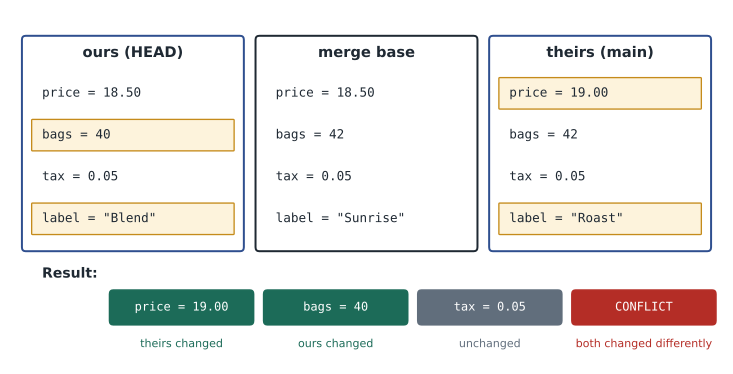
So conflicts are about lines, not files. Jordan and Sam can both edit sales.py all day without a conflict, as long as they change different lines that are not right next to each other. Conflicts are also not about meaning: Git knows nothing about Python. Two changes on different lines can still break the program when combined, for example if one person renames a function and the other adds a new call to the old name. Git merges those cleanly and the tests are what catch the problem, which is one reason to run them after every merge.
What a conflict looks like
When a merge hits a conflict, Git merges everything it can, stops before making the merge commit and tells you which files need attention. git status lists them under unmerged paths. Inside each conflicted file, Git writes both versions of the disputed lines between conflict markers: a line of seven less-than signs starts our version, the version on the branch you are on; seven equals signs separate the two; and seven greater-than signs end their version, the one being merged in, labeled with the branch name.
> git merge main
Auto-merging src/ridgeline/sales.py
CONFLICT (content): Merge conflict in src/ridgeline/sales.py
Automatic merge failed; fix conflicts and then commit the result.
> git status --short
UU src/ridgeline/sales.pydef receipt_total(items):
subtotal = sum(qty * price for qty, price in items)
<<<<<<< HEAD
return round(subtotal, 2), int(subtotal)
=======
return round(subtotal + 0.0001, 2)
>>>>>>> mainThe file is not valid Python while the markers are in it, so a conflict cannot be missed for long: the program will not run until the markers are gone. Each conflict is called a hunk, and a file can contain several. Before resolving anything, find out how many there are and where. Editors list them, git diff shows them, and a short script can count them, as the next listing and exercise do.
text = """def receipt_total(items):
    subtotal = sum(qty * price for qty, price in items)
<<<<<<< HEAD
    return round(subtotal, 2), int(subtotal)
=======
    return round(subtotal + 0.0001, 2)
>>>>>>> main
"""

for number, line in enumerate(text.splitlines(), start=1):
    if line.startswith(('<<<<<<<', '=======', '>>>>>>>')):
print(number, line)3 <<<<<<< HEAD 5 ======= 7 >>>>>>> main
Try it yourself
Count the conflicts in a file
Write conflict_starts(text) that returns a list of the line numbers (starting at 1) where a conflict begins, that is, lines starting with seven less-than signs. Then write has_conflicts(text) that returns True if the text contains any line starting with seven less-than signs, seven equals signs or seven greater-than signs.
def conflict_starts(text):
    return []

def has_conflicts(text):
    return '<' in text

print(conflict_starts(MERGED), has_conflicts(CLEAN))
Resolving a conflict step by step
Resolving a conflict means editing the file into the version that should exist after the merge, then telling Git you are done. The right result is often neither side exactly but a combination: here Sam's line should keep Jordan's corrected rounding and still return the points. That decision needs understanding of both changes, so read both commits' messages and, if in doubt, ask their author, which takes a minute on a small team.
def receipt_total(items):
    subtotal = sum(qty * price for qty, price in items)
return round(subtotal + 0.0001, 2), int(subtotal)> # edit sales.py: combine both changes and delete all marker lines
> python3 -m pytest
14 passed in 0.31s
> git add src/ridgeline/sales.py
> git status
All conflicts fixed but you are still merging.
(use "git commit" to conclude merge)
> git commit
[feature/loyalty-points 6a0f2d4] Merge branch 'main' into feature/loyalty-pointsThe steps are always the same. Open each conflicted file and find every hunk. Decide what the code should be and edit it, removing all three kinds of marker line. Run the tests, or at least the program, to check the combined result. Mark each file as resolved with git add. When git status shows no unmerged paths, run git commit to make the merge commit; Git suggests a message. If you get lost halfway, git merge --abort puts everything back exactly as it was before the merge began, and you can start again calmly.
Try it yourself
Resolve by choosing a side
Write resolve(text, choices) that removes the conflicts from text. choices is a list with one entry per conflict, in order: "ours" keeps the lines between the start marker and the separator, "theirs" keeps the lines between the separator and the end marker, and "both" keeps ours followed by theirs. Lines outside conflicts are kept unchanged and the marker lines are always removed. Return the resolved text, ending with a newline.
def resolve(text, choices):
    out = []
    for line in text.splitlines():
        out.append(line)
    return '\n'.join(out) + '\n'

print(resolve(MERGED, ['ours', 'theirs']))
Three-way merging, line by line
Seeing how a three-way merge decides each line makes conflicts much less mysterious. The listing below handles the simplest case, where the three versions have the same number of lines and differ only by changes within lines, so line 1 of the base corresponds to line 1 of each side. Real Git first aligns the versions with a diff algorithm, so it can also handle inserted and deleted lines, but the decision for each region is exactly this one.
base   = ['price = 18.50', 'bags = 42', 'tax = 0.05', 'label = "Sunrise"']
ours   = ['price = 18.50', 'bags = 40', 'tax = 0.05', 'label = "Sunrise Blend"']
theirs = ['price = 19.00', 'bags = 42', 'tax = 0.05', 'label = "Sunrise Roast"']

for b, o, t in zip(base, ours, theirs):
    if o == t:
        result = o                      # same on both sides (changed or not)
    elif o == b:
        result = t                      # only theirs changed
    elif t == b:
        result = o                      # only ours changed
    else:
        result = 'CONFLICT: ' + o + ' | ' + t
print(result)price = 19.00 bags = 40 tax = 0.05 CONFLICT: label = "Sunrise Blend" | label = "Sunrise Roast"
Try it yourself
A three-way merge of lines
Write merge3(base, ours, theirs) for three lists of lines of equal length. Return a tuple (merged, conflicts): merged is the list of resulting lines, and conflicts is the list of indexes (starting at 0) where both sides changed a line differently. At a conflict, put our line in merged for now, as Git keeps both versions for a person to choose.
def merge3(base, ours, theirs):
    return list(ours), []

print(merge3(['a', 'b', 'c'], ['a', 'B', 'c'], ['a', 'b', 'C']))
Tools that help
Code editors show conflicts in a merge view: each hunk is highlighted, with buttons above it to accept the current change, accept the incoming change or accept both, and some editors show the three versions side by side. git mergetool opens a configured external merge program for each conflicted file. One setting is worth turning on everywhere: git config --global merge.conflictStyle zdiff3. With it, Git includes the base version between our version and theirs, marked by seven vertical bars, so you can see what each side changed rather than just the two results.
<<<<<<< HEAD
    return round(subtotal, 2), int(subtotal)
||||||| merge base
    return round(subtotal, 2)
=======
    return round(subtotal + 0.0001, 2)
>>>>>>> main
With the base in view, the resolution is obvious: ours added , int(subtotal) and theirs changed the rounding inside, so the answer keeps both edits. When conflicts involve files that were moved or deleted on one side, git status explains the situation in words, and the same steps apply: decide what should exist, make it so, add and commit.
Keeping conflicts rare and small
Conflicts cannot be avoided entirely on a team, but their size can. Small pull requests merged quickly leave little time for others to edit the same lines. Bringing main into a long-running branch every day turns one large conflict at the end into several tiny ones along the way. A shared formatter, from lesson 2, prevents conflicts caused by two people laying out the same code differently. Separating changes helps too: a commit that reformats a whole file should not also change behavior, and it should be merged on its own, quickly, after telling the team.
Communication prevents the rest. On Ridgeline's team, a quick message, I'm reworking receipt_total today, lets the other person avoid that function or coordinate. Issue tracking and team boards, the subject of lesson 11, make the same information visible on larger teams.
A note on rebasing
Git offers a second way to bring branches together. git rebase main, run on a feature branch, replays the branch's commits one by one on top of the latest main, as if the branch had been started from there. The result is a straight history without merge commits, and any conflicts appear one commit at a time as each is replayed, resolved with the same edit, add and git rebase --continue steps, or abandoned with git rebase --abort.
Rebasing rewrites commits: the replayed commits get new hashes. That is harmless for commits only you have, but it causes real trouble for commits that others have already fetched, because their copies and yours now disagree. The golden rule is never to rebase commits that have been pushed to a shared branch. Many teams, Ridgeline included, simply merge, and let the hosting service's squash merge option, which combines a pull request's commits into one when merging, keep main's history tidy.
Worked problem
Resolving Sam's Monday conflict
Sam ran git merge main on the loyalty branch and got a conflict in receipt_total. Walk through the resolution.
Show solution
- git status shows one unmerged file, src/ridgeline/sales.py; the editor shows one conflict hunk in it.
- Read both sides: git log main -1 shows Jordan's message, Fix cent rounding in receipt totals, explaining the + 0.0001 change; Sam's side added the points.
- Combine them: return round(subtotal + 0.0001, 2), int(subtotal), and delete every marker line.
- Run python3 -m pytest: all tests pass, including Jordan's new rounding test.
- git add src/ridgeline/sales.py, then git commit to finish the merge, and push the branch to update the pull request.
Answer: The merged code keeps both fixes; the tests confirm it, and the merge commit records how the conflict was resolved.
Common mistakes
MistakePanicking and deleting the folder when a conflict appears.
InsteadNothing is lost: resolve the conflict or run git merge --abort to start again.
MistakeKeeping one side without reading the other.
InsteadRead both changes and their commit messages; the right answer often combines them.
MistakeLeaving a marker line in the file.
InsteadSearch for <<<<<<<, ======= and >>>>>>> before adding the file.
MistakeCommitting the merge without running the tests.
InsteadRun the tests after every conflict resolution; clean merges can still break code.
MistakeRebasing commits that are already on a shared branch.
InsteadOnly rebase commits you have not pushed; merge otherwise.
MistakeMixing a whole-file reformat with feature changes.
InsteadMake formatting changes in their own commit and merge them quickly.
Summary and key terms
- A merge conflict happens when both branches changed the same lines differently since their merge base.
- Changes to different lines merge automatically, but a clean merge can still break the program, so test after merging.
- Git marks each conflict hunk with <<<<<<<, ======= and >>>>>>> lines around our version and theirs.
- To resolve: edit each hunk into the correct code, remove the markers, test, git add the file and git commit.
- git merge --abort restores the state before the merge began.
- merge.conflictStyle zdiff3 shows the base version too, making each side's change clear.
- Small, frequent merges, a shared formatter and communication keep conflicts rare; never rebase shared commits.
- Merge conflict
- A place where both branches changed the same lines differently and Git cannot choose.
- Conflict markers
- The <<<<<<<, ======= and >>>>>>> lines Git writes around conflicting versions.
- Hunk
- One region of a file in a diff or one conflicted region in a merge.
- Ours
- The version from the branch you are on during a merge.
- Theirs
- The version from the branch being merged in.
- Unmerged path
- A file that still has unresolved conflicts.
- git merge --abort
- The command that cancels a merge in progress and restores the previous state.
- zdiff3
- A conflict style that also shows the merge base version between the two sides.
- Rebase
- Replaying a branch's commits on top of another commit, rewriting their hashes.
- Squash merge
- Merging a pull request by combining its commits into a single commit.
Practice problems
Work each problem on paper first, then reveal the answer to check.
Jordan changes line 10 of stock.py and Sam changes line 40. Will merging conflict?
Show answer
No: the changes are on different lines, so Git merges them automatically.
Both sides change line 10 to exactly the same new text. Conflict?
Show answer
No: identical changes on both sides are taken once.
Between which markers is your own branch's version of a conflict?
Show answer
Between <<<<<<< HEAD and =======.
What does UU mean in git status --short?
Show answer
The file is unmerged, changed on both sides.
List the steps after editing a conflicted file.
Show answer
Run the tests, git add the file, and git commit when no unmerged paths remain.
How do you cancel a merge that is going badly?
Show answer
git merge --abort
Base 'tax = 0.05', ours 'tax = 0.05', theirs 'tax = 0.06'. What does a three-way merge produce?
Show answer
tax = 0.06, because only theirs changed.
What extra information does the zdiff3 conflict style show?
Show answer
The merge base version, between our version and theirs.
Why can a merge with no conflicts still break the program?
Show answer
Changes on different lines can conflict in meaning, such as renaming a function another change calls.
State the golden rule of rebasing.
Show answer
Never rebase commits that have been pushed to a shared branch.
Lesson quiz · 5 questions
Score 60% or more to complete this lesson.
Create a free account to save your progress, take quizzes and earn a certificate.