
PYTH-110 · Lesson 6 of 12 · 31 min
Remote repositories and pull requests
▶ Video coming soon A video version of this lesson is on the way.
So far each of Jordan's and Sam's repositories lives on its own laptop. Jordan's has the rounding fix; Sam's has the start of the loyalty tracker; neither can see the other's commits. Rosa sets up an organization account for Ridgeline on a Git hosting service and creates a repository there called ridgeline-tools. From now on that copy is the team's shared meeting point: everyone sends commits to it and takes commits from it, and changes reach the main branch through pull requests that the other person reviews first.
This lesson explains remote repositories, how to clone one, how to prove your identity to a hosting service, how fetch, pull and push move commits between repositories, what pull requests are and how to write a good one, how forks support open-source collaboration and how branch protection keeps the main branch safe.
Remotes and cloning
A remote is another copy of the repository that your copy knows about by name and address. By convention the main shared copy is named origin. Remotes are usually on a hosting service, such as GitHub, GitLab or Bitbucket, but a remote can be any Git repository you can reach, even a folder on a shared drive. Because Git is distributed, the remote is not special to Git itself: it is simply the copy the team has agreed to treat as the shared one.
git clone copies a remote repository to your computer, with its complete history, and sets up origin to point back to where it came from. It also creates a local main branch ready to work on. When Sam joins after Jordan has already pushed the project, cloning is the first thing Sam does. For a project that already exists on one laptop, like Jordan's, git remote add origin with the address connects it to the new empty repository on the hosting service instead.
> cd ~/projects
> git clone git@github.com:ridgeline-roasters/ridgeline-tools.git
Cloning into 'ridgeline-tools'...
remote: Enumerating objects: 214, done.
Receiving objects: 100% (214/214), 61.3 KiB | 2.1 MiB/s, done.
Resolving deltas: 100% (97/97), done.
> cd ridgeline-tools
> git remote -v
origin  git@github.com:ridgeline-roasters/ridgeline-tools.git (fetch)
origin  git@github.com:ridgeline-roasters/ridgeline-tools.git (push)
Repository addresses come in two common forms. An HTTPS address looks like a web address, https://github.com/ridgeline-roasters/ridgeline-tools.git, and works through most firewalls. An SSH address looks like git@github.com:ridgeline-roasters/ridgeline-tools.git, with a colon between the host and the path, and uses SSH keys for sign-in. Both name the same three things: the host, the owner (a person or organization) and the repository. Tools that work with many repositories often need to pull those three pieces out of an address.
from urllib.parse import urlparse

def describe(url):
    if url.startswith('git@'):
        host, path = url[4:].split(':', 1)
    else:
        parts = urlparse(url)
        host, path = parts.hostname, parts.path.lstrip('/')
    owner, repo = path.split('/', 1)
    return host, owner, repo.removesuffix('.git')

for u in ('https://github.com/ridgeline-roasters/ridgeline-tools.git',
          'git@github.com:ridgeline-roasters/ridgeline-tools.git',
          'https://gitlab.com/okoye/roast-curves'):
print(describe(u))('github.com', 'ridgeline-roasters', 'ridgeline-tools')
('github.com', 'ridgeline-roasters', 'ridgeline-tools')
('gitlab.com', 'okoye', 'roast-curves')Try it yourself
Parse a remote address
Write parse_remote(url) that returns a dictionary with the keys host, owner, repo and protocol for an HTTPS address (https://host/owner/repo.git) or an SSH address (git@host:owner/repo.git). protocol is "https" or "ssh". The .git ending is optional and is not part of repo.
def parse_remote(url):
    return {'host': '', 'owner': '', 'repo': '', 'protocol': ''}

print(parse_remote('git@github.com:ridgeline-roasters/ridgeline-tools.git'))
Proving who you are
A hosting service must know who is pushing commits, so every push, and every pull from a private repository, needs sign-in. Passwords are no longer accepted for Git operations by the major services. Instead there are two common methods. With HTTPS, you use a personal access token, a long random string created in the service's settings with a limited set of permissions and an expiry date; a credential manager installed with Git stores it securely so you are not asked every time. With SSH, you generate a key pair on your computer and upload the public key to the service.
> ssh-keygen -t ed25519 -C "sam.okoye@example.com"
Generating public/private ed25519 key pair.
Enter file in which to save the key (/home/sam/.ssh/id_ed25519):
Enter passphrase (empty for no passphrase):
Your identification has been saved in /home/sam/.ssh/id_ed25519
Your public key has been saved in /home/sam/.ssh/id_ed25519.pub
> cat ~/.ssh/id_ed25519.pub
ssh-ed25519 AAAAC3NzaC1lZDI1NTE5AAAAIFqk8... sam.okoye@example.com
> ssh -T git@github.com
Hi sam-okoye! You've successfully authenticated, but GitHub does not provide shell access.
The .pub file is the public key and is safe to paste into the hosting service's settings. The other file, without .pub, is the private key: it never leaves your computer, it is never committed and it is never sent to anyone, including a colleague who offers to help. Protect it with a passphrase, which an SSH agent remembers for the session. If a laptop is lost, delete its public key from the service so the private key on it stops working.
Fetch, pull and push
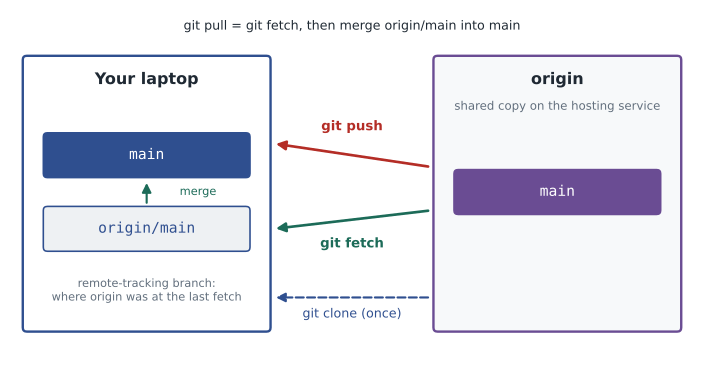
Three commands move commits between your repository and a remote. git fetch downloads new commits from the remote without changing your own branches; it updates remote-tracking branches such as origin/main, which record where the remote's branches were the last time you talked to it. git pull does a fetch and then merges the remote branch into your current branch, bringing your work up to date. git push uploads your new commits to the remote and moves the remote's branch label forward.
> git switch -c feature/loyalty-points
> # ... commit work ...
> git push -u origin feature/loyalty-points
To github.com:ridgeline-roasters/ridgeline-tools.git
 * [new branch]      feature/loyalty-points -> feature/loyalty-points
branch 'feature/loyalty-points' set up to track 'origin/feature/loyalty-points'.
> git switch main
> git pull
Updating a41c9e2..d27aa90
Fast-forward
 src/ridgeline/stock.py | 2 +-
> git status
On branch main
Your branch is up to date with 'origin/main'.
The -u option on the first push of a branch sets its upstream, the remote branch it tracks, so later a plain git push or git pull knows where to go. git status then reports how your branch compares with its upstream: up to date, ahead by some commits that you have not pushed, behind by some commits that you have not pulled, or both, which Git calls diverged. A push is refused if the remote has commits you do not have, because accepting it would throw those commits away; the fix is to pull first, merge, and push again.
Try it yourself
Ahead and behind
Git compares a local branch with its upstream by counting commits. Write ahead_behind(local, remote) where each argument is a list of commit hashes from oldest to newest (each branch's history). Return a tuple (ahead, behind): the number of commits in local that are not in remote, and the number in remote that are not in local. Then write status_word(local, remote) returning "up to date", "ahead", "behind" or "diverged".
def ahead_behind(local, remote):
    return (0, 0)

def status_word(local, remote):
    return 'up to date'

print(ahead_behind(['a', 'b', 'c'], ['a', 'b']))
Pull requests
A pull request, called a merge request on GitLab, is a proposal on the hosting service to merge one branch into another, usually a feature branch into main. It is not a Git command but a feature of the hosting website. A pull request shows the commits and the combined diff, runs any automated checks the project has set up and gives teammates a place to discuss the change line by line, request changes and finally approve it. When it is approved, a button merges it.
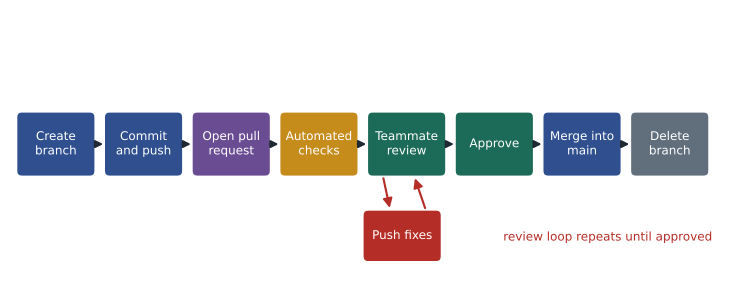
Pull requests turn merging from a private act into a shared one. Nothing reaches main without a second person looking at it, which catches bugs, spreads knowledge of the code across the team and keeps a written record of why each change was made. For Ridgeline, it means Jordan sees every line of the loyalty tracker before the café uses it, and Sam sees every bug fix Jordan makes, so both of them come to know the whole codebase.
Writing a good pull request
A pull request should be easy to review. Keep it small and focused on one change; a reviewer can study 200 lines carefully but will skim 2,000. Give it a clear title, written like a commit summary. In the description, explain what the change does, why it is needed, how you tested it and anything the reviewer should look at closely, and link the issue it addresses. Screenshots or sample output help when the change affects what users see. Before asking for review, read your own diff once, top to bottom: authors catch a surprising number of problems that way.
Title: Add loyalty points and tiers

What
- Customers earn 1 point per whole dollar spent (receipt total, before tax).
- Tiers: Bean 0-99, Roast 100-299, Reserve 300+.
- New command: ridgeline loyalty CUSTOMER shows points and tier.

Why
Mei wants to replace the paper stamp cards (issue #21).

How it was tested
- New tests in tests/test_loyalty.py cover tier boundaries 99/100 and 299/300.
- Ran the command against last week's sales export; totals match the paper cards.

Reviewer notes
The rounding of points uses floor, not round: 18.99 gives 18 points. Please confirm.
Many projects add a pull request template, a file such as .github/pull_request_template.md, whose headings are filled in automatically when a pull request is opened, so no section is forgotten. Teams can also check pull requests automatically before review, as the next exercise does in miniature.
Try it yourself
A pull request checklist
A pull request is given as a dictionary such as PR below. Write missing_items(pr) that returns a list of the problems that should be fixed before review, in this order: "title" if the title is empty or longer than 72 characters; "description" if the description has fewer than 20 characters after removing surrounding whitespace; "issue" if the description does not contain a # followed by a digit; "checks" if any value in pr["checks"] is not "passed"; "size" if pr["lines_changed"] is more than 400.
def missing_items(pr):
    problems = []
    return problems

print(missing_items({'title': '', 'description': 'wip', 'checks': {'tests': 'failed'}, 'lines_changed': 900}))
Forks and open source
On open-source projects, contributors usually cannot push to the project's repository at all. Instead they fork it: the hosting service makes a copy of the repository under their own account. They clone their fork, create a branch, push to the fork and open a pull request from the fork's branch to the original project. The original repository is conventionally added as a second remote named upstream, so the contributor can fetch the latest changes from it and keep the fork current. The pull request and review then work exactly as within a team.
Contributing to open source is an excellent way to practice these skills, and many projects label beginner-friendly issues. Read the project's contributing guide first, follow its style and testing rules, and keep your first contribution small, such as a documentation fix.
Protecting the main branch
Hosting services let a repository's owners protect important branches. Typical branch protection rules for main say that nobody can push to it directly, that every change must arrive through a pull request with at least one approving review, that the required automated checks must pass first and that the branch must be up to date with main before merging. Ridgeline turns these on for ridgeline-tools, so even Rosa, who owns the repository, cannot accidentally push untested code to the version the café runs.
Worked problem
Sam's first pull request
Sam has three commits on feature/loyalty-points in a local clone. List the steps to get the work reviewed and merged into main under the team's protection rules.
Show solution
- git pull on main, then git merge main into the feature branch, so the branch includes Jordan's latest fixes; rerun the tests.
- git push -u origin feature/loyalty-points to publish the branch.
- Open a pull request into main with a clear title, a description covering what, why and testing, and a link to issue #21; request Jordan as reviewer.
- Wait for the automated checks; respond to Jordan's comments by pushing further commits to the same branch, which update the pull request automatically.
- After approval, merge with the button, delete the branch on the service and locally, and git pull on main.
Answer: The loyalty tracker reaches main only after a passing test run and a review, with the whole discussion recorded on the pull request.
Common mistakes
MistakePushing and getting rejected, then trying to force the push.
InsteadPull first, merge the remote's commits, then push again; never force-push a shared branch.
MistakeSharing or committing the private SSH key.
InsteadShare only the .pub public key; the private key stays on your computer.
MistakeUsing an account password for Git over HTTPS.
InsteadUse a personal access token stored by the credential manager, or SSH keys.
MistakeOpening a 2,000-line pull request.
InsteadSplit work into small, focused pull requests that can be reviewed carefully.
MistakeWriting no description on a pull request.
InsteadExplain what, why and how it was tested, and link the issue.
MistakeForgetting that fetch does not change your branches.
InsteadUse git pull, or fetch and then merge, to update your branch.
Summary and key terms
- A remote is another copy of the repository known by name; origin is the shared copy, usually on a hosting service.
- git clone copies a remote with its full history; HTTPS and SSH addresses both name a host, owner and repository.
- Hosting services require a personal access token over HTTPS or an SSH key pair; only the public key is shared.
- git fetch downloads commits, git pull fetches and merges, and git push uploads; -u sets a branch's upstream.
- git status reports whether a branch is ahead of, behind or diverged from its upstream.
- Pull requests propose merging a branch, with diffs, automated checks and review in one place.
- Forks, the upstream remote and branch protection rules support open-source work and keep main safe.
- Remote
- Another copy of the repository, known by a name such as origin.
- Clone
- A full copy of a remote repository, made with git clone.
- origin
- The conventional name for the main shared remote.
- Remote-tracking branch
- A branch such as origin/main recording where a remote branch was at the last fetch.
- Upstream branch
- The remote branch that a local branch pushes to and pulls from.
- Personal access token
- A limited, expiring secret used instead of a password for Git over HTTPS.
- Pull request
- A request on a hosting service to merge one branch into another, with review and checks.
- Fork
- A copy of someone else's repository under your own account.
- Branch protection
- Hosting rules that restrict how changes reach a branch such as main.
- Push
- Uploading local commits to a remote repository.
Practice problems
Work each problem on paper first, then reveal the answer to check.
What is origin?
Show answer
The conventional name of the main remote, set by git clone.
Give the owner and repository in git@gitlab.com:okoye/roast-curves.git.
Show answer
Owner okoye, repository roast-curves.
What is the difference between git fetch and git pull?
Show answer
fetch downloads commits and updates remote-tracking branches only; pull also merges into your current branch.
A push is rejected because the remote has new commits. What do you do?
Show answer
Pull, resolve any conflicts, test, then push again.
Which file from ssh-keygen do you paste into the hosting service?
Show answer
The public key, the file ending in .pub.
Your branch has 2 commits the remote lacks and the remote has 1 you lack. What does git status say?
Show answer
That the branches have diverged, 2 and 1 commits respectively.
What does the -u in git push -u origin fix/tax do?
Show answer
Sets origin/fix/tax as the branch's upstream for later pushes and pulls.
Name four things a good pull request description includes.
Show answer
What it does, why, how it was tested and the linked issue; also notes for the reviewer.
In a fork-based workflow, what is the upstream remote?
Show answer
The original project's repository, used to fetch its latest changes.
Give two typical branch protection rules for main.
Show answer
No direct pushes; pull requests need an approving review; required checks must pass.
Lesson quiz · 5 questions
Score 60% or more to complete this lesson.
Create a free account to save your progress, take quizzes and earn a certificate.