
PYTH-110 · Lesson 10 of 12 · 30 min
Writing documentation and READMEs
▶ Video coming soon A video version of this lesson is on the way.
The loyalty tracker has been live for a week when Mei asks a simple question: how do I look up a customer's points? Sam is at college and Jordan is on a day off. The command exists, it works and it has tests, but nobody wrote down how to use it, so for one busy morning it might as well not exist. A week later, Sam spends an hour working out why a function rounds the way it does, only to find a code review comment from Jordan explaining it, buried in a merged pull request. Both problems come from missing documentation.
This lesson covers who documentation is for and the kinds it comes in, how to write a README that answers a newcomer's questions, the Markdown format used for most project documentation, docstrings and helpful comments, tools that turn docstrings into reference pages and test the examples in them, changelogs, and the habits that keep documentation true as the code changes.
Who documentation is for
Documentation serves three audiences. Users want to know what the software does and how to use it: Mei needs the loyalty command and nothing about its internals. Contributors want to know how to set up the project, how it is organized and how to make a change: Sam's first day would have been shorter with a good setup guide. And maintainers, including the authors themselves six months later, want to know why the code is the way it is. Each audience needs different documents, written at a different level of detail.
| Kind | Audience | Answers | Where it lives |
|---|---|---|---|
| README | Everyone, first | What is this, how do I install and use it? | README.md at the top of the repository |
| User guide | Users | How do I do each task? | A docs folder or project website |
| Docstrings | Programmers using the code | What does this function do, what does it take and return? | Inside the code, under each definition |
| Comments | Programmers reading the code | Why is this done this way? | Inside the code, beside the lines |
| Contributing guide | New contributors | How do I set up, test and submit a change? | CONTRIBUTING.md |
| Changelog | Users and maintainers | What changed in each release? | CHANGELOG.md |
| Decision records | Maintainers | Why did we choose this design? | A docs/decisions folder |
Good documentation is short, accurate and easy to find. A two-paragraph README that is correct beats a forty-page manual that describes last year's version. The tests of good documentation are practical: can a newcomer get the project running using only the README, can a user complete a common task without asking anyone, and can a maintainer find out why a decision was made?
The README
The README is the front door of a project. Hosting services display it on the repository's main page, so it is the first thing anyone sees. It should answer, in this order: what the project is and who it is for, how to install it, how to use it for the most common tasks, how to run the tests and contribute, and where to get help. It should not try to document everything; it links to fuller guides when the project grows.
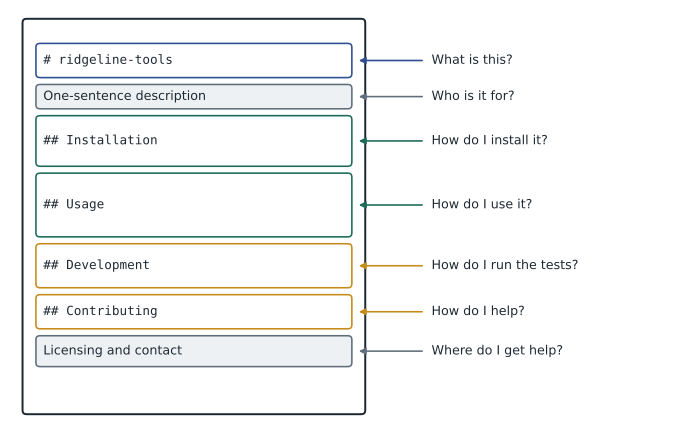
# ridgeline-tools

Command-line tools for Ridgeline Coffee Roasters: stock, sales,
roast logs and the café loyalty program.

## Installation

    python3 -m venv .venv
    source .venv/bin/activate          # Windows: .venv\Scripts\Activate.ps1
    python -m pip install -r requirements-lock.txt
    python -m pip install -e .

## Usage

    ridgeline low                 # coffees below the reorder point
    ridgeline sell RC-101 2       # record a sale of two bags
    ridgeline loyalty 0451        # points and tier for card 0451

## Development

Install the tools with `python -m pip install -e .[dev]` and run
`python -m pytest`. See CONTRIBUTING.md for the review process.
Look at what the README does not contain: an explanation of every option, the history of the project or the internal design. Those belong in other documents. The usage section shows real commands that a person can copy, with a comment on each saying what it does. Examples are the most-read part of any documentation, so they must be correct; a later section shows how to test them automatically.
Markdown essentials
Markdown is a plain-text format with light punctuation for structure, readable as it is and turned into formatted pages by hosting services, editors and documentation tools. A line starting with # is a heading, with ## for a second level and so on. Lines starting with a hyphen form a bulleted list; lines starting with 1. form a numbered one. Text between single backticks is shown as code, and a block between lines of three backticks, or indented by four spaces, is a code block. A link is written as the link text in square brackets followed by the address in parentheses. Tables use vertical bars between cells.
Hosting services also create an anchor for every heading, so you can link straight to a section. The anchor, or slug, is the heading in lowercase, with spaces turned into hyphens and most punctuation removed: the heading Running the tests gets the anchor running-the-tests. A table of contents at the top of a long document is just a list of links to those anchors, and it is easy to generate.
import re

doc = """# ridgeline-tools
## Installation
## Usage
### Loyalty commands
## Running the tests
"""

for line in doc.splitlines():
    match = re.match(r'(#{2,6}) (.+)', line)
    if match:
        level = len(match.group(1)) - 2
        title = match.group(2)
        slug = re.sub(r'[^a-z0-9 -]', '', title.lower()).replace(' ', '-')
print(' ' * level + '- [' + title + '](#' + slug + ')')- [Installation](#installation) - [Usage](#usage) - [Loyalty commands](#loyalty-commands) - [Running the tests](#running-the-tests)
Try it yourself
Heading anchors
Write slugify(heading) that makes an anchor the way hosting services commonly do: lowercase the text, remove every character that is not a letter, digit, space, hyphen or underscore, then replace each space with a hyphen. Then write toc(markdown) that returns a list of (level, title, slug) tuples for every heading line from ## to ######, where level is the number of # characters.
For example, slugify("What's new in 0.4?") gives "whats-new-in-04".
def slugify(heading):
    return heading.lower()

def toc(markdown):
    return []

print(slugify("What's new in 0.4?"))
Docstrings
A docstring is a string literal written as the first statement of a module, class or function. Python stores it, help() displays it, editors show it when you hover over a call, and documentation tools collect it. PEP 257 sets the conventions: use triple double quotes, start with a one-line summary written as a command, such as Return the loyalty tier for a points total, and if more is needed, add a blank line and then describe the arguments, the return value, any exceptions raised and an example.
def tier(points):
    """Return the loyalty tier name for a points total.

    Tiers: Bean below 100 points, Roast from 100 to 299, Reserve from 300.
    Negative totals are treated as 0.

    >>> tier(99), tier(100), tier(300)
    ('Bean', 'Roast', 'Reserve')
    """
    points = max(points, 0)
    if points >= 300:
        return 'Reserve'
    if points >= 100:
        return 'Roast'
    return 'Bean'

print(tier.__doc__.splitlines()[0])
help(tier)Return the loyalty tier name for a points total.
Help on function tier in module __main__:
tier(points)
Return the loyalty tier name for a points total.
Tiers: Bean below 100 points, Roast from 100 to 299, Reserve from 300.
Negative totals are treated as 0.
>>> tier(99), tier(100), tier(300)
('Bean', 'Roast', 'Reserve')The example in the docstring, written as an interactive session with >>> prompts, is called a doctest. It documents the function's behavior precisely, and the standard library's doctest module can run it and check that the output still matches. That turns the examples in documentation from claims into tests: if someone later changes tier so that 100 points no longer reaches Roast, the doctest fails.
import doctest

def points_for(total):
    """Return loyalty points for a receipt total: one per whole dollar.

    >>> points_for(18.99)
    18
    >>> points_for(-5.25)
    0
    """
    return int(total) if total > 0 else 0

runner = doctest.DocTestRunner()
for test in doctest.DocTestFinder().find(points_for, globs={'points_for': points_for}):
    runner.run(test)
print('attempted:', runner.tries, 'failed:', runner.failures)attempted: 2 failed: 0
Because docstrings are part of the program, a script can check that they exist. The ast module parses Python source into a syntax tree, the same structure linters use, without running it. Walking the tree finds every function definition, and ast.get_docstring returns its docstring or None. Many projects run such a check in their linter, so a public function without a docstring is flagged in review.
Try it yourself
Find functions without docstrings
Write undocumented(source) that parses Python source with the ast module and returns a sorted list of the names of all functions (including methods inside classes) that have no docstring. Ignore functions whose name starts with an underscore, which are private by convention.
import ast

def undocumented(source):
    tree = ast.parse(source)
    return []

print(undocumented(SOURCE))
Comments that help
Docstrings describe what code does for people who use it; comments explain how and why for people who read it. The most valuable comments record reasons that the code cannot show: why int is used rather than round for points (Mei's paper cards always rounded down), why a strange-looking constant exists (the till adds 0.0001 to avoid a rounding error), or a link to the issue that explains a workaround. Comments that repeat the code, such as add one to count above count += 1, add nothing and go stale.
When a comment is needed to explain what a block of code does, consider whether a well-named function would make it unnecessary. A block under the comment calculate tier boundaries becomes clearer as a function named tier_boundaries. And when code changes, update or delete the comments beside it in the same commit, because a comment that contradicts the code is worse than none.
Generating reference documentation
For larger projects, tools build a documentation website from Markdown or reStructuredText files plus the docstrings in the code. Sphinx is the long-standing standard for Python, used for the official Python documentation itself; MkDocs, with plugins that read docstrings, is a popular Markdown-based alternative. Both produce searchable reference pages for every module and function, and many hosting services can rebuild and publish the site automatically whenever main changes. For ridgeline-tools, the README and docstrings are enough for now.
Try it yourself
A command reference table
Write command_table(commands) that takes a dictionary mapping command names to one-line descriptions and returns a Markdown table as a string. The table has a header row | Command | Description |, a separator row | --- | --- |, then one row per command in alphabetical order, with the command name in backticks. Join the rows with newlines and end with a newline.
def command_table(commands):
    rows = ['| Command | Description |']
    return '\n'.join(rows)

print(command_table(COMMANDS))
Changelogs
A changelog is a file, usually CHANGELOG.md, listing the notable changes in each release, newest first, so users can see what is new and what might affect them. A widely followed convention groups changes under headings for added, changed, deprecated, removed and fixed features and for security, keeps an Unreleased section at the top for changes not yet released, and dates each version. The changelog is written for people, so it describes changes in plain words rather than copying commit messages, although lesson 12 shows how commit conventions can help produce a first draft.
# Changelog

## [Unreleased]
### Added
- `ridgeline export` writes the monthly report as a spreadsheet.

## [0.4.0] - 2026-10-20
### Added
- Loyalty points, tiers and the `ridgeline loyalty` command.
### Fixed
- Refunds no longer earn negative loyalty points.
- Receipt totals are rounded to the cent correctly.
Keeping documentation true
Documentation goes out of date for one reason: code changes without the documents changing with it. The fix is to treat documentation as part of the change. When a pull request adds or changes a command, the same pull request updates the README and the changelog, and reviewers check for it; many teams put a documentation line in their pull request template. Doctests and a docstring check in CI catch some drift automatically. And when you find documentation that is wrong, fix it at once, even in the middle of other work, because the next person to read it will believe it.
Worked problem
Answering Mei's question for good
Mei could not find out how to look up a customer's points. Plan the documentation changes so that nobody has to ask again.
Show solution
- Add the loyalty command to the Usage section of the README, with a copyable example and a comment.
- Write a one-page user guide, docs/cafe-guide.md, for café staff: looking up points, redeeming a free drink and what to do if a card is missing.
- Give tier and points_for full docstrings with doctests for the boundary cases, and add the docstring check to CI.
- Record the rounding decision as a comment in points_for, with a link to the review discussion.
- Add a line to the pull request template: documentation and changelog updated, or not needed.
Answer: Users, contributors and maintainers each get the answer where they will look for it, and the template keeps it up to date.
Common mistakes
MistakeWriting a README that explains the internal design but not how to install or use the project.
InsteadLead with what it is, installation and usage examples.
MistakeCopying commands into the README without trying them.
InsteadRun every documented command, and test docstring examples with doctest.
MistakeWriting comments that repeat the code.
InsteadComment on why, not what; use good names to explain what.
MistakeLeaving docstrings and comments unchanged when the code changes.
InsteadUpdate documentation in the same commit and pull request as the code.
MistakePasting raw commit messages into the changelog.
InsteadWrite changelog entries for users, grouped by kind of change.
MistakePutting every detail in the README.
InsteadKeep the README short and link to fuller guides.
Summary and key terms
- Documentation serves users, contributors and maintainers, and comes as READMEs, guides, docstrings, comments, changelogs and decision records.
- A README says what the project is, how to install and use it, how to test and contribute and where to get help.
- Markdown marks headings with #, lists with hyphens, code with backticks and links with brackets; headings get anchors.
- Docstrings follow PEP 257: a one-line imperative summary, then details; help() and editors display them.
- Doctests turn examples in docstrings into tests; the ast module can check that docstrings exist.
- Comments should explain why; Sphinx and MkDocs build reference sites from docstrings.
- A changelog lists notable changes per release, and documentation is updated in the same pull request as the code.
- README
- The introductory document at the top of a repository.
- Markdown
- A plain-text format that uses light punctuation for headings, lists, code and links.
- Anchor
- An identifier for a heading that lets a link point to that section.
- Docstring
- A string literal at the start of a module, class or function that documents it.
- PEP 257
- The conventions for writing Python docstrings.
- Doctest
- An example in a docstring, written as an interactive session, that can be run as a test.
- ast
- The standard library module that parses Python source into a syntax tree.
- Changelog
- A file listing the notable changes in each release.
- Sphinx
- A documentation generator widely used for Python projects.
- Contributing guide
- A document explaining how to set up the project and submit changes.
Practice problems
Work each problem on paper first, then reveal the answer to check.
Name the three audiences of documentation.
Show answer
Users, contributors and maintainers.
List five sections a README usually has.
Show answer
Description, installation, usage, development or testing, contributing, and help or license.
What is the Markdown anchor for the heading Installing on Windows?
Show answer
installing-on-windows
Write a PEP 257 summary line for a function that returns low-stock coffees.
Show answer
Return the coffees whose stock is below the reorder point.
What does doctest do?
Show answer
Runs the interactive examples in docstrings and checks that their output still matches.
Which function returns a function node's docstring when walking an ast tree?
Show answer
ast.get_docstring
Improve the comment # multiply by 100 on cents = round(total * 100).
Show answer
Explain why: work in whole cents to avoid floating-point rounding errors.
Under which changelog heading does a bug fix go?
Show answer
Fixed.
When should the README be updated for a new command?
Show answer
In the same pull request that adds the command.
Name two tools that build documentation sites for Python projects.
Show answer
Sphinx and MkDocs.
Lesson quiz · 5 questions
Score 60% or more to complete this lesson.
Create a free account to save your progress, take quizzes and earn a certificate.