
PYTH-110 · Lesson 4 of 12 · 34 min
Git basics: commits and history
▶ Video coming soon A video version of this lesson is on the way.
Before Sam arrived, Jordan kept safe copies of ridgeline.py the way many people keep documents: ridgeline_backup.py, ridgeline_old.py, ridgeline_final.py and, after one bad afternoon, ridgeline_final_WORKING.py. Nobody could say which copy held the fix for the rounding bug, what had changed between two copies or why. With two people editing, the problem would get worse every week. Version control solves it, and Git is the version control system used by nearly every software team today.
This lesson explains what version control does, how Git stores a project's history, how to set Git up and create a repository, how changes move through Git's three areas into a commit, what a commit contains and how its identifier is calculated, how to write commit messages that help your team, how to read history and how to tell Git which files to ignore.
Why version control
A version control system records changes to a set of files over time so that you can recall any earlier version later. It answers questions that copies of files cannot: what exactly changed between Tuesday and today, who changed this line and why, what did the program look like when the last release went out, and can we undo just this one change without losing everything since? It also lets several people work on the same files at once and combine their work safely, which is the subject of lessons 5 to 7.
Version control is not only for code. Any set of plain-text files benefits, including documentation, configuration and data in CSV form. It works less well for large binary files, such as videos or design documents, because it cannot show what changed inside them; teams store those elsewhere or use special extensions. For a Python project, everything that a person writes by hand belongs under version control, and everything that a program can regenerate does not.
Git in a nutshell
Git was created in 2005 by Linus Torvalds, the creator of Linux, to manage the development of the Linux kernel after the team lost access to the tool it had been using. It is free, open source and runs on every major operating system. Two design choices explain much of how Git behaves.
First, Git is distributed. Every person's copy of a project, called a repository, contains the full history, not just the latest files. You can commit, browse history and create branches with no network connection at all, and every copy is a complete backup. Sharing happens by exchanging commits between repositories, usually through a central copy on a hosting service such as GitHub, GitLab or Bitbucket, as lesson 6 explains. Git is the tool; these services are websites that host Git repositories and add features such as pull requests and issue tracking.
Second, Git stores snapshots, not lists of differences. Each commit records the complete state of every tracked file at that moment. To save space, a file that has not changed is not stored again; the new snapshot simply points to the stored copy from before. When Git shows you what changed, it calculates the difference between two snapshots on the spot.
Setting up Git and creating a repository
After installing Git, tell it who you are. Every commit records an author name and email address, so set them once for your user account. While setting up, also choose main as the name of the first branch in new repositories, which is the common convention today. These settings live in a file in your home folder and apply to every repository on the computer.
> git --version
git version 2.51.0
> git config --global user.name "Sam Okoye"
> git config --global user.email "sam.okoye@example.com"
> git config --global init.defaultBranch main
> git config --global core.autocrlf input     # on Windows use: true
> git config --list --global
user.name=Sam Okoye
user.email=sam.okoye@example.com
init.defaultbranch=main
core.autocrlf=input
The core.autocrlf setting deals with the line-ending difference from lesson 1. With true on Windows, Git converts CRLF line endings to LF when it stores files and back to CRLF when it writes them out; with input on macOS and Linux, it converts any CRLF to LF on the way in and leaves files alone on the way out. The repository then always holds LF endings, whoever committed the file. Many teams also add a .gitattributes file to the project with a line such as * text=auto, so the rule travels with the repository instead of depending on each person's settings.
To put a project under version control, move into its folder and run git init. Git creates a hidden folder named .git that holds the entire history and all of Git's bookkeeping. The project's files are untouched, and nothing is recorded yet. If you ever delete the .git folder, the history is gone, so never edit or remove it by hand.
> cd ~/projects/ridgeline-tools
> git init
Initialized empty Git repository in /home/sam/projects/ridgeline-tools/.git/
> git status
On branch main

No commits yet

Untracked files:
  (use "git add <file>..." to include in what will be committed)
        README.md
        pyproject.toml
        src/

nothing added to commit but untracked files present (use "git add" to track)
The three areas: working tree, staging area and repository
Changes move through three places on their way into Git's history. The working tree is the ordinary folder of files that you edit. The staging area, also called the index, holds the changes you have chosen to include in the next commit. The repository, inside the .git folder, holds every commit ever made. git add copies changes from the working tree into the staging area, and git commit turns everything in the staging area into a new commit.
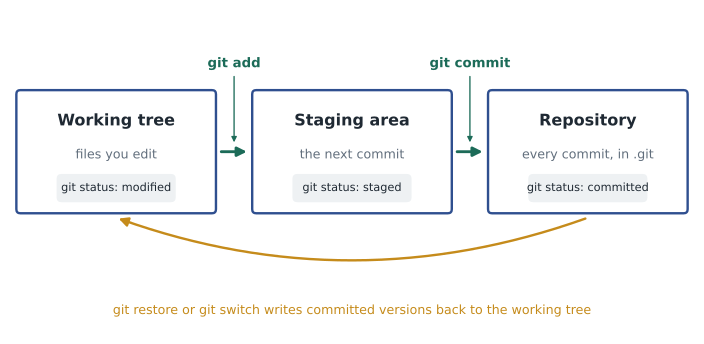
The staging area is what lets you make tidy, focused commits. Suppose Jordan fixed the rounding bug in sales.py and, while in there, also started a half-finished report feature in stock.py. Staging only sales.py and committing it records the bug fix on its own, with its own message, and leaves the unfinished work out of the history for now. git status, which you will run constantly, shows which files are untracked, modified but not staged, or staged and ready to commit.
> git add README.md pyproject.toml src
> git commit -m "Add ridgeline tool and project files"
[main (root-commit) 19fe3a0] Add ridgeline tool and project files
 5 files changed, 214 insertions(+)
> # ... edit src/ridgeline/sales.py and src/ridgeline/stock.py ...
> git status --short
 M src/ridgeline/sales.py
 M src/ridgeline/stock.py
> git add src/ridgeline/sales.py
> git commit -m "Fix rounding in daily totals"
[main 7d02b15] Fix rounding in daily totals
 1 file changed, 3 insertions(+), 2 deletions(-)
What a commit is
A commit is a snapshot of the staged files together with information about it: the author's name and email, the date and time, the commit message and a reference to the commit that came before it, called its parent. The very first commit has no parent; a commit that merges two lines of work, as lesson 5 shows, has two. Because each commit points to its parent, the commits form a chain back to the start of the project, and that chain is the project's history.
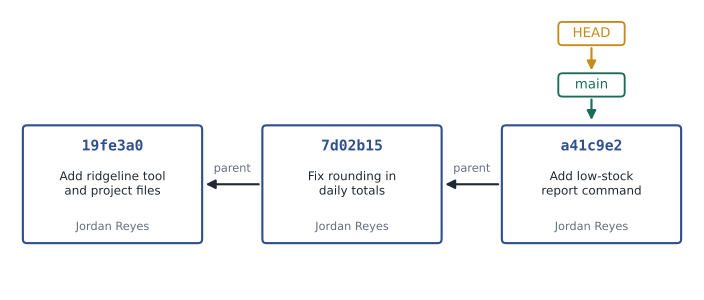
Every commit is identified by a hash, a 40-character code such as a41c9e2bd7f0... calculated from the commit's contents with a cryptographic hash function. Commands usually show only the first seven characters, which are almost always enough to identify a commit within one project. Git stores files the same way: the content of each file version, called a blob, is hashed, and the hash becomes its name. Because the name comes from the content, identical content always gets the same hash, so an unchanged file is stored only once, and any change to the content, however small, gives a completely different hash. Git can therefore detect corruption or tampering simply by recalculating hashes.
import hashlib

def blob_hash(text):
    data = text.encode('utf-8')
    header = b'blob ' + str(len(data)).encode() + b'\0'
    return hashlib.sha1(header + data).hexdigest()

print(blob_hash('hello\n'))
print(blob_hash('RC-101,Sunrise Blend,18.50,42\n'))
print(blob_hash('RC-101,Sunrise Blend,18.50,41\n'))ce013625030ba8dba906f756967f9e9ca394464a 7dbb71bdd484affb35e808ddfae46af45089fa7a 2be4549f670cc5c02fa807bab24f886d11d2c213
The first line prints ce013625030ba8dba906f756967f9e9ca394464a, which is exactly the hash that git hash-object gives for a file containing hello and a newline, on any computer. The last two lines show the effect of a one-character change: changing 42 bags to 41 produces an unrelated hash. Git has used SHA-1 for most repositories since 2005 and supports a newer SHA-256 format for new repositories; the idea is the same with either function.
Try it yourself
Calculate a Git blob hash
Write git_blob_id(content) that returns the hexadecimal SHA-1 hash Git uses for a file whose content is the string content. Encode the text as UTF-8 bytes, then hash the bytes blob , the length of the content in bytes as decimal digits, a zero byte and the content itself.
Careful: the length is counted in bytes after encoding, which differs from the number of characters for text such as café.
import hashlib

def git_blob_id(content):
    return hashlib.sha1(content.encode('utf-8')).hexdigest()

print(git_blob_id('hello\n'))
Writing good commit messages
A commit message is a note to your future self and your team explaining why a change was made. The code shows what changed; the message should say why. Good messages make history searchable and code review easier, and they are the first thing anyone reads when tracking down when a bug appeared. Git itself does not enforce any format, but a widely used convention has emerged.
Start with a summary line of about 50 characters or fewer, written as a command, as if completing the sentence 'If applied, this commit will...': Fix rounding in daily totals, not Fixed rounding or Rounding stuff. Capitalize the first word and do not end the summary with a period. If more explanation is needed, leave the second line blank and write a body, wrapped at about 72 characters, explaining what problem the change solves and why it was solved this way. Many teams also refer to the issue being fixed, a practice lesson 11 covers.
Fix rounding in daily totals

The till exports prices with two decimal places, but the total was
built by adding floats and rounding only once at the end, so some days
were off by a cent. Totals are now computed in cents as integers and
converted to dollars for display.

Fixes #14messages = ['Fix rounding in daily totals', 'fixed stuff.', 'Add low-stock report command for the cafe and roastery staff']
for m in messages:
problems = []
if len(m) > 50:
problems.append('summary is ' + str(len(m)) + ' characters')
if m[:1].islower():
problems.append('starts with a lowercase letter')
if m.endswith('.'):
problems.append('ends with a period')
print(repr(m)[:34].ljust(36), problems or 'ok')'Fix rounding in daily totals' ok 'fixed stuff.' ['starts with a lowercase letter', 'ends with a period'] 'Add low-stock report command for ['summary is 60 characters']
Try it yourself
A commit message linter
Write lint_message(message) that returns a list of problem codes for a full commit message, in this order: "long-summary" if the first line has more than 50 characters, "lowercase" if the first line starts with a lowercase letter, "period" if the first line ends with a period, and "no-blank-line" if there is a second line and it is not empty.
Return an empty list when the message follows all four rules.
def lint_message(message):
    lines = message.split('\n')
    problems = []
    return problems

print(lint_message('fixed the totals.\nIt was wrong'))
Reading history
Git offers several ways to look back. git log lists commits from newest to oldest with their hash, author, date and message; git log --oneline shows one line per commit, which is usually what you want. git show with a hash displays one commit and the changes it made. git diff shows the changes in the working tree that are not yet staged, and git diff --staged shows what the next commit will contain. git blame lists every line of a file with the commit that last changed it, which answers the question who changed this and why, when combined with git show.
> git log --oneline
a41c9e2 (HEAD -> main) Add low-stock report command
7d02b15 Fix rounding in daily totals
19fe3a0 Add ridgeline tool and project files
> git diff
diff --git a/src/ridgeline/stock.py b/src/ridgeline/stock.py
--- a/src/ridgeline/stock.py
+++ b/src/ridgeline/stock.py
@@ -12,7 +12,7 @@ def low_stock(inventory, reorder_point=10):
-        if bags <= reorder_point:
+        if bags < reorder_point:
             low.append(sku)
> git blame -L 12,14 src/ridgeline/stock.py
a41c9e2 (Jordan Reyes 2026-10-09) def low_stock(inventory, reorder_point=10):
In a diff, lines starting with a minus sign were removed and lines starting with a plus sign were added; a changed line appears as one of each. The line beginning with @@ tells you where in the file the change is. Learning to read diffs fluently is worth the effort, because you will read far more of them than you write, in your own work and, from lesson 8, in code review.
Try it yourself
Parse a one-line log
LOG holds the output of git log --oneline. Write parse_log(text) that returns a list of (hash, message) tuples in the same order, without any decoration such as (HEAD -> main) in front of the message. Then write find_commits(text, word) that returns the hashes of commits whose message contains word, ignoring case.
def parse_log(text):
    return [tuple(line.split(' ', 1)) for line in text.splitlines()]

def find_commits(text, word):
    return []

print(parse_log(LOG)[0])
Telling Git what to ignore
Some files in a project folder should never be committed: Python's __pycache__ folders of compiled bytecode, virtual environment folders such as .venv, editor folders with personal settings, log files, local databases and, above all, files containing passwords or keys. A file named .gitignore at the top of the repository lists patterns for files Git should not track. git status then stops reporting them, and git add leaves them out.
# .gitignore for ridgeline-tools
__pycache__/
*.pyc
.venv/
.env
*.log
/data/private/
.DS_Store
A .gitignore only affects files that are not yet tracked. If a secrets file has already been committed, adding it to .gitignore does not remove it from history; the secret must be changed, and the file removed from tracking with git rm --cached. This is why the .gitignore should be one of the first files in a new repository.
Worked problem
Turning Jordan's backup files into history
Jordan has ridgeline_old.py, ridgeline_final.py and ridgeline_final_WORKING.py. The team wants a clean repository with a sensible history. Plan the steps.
Show solution
- Create the project folder layout from lesson 1, with ridgeline_final_WORKING.py moved to src/ridgeline as the current code, and run git init.
- Write .gitignore first and commit it on its own, so no unwanted files are ever added.
- Optionally rebuild history: copy ridgeline_old.py into place and commit it with the message Import original version, then replace it with the next copy and commit with a message describing what changed, ending with the working version.
- Delete the loose backup files once their content is in the history; git log --oneline now tells the story.
- From now on, commit small, focused changes with clear messages instead of making copies.
Answer: The repository holds one current copy of each file, and every earlier version is recoverable from its commits.
Common mistakes
MistakeKeeping numbered copies of files instead of committing.
InsteadCommit each meaningful change; Git keeps every version.
MistakeCommitting everything with git add . without looking.
InsteadRun git status and git diff first, and stage only what belongs in the commit.
MistakeWriting messages such as update or fixed stuff.
InsteadWrite a short imperative summary that says what the commit does, and explain why in the body.
MistakeCommitting a file with a password, then adding it to .gitignore.
InsteadCreate .gitignore first; if a secret was committed, change the secret and untrack the file.
MistakeMaking one huge commit at the end of the day.
InsteadMake small commits, each with one purpose, as you go.
MistakeDeleting or editing the .git folder by hand.
InsteadLeave .git alone; it holds the entire history.
Summary and key terms
- Version control records every change to a project so any version can be recovered, compared or shared.
- Git is distributed, so every clone holds the full history, and it stores snapshots of the project rather than lists of changes.
- Set user.name, user.email and the default branch once; git init creates a repository in the hidden .git folder.
- Changes move from the working tree to the staging area with git add, and into the repository with git commit.
- A commit holds a snapshot, author, date, message and parent; its hash is calculated from its content.
- Good messages have a short imperative summary, a blank line and a body explaining why.
- git log, git show, git diff and git blame read history; .gitignore keeps generated and secret files out.
- Version control
- A system that records changes to files over time so earlier versions can be recalled.
- Repository
- A project together with its complete history, stored in the .git folder.
- Working tree
- The ordinary files of the project that you edit.
- Staging area
- The set of changes chosen for the next commit; also called the index.
- Commit
- A recorded snapshot of the project with an author, date, message and parent.
- Hash
- A fixed-length code calculated from content, used by Git to identify commits and files.
- Blob
- Git's stored copy of one version of a file's content.
- HEAD
- Git's pointer to the commit you are currently working from.
- Diff
- A listing of the lines removed and added between two versions.
- .gitignore
- A file listing patterns for files Git should not track.
Practice problems
Work each problem on paper first, then reveal the answer to check.
Name two questions version control can answer that file copies cannot.
Show answer
What changed between two versions, and who changed a line and why; also how to undo one change without losing later work.
What does git add do?
Show answer
Copies changes from the working tree into the staging area for the next commit.
You changed three files but want to commit only one. How?
Show answer
Stage only that file with git add and then commit.
Why do two identical files get the same blob hash?
Show answer
The hash is calculated from the content alone, so identical content gives an identical hash.
Rewrite the summary fixed the bug in totals. in the conventional style.
Show answer
Fix bug in daily totals
Which command shows the changes that are staged for the next commit?
Show answer
git diff --staged
In a diff, what does a line starting with + mean?
Show answer
The line was added.
Which command shows which commit last changed each line of a file?
Show answer
git blame
Write a .gitignore line that ignores every folder named __pycache__.
Show answer
__pycache__/
A password file was committed last week. Is adding it to .gitignore enough?
Show answer
No: it stays in history; change the password and stop tracking the file with git rm --cached.
Lesson quiz · 5 questions
Score 60% or more to complete this lesson.
Create a free account to save your progress, take quizzes and earn a certificate.