
PHOT-440 · Lesson 10 of 12 · 28 min
Color, audio finishing and delivery
After picture lock comes finishing: color correction and grading, cleaning and mixing the sound, measuring loudness, adding captions, exporting the right files and checking them before delivery. Photographers usually feel at home with color, and they have an advantage clients appreciate: they can make a video match the look of the stills set from the same job. Audio finishing, loudness standards and captions are newer territory. This lesson walks through a finishing workflow for hybrid deliverables. CINE-310 covers professional color grading in depth, CINE-202 covers log and color management, and CINE-430 covers broadcast and streaming delivery, HDR mastering and quality control; this lesson gives a hybrid shooter what is needed for typical web, social and corporate delivery.
Correction first, then grading
Color work happens in two stages. Correction makes footage technically right and consistent: converting log to a display color space, setting exposure and contrast, neutralizing white balance and matching shots within a scene so that cuts do not jump in brightness or color. Grading creates the look: the overall mood, palette, contrast style and any stylization. Doing correction first avoids building a look on top of inconsistent shots.
For log footage, start by converting to the delivery color space, usually Rec. 709 for standard dynamic range web and corporate delivery. Use the camera manufacturer's conversion LUT or, better, a color space transform in the editing software that understands the camera's log curve and gamut. A conversion LUT applied after exposure adjustment preserves highlights better than one applied blindly. Avoid creative LUTs downloaded as shortcuts until the footage is correctly normalized; they assume a specific starting point and can clip highlights or distort skin.
Scopes in finishing
The waveform shows brightness by position, the RGB parade shows red, green and blue separately (useful for spotting color casts in highlights and shadows), and the vectorscope shows hue and saturation as a circular plot. Most vectorscopes include a skin tone line, a diagonal along which human skin of all tones tends to fall, because the hue of skin is similar across people even though brightness and saturation vary. If a face sits well off the line, the white balance or grade has probably pushed it too green or too magenta. CINE-310 explains these tools in more detail.
| Check | Scope | What to look for |
|---|---|---|
| Highlights not clipped | Waveform | Peaks below 100 percent unless intentionally clipped |
| Blacks not crushed | Waveform | Shadow detail just above 0 percent where wanted |
| Neutral whites | RGB parade | Red, green and blue tops level on white objects |
| Natural skin hue | Vectorscope | Skin near the skin tone line |
| Shot match | Waveform and parade | Similar levels across shots in a scene |
| Saturation within limits | Vectorscope | Traces inside the target boxes for delivery |
Matching stills and video looks
Clients notice when the film from a job looks different from the photographs. Matching is part of the hybrid shooter's value. Aim for consistent white balance, contrast and palette rather than identical processing, because stills and video differ in dynamic range, sharpening and compression. A practical method is to grade a hero still first, then match a frame of video to it side by side using the scopes and your eye, save that grade as a look for the video project, and refine per scene. Some photo editors can export color adjustments as LUTs for video software, which is a useful starting point but rarely a perfect match because the underlying images differ. Keep skin tones and brand colors consistent above all; small differences in mood matter less.
Audio finishing
Audio finishing turns the edit's rough sound into a clean, balanced mix. The usual order is: clean dialogue by removing clicks, hum and background noise with care (heavy noise reduction makes voices sound watery); equalize dialogue to reduce boominess or harshness, often with a gentle low cut below about 80 Hz; compress dialogue lightly so quiet and loud words are more even; balance dialogue, natural sound, effects and music so speech is always clear, typically with music ducked well below speech; add fades at the start and end of clips; then measure and adjust overall loudness.
Mix on decent headphones and check on a phone speaker and a laptop, because most viewers will hear the piece on small speakers. Music that sounds balanced on studio headphones often overwhelms dialogue on a phone.
Loudness standards
Loudness is measured in LUFS (loudness units relative to full scale), also written as LKFS; the two terms describe the same measurement. Integrated loudness is the average over the whole program; true peak is the maximum level after accounting for peaks between digital samples, measured in dBTP. Broadcasters must meet specific loudness targets, and streaming and social platforms usually normalize playback toward their own targets, turning loud files down and sometimes quiet files up.
In the United States, the Commercial Advertisement Loudness Mitigation (CALM) Act and FCC rules require broadcasters and cable operators to apply the ATSC A/85 recommended practice to commercials, targeting an integrated loudness of −24 LKFS; network specifications for programs generally use the same target. Many international deliveries follow EBU R128 at −23 LUFS. Web platforms such as YouTube normalize playback, commonly toward about −14 LUFS.
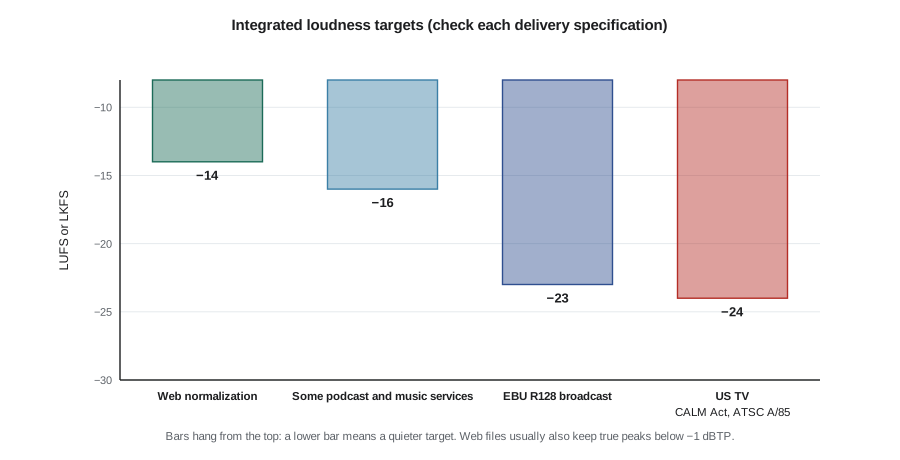
For a typical hybrid deliverable intended for websites and social media, a reasonable target is about −14 to −16 LUFS integrated with a true peak no higher than −1 dBTP. If the same piece will air on television, deliver a separate broadcast mix at −24 LKFS with the broadcaster's true-peak limit, typically −2 dBTP, and follow their specification sheet exactly.
Worked problem
Adjusting a mix to a loudness target
Your finished web mix measures −20.5 LUFS integrated with a true peak of −4.2 dBTP. You want −14 LUFS integrated and a true peak no higher than −1 dBTP. What should you do?
Show solution
- Gain needed: \( -14 - (-20.5) = +6.5 \) dB.
- True peak after gain: \( -4.2 + 6.5 = +2.3 \) dBTP, which exceeds the −1 dBTP ceiling by 3.3 dB.
- Apply a true-peak limiter set to −1 dBTP after the gain. The limiter will reduce peaks by about 3.3 dB; listen for audible pumping or distortion, and if it is obvious, reduce dynamic range earlier with gentle compression on dialogue or music rather than relying on the limiter.
Answer: Raise the mix by 6.5 dB and limit peaks at −1 dBTP, then re-measure to confirm about −14 LUFS integrated.
def loudness_fix(measured_lufs, measured_tp, target_lufs, tp_ceiling):
    gain = target_lufs - measured_lufs
    new_tp = measured_tp + gain
    limit = max(0.0, new_tp - tp_ceiling)
    return gain, new_tp, limit
for target, ceiling in [(-14, -1), (-16, -1), (-24, -2)]:
    g, tp, lim = loudness_fix(-20.5, -4.2, target, ceiling)
    print(f'target {target} LUFS: gain {g:+.1f} dB, peak {tp:+.1f} dBTP, limit by {lim:.1f} dB')
for name, mbps, secs in [('1080p web H.264', 12, 90), ('4K web H.265', 35, 90), ('ProRes 422 HQ master 1080p', 220, 90)]:
print(f'{name:28s} {mbps * secs / 8:7.0f} MB')target -14 LUFS: gain +6.5 dB, peak +2.3 dBTP, limit by 3.3 dB target -16 LUFS: gain +4.5 dB, peak +0.3 dBTP, limit by 1.3 dB target -24 LUFS: gain -3.5 dB, peak -7.7 dBTP, limit by 0.0 dB 1080p web H.264 135 MB 4K web H.265 394 MB ProRes 422 HQ master 1080p 2475 MB
Captions and accessibility
Captions present dialogue and important sounds as text. Closed captions are delivered as a separate file or track that viewers can switch on or off; common formats are SRT and WebVTT for the web and SCC or other formats for broadcast. Open captions are burned into the picture and always visible; they are standard for social clips because many viewers watch muted and some platforms' automatic captions are inconsistent. Captions differ from subtitles, which translate dialogue for viewers who can hear; captions also describe relevant sounds such as music, laughter or a door slamming. Good practice is to keep lines to about 32 to 42 characters, use no more than two lines at a time, keep reading speed comfortable (often around 15 to 20 characters per second), synchronize closely with speech and check spelling of names.
In the United States, the Department of Justice's ADA Title II rule requires state and local government web content to meet WCAG 2.1 Level AA, including captions for prerecorded video; in April 2026 the compliance dates were extended to April 26, 2027 for larger entities and April 26, 2028 for smaller ones. Courts have applied ADA Title III to many private businesses' websites, federal agencies must meet Section 508, and FCC rules require captions on television programming that is later distributed online. Clients increasingly treat captions as standard.
Audio description, a narrated description of important visual information for blind and low-vision viewers, is a further accessibility feature some clients require, particularly public bodies. Mention it when quoting for public-sector clients.
Worked problem
Checking caption reading speed
A caption reads "We opened the bakery in 2015 with one oven and a lot of hope." It is displayed for 2.4 seconds. Is the reading speed comfortable at a guideline of 17 characters per second?
Show solution
- Count characters including spaces and punctuation: the sentence has 61 characters.
- Reading speed: \( 61 / 2.4 \approx 25.4 \) characters per second, well above 17.
- Minimum display time at 17 characters per second: \( 61 / 17 \approx 3.6 \) seconds.
Answer: Too fast. Extend the caption to about 3.6 seconds if the speech allows, or split it into two captions of about 31 characters each and time each to the speech.
Exporting masters and delivery files
Export a high-quality master first, then make delivery files from it. A master is typically an intra-frame, high-bitrate file such as ProRes 422 HQ or DNxHR HQ at the project's resolution and frame rate, with the final mix. Delivery files for the web are usually H.264 or H.265 in an MP4 container, at bitrates appropriate to resolution: roughly 10 to 16 Mb/s for 1080p and 35 to 45 Mb/s for 4K are common guidelines for uploading to platforms that will re-encode. Keep the frame rate the same as the project; do not convert 24 fps to 30 fps for delivery unless a specification requires it.
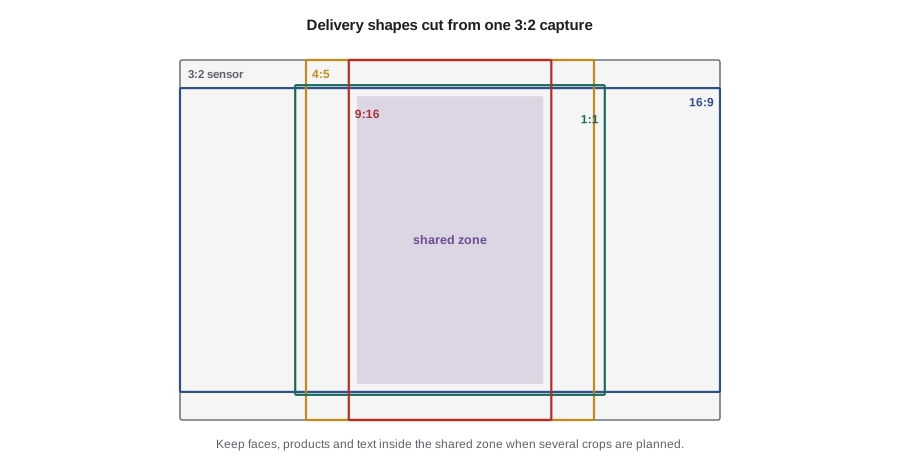
Make a deliverables list for each job, naming every file, its aspect ratio, resolution, duration, captions, loudness and destination. A typical hybrid package might include a 90-second 16:9 master and web file, a 60-second 9:16 cut, a 30-second 9:16 cut, a 15-second 4:5 cut, an SRT caption file for each version, burned-in caption versions for social, and a set of graded stills or frame grabs. Use consistent file names such as BakeryCo_Brand_90s_16x9_v3_2026-10-28.mp4.
| File | Shape and size | Captions | Audio |
|---|---|---|---|
| Brand film 90 s master | 16:9, 3840 x 2160, ProRes 422 HQ | SRT, English and French | −14 LUFS, −1 dBTP |
| Brand film 90 s web | 16:9, 1920 x 1080, H.264 12 Mb/s | SRT | −14 LUFS |
| Social cut 30 s | 9:16, 1080 x 1920, H.264 | Burned in | −14 LUFS |
| Social cut 15 s | 4:5, 1080 x 1350, H.264 | Burned in | −14 LUFS |
| Stills selection | JPEG, sRGB, long edge 3000 px | Not applicable | Not applicable |
Quality control before delivery
Watch every delivery file all the way through, from the exported file rather than the timeline, on at least two devices. Check for flash frames (single stray frames at edit points), gaps in audio, typos in titles and captions, correct logos and brand colors, correct durations, black frames at the start and end, loudness and true peak, caption sync and spelling of names. Ask a second person to check if possible; editors become blind to their own errors. Keep a checklist and tick it on every job. CINE-430 covers formal automated and manual QC for broadcast and streaming delivery.
Archiving the project
After delivery, archive the project file, the original media, audio, music licenses, graphics, fonts (or font license information), captions, the master and the delivery files, and a short note describing the software versions used. Agree in the contract how long you will keep the archive and whether the client receives raw footage (lesson 11). Store archives on two media, one off site, as for the shoot backups.
Common mistakes
MistakeApplying a creative LUT to log footage before correction
InsteadConvert log with the correct transform, correct and match shots, then build the look.
MistakeMixing only on studio headphones
InsteadCheck the mix on a phone and laptop as well.
MistakeDelivering a web mix at broadcast loudness or the reverse
InsteadMake separate mixes to each specification, such as −14 LUFS for web and −24 LKFS for television.
MistakeBurning in captions without checking speed and names
InsteadKeep reading speed comfortable and verify spelling against the client's list.
MistakeWatching the timeline instead of the exported files before delivery
InsteadPlay every exported file to the end and run a QC checklist.
Summary and key terms
- Correct first for technical consistency, then grade for the look.
- Waveform, RGB parade and vectorscope check exposure, neutrality and skin hue.
- Matching stills and video looks is part of the hybrid shooter's value.
- Finish audio by cleaning, equalizing, compressing, balancing and then measuring loudness.
- Web platforms commonly normalize near −14 LUFS; North American television follows ATSC A/85 at −24 LKFS.
- Captions are required or expected by many clients; accessibility laws differ between Canada and the United States.
- Export a master, make delivery files from it, follow a deliverables list and run QC before delivery.
- Color correction
- Technical adjustments for exposure, balance and shot matching.
- Color grading
- Creative adjustments that create a look.
- Vectorscope
- A display of hue and saturation in a circular plot.
- Skin tone line
- A line on the vectorscope along which skin hues tend to fall.
- LUFS
- Loudness units relative to full scale, a measure of perceived loudness.
- True peak
- The maximum signal level including inter-sample peaks, in dBTP.
- ATSC A/85
- A North American recommended practice for television loudness at −24 LKFS.
- Closed captions
- Captions that viewers can turn on or off, delivered as a separate track or file.
- Open captions
- Captions burned into the picture.
- Master file
- A high-quality export from which delivery files are made.
Practice problems
Work each problem on paper first, then reveal the answer to check.
A mix measures −18 LUFS. What gain reaches −14 LUFS?
Show answer
+4 dB.
What loudness target does ATSC A/85 set for television?
Show answer
−24 LKFS integrated.
What is the difference between captions and subtitles?
Show answer
Captions include relevant sounds for viewers who cannot hear; subtitles translate dialogue.
A 51-character caption at 17 characters per second needs how long?
Show answer
3 seconds.
Name two common web caption file formats.
Show answer
SRT and WebVTT.
Which scope checks skin hue?
Show answer
The vectorscope.
Why export a master before delivery files?
Show answer
Delivery versions are made from a high-quality source without re-rendering the timeline.
About how large is a 90-second file at 12 Mb/s?
Show answer
\( 12 \times 90/8 = 135 \) MB.
What Ontario regulation standard applies to large organizations' web content?
Show answer
WCAG 2.0 Level AA under the AODA regulations.
When must larger US public entities meet the ADA Title II web rule after the 2026 extension?
Show answer
April 26, 2027.
Lesson quiz · 5 questions
Score 60% or more to complete this lesson.
Create a free account to save your progress, take quizzes and earn a certificate.