
PHOT-440 · Lesson 4 of 12 · 28 min
Shooting sequences and coverage
Photographers are trained to make each frame complete in itself. A strong stills set has variety, but each image must stand alone on a wall or in a gallery. Video works differently: the basic unit is not the shot but the sequence, a group of shots that cut together to show an action, a place or an idea. A beautiful clip that has nothing to cut to is almost useless to an editor. This lesson teaches the vocabulary of shot sizes, the classic five-shot sequence, coverage planning, continuity and shooting ratios for hybrid jobs. CINE-101 introduces coverage and continuity for beginning filmmakers and CINE-301 treats shot design for narrative scenes in depth; this lesson focuses on the unscripted and lightly directed situations that hybrid photographers meet at events, businesses and brand shoots.
Shot sizes as a vocabulary
Shot sizes are named by how much of a person they show, though the same terms apply to objects and places. An extreme wide shot shows a location with people small or absent; a wide shot shows a whole person and their surroundings; a medium shot shows a person from the waist up; a medium close-up from the chest up; a close-up shows the face; an extreme close-up shows a detail such as eyes or hands. An insert is a close shot of an object or action, such as a coffee being poured or a signature on a contract.
Shot sizes matter because cutting between them creates rhythm and directs attention. A cut from a wide shot to a close-up says "look at this". A cut between two shots of nearly the same size and angle produces a jarring jump cut, which may be intentional in some styles but usually looks like a mistake. A useful working rule is to change shot size by at least one step and camera angle by at least 30 degrees between consecutive shots of the same subject.
| Shot size | Shows | Typical use in client work |
|---|---|---|
| Extreme wide (EWS) | Location, scale | Opening a piece, showing a venue or landscape |
| Wide (WS) | Whole person and setting | Establishing who is where; action |
| Medium (MS) | Waist up | Conversation, presenters, activity |
| Medium close-up (MCU) | Chest up | Interviews, reactions |
| Close-up (CU) | Face | Emotion, emphasis |
| Extreme close-up (ECU) | Eyes, hands, texture | Detail, craft, intensity |
| Insert | Object or action detail | Product, process, hands at work |
The five-shot sequence
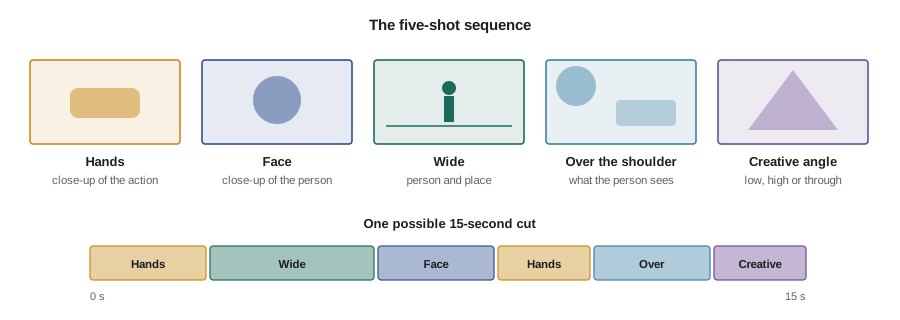
News and documentary trainers have long taught a simple recipe for covering any action so that it can be edited, often called the five-shot sequence. For a person doing something, film: a close-up of the hands doing the action; a close-up of the face; a wide shot showing the person and the place; an over-the-shoulder shot from behind the person, showing what they see; and an unusual or creative angle, such as a low angle, a high angle or a shot through something in the foreground. Each shot should be held for at least eight to ten seconds while the action repeats or continues.
The recipe works because it gives the editor what they need to compress time and maintain interest. With these five shots, a two-minute action such as kneading dough can be shown in fifteen seconds without jump cuts, because the editor can cut from hands to face to wide and back. Photographers are often very good at the hands and the creative angle; the face and over-the-shoulder shots are the ones new video shooters forget.
Worked problem
A five-shot sequence for a bakery brand film
A bakery wants a 60-second brand film. One sequence should show the head baker shaping loaves. Plan the five shots and estimate how much footage to record.
Show solution
- Hands: close-up from the side at bench height, 50 mm lens, as dough is folded and shaped. Hold 10 seconds, repeat for two loaves.
- Face: medium close-up from slightly below, 85 mm, catching concentration and a small smile. Hold 10 seconds.
- Wide: 24 mm from the corner showing the bench, ovens and window light. Hold 10 to 15 seconds.
- Over the shoulder: from behind the baker, looking down at the bench and the row of shaped loaves. Hold 10 seconds.
- Creative: through the shelves of proofing baskets, or a top-down shot of flour being dusted. Hold 10 seconds.
- Total recorded: about 5 shots times 10 to 15 seconds times 2 takes, roughly 2 to 2.5 minutes.
Answer: About two minutes of footage gives an editor enough for a 10 to 15 second sequence. The rest of the film needs similar sequences for other actions, plus establishing shots and perhaps a short interview.
B-roll, cutaways and natural sound
B-roll is supporting footage cut over interviews, voice-over or music. Good B-roll shows what the speaker is talking about: if a nurse describes the quiet of the night shift, the viewer should see an empty corridor at night, a monitor glowing, hands adjusting a blanket. Cutaways are shots that take the viewer briefly away from the main action, such as audience reactions during a speech; editors use them to hide cuts in the main shot. Natural sound, the real sound of the scene, makes B-roll come alive: the hiss of an espresso machine, the knock of a hammer, the laugh of a guest. Record clean natural sound with every B-roll shot, even if you expect to use music, because a few seconds of real sound placed under the music make the piece feel present.
For events and businesses, think of B-roll in categories. Place shots show where the story happens: exteriors, signs, rooms. People shots show who is involved: portraits in motion, interactions, reactions. Process shots show what people do: the sequence of actions in their work. Detail shots show textures and objects: tools, products, food, décor. A balanced piece uses all four.
Shot lists and coverage plans
A shot list is a written plan of the shots you need. For scripted work it is detailed; for hybrid jobs it is usually a list of sequences and must-have moments with a few specific shots the client has requested. Writing it forces you to think about the edit before you shoot and gives the client something to approve. CINE-301 and FILM-210 cover formal shot lists and storyboards; a hybrid shot list can be a simple table.
| No. | Sequence | Shot | Notes |
|---|---|---|---|
| 1 | Exterior | Wide of street and new sign, morning | Before 9 a.m. for clean street |
| 2 | Exterior | Close-up of sign lighting up | Ask owner to switch on |
| 3 | Coffee | Five-shot sequence of barista pulling a shot | Include steam wand natural sound |
| 4 | Customers | Reactions, first sips, conversations | Release forms at the counter |
| 5 | Owner | Interview, 3 questions, 10 minutes | Quiet corner, lavalier |
| 6 | Owner | B-roll greeting customers | Medium and close-up |
| 7 | Details | Pastries, cups, menu board, logo | Slider for 2 to 3 shots |
| 8 | Vertical | 4 shots framed 9:16 for Reels | Separate camera or open gate |
Continuity and screen direction
Continuity is the matching of elements across shots so that cuts appear seamless. In lightly directed work, the main issues are action, direction and props. If a guest raises a glass with the right hand in the wide shot, the close-up should not show the glass in the left hand. If a cyclist rides from left to right in one shot, cutting to a shot of them riding right to left suggests they have turned around. The 180-degree line, an imaginary line through the main action or between two people talking, should not be crossed between shots unless the audience sees the camera move across it; crossing it reverses screen direction and confuses viewers. CINE-301 covers the line and eyelines in detail.
Matching on action is a simple technique that photographers pick up quickly: when an action repeats, film it from two shot sizes and let the editor cut during the movement. A barista lifting a cup in a wide shot can be cut to the close-up of the cup arriving at the counter, and the movement hides the cut.
Shooting for vertical and horizontal at once
Clients often want both a 16:9 film and 9:16 vertical clips from the same shoot. There are three approaches. You can frame for 16:9 and crop vertical versions in post, which works if you shoot 4K or higher for HD delivery and keep important action in the center third; you can use an open-gate or 3:2 mode and crop both from the full sensor; or you can dedicate a second camera mounted vertically to the social versions. The first approach is cheapest but often gives tight or awkward vertical crops, especially for groups. The third gives the best social results but needs a second operator or a locked-off setup. Mark frame guides on your monitor so you see both crops while shooting.
Worked problem
Will a vertical crop from 4K be sharp enough?
You shoot UHD 4K (3840 by 2160) and want a vertical 9:16 crop at 1080 by 1920 for Reels. How much of the frame width can you use, and is resolution sufficient?
Show solution
- The full frame height is 2160 pixels. A 9:16 crop that uses the full height has a width of \( 2160 \times 9/16 = 1215 \) pixels.
- Resolution: 1215 by 2160 scaled to 1080 by 1920 is a small downscale, so sharpness is fine.
- Proportion of frame width: \( 1215 / 3840 \approx 32 \) percent, roughly the center third.
Answer: The vertical crop is sharp enough but uses only about a third of the frame width, so subjects must stay inside that zone. Groups and wide gestures need either open-gate capture or a dedicated vertical camera.
Shooting ratios and how much to record
The shooting ratio is the amount of footage recorded for each minute of finished film. Scripted commercials might shoot 30:1 or more; event highlight films often run 20:1 to 40:1; well-planned social clips can be 5:1 to 10:1. Shooting too little leaves the editor without options; shooting too much makes logging and editing slow and expensive and fills drives. A deliberate target helps.
finished_seconds = 90
avg_shot_seconds = 2.5
ratio = 25
shots_in_edit = finished_seconds / avg_shot_seconds
raw_minutes = finished_seconds / 60 * ratio
print(f'Shots in the finished piece: about {shots_in_edit:.0f}')
print(f'Raw footage at {ratio}:1 is about {raw_minutes:.1f} minutes')
for mbps in (100, 150, 400):
print(f' at {mbps} Mb/s: {raw_minutes * 60 * mbps / 8000:.0f} GB')Shots in the finished piece: about 36 Raw footage at 25:1 is about 37.5 minutes at 100 Mb/s: 28 GB at 150 Mb/s: 42 GB at 400 Mb/s: 112 GB
The output shows that a 90-second piece cut at an average of 2.5 seconds per shot uses about 36 shots, and a 25:1 ratio means about 38 minutes of raw footage. That figure helps you plan storage, time on site and editing time, and it gives you a way to explain to a client why a 90-second film takes a full day to shoot well.
Holding shots and handles
New video shooters often move the camera too soon. Hold each shot steady for at least eight to ten seconds, even if you think the editor will use only two. Start recording a few seconds before the action and stop a few seconds after it. Avoid zooming or panning while you hunt for the next composition; stop, reframe and record a new shot. If you must move during a shot, make the move purposeful with a clear start and end frame, as lesson 5 explains. These habits, sometimes called "shooting for the edit", make your footage far easier to cut than more spectacular but restless material.
Working with people in unscripted coverage
At events and workplaces you rarely direct people as actors, but light direction helps. Ask a person to repeat an action so you can cover it from another angle, saying something like "Could you pour that one more time? I'd like it from the other side." Ask people to ignore the camera and avoid looking into the lens unless you want direct address. Warn people when you are recording audio near them. Respect requests not to be filmed and note them for the editor; lesson 8 covers releases and consent in more detail.
Common mistakes
MistakeMoving on after two or three seconds of each shot
InsteadHold every shot for eight to ten seconds and start and stop with handles.
MistakeCutting together shots that are too similar in size and angle
InsteadChange shot size by a step and angle by about 30 degrees to avoid jump cuts.
MistakeRecording only wides and details and forgetting faces and over-the-shoulder views
InsteadUse the five-shot sequence to cover each action fully.
MistakeCrossing the 180-degree line between shots without reason
InsteadKeep the camera on one side of the line or show the move across it.
MistakePlanning vertical clips as an afterthought
InsteadDecide early whether to crop, use open gate or dedicate a vertical camera, and mark frame guides.
Summary and key terms
- The sequence, not the single shot, is the basic unit of video storytelling.
- Shot sizes from extreme wide to insert create rhythm and direct attention.
- The five-shot sequence covers hands, face, wide, over the shoulder and a creative angle.
- B-roll should show place, people, process and detail, with natural sound.
- Shot lists turn a brief into a coverage plan the client can approve.
- Continuity, matching on action and the 180-degree line keep cuts seamless.
- Shooting ratios help plan raw footage, storage and editing time.
- Sequence
- A group of shots that cut together to show an action or idea.
- Insert
- A close shot of an object or action detail.
- Jump cut
- A cut between two similar shots that makes the subject appear to jump.
- Five-shot sequence
- A coverage recipe of hands, face, wide, over-the-shoulder and creative angle.
- Cutaway
- A shot that briefly leaves the main action, often used to hide a cut.
- Natural sound
- The real sound recorded at the scene.
- Shot list
- A written plan of shots and sequences to capture.
- Match on action
- Cutting between shots during a continuous movement.
- 180-degree line
- An imaginary line through the action that the camera should not cross between shots.
- Shooting ratio
- Raw footage recorded per unit of finished film.
Practice problems
Work each problem on paper first, then reveal the answer to check.
Name the five shots of the five-shot sequence.
Show answer
Hands, face, wide, over the shoulder, creative angle.
How wide is a full-height 9:16 crop from a 2160-pixel-high frame?
Show answer
\( 2160 \times 9/16 = 1215 \) pixels.
A 2-minute film at 20:1. How much raw footage?
Show answer
40 minutes.
What are the four categories of B-roll in this lesson?
Show answer
Place, people, process and detail.
How long should you hold each shot?
Show answer
At least eight to ten seconds.
What happens if you cross the 180-degree line between shots?
Show answer
Screen direction reverses and viewers may be confused.
Why record natural sound with B-roll?
Show answer
It makes the piece feel present and can sit under music.
How many shots fill 60 seconds at a 3-second average?
Show answer
20 shots.
What is a cutaway used for?
Show answer
To take the viewer briefly away and hide a cut in the main action.
Give a polite way to ask a subject to repeat an action.
Show answer
"Could you do that one more time? I'd like it from the other side."
Lesson quiz · 5 questions
Score 60% or more to complete this lesson.
Create a free account to save your progress, take quizzes and earn a certificate.