
MSBA-351 · Lesson 7 of 12 · 20 min
Item tracking
▶ Video coming soon A video version of this lesson is on the way.
In August 2026, before the Business Central project began, one of Corbel & Finch's importers phoned to say that a container of Guatemalan coffee had been stored too damp at the port and might have developed mold. The importer gave the lot number and asked which bags of roasted coffee had used it. Answering took Callum and Dovrin two days of digging through roast logs, delivery slips and the web shop's order export. Nothing was wrong in the end, but Bettina said she never wanted to spend two days on that question again. "With lots in Business Central," Noor said at the November session, "that is a five-minute report."
What item tracking does
Item tracking records serial numbers, lot numbers or package numbers on item ledger entries, so every unit or batch can be followed from receipt to sale. A serial number identifies one unit, such as an espresso grinder sold to a café. A lot number identifies a batch made or received together, such as a container of green coffee or a roast batch. Package numbers, a newer option, identify a container such as a pallet. Tracking can also store expiration dates and warranty dates.
| What is tracked | Corbel & Finch use | Why |
|---|---|---|
| Lot number with expiration date | Green coffee (importer lot) and roasted coffee (roast batch) | Recalls, quality complaints and best-before control |
| Serial number | Grinders and brewers sold as merchandise | Warranty claims and service |
| None | Packaging, mugs, cleaning supplies | No traceability need |
Item tracking codes
Tracking rules are kept in item tracking codes and assigned to items on the Item Tracking FastTab. A code says which kind of number to track and in which transactions it is required.
| Setting on the item tracking code | Meaning |
|---|---|
| SN Specific Tracking or Lot Specific Tracking | The number must be recorded on every inbound and outbound transaction, and outbound entries must apply to the exact inbound number |
| Inbound and outbound settings by transaction type | Without specific tracking, choose where numbers are required, for example on purchases and sales but not on adjustments |
| SN or Lot Warehouse Tracking | Numbers are also required on warehouse documents such as picks and put-aways |
| Use Expiration Dates | Lots and serial numbers carry expiration dates |
| Require Expiration Date Entry | The user must enter an expiration date on receipt |
| Strict Expiration Posting | Expired items cannot be sold or consumed |
| Create SN or Lot Info on posting | Business Central creates an information card for each new number automatically |
Corbel & Finch created three codes. LOT-EXP is lot specific, with warehouse tracking and expiration dates required on entry, and is used for green coffee. LOT-ROAST is lot specific with warehouse tracking and expiration dates calculated from the item's Expiration Calculation, used for roasted coffee: a roast batch gets a best-before date 9 months after roasting. SN-WARRANTY is serial-number specific with warranty dates, used for grinders and brewers. Specific tracking is the stricter choice: it guarantees that a sale is linked to the exact lot it came from, which is what a recall needs.
Item tracking codes should be chosen before the item has entries. Adding a code to an item with existing stock is possible, but untracked stock already on hand then has no numbers, and outbound postings will need them, so the existing stock must be given lot numbers first, typically with the item reclassification journal.
Assigning numbers
Lot and serial numbers are entered on item tracking lines, opened from a document line with Item Tracking Lines. Each tracking line holds the number, the quantity, and dates. Numbers can be typed, scanned, or assigned from a number series on the item card (Lot Nos. or Serial Nos.) with Assign Lot No. or Assign Serial No.
| Transaction | Who assigns the number | Corbel & Finch practice |
|---|---|---|
| Purchase receipt of green coffee | The vendor, printed on the sack | Receiver scans or types the importer's lot, enters the expiration date |
| Assembly output of roasted coffee | Business Central from the Lot Nos. series | Roast batch lot such as R261118-03 (date and batch) |
| Sales shipment | Picked from existing lots | Inventory pick suggests lots by FEFO; picker confirms |
| Purchase of a grinder | The manufacturer's serial number | Receiver scans the serial number from the box |
On outbound documents, the user selects existing numbers with Select Entries, which shows available lots and serial numbers with their quantities and dates. With picks at a location that uses FEFO (lesson 6), Business Central proposes the lots that expire first. If a line's tracked quantity does not match the line quantity, Business Central will not post it, which stops a shipment from leaving without its lot numbers.
Each lot or serial number can have an information card (Lot No. Information), which holds a description, test quality, a Blocked flag, comments and attachments. Corbel & Finch stores the importer's cupping score and the moisture reading on the green coffee lot card. Blocking a lot stops it from being used in outbound transactions, which is the first step in any quality hold.
Tracking through assembly
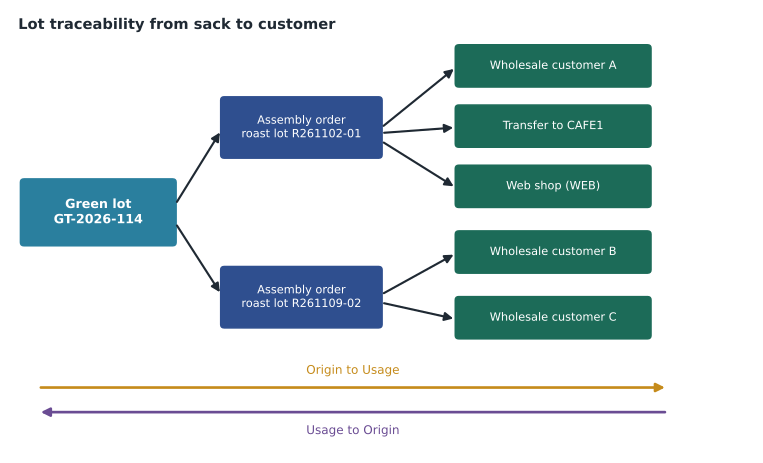
Corbel & Finch roasts through assembly orders (lesson 8). An assembly order consumes green coffee and packaging and outputs roasted bags. With tracking on both sides, the assembly order records which green lot was consumed and which roast lot was produced. That link is what turns a recall question into a report.
Item Tracing
The Item Tracing page follows item ledger entries through their tracking numbers. Entering a lot or serial number and choosing Trace builds a tree in one of two directions. Usage to Origin starts from a sale or consumption and works back to where the goods came from; Origin to Usage starts from a receipt and works forward to every place the goods went. Each node shows the document, the date, the quantity and the customer, vendor or location.
Worked problem
The five-minute recall
An importer reports a possible problem with green coffee lot GT-2026-114, received on October 20, 2026. Bettina wants to know which customers received coffee from that lot, and to stop any remaining stock from being sold. What does Callum do?
Show solution
- Open the Lot No. Information card for GT-2026-114 on the green coffee item and turn on Blocked, so the remaining green coffee cannot be consumed.
- Open Item Tracing, enter the lot number, set the direction to Origin to Usage and choose Trace.
- Expand the tree: the lot was consumed by two assembly orders that produced roast lots R261102-01 and R261109-02.
- Block those two roast lots as well, so no more bags are shipped while the question is open.
- Follow each roast lot to its shipments: three wholesale customers, the web shop customer and a transfer to CAFE1. Export the list of documents and ship-to addresses for the customer service team.
Answer: Block the green lot and its roast lots, then trace origin to usage to list every shipment that contained them.
For the web shop, which posts through one WEB customer, Item Tracing finds the sales documents, and the web shop's own order numbers, stored in the external document number, identify the individual buyers. This was one of the reasons Callum insisted the integration fill that field.
Expiration dates in practice
Expiration dates come from two places. For received lots, the receiver enters them, and Require Expiration Date Entry makes that mandatory. For produced or assembled lots, the item's Expiration Calculation (for example 9M) adds a period to the posting date. Strict Expiration Posting prevents shipping or consuming expired lots. The Item Expiration - Quantity report lists stock by how soon it expires, which the cafés use to put older bags on the front shelf or use them in the espresso machines.
Package tracking
Recent versions of Business Central add package number as a third tracking dimension, useful for pallets, cases or containers that hold several lots. Package tracking is turned on through Feature Management in some versions and set on the item tracking code. Corbel & Finch does not use it yet; a wholesale customer asked for pallet-level labels, and Noor noted it as a later option rather than complicating the first year.
Serial numbers for merchandise
Grinders and home brewers sold through the web shop and the cafés carry manufacturers' serial numbers and a two-year warranty. The SN-WARRANTY item tracking code requires a serial number on every inbound and outbound transaction and calculates a warranty date from the item's Warranty Date Formula. When the goods arrive, the receiver scans each box's serial number onto the item tracking lines; one line per unit, quantity 1. When a customer calls about a faulty grinder, the serial number on their receipt leads to the sales shipment, the warranty date and the vendor it was bought from, which is what the manufacturer asks for when the grinder is sent back.
| Question | Lot tracking answers | Serial tracking answers |
|---|---|---|
| Which batch did this come from? | Yes, by lot number | Yes, each unit has its own number |
| Which customers got this batch? | Yes, Item Tracing by lot | Yes, but one unit at a time |
| Is this unit under warranty? | Only if dates are on the lot | Yes, from the warranty date on the serial number |
| How many numbers per receipt? | One per batch | One per unit |
Lot numbering conventions
Callum set a convention for roast lots so they can be read at a glance: R for roasted, the roast date as YYMMDD, a dash and the batch number that day, such as R261118-03 for the third batch on November 18, 2026. The Lot Nos. number series on each roasted item generates the sequence part, and Ysmay's team prints the lot and best-before date on the bag label. Green coffee keeps the importer's lot code exactly as printed on the sack, because that is the number the importer will quote in a recall.
Tracking on warehouse documents
Because the roastery uses inventory picks (lesson 6) and the item tracking codes have warehouse tracking on, lots are chosen on the pick, not on the sales order line. The sales order can leave lots blank; the pick assigns them by FEFO, and posting the pick copies them to the shipment. This avoids the order taker having to know which lots are on which shelf. For transfers to the cafés, the transfer shipment carries the lots, and the café's receipt receives the same lots, so a café's stock is traceable too.
Worked problem
A customer complaint without a lot number
A wholesale café complains that last week's Breakwater tasted stale but has thrown away the bag. How can Callum find the lot?
Show solution
- Open the customer's posted sales shipments for last week and find the Breakwater line.
- Open the item tracking lines on the posted shipment line, or the item ledger entries, to see the lot shipped: R261109-02.
- Open the lot information card and check the roast date, best-before date and any notes from cupping.
- Run Item Tracing from that lot, usage to origin, to see which green coffee lots went into it, and origin to usage to see who else received the same lot.
Answer: The posted shipment records the lot, so the complaint can be traced to its roast batch and its green coffee without the bag.
Item tracking and costing
Tracking and costing are separate. Lot numbers do not change how cost is calculated unless the costing method is Specific. With FIFO, Business Central applies outbound entries to inbound entries in date order, and with lot-specific tracking it applies them to the exact lot instead, which in practice means the oldest lots tend to go first when picking follows FEFO. Callum checked this with Noor: for green coffee, FIFO plus lot tracking gives both a sensible cost and full traceability, without the extra discipline that Specific costing would demand.
Common mistakes
MistakeAdding an item tracking code to an item that already has stock without assigning numbers to that stock.
InsteadReclassify existing stock with lot numbers before outbound postings need them.
MistakeUsing non-specific tracking for products that may be recalled.
InsteadUse lot or serial specific tracking so every outbound entry links to its inbound number.
MistakeTyping a new lot number on a sale instead of selecting the existing one.
InsteadUse Select Entries so the sale applies to a real lot on hand.
MistakeRelying on people to remember best-before dates.
InsteadUse expiration dates with FEFO picking and strict expiration posting.
MistakeLeaving the web shop's order number out of the integration.
InsteadStore it in the external document number so individual buyers can be found.
Summary and key terms
- Item tracking records serial, lot or package numbers and dates on item ledger entries.
- Item tracking codes set which numbers are required, in which transactions, and with which date rules.
- Numbers are entered on item tracking lines, from vendors, number series or existing stock.
- Lot information cards hold quality data and can block a lot from use.
- Tracking through assembly links green lots to roast lots.
- Item Tracing follows numbers from origin to usage or usage to origin for recalls and complaints.
- Expiration dates, FEFO and strict expiration posting control best-before dates.
- Lot number
- A number identifying a batch of an item received or made together.
- Serial number
- A number identifying a single unit of an item.
- Item tracking code
- A setup record defining tracking rules for items.
- Specific tracking
- Tracking that requires outbound entries to apply to the exact inbound number.
- Item tracking lines
- The lines on a document that record tracking numbers and quantities.
- Item Tracing
- A page that follows tracked items forward or backward through transactions.
- Expiration Calculation
- A date formula that sets expiration dates for produced or assembled lots.
Practice problems
Work each problem on paper first, then reveal the answer to check.
Which direction of Item Tracing answers "which customers received this green lot"?
Show answer
Origin to Usage.
How do you stop a lot from being shipped while a quality question is open?
Show answer
Turn on Blocked on its Lot No. Information card.
Where does a roast batch get its expiration date?
Show answer
From the item's Expiration Calculation added to the posting date of the assembly output.
Lesson quiz · 5 questions
Score 60% or more to complete this lesson.
Create a free account to save your progress, take quizzes and earn a certificate.