
MSBA-351 · Lesson 11 of 12 · 22 min
Inventory costing
▶ Video coming soon A video version of this lesson is on the way.
The question Bettina asked most often in the old system was simple: "What does a bag of Breakwater actually cost us?" The answer changed depending on who she asked. The old package valued all stock at the last purchase price, so a single expensive lot of Ethiopian coffee could change the value of every sack on the shelf overnight. Callum's month-end spreadsheet used a different number. "In Business Central the cost is the result of rules we choose," Noor said at the last inventory session in November. "Once the rules are set, the system applies them the same way every time, and we can explain every cent."
Costing methods
Each item has a Costing Method, chosen before the first posting and not changed afterward. The method decides how outbound entries, such as sales and assembly consumption, are valued from inbound entries, such as purchases and assembly output.
| Method | How outbound cost is chosen | Strengths | Watch out for |
|---|---|---|---|
| FIFO | The oldest inbound entries are applied first | Matches physical flow for perishables; inventory value reflects recent costs | Cost of sales lags price changes |
| LIFO | The newest inbound entries are applied first | Cost of sales reflects recent prices | Not allowed for financial reporting in many jurisdictions |
| Average | An average cost per item (and optionally location and variant) per period | Smooths price swings | Average is recalculated by the cost adjustment batch job |
| Specific | The exact serial or lot entry is applied | True cost of each unit | Requires specific item tracking |
| Standard | A fixed standard cost; differences post as variances | Stable cost for pricing; variances show drift | Standards must be updated deliberately |
Corbel & Finch chose FIFO for green coffee, packaging and merchandise, because the oldest stock really is used first and lot tracking already follows it. Standard was chosen for roasted coffee, as explained in lesson 8. LIFO was ruled out because, although US GAAP allows it, Corbel & Finch's accountant advised against it for a business whose costs are tracked by lot anyway, and Specific was unnecessary because FIFO with lots already gives traceability.
Worked problem
FIFO and average side by side
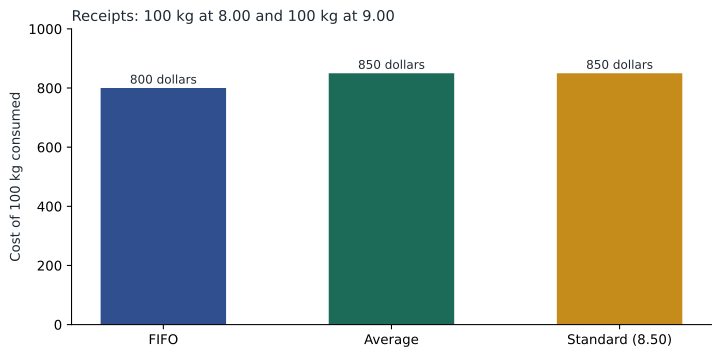
Corbel & Finch receives 100 kg of Colombia at 8.00 dollars per kg in September and 100 kg at 9.00 in October. In October it roasts 120 kg. What is the cost of the green coffee consumed under FIFO, and under average cost for October?
Show solution
- FIFO: the first 100 kg come from the September receipt at 8.00 (800.00 dollars) and the next 20 kg from October at 9.00 (180.00 dollars), for 980.00 dollars.
- Average for October: total cost on hand is 800 + 900 = 1,700 dollars for 200 kg, or 8.50 per kg.
- 120 kg at 8.50 is 1,020.00 dollars.
- Remaining inventory: FIFO leaves 80 kg at 9.00 = 720.00 dollars; average leaves 80 kg at 8.50 = 680.00 dollars.
Answer: FIFO consumption costs 980.00 dollars and average costs 1,020.00 dollars; the total of consumption plus remaining inventory is 1,700.00 dollars either way.
Expected cost and actual cost
Inventory is valued in two stages. When goods are received but not yet invoiced, Business Central records expected cost on the value entries. When the purchase invoice posts, the expected cost is reversed and actual cost is recorded. The same happens on the sales side: a shipment records expected cost of goods sold, and the invoice makes it actual. Item charges and revaluations add more actual-cost value entries later.
Whether expected cost reaches the general ledger depends on Expected Cost Posting to G/L in Inventory Setup. Corbel & Finch left it off, so the G/L shows inventory only when it is invoiced, and the Inventory Valuation report shows received-not-invoiced value separately. Companies with long gaps between receipt and invoice often turn it on so the balance sheet includes goods received, posting to interim accounts until the invoice arrives.
Adjusting item cost
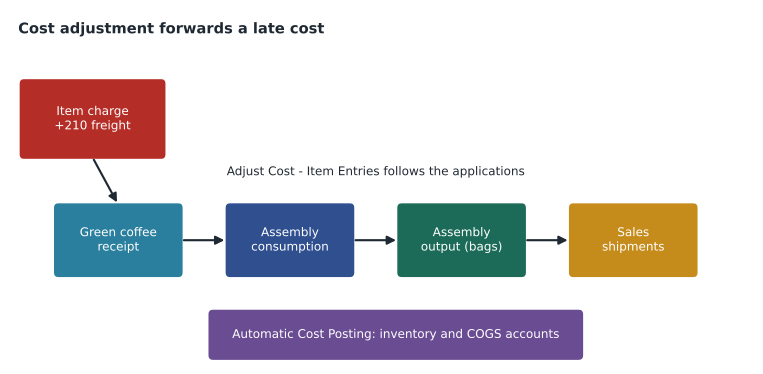
Costs change after the fact. A freight item charge arrives two weeks after the coffee was roasted. A purchase invoice comes in at a different price from the order. Average cost for the month changes as new receipts arrive. The study guide lists "Adjust item cost" as a core skill, and the tool is the Adjust Cost - Item Entries batch job, which recalculates the cost of outbound entries from the inbound entries they are applied to and forwards changes through assembly to cost of goods sold.
| Tool | What it does | Corbel & Finch setting |
|---|---|---|
| Adjust Cost - Item Entries | Recalculates outbound costs from applied inbound entries and forwards changes | Job queue entry every night at 2:00 |
| Automatic Cost Adjustment (Inventory Setup) | Runs adjustment on each posting within a date range | Never; the nightly job is enough |
| Automatic Cost Posting (Inventory Setup) | Posts value entries to the G/L as they are created | On |
| Post Inventory Cost to G/L | Posts value entries to the G/L in a batch when automatic posting is off | Not needed; used only to check |
| Revaluation journal | Changes the value of inventory on hand directly | Used for write-downs of old stock |
Running cost adjustment regularly is part of every close. Before Callum closes a month, the checklist from the finance course now includes: confirm the nightly cost adjustment ran without errors, review the Inventory - G/L Reconciliation report, and investigate any difference between inventory value by posting group and the inventory accounts in the G/L. Closing the inventory period afterward, on the Inventory Periods page, stops new postings into that period for items.
Revaluation
The revaluation journal changes the value of items already in stock. Calculate Inventory Value fills the journal with the current value per item, by item or by item ledger entry; the user enters a revalued amount or unit cost; posting creates revaluation value entries. Corbel & Finch uses it for merchandise that will be sold below cost, such as a discontinued mug design, to write it down to net realizable value. For standard cost items, a standard cost change on inventory on hand is also posted through revaluation, which is how a new standard takes effect for existing stock.
Standard cost and variances
For a standard cost item, every inbound entry is valued at the standard. The difference between actual and standard posts to a variance account through the general posting setup or inventory posting setup: purchase variance when a purchased item's invoice differs from standard, and, for assembled items, material variance, capacity variance and overhead variance where actual consumption or resource cost differs from the standard roll-up. The Standard Cost Worksheet proposes new standards from the BOM with Suggest Item Standard Cost and Roll Up Standard Cost, and Implement Standard Cost Changes posts the revaluation of stock on hand.
Worked problem
A new standard for 2027
Green coffee prices for 2027 contracts are about 6 percent higher. Breakwater Blend's standard cost is 5.90 dollars per bag, and 400 bags are on hand on December 31, 2026. What does Callum do?
Show solution
- In the Standard Cost Worksheet, run Suggest Item Standard Cost for the green coffees with the new contract prices, then Roll Up Standard Cost for FC-BRK.
- Review the result: the new standard is 6.18 dollars per bag.
- Run Implement Standard Cost Changes with posting date January 1, 2027; Business Central updates the item card and creates a revaluation journal.
- Post the revaluation: 400 bags x 0.28 = 112.00 dollars added to inventory value.
- From then on, roasting variances are measured against 6.18.
Answer: Roll up a new standard from the new component costs, implement it, and post the revaluation for stock on hand.
Cost in the general ledger
Every value entry posts to the G/L through posting setup. Purchases post to the inventory account and to direct cost applied; the purchase invoice posts to the purchase account; sales post cost of goods sold and reduce inventory; assembly posts consumption and output through inventory adjustment accounts; variances go to their own accounts. The net effect is that the inventory balance sheet account always equals the value of item ledger entries, provided cost adjustment and posting are up to date. The Inventory - G/L Reconciliation report proves it, and the Inventory Valuation report gives the value at any date for the auditors.
Average cost settings
For items using the Average method, two Inventory Setup fields decide how the average is calculated. Average Cost Calc. Type is either Item, one average per item across all locations and variants, or Item & Location & Variant, a separate average for each combination. Average Cost Period is Day, Week, Month, Quarter, Year or Accounting Period: all outbound entries within a period get the same average cost, calculated from inbound entries up to the end of that period. Corbel & Finch set Item and Month for completeness, though no items currently use average cost; Callum noted that the settings would matter if merchandise moved to average cost later.
Item applications and fixed application
Costing methods work through item applications, the links between inbound and outbound item ledger entries. Business Central creates them automatically by the costing method rules, but some are fixed by the user. A return linked with Appl.-from Item Entry (lesson 10) is a fixed application: it reverses the exact original entry. Fixed applications override the costing method for that entry, which is why exact cost reversing gives the original cost even for FIFO or average items. The Application Worksheet lets an advanced user remove and reapply applications to correct mistakes, but Noor advised Callum to treat it as a tool for consultants only.
| Report | What it shows | When Corbel & Finch uses it |
|---|---|---|
| Inventory Valuation | Value of inventory by item at a date, including received-not-invoiced | Month end and year end |
| Inventory - G/L Reconciliation | Inventory value by posting group compared with G/L accounts | Every month before closing |
| Item Age Composition - Value | Value of stock by age band | Quarterly review of slow-moving merchandise |
| Inventory Cost and Price List | Unit cost, average cost and unit price by item | Price reviews |
| Cost Shares Breakdown | Cost of assembled items by component, resource and overhead | Standard cost reviews |
Worked problem
Finding a reconciliation difference
At the end of the test month, Inventory - G/L Reconciliation shows a difference of 640.00 dollars for posting group PACKAGING at ROASTERY. What should Callum check?
Show solution
- Confirm the nightly Adjust Cost - Item Entries job ran without errors; an unadjusted item charge is a common cause.
- Check that Automatic Cost Posting was on for the whole month; if not, run Post Inventory Cost to G/L.
- Look for G/L entries posted directly to the inventory account from a general journal. In this case, a manual journal entry of 640.00 for a packaging delivery had been posted to the inventory account instead of through a purchase invoice.
- Reverse the journal entry and post the delivery as a purchase invoice for the item, so inventory and the G/L agree again.
Answer: Check cost adjustment and cost posting first, then look for direct postings to inventory accounts; here a manual journal entry caused the difference.
This is why Noor recommended turning off Direct Posting on inventory G/L accounts, as was done for receivables and payables control accounts in the finance course. With direct posting off, inventory accounts can only be changed through item postings, and the reconciliation stays clean.
Common mistakes
MistakeChoosing a costing method without thinking because it cannot be changed later.
InsteadDecide per item group before go-live and record the reasons.
MistakeClosing a month without running cost adjustment.
InsteadSchedule Adjust Cost - Item Entries and check it before every close.
MistakePosting late freight to an expense account to avoid cost adjustment.
InsteadUse item charges; adjustment forwards them to cost of goods sold correctly.
MistakeChanging a standard cost on the item card with stock on hand.
InsteadUse the Standard Cost Worksheet and Implement Standard Cost Changes so stock is revalued.
MistakeIgnoring a difference on the Inventory - G/L Reconciliation report.
InsteadInvestigate posting setup and unposted adjustments until it agrees.
Summary and key terms
- Costing methods (FIFO, LIFO, Average, Specific, Standard) decide how outbound cost is valued.
- Expected cost is recorded on receipt and replaced by actual cost on invoice.
- Adjust Cost - Item Entries forwards late cost changes through assembly to cost of goods sold.
- Automatic cost posting or Post Inventory Cost to G/L carries value entries to the G/L.
- The revaluation journal writes inventory up or down; standard cost changes use the Standard Cost Worksheet.
- Standard cost items post purchase and assembly variances.
- Inventory - G/L Reconciliation proves inventory value agrees with the G/L.
- Costing method
- The rule that values outbound inventory entries.
- Expected cost
- Cost recorded for received or shipped goods not yet invoiced.
- Actual cost
- Cost recorded when the invoice is posted.
- Adjust Cost - Item Entries
- The batch job that recalculates and forwards item costs.
- Revaluation journal
- A journal that changes the value of inventory on hand.
- Variance
- The difference between actual cost and standard cost.
- Inventory period
- A period that can be closed to stop item postings in it.
Practice problems
Work each problem on paper first, then reveal the answer to check.
Why does a late item charge change cost of goods sold for coffee already sold?
Show answer
Cost adjustment forwards the charge along item applications from the receipt to the outbound entries.
What does Expected Cost Posting to G/L do when turned on?
Show answer
Posts received-not-invoiced value to interim G/L accounts.
How is a new standard cost applied to stock on hand?
Show answer
Implement Standard Cost Changes creates a revaluation journal that is posted.
Lesson quiz · 5 questions
Score 60% or more to complete this lesson.
Create a free account to save your progress, take quizzes and earn a certificate.