
MSBA-351 · Lesson 6 of 12 · 20 min
Basic warehousing
▶ Video coming soon A video version of this lesson is on the way.
The roastery is not a big warehouse, but it is a busy one. Green coffee arrives in sacks on pallets and sits in a cool room until it is roasted. Roasted coffee is bagged, labeled and stacked by blend on shelving near the packing bench, and wholesale orders are picked from there twice a day. Merchandise and packaging live on a mezzanine. Dovrin's team of four had worked from memory for years. "I know where everything is," he told Noor, "but nobody else does, and I would like a holiday." The question for the November session was how much warehouse structure Business Central should add, and how to add it without slowing the team down.
Warehouse setup is a choice per location
Business Central lets each location choose its own level of warehouse handling. At the simplest level, inventory is posted straight from sales, purchase and transfer documents, as in lessons 2 to 5. At higher levels, separate warehouse documents take over the physical work: receiving, putting away, picking and shipping. The level is set by check boxes on the Warehouse FastTab of the location card.
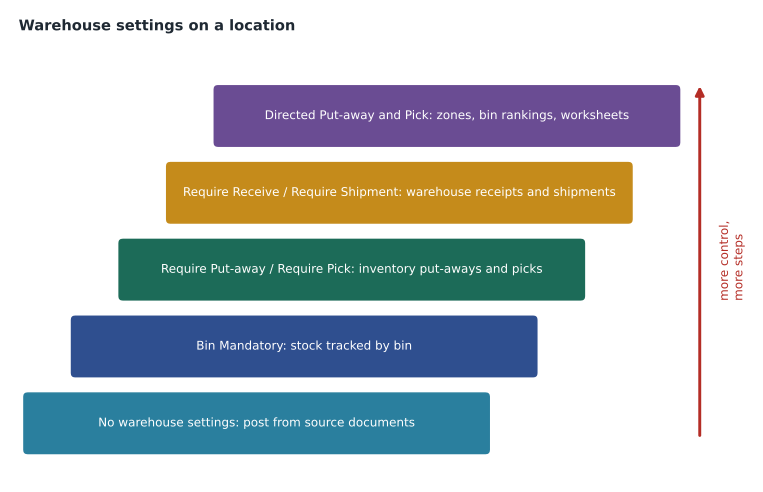
| Settings on the location | Inbound document | Outbound document | Typical use |
|---|---|---|---|
| None | Post receipt from the purchase order | Post shipment from the sales order | Cafés, small stockrooms |
| Require Put-away | Inventory put-away (posts the receipt) | Post from the order | Put-away by bin, simple shipping |
| Require Pick | Post from the order | Inventory pick (posts the shipment) | Picking by bin, simple receiving |
| Require Receive | Warehouse receipt, combining several orders | Post from the order | Busy receiving dock |
| Require Shipment | Post from the order | Warehouse shipment, combining several orders | Busy shipping dock |
| Receive, Put-away, Shipment and Pick together | Warehouse receipt, then warehouse put-away | Warehouse pick, then warehouse shipment | Separate roles at each step |
| Directed Put-away and Pick | As above, with bin rankings and zones | As above, with worksheets and bin rules | Large warehouses |
The study guide for MB-800 focuses on locations and inventory transactions rather than advanced warehousing, but functional consultants are expected to know what each level does and to recommend one. A good rule of thumb is to add one step only when it solves a real problem: if receiving and posting are done by the same person at the same moment, a separate receiving document adds clicks without adding control.
Bins
A bin is a storage place inside a location: a shelf, a pallet rack position, a cool-room slot. Turning on Bin Mandatory makes Business Central track quantity by bin and require a bin code on every inventory line at that location. Bins are created on the location card, often from a bin creation worksheet that generates codes from rack, section and level, such as COOL-01-A.
Bin contents record which items can or do live in which bins. An item can have a default bin at a location, which Business Central suggests on documents; at the roastery, each finished blend has a default shelf bin near the packing bench, and each green coffee origin has a default slot in the cool room. Bins can have maximum quantities and can be blocked for inbound or outbound movement, which is useful when a rack is being repaired.
Moving stock between bins without changing location is done with the item reclassification journal (lesson 5) or, at locations with more advanced setups, with movements. Bins also give counting a sharper focus: cycle counts can be done bin by bin, and a discrepancy points to a shelf rather than to a whole building.
Inventory put-aways and picks
With Require Put-away, a released purchase order or inbound transfer creates a request; the warehouse creates an inventory put-away from it, either one at a time or with Create Inventory Put-away/Pick for many source documents. The put-away lists each item with its suggested bin. When the worker places the goods and fills Qty. to Handle, posting the put-away also posts the receipt on the purchase order. Receiving and putting away are one action.
Require Pick works the same way on the outbound side. A released sales order or outbound transfer creates a request; an inventory pick lists the bins to take each item from, following the bin contents, and the lot numbers if item tracking requires them. Posting the inventory pick posts the shipment on the sales order. For items with lots and expiration dates, the pick can follow first expired, first out if the location setting Pick According to FEFO is used, which requires bins and lot tracking with expiration dates.
Worked problem
Choosing the roastery's setup
Dovrin wants pickers to know which shelf to go to and which lot to take, but receiving is done by the same person who puts sacks away, and shipping is a pallet at the door twice a day. Which warehouse settings fit?
Show solution
- Turn on Bin Mandatory so stock is tracked by shelf and slot.
- Turn on Require Pick so wholesale orders become inventory picks with bins and lots suggested.
- Turn on Pick According to FEFO so the oldest roast dates go first.
- Leave Require Receive and Require Shipment off: one person receives and puts away, and shipping does not need a separate document.
- Consider Require Put-away: it lets the receiver confirm the bin while posting the receipt, so the cool room slots stay accurate. Dovrin agrees to try it.
Answer: Bins with inventory put-aways and inventory picks, FEFO picking, and no separate warehouse receipt or shipment documents.
Warehouse receipts and shipments
With Require Receive, inbound goods are received on a warehouse receipt. One warehouse receipt can combine lines from several purchase orders, transfers and sales returns, which suits a dock where trucks bring goods from many vendors. The receiving clerk uses Get Source Documents to pull in the expected lines, enters quantities, and posts the receipt; with Require Put-away also on, posting the receipt creates warehouse put-away documents for the next step. Require Shipment is the outbound counterpart: a warehouse shipment collects lines from several orders, a warehouse pick moves the goods to a shipping bin, and posting the shipment posts each source document.
Splitting the work this way lets different people do different steps and gives managers a view of what is waiting. It also adds documents. Noor showed Dovrin the full receive, put-away, pick and ship setup in TRAINING, then they agreed it was too much for a team of four. If wholesale volume doubles, the roastery can move up one step without changing items or orders.
Warehouse employees and roles
Users who work with warehouse documents must be set up as warehouse employees for the location on the Warehouse Employees page, with one location marked as default. Without this, they cannot create or see put-aways and picks for that location. The warehouse role center and the security group BC-Warehouse from the foundations course give Dovrin's team the pages they need without access to finance.
Handling time and shipping dates
Each location has an inbound warehouse handling time and an outbound warehouse handling time, used in the date calculations from lessons 2 and 3. At the roastery, outbound handling is one day: an order released by noon is picked, packed and shipped the next working day. The location's base calendar removes weekends and holidays from these calculations, so a Friday order does not promise Saturday shipping.
Warehouse and item tracking
Item tracking (lesson 7) can be required in warehouse documents as well as in inventory documents. If the item tracking code has warehouse tracking turned on for lots, picks and put-aways must record lot numbers, and bin contents show lots by bin. Corbel & Finch turned this on for roasted coffee and green coffee, so a recall can find every bag by shelf as well as by lot.
Setting up bins at the roastery
Dovrin and Callum walked the roastery with a tape measure and a floor plan. They named bins by area, rack and level: COOL for the green coffee cool room, PACK for the finished goods shelving near the packing bench, MEZZ for the mezzanine, and DOCK for a single receiving and shipping area by the door. The bin creation worksheet generated the codes, such as COOL-01-A to COOL-06-C and PACK-01-1 to PACK-08-4, and the location card's Receipt Bin Code and Shipment Bin Code were set to DOCK so goods arriving or leaving pass through one known place.
| Area | Bin codes | Holds | Default bin for |
|---|---|---|---|
| Cool room | COOL-01-A to COOL-06-C | Green coffee sacks on pallets | Each green coffee origin |
| Packing shelves | PACK-01-1 to PACK-08-4 | Roasted coffee in bags and cases | Each roasted blend |
| Mezzanine | MEZZ-01 to MEZZ-12 | Packaging and merchandise | Bags, labels, mugs |
| Dock | DOCK | Goods being received or shipped | Receipts and shipments |
Default bins are set on the bin contents with Default turned on, one per item and location. Fixed bin contents mark bins an item always lives in, so put-aways suggest them and Business Central does not delete the bin content when the bin is empty. When bins fill up, put-aways can still go elsewhere; the worker changes the bin on the put-away line, and the new bin content is created.
Picking in practice
An inventory pick at the roastery lists, for each sales order line, the bin to take from and, for lot-tracked coffee, the lot. With Pick According to FEFO on, the lot with the earliest expiration date is proposed first, even if it sits in a different bin from the default. The picker confirms or changes the bin and lot, fills Qty. to Handle, and posts. If a bin is short, the picker can split the line to take part from another bin. When a pick cannot be completed, the remaining quantity stays on the pick or can be deleted so a new pick is created later.
Worked problem
Picking an order with two lots
An order needs 6 CASE of Foghorn Espresso. Bin PACK-03-2 holds 4 cases of lot R261109-02, expiring in August, and 5 cases of lot R261116-01, expiring a week later. FEFO is on. What does the inventory pick show?
Show solution
- Business Central proposes two pick lines: 4 cases of lot R261109-02, the earlier expiry, and 2 cases of lot R261116-01.
- Both lines point to bin PACK-03-2, because that is where the lots are.
- The picker takes the cases, confirms the lots and quantities, and posts the pick.
- Posting the pick posts the sales shipment with both lots on the shipment lines, so Item Tracing can find them.
Answer: Two pick lines split by lot, earliest expiry first, and posting the pick posts the shipment with both lots recorded.
Cafés: no warehouse settings
The cafés have no bins and no warehouse documents. Café managers post transfer receipts and counts directly, and sales come from the point-of-sale summary. Noor showed that adding bins to a café would mean every sale needed a bin code, which the point-of-sale integration does not send. This is the practical reason to keep warehouse settings per location: the roastery and the cafés have different needs, and Business Central lets each choose.
Changing warehouse settings later
Warehouse settings can be changed on a location, but not freely while documents or stock are in progress. Turning on Bin Mandatory at a location that already holds stock requires that the stock be placed into bins, which is usually done with a warehouse adjustment or item reclassification. Turning on Require Receive or Require Shipment while there are open orders means those orders must be handled through the new warehouse documents. Noor's advice was to make the change on a quiet day, after completing open documents, and to test it in a sandbox copy first.
Common mistakes
MistakeTurning on every warehouse setting at a small location.
InsteadAdd a step only when it solves a real problem; each one adds documents.
MistakeEnabling Bin Mandatory on a location that already has stock without planning.
InsteadPlan bins and move existing stock into them as part of the change.
MistakeForgetting to set up warehouse employees.
InsteadAdd each user to Warehouse Employees for the locations they work in.
MistakeExpecting FEFO picking without expiration dates.
InsteadFEFO needs lot or serial tracking with expiration dates and bins.
MistakePosting the receipt on a purchase order at a location that requires put-away.
InsteadPost the inventory put-away; it posts the receipt.
Summary and key terms
- Each location chooses its warehouse level with check boxes on the location card.
- Bin Mandatory tracks stock by bin; bin contents and default bins guide put-away and picking.
- Require Put-away and Require Pick use inventory put-aways and picks that post the source documents.
- Require Receive and Require Shipment use warehouse receipts and shipments that combine source documents.
- Directed put-away and pick is for large, advanced warehouses.
- Warehouse employees, handling times and base calendars complete the setup.
- Bin
- A storage place within a location.
- Bin content
- A record of an item that can or does sit in a bin.
- Inventory put-away
- A document that puts away and posts receipt of one source document.
- Inventory pick
- A document that picks and posts shipment of one source document.
- Warehouse receipt
- A document that receives goods for several source documents.
- Warehouse shipment
- A document that ships goods for several source documents.
- FEFO
- First expired, first out: picking the lot that expires first.
Practice problems
Work each problem on paper first, then reveal the answer to check.
At a location with Require Pick only, what posts the sales shipment?
Show answer
Posting the inventory pick.
What does a warehouse receipt allow that an inventory put-away does not?
Show answer
Receiving lines from several source documents on one document.
What does FEFO picking require?
Show answer
Bins and items tracked by lot or serial number with expiration dates.
Lesson quiz · 5 questions
Score 60% or more to complete this lesson.
Create a free account to save your progress, take quizzes and earn a certificate.