
MSBA-350 · Lesson 4 of 12 · 20 min
Receivables and customer payments
▶ Video coming soon A video version of this lesson is on the way.
Corbel & Finch's wholesale customers, about 230 cafés and grocers after the migration clean-up, owe the business between 90,000 and 140,000 dollars at any time. In the old system, Callum knew who was late mostly from memory. In early November 2026 he and Noor set up receivables in the CONFIG company: customer cards, payment registration, cash receipts, reminders and the reports that tell him, every Monday, who owes what. Bettina had one request: "I want to stop finding out in March that a café hasn't paid since November."
The receivables chain
A posted sales invoice creates a customer ledger entry for the amount the customer owes, and G/L entries that debit the receivables account (set by the customer posting group) and credit sales and tax. When the customer pays, a payment entry is posted to the customer and applied to the invoice. Each change to a customer ledger entry, such as the original amount, an application, a payment discount or an exchange rate adjustment, is recorded as a detailed customer ledger entry. The customer entry's remaining amount is the sum of its detailed entries. The study guide asks candidates to understand exactly this chain: customers, customer ledger entries, detailed customer ledger entries and G/L entries.
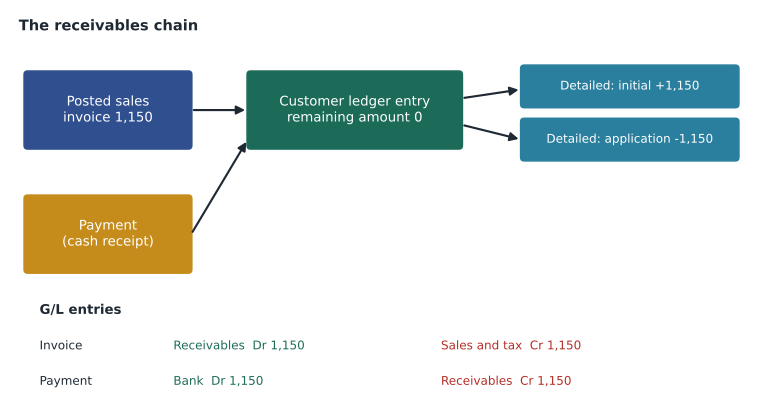
Because the receivables account has Direct Posting turned off and every posting to it goes through a customer, the Aged Accounts Receivable total and the receivables G/L balance agree. When they do not, something has posted to the control account directly, usually during migration, or a customer posting group points at the wrong account. Checking that the two agree is the first line of Callum's month-end checklist.
Customer setup for finance
The foundations course set up customer templates and migrated the customers. From the finance side, the important fields on a customer card are these.
| Field | Purpose | Typical Corbel & Finch value |
|---|---|---|
| Customer Posting Group | Receivables and related accounts | DOMESTIC or EXPORT |
| Gen. Bus. Posting Group | With the item, chooses sales and cost accounts | WHOLESALE |
| Payment Terms Code | Due date and discount | NET30 |
| Payment Method Code | How the customer pays | EFT |
| Credit Limit (LCY) | Warning or block when exceeded | 5,000 for most cafés |
| Reminder Terms Code | Which reminder levels apply | STANDARD |
| Fin. Charge Terms Code | Interest on overdue amounts | Blank; the business does not charge interest |
| Tax Area Code and Tax Liable | Sales tax calculation | Set in lesson 6 |
| Blocked | Stops shipping, invoicing or all transactions | Used for customers in collections |
Customers can also have customer bank accounts for direct debits and refunds, and a Bill-to Customer so that one head office pays for several cafés. Three cafés owned by the same family were set up as separate sell-to customers with one bill-to customer, so the head office receives one statement.
Sales & Receivables Setup
The Sales & Receivables Setup page holds company-wide rules for selling. Finance-relevant settings include the Credit Warnings field (credit limit, overdue balance, both or none), the number series for customers and sales documents, the option to make Ext. Doc. No. Mandatory so that the customer's purchase order number is captured, settings for Invoice Rounding, Default Posting Date and whether Calc. Inv. Discount happens automatically, and the Discount Posting setting that decides whether invoice and line discounts post to separate accounts. Callum chose to warn on both credit limit and overdue balance, which supports Bettina's request: an order entered for a café that is 30 days overdue now shows a warning before it ships.
Receiving payments
Customer payments arrive by electronic funds transfer, check, card and, in the cafés, cash. Business Central offers three ways to record them.
| Method | How it works | Best for |
|---|---|---|
| Cash receipt journal | Enter payment lines with customer, amount and applies-to document, or use Apply Entries | Batches of checks or a deposit slip |
| Payment Registration page | Lists open invoices; tick the ones paid and post | Quick entry of individual payments |
| Payment reconciliation journal | Import the bank statement and match to open entries (lesson 3) | Electronic payments from the bank file |
In a cash receipt journal, a line has document type Payment, account type Customer, the customer number and a negative amount (a credit to the customer). The Applies-to Doc. No. field names the invoice being paid, or the Apply Entries action opens the customer's open entries so that one payment can be applied to several invoices. The balancing account is the bank account. When posted, the payment closes the invoices it was applied to.
The Payment Registration page is simpler. It shows all open customer documents with due dates. The user ticks Payment Made, adjusts the amount received if it differs, and chooses Post Payments. The page uses a balancing account set up in Payment Registration Setup, which also names the journal template and batch used behind the scenes. The study guide lists payment registration as a separate objective, so it is worth knowing well.
Worked problem
One check, three invoices
Bayside Café sends one check for 2,640 dollars covering invoices PSI-27-00011 (1,150), PSI-27-00019 (890) and PSI-27-00024 (600) in a test month. How does Callum post it?
Show solution
- In the cash receipt journal, batch BANK-MAIN, enter a line: document type Payment, account type Customer, Bayside Café, amount minus 2,640, balancing account Bank Account MAIN.
- Choose Apply Entries and set Applies-to ID on the three invoices. The Balance field on the page shows zero when the payment exactly covers them.
- Post. The three invoices close; each has a detailed ledger entry for the application.
- Deposit the check; it will match a bank statement line in the next reconciliation.
Answer: One payment line, applied to three invoices with Apply Entries, balanced against the MAIN bank account.
Applications, discounts and tolerance
Payments do not always match invoices. A customer may pay early and take a discount, pay a few cents short, or pay before the invoice is even posted. Payment discounts come from payment terms such as 2/10NET30: if the payment is applied within the discount period, Business Central closes the invoice with the discount posted to the payment discount account in the customer posting group. Payment tolerance allows small differences to be written off automatically. In General Ledger Setup, a maximum tolerance amount and percentage can be set, and a payment discount grace period can accept discounts a few days late. When a payment is within tolerance, the invoice closes and the difference posts to tolerance accounts.
Applications can be undone. If a payment was applied to the wrong invoice, the Unapply Entries action on the customer ledger entry reverses the application, leaving the payment and invoice open again. Then the payment can be applied correctly. Unapplying does not reverse the payment itself; it only changes which invoices it closes. If the payment itself was wrong, it must be unapplied first and then reversed from the register.
Correcting posted invoices
A posted sales invoice cannot be edited. To fix it, Business Central offers Correct, which creates and posts a credit memo that cancels the invoice and opens a new invoice copy to fix and post; Cancel, which creates and posts a credit memo only; and Create Corrective Credit Memo, which creates an unposted credit memo for partial corrections such as a returned case of coffee. These actions keep the audit trail clean and apply the credit memo to the original invoice automatically. They work only while the invoice is unpaid or after any payment is unapplied.
Prepayments
Some new wholesale customers, and all export customers, must pay before goods ship. Prepayments are set by a prepayment percentage on the customer, the item or a sales order. On the order, the Post Prepayment Invoice action posts an invoice for the prepayment amount to a prepayment account. When the customer pays and the goods ship, the final invoice deducts the prepayment automatically. Prepayment accounts are set in the general posting setup.
Reminders and collections
Bettina's request was mostly about following up. Reminder terms define levels: for example, level 1 seven days after the due date, level 2 at 21 days and level 3 at 35 days, each with its own text and, optionally, an additional fee. The Create Reminders action proposes reminders for all customers with overdue entries, and Issue posts them and sends them by email using document sending profiles. Newer versions add reminder automation, in which a group of actions creates, issues and sends reminders on a schedule through the job queue. Finance charge memos calculate interest on overdue amounts for businesses that charge it.
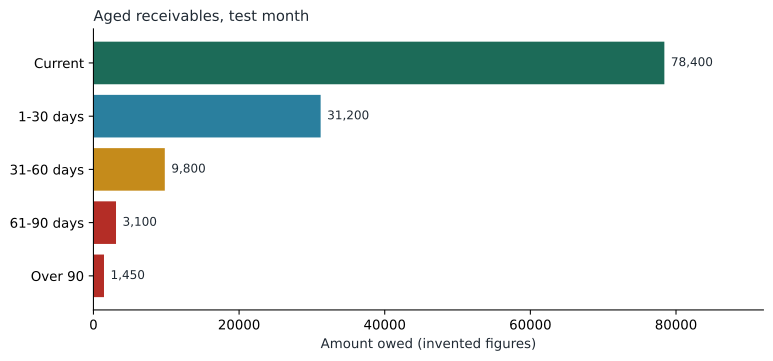
Reports and tools tie it together. The Aged Accounts Receivable report shows balances by age band. Customer statements list a customer's activity and open items. The Customer - Balance to Date report proves balances at a date. Business Central can also predict which invoices are likely to be paid late, using a late payment prediction extension that applies a machine learning model to historical payment patterns. Callum turned it on in CONFIG to try; it needs enough history to be useful, so he planned to review it after six months of live data.
Credit limits and blocking in practice
Credit control in Business Central works at two points. When an order or invoice is entered, the credit limit warning checks the customer's balance, outstanding orders and the new document against the credit limit, and the overdue balance against zero, depending on the Credit Warnings setting. The warning shows the figures and lets an authorized user continue or stop. When a customer must not be served at all, the Blocked field stops new documents: Ship blocks shipping, Invoice blocks invoicing, and All blocks every transaction including payments posted by mistake to the wrong customer. Corbel & Finch also used the credit limit approval workflow template from the foundations course, so an order that pushes a customer over its limit goes to Callum before release.
| Tool | When it acts | Effect |
|---|---|---|
| Credit limit warning | When a sales document line is entered | Shows balance, orders and limit; user decides |
| Overdue balance warning | When a sales document is entered | Shows overdue amounts; user decides |
| Credit limit approval workflow | When the document is released | Sends it to an approver if over the limit |
| Blocked: Ship or Invoice | On posting | Stops shipping or invoicing |
| Blocked: All | On any transaction | Stops everything for that customer |
Reading the aged receivables report
The Aged Accounts Receivable report has options that change its meaning. It can age by due date, posting date or document date; aging by due date shows how late payments are, while aging by posting date shows how old invoices are. The period length, such as 30D, sets the bands. It can show amounts in the customer's currency or the local currency, and it can be printed with or without details. Callum ran it every Monday by due date with 30-day bands, sorted by the amount over 30 days, and sent the top ten to Bettina with a note on each.
Worked problem
A short payment within tolerance
General Ledger Setup allows a payment tolerance of up to 5 dollars or 0.5 percent, whichever is lower. Bayside Café pays 1,147 dollars for an invoice of 1,150. What happens when Callum applies the payment?
Show solution
- The difference is 3 dollars, which is 0.26 percent of the invoice.
- Both the amount and percentage are within the tolerance, so Business Central offers to post the difference as payment tolerance.
- Callum accepts. The invoice closes, and 3 dollars posts to the payment tolerance account in the customer posting group.
- If the difference had been 12 dollars, the invoice would have stayed open with 12 dollars remaining, and he would follow up with the café.
Answer: The 3-dollar difference is within tolerance, so the invoice closes and the difference posts to the tolerance account.
Customer statements list each customer's transactions and open items for a period and can include an aging summary. They are sent through document sending profiles, so a customer who prefers email gets a PDF and one who wants paper gets a printed copy. Bettina asked for statements to go to all wholesale customers on the third working day of each month, which Callum scheduled through the job queue.
Common mistakes
MistakePosting a payment without applying it to invoices.
InsteadApply payments so invoices close and aging is accurate; unapplied payments sit as credits.
MistakeReversing a payment that was only applied to the wrong invoice.
InsteadUnapply it and apply it again correctly.
MistakeEditing invoice amounts by posting journal lines to receivables.
InsteadUse Correct, Cancel or a corrective credit memo.
MistakeSetting large payment tolerances to avoid follow-up.
InsteadKeep tolerance small; follow up real short payments.
Summary and key terms
- Invoices create customer ledger entries; detailed entries record every change; G/L entries post to the receivables control account.
- Customer cards hold posting groups, payment terms, payment methods, credit limits and reminder terms.
- Sales & Receivables Setup controls credit warnings, number series and discount posting.
- Payments are recorded in cash receipt journals, on the Payment Registration page or through the payment reconciliation journal, and applied to invoices.
- Discounts, tolerance, unapplying and correction actions handle payments and invoices that do not match.
- Prepayments, reminders and aging reports support collections.
- Customer ledger entry
- An entry in the customer subledger for an invoice, payment or credit memo.
- Detailed customer ledger entry
- A record of one change to a customer ledger entry, such as an application or discount.
- Application
- Linking a payment or credit memo to the invoices it settles.
- Payment tolerance
- A small allowed difference that closes an invoice and posts the difference automatically.
- Prepayment
- An amount invoiced and paid before goods ship or services are delivered.
- Reminder terms
- A setup of overdue levels, texts and fees used to create reminders.
Practice problems
Work each problem on paper first, then reveal the answer to check.
Which action fixes a payment applied to the wrong invoice?
Show answer
Unapply Entries, then apply it to the right invoice.
Which page lets a user tick paid invoices and post the payments quickly?
Show answer
Payment Registration.
Where does a payment discount post?
Show answer
To the payment discount account in the customer posting group.
Lesson quiz · 5 questions
Score 60% or more to complete this lesson.
Create a free account to save your progress, take quizzes and earn a certificate.