
MSBA-350 · Lesson 11 of 12 · 18 min
Year-end close
▶ Video coming soon A video version of this lesson is on the way.
Corbel & Finch's first real year-end in Business Central will be December 31, 2027, a year after go-live. Callum did not want to meet the process for the first time then. On November 20, 2026, he and Noor practiced a full year-end close in a copy of the CONFIG company that held two years of test data, closing the test fiscal year 2026. The practice produced a checklist that Callum filed with the month-end checklist from lesson 12. This lesson follows the practice run: what a year-end close involves in Business Central, the order of the steps, and the controls around the closed year.
What closing a year means
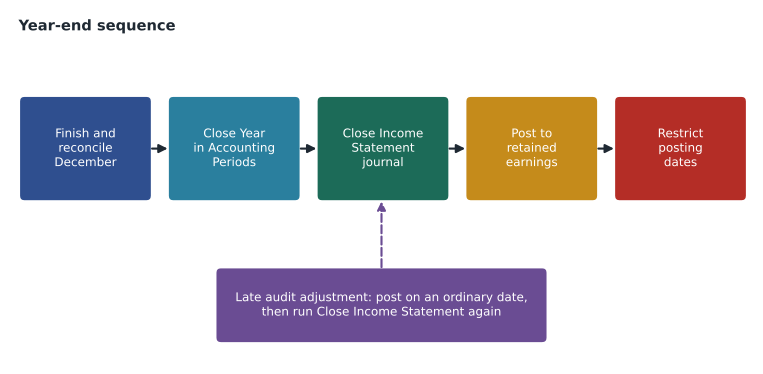
In Business Central, closing a fiscal year has two separate parts. Closing the year in Accounting Periods marks the year's periods as closed. Closing the income statement transfers the year's profit or loss from the income statement accounts to retained earnings, so the new year starts with zero balances on revenue and expense accounts. Neither part deletes or locks entries by itself. Locking posting into the old year is done with posting date windows, the same controls used every month.
Step 1: finish the last month properly
A year-end close is a month-end close plus a few extra steps. Everything in the December close must be done first: all sales and purchase documents posted, bank accounts reconciled, receivables and payables reconciled to their control accounts, depreciation calculated through December 31, inventory costs adjusted and posted to the general ledger, foreign currency balances revalued with Adjust Exchange Rates, accruals and deferrals posted, and intercompany cleared where there is more than one company. Lesson 12 walks through a full month-end close; Callum's year-end checklist begins with "complete the December month-end checklist."
Inventory deserves a special mention at year end. The Adjust Cost - Item Entries process updates the cost of items sold or consumed so that cost of goods sold reflects actual purchase costs, including late item charges such as freight. Post Inventory Cost to G/L posts the result. Many companies also close the inventory period, which stops postings that would change inventory value before the period end date, so the year's inventory value cannot change after the books close.
Step 2: reconcile and review
Before closing, every balance sheet account should be reconciled or explained. Callum's practice list included the bank accounts (lesson 3), receivables and payables against their subledgers (lessons 4 and 5), tax accounts against tax reports (lesson 6), fixed asset accounts against the integrated depreciation book (lesson 7), inventory against the inventory valuation report, prepaid and deferred accounts against deferral schedules (lesson 1), accrued liabilities against support, intercompany balances against the partners (lesson 9), and suspense accounts, which should be zero. The income statement was reviewed against the budget (lesson 8) and last year, with every large variance explained.
| Account | Reconcile against | Lesson |
|---|---|---|
| Bank accounts | Bank statements via bank account reconciliation | 3 |
| Receivables | Aged Accounts Receivable | 4 |
| Payables | Aged Accounts Payable | 5 |
| Sales tax payable and recoverable | Tax reports by jurisdiction | 6 |
| Fixed assets and accumulated depreciation | FA book value report, integrated book | 7 |
| Inventory | Inventory Valuation report after cost adjustment | this lesson |
| Prepaid and deferred | Deferral schedules | 1 |
| Suspense and clearing | Should be zero; investigate anything left | 3 |
Step 3: close the year in Accounting Periods
On the Accounting Periods page, the Close Year action closes the oldest open fiscal year. Business Central asks for confirmation and requires that the next fiscal year's periods already exist, which is why Callum created both 2026 and 2027 in the foundations course and would create 2028 well before the end of 2027. Closed periods show as closed and date-locked on the page. Closing the year is a prerequisite for running Close Income Statement. It is intended to be permanent, so Noor treated it as a one-way step and checked the earlier steps before choosing it.
Step 4: close the income statement
The Close Income Statement process creates journal lines that zero out every income statement account for the fiscal year and transfer the total to a balance sheet account. According to Microsoft's documentation (updated August 2025), the lines are created in a general journal, and the user must specify a retained earnings account and the journal to use before posting. The lines are dated on a closing date, a special date that sits between the last day of the old year and the first day of the new year, written with a C before the date, such as C12/31/26.
Closing dates are a clever device. Entries on a closing date belong to the old year for balance sheet purposes but are kept separate from the year's ordinary dates, so an income statement for December 31 still shows the year's results, while the balance sheet on January 1 shows the profit moved into retained earnings. Reports can include or exclude closing-date entries, which matters when comparing years.
Worked problem
Closing the test year 2026
The CONFIG copy shows a test profit of 148,250 dollars for 2026. After closing the year in Accounting Periods, how does Callum transfer it to retained earnings?
Show solution
- Run Close Income Statement for the fiscal year ending December 31, 2026, choosing the general journal batch YEAREND, document number YE-2026 and retained earnings account 33100.
- Choose whether to close by dimension. He selects BUSINESS LINE so the closing entries keep that dimension, which preserves business line detail on retained earnings for analysis.
- Review the journal: one line per income statement account (and dimension value), dated C12/31/26, with a balancing line to 33100 for 148,250.
- Preview and post. Every income statement account now has a zero balance when the closing date is included.
- Set Allow Posting From on General Ledger Setup to January 1, 2027, so ordinary users cannot post into 2026.
Answer: Close Income Statement creates closing-date lines that zero the income accounts and credit retained earnings 148,250; post them and lock 2026 with posting dates.
If the company uses an additional reporting currency, the documentation notes that the process posts directly to the general ledger rather than leaving a journal to post. Corbel & Finch does not use one, so Callum saw the journal step.
Step 5: lock the old year and handle late adjustments
Closing the income statement does not stop posting to the old year. Posting date windows do. Allow Posting From on General Ledger Setup moves to the first day of the new year, and User Setup can give one or two people, such as Callum, a wider window until the auditors finish. Inventory period closing (above) protects inventory values separately.
Auditors usually propose adjustments weeks after year end. Microsoft's documentation states that Close Income Statement can be run more than once, and that a company can post to a previous fiscal year after its income statement accounts have been closed, provided it runs the process again. So late adjustments are posted on ordinary December dates, and Close Income Statement is run again; it creates lines only for the new differences, moving them to retained earnings as well. Callum practiced this with a test adjustment of 4,100 dollars to accrued bonuses, posted on December 31, 2026, followed by a second run of Close Income Statement that moved 4,100 to retained earnings.
| Task | Where | When |
|---|---|---|
| Create next year's accounting periods | Accounting Periods, Create Year | Before year end |
| Complete the December close | Month-end checklist | First week of January |
| Close the year | Accounting Periods, Close Year | After December is reconciled |
| Close income statement | Close Income Statement process, then post the journal | After closing the year |
| Restrict posting dates | General Ledger Setup and User Setup | Immediately after |
| Post audit adjustments | General journal, ordinary dates | When agreed with auditors |
| Run Close Income Statement again | Same process | After audit adjustments |
Year-end reporting and information returns
After the close come the annual reports: the year-end financial statements from financial reports (lesson 8 of the foundations course), the trial balance for the auditors, the fixed asset roll-forward, and the inventory valuation at year end. Information returns depend on the country. In the United States, 1099 forms for reportable vendor payments are prepared from Business Central's 1099 features (lesson 5), and employee forms come from the payroll provider. Business Central North American versions do not include payroll, so payroll year-end happens in the payroll system.
Data retention after year end
Old years stay in the database, which is what auditors and tax authorities expect. Business Central has retention policies for some logs and temporary data, such as job queue log entries and change log entries, which administrators set so the database does not grow without limit; the change log on sensitive tables should be kept as long as the business's record-keeping rules require. Business Central also offers date compression, which summarizes old entries into fewer entries; Noor advised against it, because it permanently removes detail an auditor may ask for.
Closing by dimension and by business unit
The Close Income Statement process offers options that decide how much detail the closing entries keep. By default it creates one line per income statement account. Choosing dimensions to close by creates one line per account and dimension value combination, so retained earnings keeps that detail; choosing none collapses the result into one line per account. In a consolidation company, the process can also close by business unit, keeping each unit's result separate. Corbel & Finch chose BUSINESS LINE because Bettina wanted to see accumulated results by business line over the years, and left DEPARTMENT out because it added no value on the balance sheet.
Closing dates in reports
Because closing entries sit on a closing date, reports must treat them deliberately. A date filter of 01/01/26..12/31/26 excludes the closing date, so an income statement for the year shows the full result. A filter of 01/01/26..C12/31/26 includes it, so the income accounts show zero, which is useful only to prove the close worked. Financial reports and the trial balance have options to include or exclude closing entries. Callum added a line to the checklist: "After closing, run the income statement for the year without the closing date and confirm the result still shows; run the trial balance with it and confirm income accounts are zero."
| Report and filter | Income accounts show | Use |
|---|---|---|
| Income statement, 01/01..12/31 | The year's result | Annual reporting |
| Trial balance, 01/01..C12/31 | Zero | Proving the close |
| Balance sheet at 01/01 of the new year | Not shown; result in retained earnings | Opening position |
Inventory and fixed assets at year end
Two subledgers need special attention at year end. For inventory, the Inventory Periods page lists periods by ending date; closing one stops any posting that would change inventory value on or before that date, including late cost adjustments. A physical inventory count, entered through a physical inventory journal, is usually done close to year end, with differences posted before the inventory period is closed. For fixed assets, Callum's checklist included running Calculate Depreciation for December, comparing the integrated book with the G/L, reviewing assets for disposal or write-down, and printing the fixed asset book value report for the auditors, along with the TAX book figures for the tax return.
Every step of the close leaves a trace. The Close Income Statement journal is posted with its own source code and appears as a G/L register; the Accounting Periods page shows which years are closed; the change log records changes to General Ledger Setup and User Setup posting dates. Together they let an auditor see when the year was closed, by whom, and whether anything was posted to it afterwards.
Common mistakes
MistakeRunning Close Income Statement before the year is closed in Accounting Periods.
InsteadClose the year first; the process requires it.
MistakeAssuming a closed year cannot receive postings.
InsteadRestrict posting dates; closing alone does not stop posting.
MistakeReversing the closing entries to post an audit adjustment.
InsteadPost the adjustment on an ordinary date, then run Close Income Statement again.
MistakeForgetting to create next year's accounting periods.
InsteadCreate them well before year end; Close Year needs them.
Summary and key terms
- A year-end close is a full December close plus closing the year and the income statement.
- Close Year in Accounting Periods closes the oldest open fiscal year and needs the next year's periods.
- Close Income Statement creates closing-date journal lines that zero income accounts and transfer the result to retained earnings.
- Closing dates such as C12/31/26 keep closing entries separate from the year's ordinary dates.
- Posting date windows lock the old year; late adjustments are posted normally and the process is run again.
- Annual reports, information returns and retention policies follow the close.
- Close Year
- The Accounting Periods action that closes the oldest open fiscal year.
- Close Income Statement
- The process that transfers income statement balances to retained earnings.
- Closing date
- A special date between years, written with C, used for closing entries.
- Retained earnings account
- The balance sheet account that receives the year's result.
- Inventory period
- A period that, when closed, stops postings that would change inventory value.
- Retention policy
- A rule for how long Business Central keeps certain logs and temporary data.
Practice problems
Work each problem on paper first, then reveal the answer to check.
What must exist before Close Year will run?
Show answer
The next fiscal year's accounting periods.
How is a late audit adjustment to the closed year handled?
Show answer
Post it on an ordinary date in the old year, then run Close Income Statement again.
What stops ordinary users posting into a closed year?
Show answer
The Allow Posting From date on General Ledger Setup, with User Setup exceptions.
Lesson quiz · 5 questions
Score 60% or more to complete this lesson.
Create a free account to save your progress, take quizzes and earn a certificate.