
MSBA-350 · Lesson 1 of 12 · 22 min
Chart of accounts and general ledger setup
▶ Video coming soon A video version of this lesson is on the way.
In the last week of September 2026, with the Business Central foundations in place in the CONFIG environment, Noor Haddad-Kessel opened a new section of the project plan called Finance. "Foundations got us a company that works," she told Callum Rennick-Obi. "Finance is where we make it a company the auditors will trust." Callum had kept Corbel & Finch's books for six years in an old desktop package and a month-end workbook. He knew double-entry bookkeeping well. What he wanted to learn was how Business Central carries it out: where each number lives, what controls stop mistakes, and which reports prove the books are right. This course follows that work, from the chart of accounts in this lesson to a full month-end close in lesson 12.
The finance side of Business Central rests on one idea that runs through every lesson. Every posting, whether it comes from a sales invoice, a payment, a depreciation run or a journal, ends up as general ledger entries. The general ledger (G/L) is the single book of record. Customers, vendors, bank accounts and fixed assets have their own ledgers, called subledgers, and each subledger is tied to the general ledger through control accounts. When the subledgers and their control accounts agree, the books balance.
The chart of accounts
The chart of accounts is the list of general ledger accounts. In the foundations course Callum cut Corbel & Finch's old list from 410 accounts to 168. Now the job was to set each account up properly. Each account is a G/L account card with a number, a name and a set of fields that decide how it behaves. The table shows the fields that matter most.
| Field | What it controls | Example at Corbel & Finch |
|---|---|---|
| No. and Name | The account number and its description | 40100 Coffee Sales |
| Income/Balance | Whether the account belongs to the income statement or the balance sheet | Income Statement |
| Account Category and Subcategory | Grouping used by built-in financial reports and charts | Income, then Income, Product Sales |
| Account Type | Posting, Heading, Total, Begin-Total or End-Total | Posting |
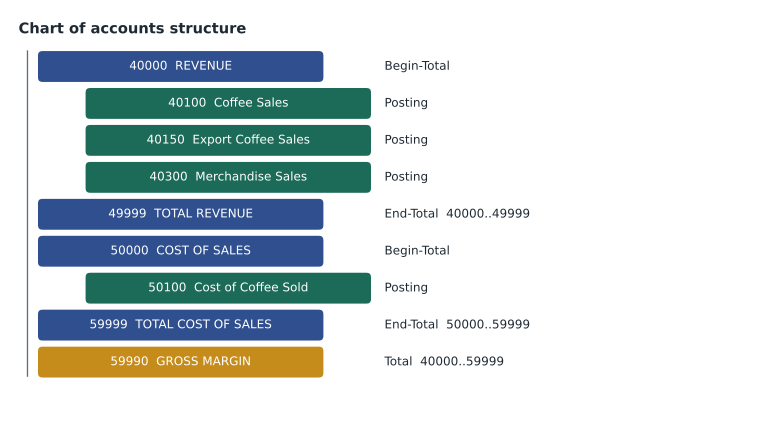
| Totaling | The range of accounts a total line adds up | 40000..49999 on the Total Revenue line |
| Direct Posting | Whether journals can post straight to the account | No, for receivables and payables control accounts |
| Reconciliation Account | Whether the account appears in journal reconciliation | Yes, for bank and cash accounts |
| Blocked | Stops all posting to the account | Used for retired accounts |
| Gen. Posting Type and posting groups | Defaults that fill in when the account is used in a journal | Sale, RETAIL, MERCH for a merchandise sales account |
The Account Type field shapes the chart. Only Posting accounts receive entries. Heading lines are labels. Begin-Total and End-Total lines bracket a section, and the End-Total line adds up the accounts in between. A Total line adds up whatever range is typed in its Totaling field, which can be any set of accounts, not just a continuous section. After changing the structure, the Indent Chart of Accounts action recalculates the indentation and fills in the Totaling ranges on End-Total lines, so the chart reads like a set of nested sections.
Account categories and financial reports
Every account also has an account category: Assets, Liabilities, Equity, Income, Cost of Goods Sold or Expense. Under each category sit subcategories such as Cash, Accounts Receivable, Inventory or Payroll Expense. Subcategories can be added and renamed on the G/L Account Categories page. Categories matter because Business Central's built-in financial reports, such as the balance sheet, income statement, cash flow statement and statement of retained earnings, are generated from the categories. When a new account is assigned to the right subcategory, it appears in the right place on those reports without anyone editing them. The G/L Account Categories page has an action that regenerates those reports after the categories change.
Callum found three accounts from the old system whose categories were wrong after the import. A bank loan had been classed as a current liability although only part of it was due within a year, and two marketing accounts had landed under Cost of Goods Sold. Fixing the subcategories moved them on the generated balance sheet and income statement at once. Noor explained that categories are also what the newer reporting tools read, including the Power BI finance apps and some Copilot answers about financial performance. A tidy category structure pays off in many places.
Numbering and structure decisions
A good chart of accounts is easy to read and leaves room to grow. Corbel & Finch kept a five-digit structure, with the first digit telling the account class: 1 for assets, 2 for liabilities, 3 for equity, 4 for revenue, 5 for cost of sales and 6 to 8 for operating expenses. Gaps of 50 or 100 between accounts left room for new ones. Two principles guided Callum's decisions.
First, detail belongs in dimensions, not in accounts. The old system had separate sales accounts for each café, the wholesale business and the web shop. In Business Central those became a single 40100 Coffee Sales account, with the global dimension BUSINESS LINE telling them apart. That cut dozens of accounts and made it possible to report sales by business line on any report. Accounts should only be split when the split matters on the financial statements themselves, such as domestic and export sales, which Corbel & Finch keeps separate (40100 and 40150) because the tax treatment and the auditors care.
Second, control accounts are protected. Accounts that the subledgers post to, such as accounts receivable, accounts payable, inventory and the bank accounts, have Direct Posting turned off. That stops anyone from typing a journal line straight to the receivables account, which would make the general ledger disagree with the customer ledger. Postings to those accounts happen only through customers, vendors, items and bank accounts, which keeps the subledgers and the general ledger in step.
Worked problem
Choosing an account or a dimension
Bettina asks for a separate sales account for the new cold brew line launched in summer 2026 so that she can see its sales. Should Callum add one?
Show solution
- Ask whether the split matters on the financial statements. Cold brew is still coffee sold to the same customers with the same tax treatment.
- Ask whether the split is temporary or permanent. The campaign may end; the product line may grow.
- Look at existing tools. Corbel & Finch already has a shortcut dimension CAMPAIGN with the value COLDBREW26, and item categories group products.
- Recommend posting to 40100 Coffee Sales with the CAMPAIGN dimension, and building an analysis view or financial report filtered on it.
Answer: No new account. Use the existing account with a dimension and item categories; report on the dimension.
General Ledger Setup
The General Ledger Setup page holds company-wide rules for the ledger. It is one of the first pages a finance consultant visits and one of the most sensitive, because some of its fields are hard to change once entries exist. The table groups the fields by purpose.
| Group | Fields | Corbel & Finch decision |
|---|---|---|
| Posting windows | Allow Posting From, Allow Posting To, Register Time | A one-month window, moved forward at each close |
| Currency | Local Currency (LCY) code and symbol, Additional Reporting Currency | USD as local currency; no additional reporting currency |
| Rounding | Amount Rounding Precision, Invoice Rounding Precision and Type | Amounts to 0.01; invoices not rounded further |
| Dimensions | Global Dimension 1 and 2, Shortcut Dimensions 3 to 8 | BUSINESS LINE and DEPARTMENT as globals |
| Credit memos | Mark Cr. Memos as Corrections | Off; corrections are clear from the document |
| Payment tolerance and discounts | Payment discount and tolerance settings | Set in lessons 4 and 5 |
| Tax | Sales tax or VAT related options for the localization | Set in lesson 6 |
| Bank | Bank Account Nos. series | BANK series for bank account cards |
The Additional Reporting Currency deserves a word. A company can keep a second set of amounts in another currency on every G/L entry, which helps a business that reports to a parent company in another currency. Corbel & Finch has no such parent, and turning the feature on later is possible but involves an adjustment process, so Noor advised leaving it off unless there was a clear need. The Local Currency code, by contrast, is the company's own currency and is set once.
The Global Dimension fields were chosen in the foundations course and are shown here because they live on this page. Changing them later is possible with the Change Global Dimensions tool, but it rewrites many records, so the decision was made carefully. Callum checked the page twice and then locked the decision in the project log.
Accounting periods and payment terms
The fiscal calendar comes from the Accounting Periods page, set up in the foundations course with 2026 and 2027 as monthly periods. Two more setup lists belong to the finance foundations and are named in the MB-800 study guide. Payment terms define when invoices are due and whether early-payment discounts apply. A code such as NET30 has a due date calculation of 30D; a code such as 2/10NET30 has a due date of 30D, a discount date calculation of 10D and a discount of 2 percent. Payment methods describe how money moves, such as check, electronic funds transfer, card or cash, and a payment method can carry a balancing account so that a card payment entered on an invoice is posted straight to the right bank account.
| Code | Due Date Calculation | Discount Date Calculation | Discount | Used for |
|---|---|---|---|---|
| NET30 | 30D | none | 0 | Most wholesale customers |
| 2/10NET30 | 30D | 10D | 2 percent | Large grocery accounts |
| CM | CM (end of the current month) | none | 0 | Utilities and rent |
| COD | 0D | none | 0 | New customers on probation |
Date formulas appear everywhere in Business Central: payment terms, recurring journals, reminders, depreciation and cash flow. A date formula combines numbers and letters, such as 30D for 30 days, 1M for one month, CM for the end of the current month and CM+10D for the tenth day of the next month. Knowing how to read them saves many surprises.
Currencies
Corbel & Finch buys green coffee from importers who invoice in Canadian dollars and, now and then, in euros. Each foreign currency is set up on the Currencies page with its code, rounding precision and the accounts used for realized and unrealized exchange gains and losses. Currency Exchange Rates hold the rates by starting date. Rates can be entered by hand or updated automatically through an exchange rate service set up in Business Central, which can run on the job queue. Vendors and customers that trade in a foreign currency have the currency code on their card, so documents default to it.
At month end, open receivables and payables in foreign currencies are revalued with the Adjust Exchange Rates process, which posts unrealized gains or losses to the accounts set on the currency. Newer versions also let companies revalue selected G/L account balances in foreign currencies, which the study guide calls revaluing general ledger account balances. Callum set up the three currencies, connected the exchange rate service in CONFIG and added the adjustment to the draft month-end checklist that becomes lesson 12.
Deferrals
Some revenue and expenses belong to several months. Corbel & Finch pays its annual software licenses and insurance up front, and its wholesale customers can buy a three-month coffee supply contract billed at the start. A deferral template spreads an amount over periods. The template sets the deferral account (a balance sheet account such as prepaid expenses or deferred revenue), the calculation method (straight-line, equal per period, days per period or user-defined), the start date rule and the number of periods. A template can be the default on a G/L account, an item or a resource, so a purchase line for insurance automatically creates a deferral schedule that posts one-twelfth to expense each month.
Worked problem
Deferring annual insurance
Corbel & Finch pays 12,600 dollars on October 1, 2026 for a one-year insurance policy. How does a deferral template handle it?
Show solution
- Create a deferral template INS12 with the deferral account 13500 Prepaid Expenses, straight-line calculation, start date of the posting date and 12 periods.
- Set INS12 as the default deferral template on account 61500 Insurance Expense.
- Post the purchase invoice with a line to 61500. The full 12,600 dollars goes to 13500 Prepaid Expenses, and a deferral schedule of 12 lines is created.
- Each month, the schedule posts 1,050 dollars from 13500 to 61500, so the expense appears in the months the policy covers.
Answer: The deferral posts 12,600 to prepaid expenses at once and releases 1,050 to expense in each of the 12 months.
General ledger allocations
The last setup topic in this lesson is allocation. Corbel & Finch's rent covers the roastery and the head office, and Bettina wants it shared between departments. Business Central offers two ways. Recurring journals can carry allocation lines, covered in lesson 2. Newer versions also include allocation accounts, which the study guide calls general ledger allocations. An allocation account is a kind of target that can be used on journal lines and on purchase and sales documents. When an amount is posted to it, Business Central splits the amount across several G/L accounts or dimension values, either by fixed shares or by variable shares calculated from balances, such as headcount or square footage held in statistical accounts. Callum set up an allocation account for rent with fixed shares of 70 for ROASTING and 30 for ADMIN, so that the monthly rent invoice could be entered once and split automatically.
Common mistakes
MistakeCreating separate accounts for each branch, café or campaign.
InsteadKeep the chart lean and use dimensions for internal detail.
MistakeLeaving Direct Posting on for receivables, payables and bank control accounts.
InsteadTurn it off so these accounts are posted only through their subledgers.
MistakeAssigning accounts to the wrong category and fixing the reports by hand.
InsteadFix the account subcategory; the generated reports follow.
MistakeTurning on an additional reporting currency without a clear reporting need.
InsteadLeave it off unless a parent company or regulator needs a second currency.
Summary and key terms
- All postings end as G/L entries; subledgers tie to the G/L through control accounts.
- G/L account cards set the account type, income or balance, category, direct posting and default posting groups.
- Account categories and subcategories drive the generated financial statements.
- General Ledger Setup holds posting windows, currency, rounding and global dimensions.
- Payment terms, payment methods, currencies and exchange rates are part of financial setup.
- Deferral templates spread amounts over periods; allocation accounts split amounts across accounts or dimensions.
- General ledger
- The book of record in which every posting ends as G/L entries.
- Control account
- A G/L account that a subledger posts to, such as receivables or payables.
- Account category
- The classification of an account used by generated financial reports.
- Direct posting
- A setting that allows or blocks journal lines posting straight to an account.
- Date formula
- A short code such as 30D or CM that calculates a date from another date.
- Deferral template
- A setup that spreads revenue or expense over several periods.
- Allocation account
- A posting target that splits an amount across several accounts or dimension values.
Practice problems
Work each problem on paper first, then reveal the answer to check.
Which account type adds up the accounts between two bracketing lines?
Show answer
End-Total, paired with a Begin-Total line.
Why turn off Direct Posting on the receivables account?
Show answer
So it is posted only through customer transactions and stays equal to the customer ledger.
What does the payment term 2/10NET30 mean?
Show answer
A 2 percent discount if paid within 10 days; otherwise the full amount is due in 30 days.
Lesson quiz · 5 questions
Score 60% or more to complete this lesson.
Create a free account to save your progress, take quizzes and earn a certificate.