
MSBA-340 · Lesson 8 of 12 · 20 min
Menu items and navigation
▶ Video coming soon A video version of this lesson is on the way.
At the start of the eighth clinic Prudence opened her browser, typed the address of the warranty form she had built and showed it working. Desmond congratulated her and then asked how a service desk user, who would never type a URL, was supposed to find it. The answer to that question is the subject of this lesson: menu items, menus, navigation, and the security that decides who sees what.
Menu items
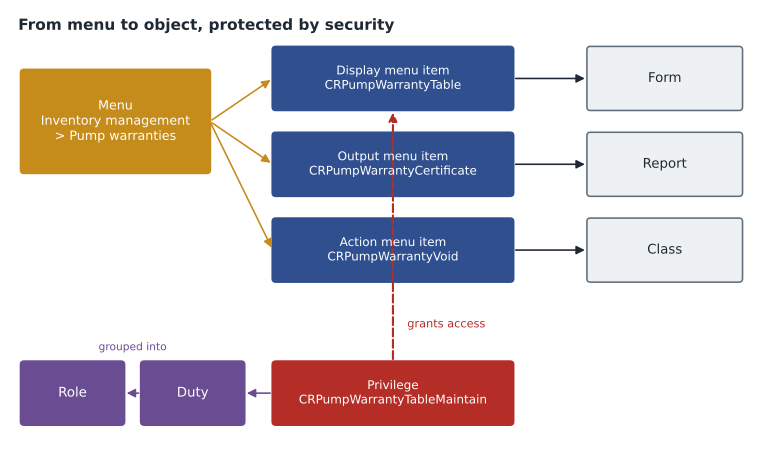
A menu item is an element that points to something a user can open or run: a form, a report or a class. Menu items are the entry points of the application. Menus, buttons, workspace tiles, links in the navigation search and the security model all refer to menu items rather than directly to forms or classes. There are three kinds.
| Kind | Opens or runs | Typical use |
|---|---|---|
| Display menu item | A form | Opening the warranty list or the parameters page |
| Output menu item | A report | Printing a warranty certificate |
| Action menu item | A class, through its main method | Running the void action or the expiry job dialog |
Each menu item has an Object property naming the form, report or class, an ObjectType, a Label, a HelpText and properties that control how it is opened. Display menu items can pass a query or a parameter to the form. Action and output menu items can be set to run in batch through the frameworks in MSBA-341. The Label property is what users see on buttons and in menus, so it must be a clear verb or noun phrase from the label file, such as Pump warranties or Void warranty.
Display menu item: CRPumpWarrantyTable
  Label:        @CRCustom:PumpWarranties
  HelpText:     @CRCustom:PumpWarrantiesHelp
  Object:       CRPumpWarrantyTable
  ObjectType:   Form

Action menu item: CRPumpWarrantyVoid
  Label:        @CRCustom:VoidWarranty
  Object:       CRPumpWarrantyVoidAction
  ObjectType:   Class
  NeedsRecord:  Yes

Output menu item: CRPumpWarrantyCertificate
  Label:        @CRCustom:WarrantyCertificate
  Object:       CRPumpWarrantyCertificateController
  ObjectType:   Class
The NeedsRecord property on the void action makes the button unavailable unless a record is selected, so the class never runs without one. A button on a form bound to this menu item, a MenuItemButton from lesson 7, picks up the label, the enabled state and the security of the menu item automatically.
Passing context through menu items
Menu items can carry context to the object they open, which lets one form or class serve several purposes. The Parameters property passes a string. The EnumTypeParameter and EnumParameter properties pass a value of a base enum, which the form or class reads from its Args object. A display menu item can also name a Query, so that the form opens with that query as its starting point, and the OpenMode property can open a form ready for viewing, editing or creating a new record.
The warranty module used this for the Unregistered pump sales entry. Rather than building a second form, Prudence created a second display menu item pointing to a small inquiry form, with an enum parameter telling the form whether to show all unregistered sales or only those for the user's own site. Two entries in the menu, one form, and the difference expressed as data rather than duplicated code. Standard code does the same thing on a large scale: the same sales order form opens in different modes from different menu items across the application.
// Reading the enum parameter passed by the menu item, in the form's init
public void init()
{
    super();

    if (element.args() && element.args().parmEnumType() == enumNum(CRUnregisteredScope))
    {
        scope = element.args().parmEnum();
    }
}
Menus and the navigation pane
A menu is an element that groups menu items into a hierarchy. The navigation pane on the left of the browser shows the main menus, called modules, such as Accounts receivable, Inventory management and Production control. Inside each module, items are grouped under headings such as Inquiries and reports, Periodic tasks and Setup. Standard menus are extended, not changed: a menu extension in the custom model adds submenus and menu items to a standard menu.
Desmond and Teodora agreed where the warranty items belonged. The warranty list went into Inventory management under a new submenu, Pump warranties, next to the serial number pages from MSBA-330, because that is where service and quality staff already worked. The parameters went under Inventory management, Setup. The expiry reminder job, once built, would go under Periodic tasks. A shortcut to the warranty list also went into Sales and marketing, because sales coordinators needed to check a customer's warranties when quoting service work.
| Module and group | Entry | Menu item |
|---|---|---|
| Inventory management, Pump warranties | Pump warranties | CRPumpWarrantyTable (display) |
| Inventory management, Pump warranties | Unregistered pump sales | CRPumpWarrantyUnregistered (display) |
| Inventory management, Setup | Pump warranty parameters | CRPumpWarrantyParameters (display) |
| Inventory management, Setup | Warranty claim reasons | CRWarrantyClaimReason (display) |
| Inventory management, Periodic tasks | Send warranty expiry reminders | CRWarrantyExpiryReminder (action) |
| Sales and marketing, Customers | Pump warranties | CRPumpWarrantyTable (display) |
The same menu item can appear in more than one menu, as the last row shows. That is one reason menu items exist as separate elements: the item, with its label and security, is defined once and placed wherever users expect it.
Other ways users navigate
Menus are only one route. Users often find pages with navigation search, typing part of a page name at the top of the browser; the search finds menu items by label, which is another reason to choose labels carefully. Workspaces have tiles and links to menu items. Favorites and recently used lists remember pages. Many forms open related forms from buttons, from the View details option on a field that has a relation, or from FactBoxes. Every one of these routes goes through a menu item, so the menu item's security check applies whichever way the user arrives.
Pages can also be opened by URL with the mi parameter naming a menu item, as lesson 10 shows for debugging. A URL that opens a form a user has no access to shows an access message rather than the form, because the check is on the menu item, not on how the user got there.
Menu items and security
Security in finance and operations apps is built from privileges, duties and roles, as MSBA-141 introduced from the administrator's side. A privilege grants access to entry points, mostly menu items, at an access level such as Read, Update, Create or Delete; it can also grant access to tables and fields directly where needed. Duties group privileges into a piece of a business process, such as Maintain pump warranties. Roles group duties and privileges into what a job needs, such as Service desk agent. Users are assigned roles.
Developers create the privileges for the entry points they build, because only they know which menu items belong together. For the warranty module Prudence created two privileges for each main menu item, a view privilege with Read access and a maintain privilege with Delete access, following the standard naming convention, and grouped them into two duties. The administrator then added those duties to existing roles. Desmond showed her that a maintain privilege also needs access to the tables behind the form; when the menu item's form has data sources, the privilege designer can derive table permissions from the form, which is easier and safer than granting table access by hand.
| Element | Name | Grants |
|---|---|---|
| Privilege | CRPumpWarrantyTableView | Read on the CRPumpWarrantyTable display menu item |
| Privilege | CRPumpWarrantyTableMaintain | Delete (full) on the CRPumpWarrantyTable display menu item |
| Privilege | CRPumpWarrantyVoidGenerate | Invoke on the CRPumpWarrantyVoid action menu item |
| Duty | CRPumpWarrantyInquire | The view privileges |
| Duty | CRPumpWarrantyMaintain | The maintain and void privileges |
| Role (existing, extended) | Service desk agent | Both duties, added by role extension |
Standard roles are extended rather than changed, through role extensions in the custom model, or adjusted by administrators in the security configuration page in the browser. Cobalt Ridge decided that roles would be extended in code for anything permanent, so that security traveled with the code through every environment, and that administrators would use the security configuration only for temporary changes and testing. MSBA-343 covers security design in depth, including extensible data security and segregation of duties.
Licensing and entry points
Menu items carry properties that matter for licensing. Each entry point has a license classification, which in turn decides which license a user needs to be granted access through a role, and custom menu items are given a classification by the developer. Desmond's advice was to set it deliberately and to confirm the current rules with the licensing guide and the partner, because a custom entry point classified at a higher level than necessary can raise the license requirement for every user who is given access to it. The exact license names and prices are outside this course.
Testing navigation in the developer environment
After deploying the menu items, menu extension and security elements, Prudence checked them in her unified developer environment in three passes. First, as herself, she found each entry in the navigation pane and in navigation search, and opened it. Second, she opened each display menu item directly by URL, using the mi parameter with the menu item name and the cmp parameter with a company such as CRCA, which is the quickest way to reach a page while developing and the same technique lesson 10 uses for debugging. Third, she asked Desmond to create a test user with only the Service desk agent role and repeated the first pass as that user, confirming that the warranty pages appeared, that the void button was available only with the maintain duty, and that the parameters page did not appear at all.
The third pass found the only security defect of the module. The Unregistered pump sales inquiry used a query over invoice lines, and the view privilege for it did not include read access to the invoice tables, so the page opened empty for the test user while working perfectly for Prudence. Deriving the table permissions from the form's data sources, as described above, fixed it. Desmond added the test user to the developer environment template so that every future feature would be tested the same way.
Configuration keys and feature management
Whether a menu item is visible also depends on configuration keys. A configuration key is an element that switches a part of the application on or off for the whole environment; tables, fields, menu items and other elements can be assigned to a key, and when the key is off those elements disappear from the user interface and, for tables and fields, from the database. Administrators set configuration keys in the license configuration page, usually during setup, because turning a key off can remove data. Cobalt Ridge created a configuration key for the warranty module, CRPumpWarranty, and assigned its tables and menu items to it, so the module could be switched off cleanly in an environment that did not need it, such as a training copy for finance users.
Feature management is a different mechanism with a similar purpose for Microsoft's own changes. New capabilities in service updates often arrive as features that administrators can enable in the Feature management workspace, sometimes before they become mandatory. Developers should know which features affect the areas they extend, because enabling a feature can change the forms, classes or tables their extensions rely on. Desmond added a line to the warranty module's documentation listing the inventory and sales features that had been enabled in Cobalt Ridge's environments when the code was written.
Designing navigation that people use
Desmond finished the clinic with Teodora's list of rules for where things go, which she had drawn from watching the service desk work for a week.
- Put pages where the people who use them already work, not where the code lives.
- Use the same names in menus, page titles and training material.
- Keep setup pages under Setup and recurring jobs under Periodic tasks, as standard modules do.
- Put one obvious entry in the menu, and add shortcuts in workspaces rather than more menu entries.
- Test navigation search with the words users actually type, such as warranty and serial.
The last rule produced the only change to the labels after testing. Service staff typed guarantee as often as warranty, so Teodora added the word to the help text of the main menu item, which navigation search also reads.
Worked problem
Tracing why a user cannot see a page
Gaetan, a service desk agent in Denver, reports that the Pump warranties page is missing from his menu. Other agents can see it. What should Prudence check?
Show solution
- Confirm the menu item appears in the Inventory management menu through the menu extension, which it does for other agents, so the menu is not the problem.
- Check Gaetan's roles. If he lacks Service desk agent, or the role extension has not been deployed to this environment, he has no privilege on the menu item.
- If his roles look right, use the security tools to check which privileges reach the CRPumpWarrantyTable menu item for him.
- Check whether a newer role was assigned in only some legal entities; role assignments can be limited by company.
Answer: Menus are shown only where the user has a privilege on the menu item, so the cause is almost always role assignment or a missing deployment of the security elements.
Common mistakes
MistakeLinking buttons and menus directly to forms.
InsteadCreate a menu item and point buttons, menus and tiles at it, so labels and security are defined once.
MistakeChanging a standard menu or role directly.
InsteadUse menu extensions and role extensions in the custom model.
MistakeCreating menu items without privileges.
InsteadCreate view and maintain privileges for each entry point and group them into duties.
MistakeTesting only as a system administrator.
InsteadTest as a user with the target role to confirm menus and access appear as designed.
Summary and key terms
- Menu items are the entry points of the application: display items open forms, output items open reports and action items run classes.
- Menus group menu items; standard menus are changed through menu extensions, and one menu item can appear in several places.
- Navigation search, workspaces, favorites and View details all go through menu items, so their security applies everywhere.
- Privileges grant access to menu items at a level; duties group privileges; roles group duties; users get roles.
- Developers create privileges and duties for their entry points and extend roles in code so security moves with the model.
- Menu item
- An element that points to a form, report or class and is used as an entry point.
- Display menu item
- A menu item that opens a form.
- Action menu item
- A menu item that runs a class.
- Menu extension
- An element that adds items to a standard menu.
- Privilege
- A security element granting access to entry points at a level.
- Duty
- A security element grouping privileges for part of a process.
Practice problems
Work each problem on paper first, then reveal the answer to check.
Which kind of menu item would start the expiry reminder job dialog?
Show answer
An action menu item, pointing to the job's controller class.
What does the NeedsRecord property do?
Show answer
It makes the menu item available only when a record is selected.
Why are roles extended in code at Cobalt Ridge?
Show answer
So permanent security changes are versioned and deployed with the model to every environment.
Lesson quiz · 5 questions
Score 60% or more to complete this lesson.
Create a free account to save your progress, take quizzes and earn a certificate.