
MSBA-340 · Lesson 5 of 12 · 21 min
Tables and fields
▶ Video coming soon A video version of this lesson is on the way.
The fifth clinic was the one Desmond had been looking forward to, because it was where the warranty module stopped being an idea. He started by reading out the requirement Teodora Brisebois had written after the seal failure described in MSBA-330. When a pump is sold, Cobalt Ridge must record which serial number went to which customer, the installation date, the warranty term and the warranty status, so that service staff can answer one question in seconds: is this pump still under warranty? Everything else in the module, the forms, the menu items and the code, would sit on top of the tables designed in this session.
Tables in finance and operations apps
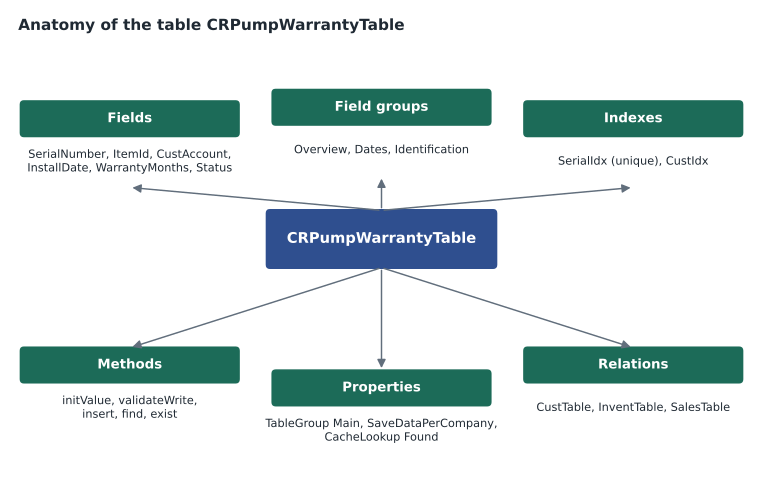
A table is an element in the AOT that defines a database table: its fields, indexes, relations, field groups, properties and methods. When a model with a new or changed table is deployed and the database is synchronized, the application creates or alters the physical table in the environment's database to match. Developers never create tables with SQL. The metadata is the source of truth, and synchronization makes the database agree with it.
Every table automatically gets system fields that the developer does not create. RecId is a 64-bit identifier unique within the table, used for relations and for identifying records internally. DataAreaId holds the legal entity of the record for tables whose data is saved per company. RecVersion supports optimistic concurrency. Optional system fields, switched on by table properties, record who created or modified a record and when, in the CreatedBy, CreatedDateTime, ModifiedBy and ModifiedDateTime fields. Cobalt Ridge turned these on for every warranty table so that the audit question, who changed this warranty and when, could always be answered.
Fields
Fields are added in the table designer, and the best way to add one is to drag an extended data type or a base enum onto the Fields node, or to create a field of the right type and set its Extended Data Type property. The field then inherits the EDT's label, help text, length, display settings and, often, a relation to the EDT's reference table. Field properties that can be set on the field itself include Mandatory, AllowEdit, AllowEditOnCreate, Visible and the label and help text when the field needs a more specific wording than the EDT.
| Field | Based on | Notes |
|---|---|---|
| SerialNumber | InventSerialId (standard EDT) | Mandatory; the serial number recorded on the pump |
| ItemId | ItemId (standard EDT) | Mandatory; relation to released products |
| CustAccount | CustAccount (standard EDT) | Mandatory; relation to customers |
| InstallDate | CRInstallDate (new EDT based on TransDate) | Entered by service staff; may differ from the invoice date |
| WarrantyMonths | CRWarrantyMonths (new EDT based on int) | Defaulted from module parameters by item group |
| Status | CRWarrantyStatus (new base enum) | Draft, Active, Expired, Void |
| SalesId | SalesId (standard EDT) | The sales order the pump was sold on |
Prudence wanted to add a field for the end date. Desmond asked whether the end date could ever be anything other than the install date plus the warranty months. It could not, so it would not be stored; it would be calculated by a method. Storing values that can be derived invites them to disagree with each other. He made one exception in his career rule: a stored value is justified when it must be searched or filtered at speed across many records, and even then it should be maintained in one place by code.
Table properties
Table properties shape how the table behaves. A handful matter on almost every table, and the MB-500 outline expects candidates to know them.
| Property | What it controls | Warranty table setting |
|---|---|---|
| Label and Help text | How the table is named to users | Labels from the CRCustom label file |
| TableGroup | The role of the table: Main, Transaction, Parameter, Group, WorksheetHeader, WorksheetLine and others | Main |
| SaveDataPerCompany | Whether records belong to a legal entity (DataAreaId) | Yes; each company records its own sales |
| PrimaryIndex and ClusteredIndex | Which index identifies records and how rows are stored | SerialIdx for both |
| ReplacementKey | The index whose fields users see instead of RecId | SerialIdx |
| CacheLookup | How records are cached on the server | Found |
| CreatedBy, CreatedDateTime, ModifiedBy, ModifiedDateTime | System audit fields | All Yes |
| TitleField1 and TitleField2 | Fields shown in form captions and lookups | SerialNumber and CustAccount |
Caching deserves only a mention here, because MSBA-343 covers it fully. The CacheLookup property tells the application whether to keep records of the table in the server's cache after they are read. Main tables that are read often by their key, such as the warranty table, typically use Found. Parameter tables use EntireTable or Found, and transaction tables that change constantly usually use None or NotInTTS.
Field groups
A field group is a named set of fields on a table. Forms, data entities and reports use field groups to decide which fields to show together, so that adding a field to a group adds it everywhere the group is used. Every table has the standard groups AutoReport, which the default report uses; AutoLookup, which decides the columns of the lookup list when users choose a record; and AutoIdentification and AutoSummary in modern patterns. Developers add their own groups, such as Overview, Dates or Identification, and the form patterns in lesson 7 place them in standard sections.
Desmond insisted that the warranty forms be built from field groups rather than individual fields. When Teodora later asked for the sales order number to appear on the overview, Prudence added SalesId to the Overview field group, and it appeared on the list page, the details form and the lookup at once.
Indexes
Indexes speed up searches and enforce uniqueness. An index is defined on the table with one or more fields, and the AllowDuplicates property set to No makes it unique. Because the warranty table must never hold two warranties for the same pump in the same company, its index SerialIdx on SerialNumber is unique. A second, non-unique index CustIdx on CustAccount and InstallDate supports the most common search: all pumps for a customer, newest first.
Every index costs something on insert and update, so tables should have the indexes their queries need and no more. The primary index is the one used to identify records, usually a unique index on the natural key. The replacement key is the unique index whose fields users see when another table refers to this one by RecId, so a user sees a serial number rather than a number like 5637144576. Trace Parser, in lesson 10, and the query plans in MSBA-343 show whether an index is used.
Relations and foreign keys
A relation on a table describes how its fields refer to another table. Relations drive lookups on forms, joins between data sources, validation that a referenced record exists and navigation, such as the View details option that opens the customer from a warranty. Many relations come for free from EDTs: a field based on CustAccount already knows that it refers to CustTable. Explicit relations are added in the Relations node when the EDT relation is not enough, or when the relation uses a RecId foreign key, which is the modern pattern for references to tables with a surrogate key.
Relations on CRPumpWarrantyTable
  CustTable       CRPumpWarrantyTable.CustAccount == CustTable.AccountNum
                  Cardinality: ZeroMore   Related: ExactlyOne   Validate: Yes
  InventTable     CRPumpWarrantyTable.ItemId      == InventTable.ItemId
                  Cardinality: ZeroMore   Related: ExactlyOne   Validate: Yes
  SalesTable      CRPumpWarrantyTable.SalesId     == SalesTable.SalesId
                  Cardinality: ZeroMore   Related: ZeroOne    Validate: No
Delete actions
Delete actions decide what happens to related records when a record is deleted. A delete action on CustTable pointing to the warranty table could be Restricted, which stops a customer being deleted while warranties exist; Cascade, which deletes the warranties with the customer; or Cascade+Restricted, used when the deletion is allowed only as part of a cascade from further up. Because a customer can only be deleted if it has no transactions in finance and operations apps anyway, and because warranties are evidence Cobalt Ridge must keep, the team added a Restricted delete action through a table extension of CustTable. Delete actions on standard tables are added through table extensions, which MSBA-341 explains.
Table methods
Tables have built-in methods that the application calls at particular moments, and developers override them on their own tables to add behavior. The most important are initValue, called when a new record is created in a form or by code, to set default values; validateField, called when a user changes a field; validateWrite, called before a record is saved, which returns false to stop the save; validateDelete, before a deletion; and insert, update and delete themselves, which perform the database operation and can be overridden to add logic around it with a call to super().
public class CRPumpWarrantyTable extends common
{
    public void initValue()
    {
        super();
        this.Status         = CRWarrantyStatus::Draft;
        this.WarrantyMonths = CRPumpWarrantyParameters::find().DefaultWarrantyMonths;
    }

    public boolean validateWrite()
    {
        boolean ret = super();

        if (ret && this.InstallDate > DateTimeUtil::getSystemDate(DateTimeUtil::getUserPreferredTimeZone()))
        {
            ret = checkFailed('The installation date cannot be in the future.');
        }
        return ret;
    }

    public static CRPumpWarrantyTable find(InventSerialId _serialNumber, boolean _forUpdate = false)
    {
        CRPumpWarrantyTable warranty;
        warranty.selectForUpdate(_forUpdate);
        select firstonly warranty where warranty.SerialNumber == _serialNumber;
        return warranty;
    }

    public static boolean exist(InventSerialId _serialNumber)
    {
        return _serialNumber
            && (select firstonly RecId from CRPumpWarrantyTable
                    where CRPumpWarrantyTable.SerialNumber == _serialNumber).RecId != 0;
    }
}
The static find and exist methods are a convention on almost every standard table. find returns the record for a key, optionally selected for update; exist returns whether a record with that key exists. Following the convention makes custom tables feel standard to other developers and gives every caller one tested way to read a record. The checkFailed function used in validateWrite adds a warning to the Infolog and returns false in one call.
Desmond made a point about validation. validateWrite runs when a form saves a record, but code that calls insert or update directly does not run validateWrite automatically. Code that creates records must call validateWrite itself, or better, go through a service class that does. Data entities, in MSBA-342, call validation as part of their own logic.
Synchronizing the database
After a table is created or changed and the model is deployed, the database must be synchronized. Synchronization compares the metadata with the database and creates tables, adds columns, changes field lengths and builds indexes. It can be run as part of deployment or on its own from the Dynamics 365 menu, as lesson 10 explains. Some changes are destructive: removing a field drops the column and its data, and shortening a string field can truncate values. The MB-500 outline asks candidates to synchronize and troubleshoot data dictionary changes, and the most common troubleshooting case is a synchronization that fails because a new unique index meets existing duplicate data. The fix is to clean the data first, not to make the index non-unique.
Regular and temporary tables
The TableType property decides where a table's data lives. A regular table is a permanent table in the database. A TempDB table is a temporary table created in the SQL Server temporary database for the duration of the code that uses it; it can be joined with regular tables in queries, which makes it the usual choice for working data in reports and calculations. An InMemory table is held in the memory of the application server and is suited only to small sets of data that never need to be joined with database tables. Temporary tables are typically created for report data providers, for intermediate results in a calculation, and for passing a set of records between methods. The MB-500 outline lists creating and modifying temporary tables for optimization, and MSBA-343 looks at when they improve performance.
Prudence used a TempDB table, CRWarrantyExpiryTmp, for the expiry reminder job described in lesson 12. The job collects the warranties that will expire soon, with the customer and contact details joined in, and then hands the temporary records to the notifier. Nothing about the temporary table is saved; when the job ends, the data is gone.
Table inheritance and other options
Tables can also take part in table inheritance, where a base table holds fields common to several kinds of record and derived tables add their own, with one logical record spread across the tables. The standard application uses it in places such as the party model for organizations and persons. It is powerful but adds joins to every query, so Cobalt Ridge decided not to use it for warranties; the two warranty terms are a property of the warranty, handled by the term classes in lesson 4, not separate kinds of record.
Other properties that occasionally matter are Valid time state tables, which keep effective-dated versions of records with ValidFrom and ValidTo fields, and the Support inheritance and Abstract properties that go with table inheritance. Valid time state was considered for warranty terms that change during a pump's life, such as an extension sold after the original sale, and rejected in favor of a simpler warranty extension line table. Simpler designs are easier to test, migrate and explain to the people who will run them.
Other data model elements
Tables sit alongside related elements that later lessons and courses cover: views, which present a query as a read-only table; maps, which let one piece of code work with fields of several tables through a common shape; queries defined in the AOT; and data entities, which present one or more tables as a single object for integration and data management. Lesson 6 introduces views, maps and queries; MSBA-342 covers data entities. The MB-500 outline asks candidates to tell these apart, and the short version is: tables store data, views and queries read it, maps share code across tables, and entities move it in and out.
Worked problem
Designing a parameters table
The warranty module needs settings: a default number of warranty months, a separate default for mining pumps, and a number of days before expiry when a reminder should be sent. How should these be stored?
Show solution
- Settings for a module belong in a parameters table, CRPumpWarrantyParameters, with TableGroup Parameter.
- Parameters differ by legal entity, so SaveDataPerCompany is Yes, and the table holds one record per company, enforced with a unique key field set to a constant.
- Fields use new EDTs: CRWarrantyMonths for both default terms and CRWarrantyReminderDays for the reminder window.
- A static find method returns the single record and creates it with defaults if it does not exist, following the standard parameters pattern.
- CacheLookup is set to EntireTable or Found because the record is read often and rarely changes.
Answer: A one-record-per-company parameters table with EDT-based fields, a find method that creates the record if missing, and caching for fast reads.
Common mistakes
MistakeStoring values that can be calculated from other fields.
InsteadCalculate derived values in methods unless there is a strong performance reason, and then maintain them in one place.
MistakeAdding fields one by one to forms instead of using field groups.
InsteadUse field groups so a change appears on every form, lookup and report that uses the group.
MistakeAssuming validateWrite runs when code calls insert.
InsteadCall validateWrite explicitly or create records through a service that validates.
MistakeMaking a unique index non-unique to get past a failed synchronization.
InsteadFind and clean the duplicate data, then synchronize again.
Summary and key terms
- Tables are defined as metadata and synchronized to the database; system fields such as RecId and DataAreaId are added automatically.
- Fields should be based on EDTs or base enums so labels, lengths and relations are consistent.
- Table properties such as TableGroup, SaveDataPerCompany, PrimaryIndex, ReplacementKey and CacheLookup shape behavior.
- Field groups, unique indexes, relations and delete actions give the table its structure and integrity.
- Table methods such as initValue and validateWrite add defaults and validation; static find and exist methods are the standard way to read a record.
- Database synchronization
- The process that creates or changes physical tables to match table metadata.
- Field group
- A named set of fields used by forms, lookups, entities and reports.
- Replacement key
- The unique index whose fields are shown to users instead of RecId.
- Delete action
- A rule that restricts or cascades deletion to related records.
- Table group
- A property that classifies the table's role, such as Main, Transaction or Parameter.
- find and exist methods
- Conventional static table methods that return a record for a key or test whether it exists.
Practice problems
Work each problem on paper first, then reveal the answer to check.
Why does the warranty table not store the end date?
Show answer
Because it can always be calculated from the install date and the warranty months; storing it would risk inconsistent data.
What does the AutoLookup field group control?
Show answer
The columns shown in the lookup list when users select a record of the table.
Which delete action stops a customer being deleted while warranties exist?
Show answer
A Restricted delete action from CustTable to the warranty table.
Lesson quiz · 5 questions
Score 60% or more to complete this lesson.
Create a free account to save your progress, take quizzes and earn a certificate.