
MSBA-340 · Lesson 6 of 12 · 22 min
Queries and data access
▶ Video coming soon A video version of this lesson is on the way.
With the warranty table deployed to her developer environment, Prudence had a table and no data. The sixth clinic fixed both, and on the way it covered the feature of X++ that most surprised her: the database is part of the language. Desmond started by writing a single line on the board, select firstonly custTable where custTable.AccountNum == 'C-000214', and asked her what it did. She read it correctly the first time, which he said was the point.
Select statements
A select statement reads records from a table into a table buffer. The buffer variable is declared with the table as its type, and the select statement fills it with the first matching record. The where clause filters, order by sorts, and keywords such as firstonly, forupdate and crosscompany change behavior. Because the statement is X++, the compiler checks table and field names, and the kernel translates the statement into SQL for the database.
CustTable custTable;

select firstonly custTable
    where custTable.AccountNum == 'C-000214';

if (custTable)
{
    info(custTable.name());
}

// Select only the fields needed
CRPumpWarrantyTable warranty;
select firstonly SerialNumber, InstallDate, WarrantyMonths from warranty
    where warranty.CustAccount == custTable.AccountNum
    order by InstallDate desc;
A table buffer that found no record evaluates to false, so if (custTable) is the usual test. The name method on CustTable is a table method that returns the customer's name from the global address book; standard tables are full of such helpers, and reading them is a good way to learn the data model. Selecting only the fields the code needs is a simple performance habit: the database returns less data and the kernel builds a smaller buffer.
Looping with while select
A while select statement loops over every matching record, running the body once per record. It is the most common way to process a set of records in X++.
CRPumpWarrantyTable warranty;
int                 count;

while select warranty
    where warranty.Status == CRWarrantyStatus::Active
       && warranty.CustAccount == 'C-000214'
{
    count++;
    info(strFmt('%1 installed %2', warranty.SerialNumber, warranty.InstallDate));
}

info(strFmt('%1 active warranties', count));
Aggregate functions such as count, sum, avg, minof and maxof can be used in a select with group by, so that the database does the counting. A count of active warranties per customer is one statement with count(RecId) and group by CustAccount, which is far cheaper than looping in X++ and adding up.
Joins
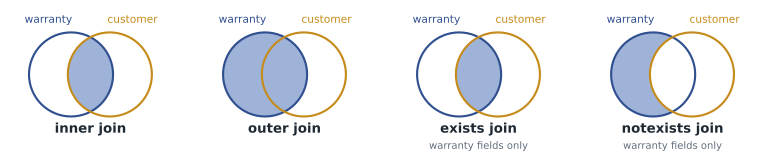
Select statements can join tables. The join type decides which records are returned and whether fields from the joined table are available.
| Join | Returns | Fields of the joined table |
|---|---|---|
| join (inner join) | Records that have a match in both tables | Available |
| outer join | All records of the first table, with matching records of the second where they exist | Available, empty where no match |
| exists join | Records of the first table that have at least one match in the second | Not available |
| notexists join | Records of the first table that have no match in the second | Not available |
CRPumpWarrantyTable warranty;
CustTable           custTable;

// Warranties with the customer's group available
while select warranty
    where warranty.Status == CRWarrantyStatus::Active
    join CustGroup from custTable
        where custTable.AccountNum == warranty.CustAccount
{
    info(strFmt('%1 %2', warranty.SerialNumber, custTable.CustGroup));
}

// Sold pumps with no warranty registered: serial numbers on invoices
// that do not exist in the warranty table
CustInvoiceTrans    invoiceLine;
InventDim           inventDim;

while select invoiceLine
    where invoiceLine.InvoiceDate >= mkDate(1, 9, 2026)
    join inventSerialId from inventDim
        where inventDim.inventDimId == invoiceLine.InventDimId
           && inventDim.inventSerialId != ''
    notexists join warranty
        where warranty.SerialNumber == inventDim.inventSerialId
{
    info(strFmt('No warranty for %1 on invoice %2', inventDim.inventSerialId, invoiceLine.InvoiceId));
}
The second example introduced Prudence to InventDim, the inventory dimensions table, which holds combinations of site, warehouse, batch, serial number and other dimensions from MSBA-330. Transaction lines refer to an InventDimId rather than storing the serial number directly. Joining to InventDim is one of the most common patterns in supply chain code, and Desmond warned that it is also one of the most common sources of slow queries when the join or the index is wrong.
Changing data: insert, update and delete
To change data, code works with table buffers inside a transaction. A new record is created by setting fields on an empty buffer and calling insert. An existing record must be selected forupdate inside a transaction before update or delete is called; otherwise the kernel raises an error. Lesson 3 showed the pattern with ttsbegin and ttscommit.
CRPumpWarrantyTable warranty;

ttsbegin;

warranty.clear();
warranty.initValue();
warranty.SerialNumber = 'MC150-261004';
warranty.ItemId       = 'MC-150';
warranty.CustAccount  = 'C-000214';
warranty.InstallDate  = mkDate(2, 11, 2026);

if (warranty.validateWrite())
{
    warranty.insert();
}

select forupdate warranty
    where warranty.SerialNumber == 'MC150-260931';
if (warranty)
{
    warranty.Status = CRWarrantyStatus::Active;
    warranty.update();
}

ttscommit;
Set-based operations
Row-by-row code sends one statement to the database for each record. When thousands of records need the same change, set-based operations do it in one statement. X++ has three: insert_recordset copies the result of a select into a table, update_recordset changes matching records, and delete_from deletes them.
CRPumpWarrantyTable warranty;
TransDate           today = DateTimeUtil::getSystemDate(DateTimeUtil::getUserPreferredTimeZone());

// Expire every active warranty whose end has passed, in one statement
ttsbegin;
update_recordset warranty
    setting Status = CRWarrantyStatus::Expired
    where warranty.Status   == CRWarrantyStatus::Active
       && warranty.EndDate  <  today;
ttscommit;
The example raised a good discussion, because lesson 5 had decided not to store the end date. A set-based expiry needs a field the database can compare, so either the end date is stored and maintained by code, or the expiry runs row by row and calls the calculator. The team chose to store EndDate after all, maintained only by the table's insert and update methods, because the nightly expiry and the service desk's searches both needed it at speed. Desmond called this the performance exception from lesson 5, made deliberately and written down.
Set-based operations have a catch. If the table overrides insert, update or delete, or has certain features such as database logging, delete actions, or alerts on the changed fields, the kernel cannot do a pure set-based operation and falls back to row-by-row processing so that the overridden logic runs. Code can call skipDataMethods, skipDatabaseLog, skipEvents and similar methods to force the set-based behavior, but only when skipping that logic is genuinely correct. The MB-500 outline asks candidates to assess when to use set-based or row-based queries, and this trade-off is the heart of the question.
| Approach | Best for | Watch out for |
|---|---|---|
| while select with update | Small sets, or when each record needs its own logic | One round trip per record; slow for large sets |
| update_recordset | Many records needing the same change | Falls back to row-by-row if update is overridden or other features apply |
| insert_recordset | Copying query results into a table, such as a temporary table | Same fallbacks for overridden insert |
| delete_from | Removing many records at once | Delete actions and overridden delete force row-by-row |
| RecordInsertList | Inserting many records built in code | Buffers inserts into fewer round trips |
Concurrency: optimistic locking and update conflicts
Finance and operations apps use optimistic concurrency for most tables. When a record is selected for update, the kernel does not lock it in the database straight away. Instead it remembers the record's RecVersion, and when update is called it checks that nobody else has changed the record in the meantime. If someone has, the update fails with an update conflict exception. This lets many users read and edit data without waiting on each other, at the cost of an occasional conflict that code must handle.
Standard batch and posting code handles conflicts with the retry statement in a catch block for Exception::UpdateConflict, usually with a limit on the number of retries and a check on the transaction level, because a retry is only possible from outside the outermost transaction. Deadlocks, where two processes wait on each other's locks, are handled the same way with Exception::Deadlock. Desmond's advice to Prudence was to keep transactions short and to touch records in a consistent order, which prevents most deadlocks in the first place. A transaction that reads a customer, waits for a web service and then updates an invoice is asking for trouble; call the service first and open the transaction only for the database work.
Performance habits
Most slow X++ code is slow for a handful of reasons, and they can be avoided while writing rather than fixed afterwards. Desmond's checklist for Prudence's queries had five points.
- Filter on indexed fields, and check in Trace Parser that the index is used.
- Select only the fields the code needs, and use firstonly when one record is enough.
- Avoid a select inside a loop when a join would return the same data in one statement.
- Use set-based operations or RecordInsertList for large volumes.
- Keep transactions short and never wait on users or external systems inside them.
The third point is the most common problem in code reviews. A loop over sales lines that, for each line, selects the item, then the item's group, then the customer, sends three extra statements per line. The same data can usually come from one select with joins, or from cached find methods on tables whose CacheLookup property keeps recently read records in memory. The difference on a thousand lines is the difference between a fraction of a second and a noticeable wait.
RecordInsertList and its sibling RecordSortedList collect records in memory and insert them in batches. They suit cases where records are built in code one at a time, such as warranty registrations created from a file, but the logic still needs the table's insert method to run. MSBA-343 covers performance in depth, including the SQL generated by X++ and how to read query plans.
Data access and security
Select statements in X++ respect the security model. When code runs for a user, the kernel checks that the user's roles grant access to the table, and extensible data security policies, which MSBA-343 introduces, can add filters automatically, so that a user sees only the records their policy allows. Code running in batch runs as the user who scheduled it. This matters for testing: a query that returns 2,000 warranties for Desmond, who has the System Administrator role, may return far fewer for a service desk user. Prudence learned to test her forms and lookups as a user with the role they were built for, not only as herself.
Query objects
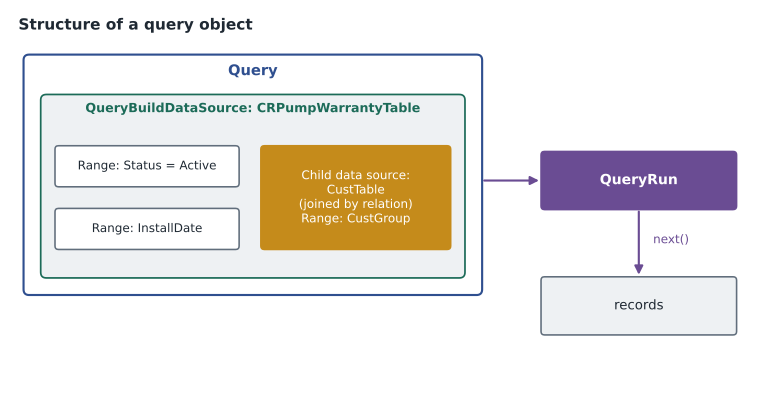
Select statements are fixed at compile time. When the filters, sorting or even the tables depend on choices made at run time, code uses query objects. A Query object contains data sources, each a QueryBuildDataSource for a table; data sources contain ranges, QueryBuildRange, that filter fields; and a QueryRun object executes the query and returns records one by one. Query objects are what users see behind the filter and select dialogs in batch jobs and reports, so a query built this way can be shown to the user to change before it runs.
Query                 query = new Query();
QueryBuildDataSource  qbdsWarranty = query.addDataSource(tableNum(CRPumpWarrantyTable));
QueryBuildRange       qbrStatus    = qbdsWarranty.addRange(fieldNum(CRPumpWarrantyTable, Status));
qbrStatus.value(queryValue(CRWarrantyStatus::Active));

QueryBuildDataSource  qbdsCust = qbdsWarranty.addDataSource(tableNum(CustTable));
qbdsCust.relations(true);
qbdsCust.joinMode(JoinMode::InnerJoin);
qbdsCust.addRange(fieldNum(CustTable, CustGroup)).value(queryValue('MUNI'));

QueryRun queryRun = new QueryRun(query);
while (queryRun.next())
{
    CRPumpWarrantyTable warranty = queryRun.get(tableNum(CRPumpWarrantyTable));
    info(warranty.SerialNumber);
}
Several details matter. The tableNum and fieldNum functions turn names into IDs and are checked by the compiler, so a misspelled field fails the build rather than the query. The queryValue function formats a value correctly for a range, including escaping special characters; building range strings by hand is a classic source of bugs. relations(true) tells the child data source to use the relation defined between the tables. Queries can also be defined as elements in the AOT, under Queries, and loaded by name with new Query(queryStr(CRPumpWarrantyActive)), which lets forms, reports and code share one definition. The MB-500 outline mentions the QueryBuilder class as well; it is a newer fluent helper for building queries in code, and the same ideas of data sources, ranges and joins apply.
Views and maps
A view is an AOT element that presents a query as a read-only table. Views can be used in select statements and as form data sources, which is useful for reporting screens and lookups that combine several tables. A view can include computed columns, whose values are calculated in SQL by static methods that return SQL expressions. A map is a different idea: it defines a set of fields and methods that several tables share, mapped to each table's own fields, so code written against the map works with any of them. The standard application uses maps for things like address handling across customer, vendor and other tables. Cobalt Ridge's module needed one view, CRPumpWarrantyOverview, joining warranties, customers and released products for the service desk, and no maps.
Looking at data while developing
Developers need to see the data their code reads and writes. In a unified developer environment the quickest way is the table browser, which opens any table in the browser through a menu item URL with the table name, and lists its records with filtering and, for tables that allow it, editing. Desmond allowed editing in the table browser only in Prudence's own environment, and only for test data she had created. Another option is to write a small runnable class that prints counts and samples to the Infolog, which also exercises the same select statements the real code will use. For larger checks, data management export of an entity to a spreadsheet, covered in MSBA-342, gives a full picture without touching the database directly.
Prudence found the table browser most useful for one thing Desmond had not expected: checking that the system fields were filled as designed. Seeing CreatedBy and CreatedDateTime populated on her first warranty record confirmed that the table properties from lesson 5 had been set and synchronized correctly.
Cross-company queries
By default, a select reads only the current legal entity's data for tables saved per company. The crosscompany keyword reads across companies, optionally limited to a list of company IDs in a container. Cobalt Ridge's service desk in Akron supports pumps sold by both CRCA and CRUS, so the service desk lookup is cross-company. The changecompany statement is the alternative when code must run a block of logic in another company's context, such as creating a record there.
Worked problem
Choosing the data access technique
Prudence has four tasks: (1) show one warranty on a form for a serial number; (2) list a customer's active warranties; (3) mark about 40,000 migrated warranties as Active after migration; (4) let users filter the reminder job by customer group and install date before it runs.
Show solution
- One record by key: call the table's find method, which wraps a select firstonly.
- A customer's active warranties: a while select with a where clause on CustAccount and Status, using CustIdx.
- Forty thousand records needing the same change: update_recordset, after checking that update is not overridden in a way that matters or that skipping it is correct.
- User-adjustable filters: a query object, ideally an AOT query, shown to the user in the batch dialog.
Answer: find for one record, while select for a small set, update_recordset for a large uniform change, and a query object when users choose the filters.
Common mistakes
MistakeUpdating a record that was not selected forupdate.
InsteadSelect forupdate inside ttsbegin and ttscommit before calling update or delete.
MistakeLooping over thousands of records to make the same change.
InsteadUse update_recordset, insert_recordset or delete_from where the logic allows.
MistakeBuilding query ranges by concatenating strings.
InsteadUse queryValue and the range methods so values are formatted and escaped correctly.
MistakeSelecting every field when only two are needed.
InsteadList the fields in the select to reduce data returned.
Summary and key terms
- Select statements are part of X++ grammar and are checked by the compiler; firstonly, forupdate, order by and field lists shape them.
- while select loops over records; aggregates with group by let the database do the arithmetic.
- Inner, outer, exists and notexists joins return different sets; exists and notexists return no fields from the joined table.
- Set-based operations change many records in one statement but fall back to row-by-row when overridden logic must run.
- Query objects build queries at run time from data sources and ranges; views, maps and cross-company queries complete the toolkit.
- Table buffer
- A variable of a table type that holds one record.
- forupdate
- A select keyword that reads a record so that it can be updated or deleted.
- Set-based operation
- An X++ statement such as update_recordset that changes many records in one database statement.
- Query object
- A run-time query made of data sources and ranges, executed by QueryRun.
- View
- A read-only table defined by a query.
- Map
- An element that maps a shared set of fields and methods onto several tables.
Practice problems
Work each problem on paper first, then reveal the answer to check.
Which join returns warranties that have no matching customer record?
Show answer
A notexists join.
Why might update_recordset run row by row?
Show answer
Because the table overrides update, or features such as database logging, events or alerts require per-record processing.
What does queryValue do?
Show answer
It formats and escapes a value correctly for use in a query range.
Lesson quiz · 5 questions
Score 60% or more to complete this lesson.
Create a free account to save your progress, take quizzes and earn a certificate.