
MSBA-330 · Lesson 8 of 12 · 18 min
Counting and adjustments
▶ Video coming soon A video version of this lesson is on the way.
Every January for fifteen years, Cobalt Ridge had closed both plants for two days to count every item. The count used paper tags, took sixty people and still produced differences that took weeks to explain. Piotr wanted to replace it with counting throughout the year, so that the most valuable and fastest-moving items were checked often and the rest less often, and so that a difference was found within weeks of it happening rather than months. Henrik wanted the same at the distribution warehouse, where pickers sometimes found empty bins that the system said were full.
Why count
Counting compares the quantity the system holds with the quantity physically present, and posts the differences so that on-hand inventory is correct again. Auditors require it for the financial statements, planning depends on it, and warehouse staff rely on it to find stock. Differences arise from many causes: unrecorded scrap, picking errors, receipts put in the wrong bin, theft, damaged goods thrown away, and unit errors like the box-of-50 problem from lesson 4.
| Approach | How it works | At Cobalt Ridge |
|---|---|---|
| Wall-to-wall count | Count everything at once, usually with operations paused | Replaced, except for the yard once a year |
| Cycle counting by frequency | Count each item at intervals set by its counting group | Main approach at the plants |
| Cycle counting by threshold | Count a location when its quantity falls below a threshold | Distribution warehouse, with warehouse management |
| Spot counting | Count a location or item when there is a reason to | After a picking problem or customer complaint |
Counting groups
A counting group is assigned to a released product and decides how often it is counted. Each group has a counting code that defines the rule, and a counting interval in days where relevant.
| Counting code | Meaning |
|---|---|
| Manual | Items are included only when a user selects them |
| Period | Items are included when the counting interval has passed since the last count |
| Zero during | Items are included when their on-hand quantity reaches zero |
| Minimum | Items are included when their on-hand quantity falls to or below the minimum from item coverage |
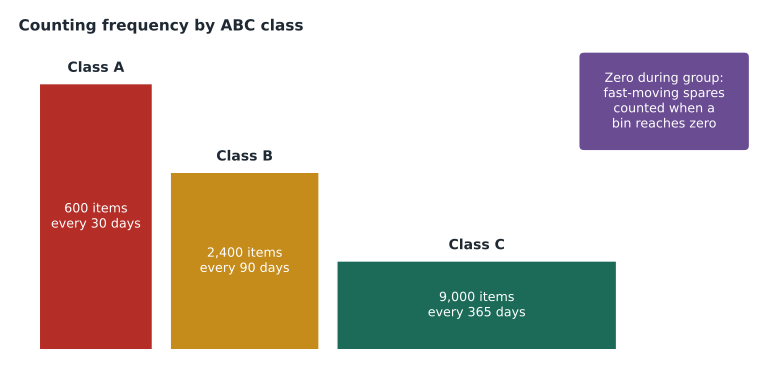
Cobalt Ridge combined counting groups with the ABC classification from lesson 11. Items in class A by value were placed in a group with a period code and an interval of 30 days. Class B items were counted every 90 days and class C items every 365 days. A separate group with the zero-during code covered fast-moving spare parts, so that an empty bin triggered a check of whether it was really empty. The result was that the 600 most valuable items would each be counted twelve times a year, while the 9,000 least valuable would be counted once.
The counting journal
Counting without warehouse management uses the counting journal. A counting journal is created from a journal name of type counting, and lines are added either manually or with Create lines, which can select lines by counting group, by items with on-hand stock, by items with transactions since a date, or by dimensions such as warehouse and location. For a cycle count, the inventory controller runs Create lines for the counting groups due, which adds a line for every item and dimension combination that the rules select.
- Create a counting journal with the right journal name and description.
- Use Create lines to add items due for counting by counting group, warehouse and location.
- Print the counting list, or use a device, without showing expected quantities to the counters.
- Enter the counted quantities on the lines; the system shows the on-hand and the difference.
- Review large differences and recount them if needed.
- Post the journal; differences post as gains or losses to the inventory profit and loss account.
While counting is in progress, the system can lock items and dimensions so that no other issues are posted against them until the journal is posted. This is controlled in the inventory management parameters and the journal name, and it prevents a picker taking stock from a bin between the count and the posting. Locking is valuable in a busy warehouse but can block operations if a counting journal is left open for days, so Cobalt Ridge set a rule that counting journals are posted on the day they are counted.
Worked problem
A cycle count at the plant
On the first Monday of December, the Akron stores are due to count 48 class A items. The counting journal shows on-hand of 120 for casting CS-3300 in location B-02-01, and the counter finds 117. Gasket G-110 shows 1,450 and the counter finds 1,500. What should happen?
Show solution
- Create the counting journal and use Create lines for the class A counting group in the main stores.
- Enter 117 for CS-3300 and 1,500 for G-110; the journal shows differences of minus 3 and plus 50.
- Recount both because the casting is high value and the gasket difference is exactly one box.
- The recount confirms 117 castings; the gasket recount finds 1,450, because one box of 50 had been counted twice.
- Correct the gasket line to 1,450, add a note to the casting line, and post.
- Investigate the casting loss with production: three castings were scrapped on the line without being reported.
Answer: A posted loss of 3 castings valued at standard cost to inventory profit and loss, no change for gaskets, and a process fix for reporting scrap.
Counting reasons and approval
Differences need explanations, especially for auditors. Counting reason codes can be set up and required on counting journal lines, with codes such as damaged, scrap not reported, picking error or receipt error. Reports by reason code then show where losses come from. Large differences can also be routed through a counting journal workflow for approval before posting, using the same workflow engine as other journals. Ifeoma set a limit: any line with a difference worth more than 2,000 dollars needed her approval, and any journal with total differences above 10,000 dollars needed Thandeka's as well.
| Reason code | Typical cause | Process fix |
|---|---|---|
| SCRAP | Scrap on the line not reported | Report scrap on the production order |
| PICK | Picking error | Scanning on pick, better location labels |
| RECV | Receipt put away to the wrong place | Directed put-away at the distribution warehouse |
| UNIT | Unit or conversion error | Correct product-specific conversion |
| DMG | Damaged and discarded | Use the damaged status and adjustment journal |
Tag counting
For the one remaining wall-to-wall count, in the yard where large casings are stored on the ground, Cobalt Ridge uses tag counting. Pre-numbered tags are printed and attached to each pile, counters write the item and quantity on each tag, and the tags are entered into a tag counting journal. Missing or void tags are tracked by number, so the count can be proved complete. Once all tags are entered, the tag counting journal is transferred to a counting journal and posted in the usual way.
Counting with warehouse management
At the distribution warehouse, which uses warehouse management, counting is done through cycle counting work on mobile devices rather than counting journals. Cycle counting plans and thresholds create counting work for locations, workers count by scanning, and differences within a tolerance are accepted automatically while others go to a supervisor for review. The supervisor approves or rejects the counts, and approved differences post. This is taught in MSBA-332, but the design decisions start here: the same items need sensible units, unit sequence groups and reason codes for the counts to make sense.
Adjustments outside counting
Not every correction comes from a count. Lesson 7 introduced the inventory adjustment journal for gains and losses found in other ways, and the movement journal for issues to an account. Two more adjustment tools are useful.
- Inventory status change at the distribution warehouse moves stock from available to damaged, or back, without changing quantity or location; stock in a blocking status remains on hand but cannot be reserved.
- On-hand adjustments with a reason, through the warehouse management mobile app, let a supervisor correct a location quickly when a picker finds a discrepancy, using an adjustment type that posts like an adjustment journal.
- Cost adjustments through the inventory adjustment functions in inventory closing change the value of transactions or on-hand inventory without changing quantity, for corrections the inventory close cannot make, such as a missed freight charge. Ifeoma's team owns these and documents each one.
| Situation | Tool |
|---|---|
| Counted quantity differs from the system | Counting journal or cycle counting work |
| Stock found broken while picking | Adjustment journal, or status change to damaged first |
| Stock issued to maintenance | Movement journal with the maintenance expense account |
| Stock must be held for an investigation | Inventory blocking |
| Value of stock is wrong but quantity is right | Cost adjustment in inventory closing |
Measuring counting accuracy
A counting program is only as good as its results. Cobalt Ridge defined inventory record accuracy as the share of counted lines where the counted quantity matched the system within a tolerance, which was zero for class A items and plus or minus two percent for class C items. The target was 97 percent for class A after six months. Counting history, available from each released product and from counting journal lines, provides the data. Piotr also asked for a monthly report of losses by reason code, which turned out to be the most useful report the team built, because it showed that unreported scrap caused more than half of all losses.
Setup behind counting
Several settings sit behind the counting process, and most are found in the inventory management parameters, on the journal names and on the released products.
| Setting | Where | Effect |
|---|---|---|
| Counting journal name | Inventory management setup, journal names | Voucher series, posting detail, approval workflow and default counting behavior |
| Lock items during count | Inventory management parameters and journal name | Stops other issues on counted dimensions until posting |
| Counting group | Released product, Manage inventory | Rule and interval for cycle counts |
| Counting reason codes | Inventory management setup | Codes users must or may enter on lines |
| Counting reason code policies | Inventory management setup, assigned to items or warehouses | Whether a reason code is required, optional or not used |
| Inventory profit and loss account | Inventory posting | Ledger account for counting gains and losses |
Reason code policies deserve a word. A policy can be assigned to a warehouse or to an item, and it decides whether a reason is mandatory or optional on counting and adjustments. Cobalt Ridge made reasons mandatory everywhere except the consumables store, where differences on low-value items such as rags and cable ties were too frequent to explain individually.
Counting also interacts with planning. Master planning uses on-hand quantities, so a bin that the system thinks is full but is actually empty causes a missed replenishment and, eventually, a stopped line. The zero-during counting code exists for exactly this reason: when a picker reports an empty bin, the system includes the item in the next count, and the correction flows into the next planning run. Piotr's planners were the strongest supporters of cycle counting once they understood that every corrected count improved their plans.
Finally, counting has an audit trail. Every posted counting journal keeps its lines, the counted and expected quantities, the reason codes and the person who posted it, and the counting history page on each item shows past counts and differences. External auditors at Cobalt Ridge agreed that a documented cycle counting program with these records could replace the annual count for most items, provided accuracy stayed above the targets.
The cut-over count
Before go-live, every item had to be counted once so that the opening balances loaded into the new system were right. The team planned it as the last wall-to-wall count for most of the business: the plants would count on the weekend before go-live, the counts would be entered into the old system to produce clean balances, and those balances would be loaded through inventory journals into the new system. From then on, cycle counting would take over. Kiri added the count weekend to the cut-over plan as a milestone in its own right, with its own go or no-go decision.
Common mistakes
MistakeLeaving a counting journal open for days with locking turned on.
InsteadPost counting journals promptly, or locked items cannot be issued.
MistakeShowing expected quantities on counting sheets.
InsteadCount blind so counters record what they see.
MistakePosting differences without reasons.
InsteadRequire counting reason codes so losses can be analyzed and fixed.
MistakeUsing counting to correct cost errors.
InsteadUse cost adjustments for value; counting corrects quantities.
Summary and key terms
- Counting keeps system on-hand equal to physical stock; cycle counting replaces most wall-to-wall counts.
- Counting groups with manual, period, zero during or minimum codes decide when items are due.
- Counting journals are filled with Create lines, counted, reviewed and posted; locking can stop issues during counting.
- Reason codes and approval workflows explain and control differences; tag counting supports full physical counts.
- Other adjustments use adjustment and movement journals, status changes, blocking and cost adjustments.
- Counting group
- A group on a released product that decides how often and under what rule it is counted.
- Counting journal
- An inventory journal that records counted quantities and posts the differences.
- Counting reason code
- A code explaining why a counted quantity differs from the system.
- Tag counting
- Counting with pre-numbered tags that are entered into a tag counting journal.
- Inventory record accuracy
- The share of counts where the system quantity matches the physical quantity within tolerance.
Practice problems
Work each problem on paper first, then reveal the answer to check.
Which counting code includes an item when its on-hand quantity reaches zero?
Show answer
Zero during.
Why count blind?
Show answer
So that counters record what they see rather than confirming the expected quantity.
Which tool corrects the value of stock without changing its quantity?
Show answer
A cost adjustment in the inventory closing and adjustment functions.
Lesson quiz · 5 questions
Score 60% or more to complete this lesson.
Create a free account to save your progress, take quizzes and earn a certificate.