
MSBA-330 · Lesson 2 of 12 · 18 min
Products and released products
▶ Video coming soon A video version of this lesson is on the way.
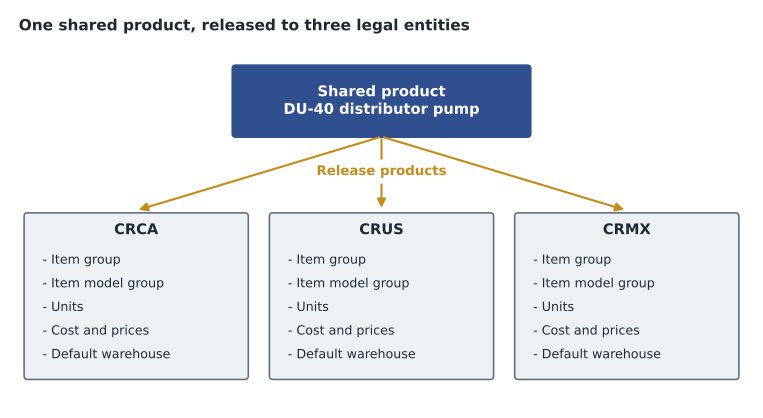
The second session started with a single pump. Annelise asked Piotr to choose a product that everyone knew, and he picked the DU-40, the smallest distributor unit, which Cobalt Ridge builds for stock in Akron and sells in both countries. By the end of the morning the team had created it as a shared product, released it to CRCA and CRUS, and filled in the settings each company needed. Along the way they met most of the concepts in this lesson.
Where products live
Products are maintained in the Product information management module. The main list is All products and product masters, which shows every shared product in the system regardless of legal entity. Two filtered views of it, Products and Product masters, show each subtype on its own. Released products is a separate list in the same module, and it shows the items released to the current legal entity only; switching the company picker changes what it shows. The Product information management workspace gathers tiles for recently created products, products not yet released and released products with missing settings, which makes it the usual starting point for the people who maintain products.
Many companies give the job of creating shared products to a small central team, often called product data stewards, while the people in each legal entity complete the released product settings. Cobalt Ridge decided that Piotr's planning group would own shared products, and that each plant's inventory controller would complete local settings, with Ifeoma checking cost and item group settings before an item could be used.
Product types and subtypes
Every product has a product type and a product subtype, chosen when the product is created.
| Setting | Values | Meaning |
|---|---|---|
| Product type | Item | Something that can be stocked; inventory transactions update on-hand quantities |
| Product type | Service | Something bought or sold that is not held in stock, such as installation or freight |
| Product subtype | Product | A distinct product with no variants |
| Product subtype | Product master | A template for variants defined by product dimensions such as size or configuration |
Services can still have released product settings such as prices and item groups, and whether a service is tracked in inventory is decided by its item model group rather than its type alone. In practice, freight, commissioning visits and engineering hours at Cobalt Ridge became service products with an item model group that does not track stock. Pumps and components became items. Lesson 3 covers product masters; this lesson concentrates on distinct products.
Creating a product
Creating a product asks for very little: the type, subtype, product number and name, and for product masters the product dimension group and configuration technology. The product number is usually generated from a number sequence or entered manually, depending on the setup in the product information management parameters. Cobalt Ridge kept its existing part-number scheme, so numbers were entered manually and validated against a naming rule, but new products created after go-live will use a number sequence with a prefix for each family.
The product name can be translated. The product translations page holds the name and description in each language a company uses, and documents printed for a customer or vendor use the translation for their language. With CRMX starting in January, Piotr asked for Spanish names on every distributor product, and the translations became part of the migration file.
Releasing products
A shared product cannot be bought, sold, stocked or produced until it is released to a legal entity. Release is done from the product list with Release products, which opens a guided dialog: choose the products, choose the legal entities, and confirm. For large volumes the release can run as a batch job. The system creates a released product in each chosen company with the same item number by default, and copies defaults from the shared product where they exist, such as the storage and tracking dimension groups.
Release does not finish the job. A newly released product typically lacks an item group, an item model group and units, and until those are filled in, transactions are refused. This is where product templates help, covered below, and where the workspace tile for released products with missing settings earns its place. Henrik's first view in the sandbox was a saved view of released products in CRUS where the item model group was blank; by the end of migration it had to be empty.
Released products can also be created directly in a legal entity with New on the released products list. The system then creates the shared product and the released product at the same time. This is convenient for a company with one legal entity, but in a group like Cobalt Ridge it hides the shared step and makes it easier to create duplicates, so the project restricted direct creation to the product data stewards.
| Released product FastTab or tab | Typical settings |
|---|---|
| General | Item group, product lifecycle state, approved vendor check, search name |
| Purchase | Purchase unit, buyer group, default vendor, purchase price and price unit, over- and under-delivery tolerances |
| Sell | Sales unit, sales price, sales tax item group, sales category |
| Manage inventory | Inventory unit, weight and dimensions, shelf life settings, counting group, ABC codes |
| Manage costs | Item model group, cost price, cost group, costing version prices |
| Engineer and Plan | Production type, coverage group, BOM and route settings |
| Warehouse | Unit sequence group, reservation hierarchy, filter codes (with warehouse management) |
Product templates
A product template, in this context, is a saved set of released product values that can be applied when a product is created or released. Finance and operations apps use record templates for this: a user fills in a released product with typical values, saves it as a template, and later chooses that template when creating a new record. Templates can be personal or shared with everyone in the legal entity.
Annelise helped the team build one shared template per kind of product in each company: purchased component, purchased component with batches, finished pump with serials, spare part sold separately, consumable and service. Each template carried the item group, item model group, dimension groups, units and the default lifecycle state. When the inventory controllers released a product they chose the matching template, and most of the local settings were filled in at once. The study guide lists creating and applying product templates as a skill, and the exam tends to test the idea that templates speed up consistent creation rather than the exact clicks.
Worked problem
Releasing a new spare part
Engineering introduces a replacement impeller, part IMP-2210, sold as a spare for mining pumps in CRCA and CRUS and stocked in both. Walk through creating and releasing it.
Show solution
- In All products and product masters, create a product of type Item and subtype Product with number IMP-2210 and name Impeller, slurry, 220 mm.
- Assign it to the Spare parts node of the sales category hierarchy and the Castings node of the procurement category hierarchy.
- Fill in the product attributes for material and diameter.
- Use Release products to release it to CRCA and CRUS.
- In each company, open the released product and apply the shared template Spare part sold separately to set item group, item model group, dimension groups and units.
- Enter the local purchase price and sales price, and set the default warehouses.
Answer: A shared product with categories and attributes, released to two companies, each completed from the same template with local prices and warehouses.
Category hierarchies
A category hierarchy is a tree of categories used to group products for a purpose. Several hierarchies can exist side by side, and each is given a role, such as procurement, sales, retail or cost. A product can belong to a category in each hierarchy. At Cobalt Ridge the procurement category hierarchy grouped products the way buyers think, by spend area: castings, machined parts, motors, bearings, seals, fasteners, fluids and services. The sales category hierarchy grouped them the way customers and reports see them: municipal pumps, mining pumps, distributor units, spare parts and services.
Categories matter well beyond reporting. Procurement policies can require that purchase requisitions use procurement categories, vendors can be approved for categories, and sales and pricing can use sales categories. A category can also carry attributes, which brings us to the next topic.
Product attributes
A product attribute is a named property, such as material, flow rate or maximum pressure, whose values describe a product. Attributes are built from attribute types, which define the kind of value: text, integer, decimal, Boolean or date, optionally with a fixed list of allowed values or a range and a unit of measure. Attributes are then attached to categories, and every product in that category inherits them so that its values can be filled in.
| Attribute | Attribute type | Example value |
|---|---|---|
| Wetted material | Text, fixed list: cast iron, ductile iron, stainless 316, high-chrome | High-chrome |
| Impeller diameter | Integer, unit millimeters, range 80 to 900 | 220 |
| Maximum pressure | Decimal, unit bar | 16 |
| ATEX rated | Boolean | No |
| Certification date | Date | 2026-03-02 |
Attributes let people search and filter products by meaningful properties rather than by trying to decode a product name. They also feed product descriptions, search and integrations. Teodora was pleased that wetted material became a field rather than a phrase buried in a description, because her quality tests differ by material.
Product lifecycle states
Products are born, mature and are eventually withdrawn. A product lifecycle state is a code assigned to a released product that controls which business processes are allowed for it. Each state lists processes, such as purchase orders, sales orders, production, planning and transfer orders, and for each one says whether it is enabled, blocked or allowed with a warning. A state can also be marked active for planning, so master planning includes or excludes the item.
| Lifecycle state | Purchase | Sales | Production | Used for |
|---|---|---|---|---|
| Design | Blocked | Blocked | Blocked | Products being engineered |
| Pilot | Allowed with warning | Blocked | Allowed with warning | First builds and approvals |
| Active | Enabled | Enabled | Enabled | Normal products |
| Phase out | Blocked | Enabled | Blocked | Sell remaining stock only |
| Obsolete | Blocked | Blocked | Blocked | Kept for history |
The phase-out state solved one of Piotr's oldest problems. In the old system a superseded impeller kept being reordered because buyers did not know it had been replaced. With the phase-out state, the system refuses new purchase orders while still allowing the remaining stock to be sold as spares. When the stock reaches zero, the product moves to obsolete.
Lifecycle states can be assigned per released product, and a default state can be set in the product information management parameters for newly released products. Cobalt Ridge set Pilot as the default so that a newly released product could not be bought in quantity by accident before engineering signed it off.
Bills of materials in brief
The MB-330 study guide includes creating bills of materials and BOM versions under product information management. A bill of materials lists the components and quantities needed to make one unit of a product, and a BOM version connects a BOM to a released product for a site and a date range, with an approval and activation step. A product can have several BOM versions, for example when a cheaper casting replaces an older one from a given date. BOMs depend on the released products of both the parent and the components, which is why products and their units must be correct first. Production, routes and BOM calculation are taught in MSBA-333; for now, it is enough to know that the finished DU-40 will have an approved, active BOM version at the Akron site listing its casing, impeller, shaft, seal kit, bearings, motor and fasteners.
Common mistakes
MistakeCreating released products directly in each company in a multi-company group.
InsteadCreate shared products once and release them, so the same product is not created twice.
MistakeReleasing a product and leaving item group and item model group blank.
InsteadApply a released product template or complete the settings before the item is used.
MistakeUsing one category hierarchy for both buying and selling.
InsteadUse hierarchies with different roles; buyers and customers group products differently.
MistakeDeleting old products to stop them being reordered.
InsteadMove them to a phase-out or obsolete lifecycle state and keep their history.
Summary and key terms
- Products are created once in All products and product masters and released to legal entities.
- Product type is item or service; subtype is product or product master.
- Released products carry company settings such as item group, item model group, units and prices; templates speed up consistent setup.
- Category hierarchies with roles group products for procurement, sales and reporting; attributes describe products with typed values.
- Lifecycle states enable, warn or block processes for a released product across its life.
- Product subtype
- Product for a distinct product, or product master for a product with variants.
- Release products
- The action that makes a shared product available in one or more legal entities.
- Record template
- A saved set of field values that can be applied when creating a record.
- Category hierarchy
- A tree of categories with a role such as procurement or sales.
- Product lifecycle state
- A code that controls which business processes are allowed for a released product.
Practice problems
Work each problem on paper first, then reveal the answer to check.
Which list shows only the products released to the current company?
Show answer
Released products.
Which lifecycle state setting would stop new purchases but allow remaining stock to be sold?
Show answer
A state, such as phase out, with purchase blocked and sales enabled.
Where are product attributes attached so that products inherit them?
Show answer
To categories in a category hierarchy, through attribute groups or category attributes.
Lesson quiz · 5 questions
Score 60% or more to complete this lesson.
Create a free account to save your progress, take quizzes and earn a certificate.