
MSBA-330 · Lesson 5 of 12 · 18 min
Inventory dimensions and storage
▶ Video coming soon A video version of this lesson is on the way.
Henrik's whiteboard drawing of the Denver warehouse filled the session room's longest wall. It showed receiving doors, a quality hold cage, pallet racking in four aisles, a mezzanine for small parts, a yard for large pump casings and a shipping area. He wanted the system to know all of it: which aisle a part was in, whether it was waiting for inspection, and which pallet it sat on. Annelise used the drawing to explain storage dimensions, and by the end of the session each part of the drawing had a name in the system.
Storage dimensions
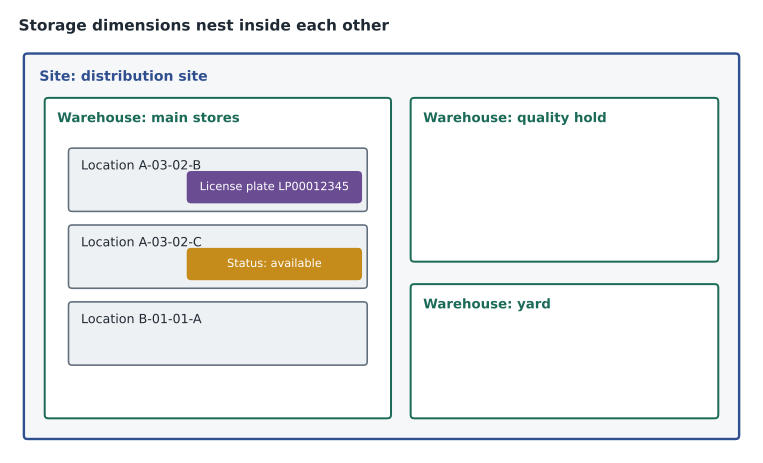
Storage dimensions describe where inventory is held and in what state. They are switched on in a storage dimension group, which is assigned to each released product.
| Storage dimension | Meaning | At Cobalt Ridge |
|---|---|---|
| Site | A physical or planning location, often a plant or region; links inventory to financial dimensions and planning | AKR plant, DEN warehouse |
| Warehouse | A store within a site | Main stores, quality hold, finished goods, yard |
| Location | A position within a warehouse, such as an aisle, rack, shelf and bin | A-03-02-B in pallet racking |
| Inventory status | A state such as available, damaged or awaiting inspection (warehouse management) | Available, QC hold, damaged |
| License plate | An identifier for a container such as a pallet (warehouse management) | LP00012345 on a pallet of gaskets |
Site is always active: every item is held at a site. In practice warehouse is active too, because inventory transactions need a warehouse to be meaningful. Location is optional for simple warehouses but needed for anything more than a single store room. Inventory status and license plate are used by the advanced warehouse management processes covered in MSBA-332; when an item uses those processes, its storage dimension group must enable them and the Use warehouse management processes option.
Physical, financial and coverage settings
For each storage dimension, the group decides more than whether it is active. Three settings determine how the dimension behaves in inventory and costing.
| Setting | If selected | Typical choice |
|---|---|---|
| Active | The dimension is recorded on transactions | Site, warehouse, location |
| Physical inventory | On-hand quantities are tracked separately for each value | Site, warehouse, location |
| Financial inventory | Inventory value is calculated separately for each value | Site, and often warehouse |
| Coverage plan by dimension | Master planning plans supply separately for each value | Site, and warehouse where planned separately |
| For purchase prices and sales prices | Prices can be set for each value | Site, if prices differ by plant |
Financial inventory decides at what level cost is calculated. If it is set for site only, a casting held in two warehouses at the same site has one cost. If it is set for warehouse too, each warehouse has its own cost. Site is always financial, because sites tie inventory to financial dimensions and to the ledger. Ifeoma wanted costs by site, but not by warehouse, because moving a part from main stores to the quality hold should not change its cost, and that became the rule for nearly all items.
Tracking dimensions in brief
Tracking dimensions identify which particular lot or unit an item is: batch number, serial number and, for consignment stock, owner. They live in a separate tracking dimension group with similar settings: active, physical inventory, financial inventory, and options for when numbers are captured, such as on receipt or only when sold. Lesson 10 is devoted to them. The reason to mention them here is that storage and tracking dimension groups are designed together, because both are assigned on the released product and both are very hard to change once stock exists.
Sites, warehouses and locations in setup
Before dimension groups can be used, the values must exist. Sites are created in inventory management setup and are linked to a financial dimension, so that inventory transactions carry the site on their vouchers. Warehouses belong to sites and have settings such as a default receipt and issue location, a quarantine warehouse for quality holds, a transit warehouse for transfer orders and, for warehouse management, whether the warehouse uses warehouse management processes. Locations belong to warehouses and are created individually or generated by a location format such as aisle, rack, shelf and bin, with location profiles and location types that warehouse management uses to direct work.
| Warehouse at DEN | Purpose | Notes |
|---|---|---|
| DEN-MAIN | Main stores | Racking and mezzanine; locations by aisle, rack, shelf, bin |
| DEN-QC | Quality hold | Quarantine warehouse for DEN-MAIN |
| DEN-YARD | Large castings and casings | Ground locations only |
| DEN-TRANS | Goods in transit | Transit warehouse for transfer orders |
Worked problem
Choosing a storage dimension group
Henrik wants pallet-level tracking and inspection statuses for gaskets in the main stores, using warehouse management. Ifeoma wants one cost per site. Which storage dimension group settings do the gaskets need?
Show solution
- Activate site, warehouse, location, inventory status and license plate.
- Select physical inventory for all five so that on-hand is tracked at each level.
- Select financial inventory for site only, so cost is calculated per site.
- Turn on Use warehouse management processes, which the warehouse management features require.
- Leave coverage by dimension at site and warehouse so planners can plan each store separately.
Answer: A storage dimension group, here called SWLSP-WMS, with all five dimensions physical, site financial, and warehouse management processes enabled.
A small set of groups
A common mistake is to create a storage dimension group for every special case. Annelise recommended a small, named set, each with a clear purpose, and the team settled on four.
| Group | Dimensions | Used for |
|---|---|---|
| SW | Site, warehouse | Services and items held in simple stores |
| SWL | Site, warehouse, location | Plant stores without warehouse management |
| SWLSP-WMS | Site, warehouse, location, inventory status, license plate, with warehouse management | Items at the distribution warehouse |
| SWL-FINW | As SWL, with warehouse financial | A few consignment-like items valued by warehouse |
Reservation hierarchies
Items that use warehouse management processes also need a reservation hierarchy. When stock is reserved for a sales order or production order, the system has to decide which dimensions to reserve at once and which to leave for the warehouse to choose when it picks. The reservation hierarchy lists the storage and tracking dimensions in order, from site at the top down to license plate and serial number, and marks a line between those reserved at order time and those decided later by warehouse work.
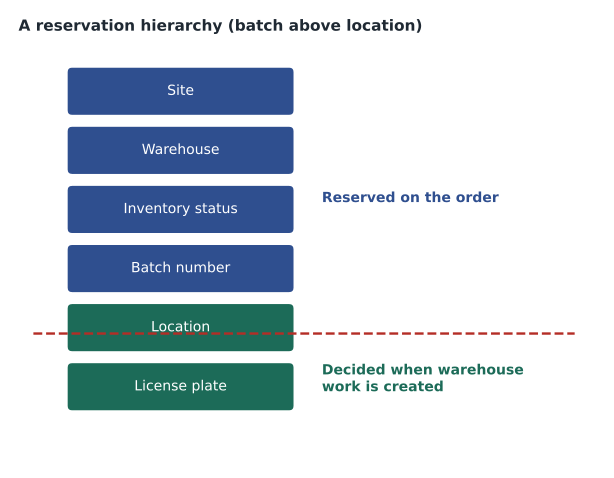
The most common hierarchy reserves site, warehouse and inventory status on the order and leaves location and license plate to the warehouse. For batch-tracked items, the hierarchy can put batch above location, so that a specific batch can be reserved on a sales order when a customer requires it, such as a utility that wants seals from a batch it has already approved. This is called batch-above reservation, and it is chosen per hierarchy. The study guide lists configuring reservation hierarchies as a product prerequisite, and it is assigned on the released product along with the dimension groups.
Inventory status
Inventory status deserves its own attention because it changes how stock is used without moving it. Each status has a flag that says whether stock in it is blocking. Stock in a blocking status, such as damaged or QC hold, is on hand but not available for reservation. Statuses are assigned on receipt, according to defaults on the warehouse or the receiving process, and changed with an inventory status change or through warehouse work. Teodora's process uses a QC hold status for parts that arrive at the distribution warehouse and need a visual check, which is quicker than moving them to the quarantine warehouse.
| Status | Blocking | Used when |
|---|---|---|
| Available | No | Normal stock |
| QC hold | Yes | Received, waiting for a quick check |
| Damaged | Yes | Found damaged; waiting for a decision |
| Customer return | Yes | Returned goods before inspection |
Product filter codes
One more warehouse-related product setting appears in the study guide's product prerequisites: product filter codes. These are codes assigned on the released product, such as HAZ for hazardous items or HEAVY for castings over 50 kilograms, that warehouse management uses in location directives and work templates to send items to suitable locations or to choose a particular way of working. The heavy castings at Cobalt Ridge carry HEAVY, which sends them to the yard's ground locations, and lubricants carry HAZ, which sends them to the flammables cabinet. The directives themselves are covered in MSBA-332.
On-hand and dimension display
With dimensions in place, the on-hand list shows stock at any level the user chooses. The Dimensions button selects which dimensions to show, and the list can summarize to site and warehouse or break down to location, status and license plate. The columns separate physical inventory, physical reserved, available physical, ordered in total and available in total, so that a buyer can see what is promised as well as what is there. Henrik's team built a saved view at location level for the morning stock check, and Piotr's planners used a site-level view.
Testing the design before migration
Annelise insisted that every dimension group be proved with transactions in the CONFIG sandbox before a single migrated item used it. The test script was short but thorough. For each group, the team released one sample item, received it through a purchase order, moved it between locations, changed its status where status was active, transferred it to another warehouse, issued part of it to a production order or sales order, counted it, and finally ran an inventory value report to see whether costs appeared at the expected level.
| Test | What it proves |
|---|---|
| Receive to a location | The location dimension is active and defaults correctly from the warehouse |
| Move between locations | Physical tracking by location works and cost does not change |
| Transfer between warehouses at one site | Cost stays the same when warehouse is not financial |
| Transfer between sites | Cost moves with the stock and posts to the right site financial dimension |
| Change inventory status | Blocking statuses remove stock from available quantities |
| Reserve on a sales order | The reservation hierarchy reserves the expected dimensions |
| Run the inventory value report | Values appear at site level, not warehouse level |
The test found one surprise. A storage dimension group copied from a demonstration company had warehouse marked as financial. Moving castings from main stores to the yard, which should have been a simple relocation, recalculated their cost at the next inventory close. The group was corrected before migration, which took five minutes in the sandbox. Ifeoma noted that the same correction after go-live would have needed every casting to be issued out and received back.
The dimension design also has to fit the financial dimensions that Thandeka's team uses. Each site is linked to a value of a site financial dimension, so every inventory voucher carries it, and the posting profiles described in the finance courses can then report inventory value by plant. Released products can also carry default financial dimensions, which some companies use to report stock by business unit. Cobalt Ridge kept it simple: site drives one financial dimension, and business unit comes from the released product's defaults where needed.
Changing dimension groups
Kiri's question from the first session came back here. What if the team gets a dimension group wrong? Annelise gave a direct answer. Changing the storage or tracking dimension group of an item with on-hand stock or open transactions is either blocked or requires the stock to be emptied and received again, and historic transactions keep their original dimensions. Microsoft provides a function to change the storage dimension group of items in some situations, for example when moving items into warehouse management, but it has conditions and is a project in itself. The time to get it right is now, with test transactions in the CONFIG sandbox.
Common mistakes
MistakeMaking warehouse a financial dimension by default.
InsteadDecide deliberately; financial by warehouse means moving stock can change its cost.
MistakeCreating a storage dimension group for each item family.
InsteadKeep a small, named set of groups with clear purposes.
MistakeForgetting the reservation hierarchy for warehouse management items.
InsteadAssign a hierarchy on every released product that uses warehouse management processes.
MistakeMoving damaged stock to another warehouse just to stop it being sold.
InsteadUse a blocking inventory status or inventory blocking where that is enough.
Summary and key terms
- Storage dimensions are site, warehouse, location, inventory status and license plate, set in a storage dimension group.
- Each dimension can be physical, financial and used for coverage; financial settings decide the level at which cost is calculated.
- Sites, warehouses and locations must be created and linked before dimension groups are used.
- Reservation hierarchies decide which dimensions are reserved on orders and which by warehouse work; batch can be reserved above location.
- Inventory status with blocking flags and product filter codes support warehouse processes; dimension groups are very hard to change later.
- Storage dimension group
- A group that activates storage dimensions and their physical, financial and coverage settings.
- Financial inventory
- A dimension setting that calculates inventory value separately for each value of the dimension.
- Reservation hierarchy
- The ordered list of dimensions that decides what is reserved at order time and what later.
- Inventory status
- A storage dimension describing the state of stock, which can block it from reservation.
- Product filter code
- A code on a released product used by warehouse rules to choose locations or work.
Practice problems
Work each problem on paper first, then reveal the answer to check.
Which storage dimension is always active and always financial?
Show answer
Site.
What does batch-above reservation allow?
Show answer
Reserving a specific batch on an order before the warehouse chooses a location.
Stock in a blocking inventory status is included in which column of on-hand, and excluded from which?
Show answer
It is in physical inventory but not in available physical.
Lesson quiz · 5 questions
Score 60% or more to complete this lesson.
Create a free account to save your progress, take quizzes and earn a certificate.