
MSBA-330 · Lesson 3 of 12 · 19 min
Product variants and dimensions
▶ Video coming soon A video version of this lesson is on the way.
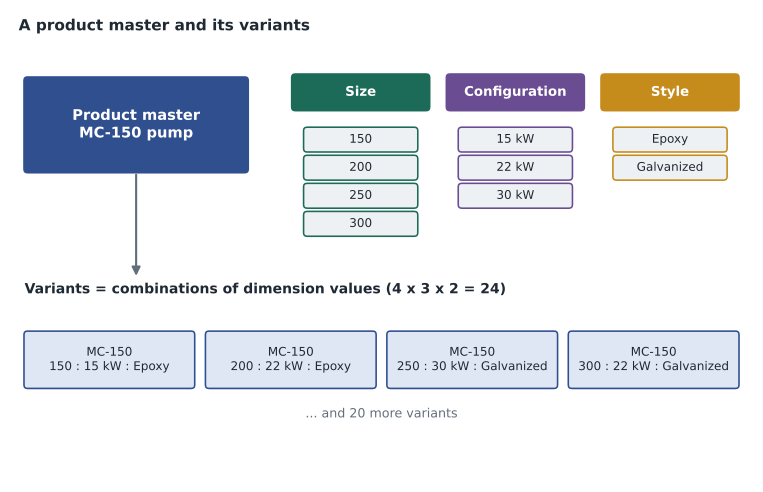
Piotr's first complaint about the old system was the item list for municipal pumps. The MC-150 municipal centrifugal pump came in four impeller sizes, three motor ratings and two coatings, and every combination had its own item number with a name that tried to describe it in thirty characters. There were 24 item numbers for one pump, and when engineering changed a gasket, someone had to update 24 bills of materials. Annelise promised that by the end of this session the MC-150 would be one product with variants.
Product masters and variants
A product master is a product with the subtype product master. It is not itself stocked or sold. Instead it acts as the parent of a set of product variants, each of which is a specific combination of product dimension values. Variants are what appear on purchase orders, sales orders, production orders and inventory. Each variant has its own variant number, can have its own bar codes, prices and costs, and appears as its own line in on-hand inventory. But the shared description, categories, attributes, released product settings and most setup are held once, on the master.
The product dimensions
Finance and operations apps offer a fixed set of product dimensions. Each can be switched on or off in a product dimension group, and a product master uses exactly one product dimension group.
| Product dimension | Typical use | Used at Cobalt Ridge |
|---|---|---|
| Configuration | An engineered variation, often with its own BOM | Motor rating on municipal pumps |
| Size | A physical size | Impeller size on municipal pumps |
| Color | A color or finish | Not used |
| Style | A style or design variation | Coating: epoxy or galvanized |
| Version | A revision of the same product | Engineering revision on castings (pilot) |
Dimension values are defined as shared lists, such as sizes or colors, and then linked to each product master: the MC-150 uses sizes 150, 200, 250 and 300, but not every size in the shared list. The Version dimension is newer than the others and is designed for revisions, such as revision A and revision B of a casting, where the company wants to keep stock of each revision apart without creating new product numbers. In earlier versions it had to be turned on in Feature management before it appeared, so check that it is available in your environment before designing around it.
The names of product dimensions can be renamed for display in some places, but the underlying dimension keeps its name in setup and data entities. Annelise warned that if the team used Style for coating, everyone would need to remember that, so the decision went into the log with the words style means coating underlined.
Configuration technologies
When a product master is created, it is given a configuration technology. This decides how variants come into existence.
| Configuration technology | How variants are created | Best for |
|---|---|---|
| Predefined variant | Variants are created in advance, either one at a time or by generating all valid combinations, and then released | Products with a manageable set of known variants |
| Dimension-based configuration | The configuration value is created when an order is entered, by choosing options in a configurator | Products configured to order where the configuration drives the BOM |
| Constraint-based configuration | A product configuration model with attributes, constraints and calculations creates a variant at order entry | Complex engineer-to-order or configure-to-order products |
| Rule-based configuration | An older approach based on rules | Existing solutions; new configuration designs use constraint-based models |
Most products use predefined variants. The MC-150 has 24 possible combinations and all are valid, so the team generated all 24 variants at once with Variant suggestions, which proposes every combination of the linked dimension values. For products where some combinations make no sense, variants can be created individually or the unwanted suggestions can be cleared before they are created.
Engineering asked whether the larger mining pumps, with dozens of options, should use constraint-based configuration. Annelise said yes in principle, but recommended doing it in a later phase. A configuration model is a project in itself, and the go-live scope should be predefined variants only. That decision is in the log as well.
Worked problem
Turning 24 items into one master
Replace the 24 MC-150 item numbers with one product master, keeping the ability to stock, cost and sell each combination.
Show solution
- Create a product dimension group MUNI that activates Configuration, Size and Style.
- Create a product of subtype Product master, number MC-150, with dimension group MUNI and configuration technology Predefined variant.
- Link the sizes 150, 200, 250 and 300, configurations 15 kW, 22 kW and 30 kW, and styles Epoxy and Galvanized to the master.
- Use Variant suggestions to propose all 24 combinations and create them.
- Release the master and its variants to CRCA and CRUS.
- Record a cross-reference from each old item number to the new variant for migration and for customers who still quote old numbers.
Answer: One product master with three active dimensions and 24 released variants, with the old numbers kept as external references.
Releasing variants
Releasing a product master to a legal entity creates the released master. Its variants must also be released before they can be used there. The release dialog lets you choose variants as well as masters, and variants created later can be released on their own. A company that sells only some sizes can release only those variants. At Cobalt Ridge, CRUS released all 24 MC-150 variants, but CRMX, when it starts, will release only the six variants sold in Mexico.
Most released product settings, such as item group, item model group and units, are inherited by released variants from the released master. Some can be set per variant: cost prices and sales prices can differ by variant through costing versions and trade agreements, default order settings can be set per variant, and bar codes and external item numbers are per variant. When engineering creates a new BOM for the 30 kW configuration only, it is linked to that configuration value rather than to the whole master, which is one reason configuration is the dimension used for engineered differences.
Variant numbers and display
Variants have a number and a name. By default the variant number is generated from the product number and the dimension values, joined by a separator, such as MC-150 : 200 : 22 kW : Epoxy. The format is controlled in the product information management parameters, as is the way product names for variants are built. Cobalt Ridge kept the default style because it was readable on the shop floor, but shortened the dimension value codes so that the full number fit on a label.
| Where a variant appears | How it is identified |
|---|---|
| Sales order line | Item number MC-150 plus dimension values in the Configuration, Size and Style fields, or the variant number |
| On-hand inventory | One line per variant per storage and tracking dimension combination |
| Bar code | A bar code record linked to the item and its variant dimensions |
| Price | A trade agreement line for the item with the variant dimensions filled in |
| Standard cost | A costing version price for the item and its variant dimensions |
Product dimensions compared with other dimensions
Product dimensions are only one of three families of inventory dimensions. The other two, storage dimensions and tracking dimensions, are the subject of lessons 5 and 10. The difference is in what they describe.
| Family | Answers the question | Examples | Set where |
|---|---|---|---|
| Product dimensions | What exactly is this product? | Configuration, Size, Color, Style, Version | Product dimension group on the product master |
| Storage dimensions | Where is it and in what state? | Site, Warehouse, Location, Inventory status, License plate | Storage dimension group on the released product |
| Tracking dimensions | Which particular unit or lot is it? | Batch number, Serial number, Owner | Tracking dimension group on the released product |
Henrik asked whether a pump's coating could be a batch attribute instead of a product dimension. Annelise explained the test she uses. If customers order it, prices differ by it, or the BOM differs by it, it belongs in a product dimension. If it describes a particular lot or unit after it is made, such as a measured hardness, it belongs in batch attributes. If it describes where the stock is, it is a storage dimension. Coating is ordered by customers and changes the BOM, so it stays a product dimension.
Working with variants day to day
Once variants exist, most people meet them through a few everyday tasks. A sales clerk entering an order types the item number MC-150 and then fills in the Configuration, Size and Style fields, or picks the variant number directly; if a combination has not been released to the company, the line is refused. A buyer raising a purchase order for a component with variants does the same. An inventory controller looking at on-hand sees one line for each variant in each warehouse and can use the dimension display settings to show or hide product dimensions, so the view can roll up to the master or break down to each variant.
Planners rely on the same structure. Coverage settings, such as minimum stock and reorder quantities, can be set for each variant at each site or warehouse, so the fast-moving 200 millimeter, 22 kilowatt, epoxy-coated MC-150 can be kept in stock while the rare 300 millimeter galvanized variant is built only to order. Ifeoma's cost reports group by item number and break down by variant, which finally let her see that two of the 24 combinations had been sold below cost for a year.
| Task | Who | Variant detail used |
|---|---|---|
| Enter a sales order line | Customer service | Item number and product dimension values |
| Review on-hand stock | Inventory controller | Dimension display to roll up or break down variants |
| Set reorder points | Planner | Item coverage per variant and warehouse |
| Compare margins | Cost accountant | Costs and sales by variant |
| Print a label | Warehouse | Variant number and bar code |
Dimension display is worth a moment of practice. Many inquiry pages, such as on-hand and transactions, have a Dimensions button that opens a dialog listing every inventory dimension with a check box. Selecting only the product dimensions and the warehouse gives a compact summary; adding location and batch breaks it down further. Users can save their choice so the page opens the same way next time. Henrik trained his team to start broad and add dimensions only when a question needed them, because a page that shows every dimension at once is hard to read.
When not to use a product master
Product masters are powerful, but not every family of similar items needs one. Fasteners are a good example. Cobalt Ridge stocks hundreds of bolts that differ by diameter, length and grade. They could be modeled as one master with Size and Style, but buyers buy them from catalogs by part number, prices differ unpredictably, and nobody sells them by choosing options. The team kept them as distinct products, each with its own number, and used product attributes for diameter, length and grade so that they can be searched and filtered.
| Use a product master when | Use distinct products when |
|---|---|
| Customers or planners choose options from a set | Each part is bought from a catalog by number |
| Most settings are the same across the family | Settings such as vendor, lead time and unit differ for each part |
| The BOM or price differs systematically by option | Differences are better described as attributes |
| Reports need to roll up the family easily | Each part is analyzed on its own |
Changing variants later
Variants can be added after go-live: link a new dimension value to the master, create the variant and release it. Variants that are no longer made can be moved to a lifecycle state that blocks new orders, just like distinct products, and lifecycle states can be set per released variant where the feature is enabled. What is hard to change is the product dimension group itself. Activating a new dimension on a master that already has variants and transactions is not allowed, because existing transactions have no value for it. That is why the dimension group for every master family was agreed in the dimension design workshop before any masters were created.
Teodora asked about the Version dimension for castings. Engineering revises casting patterns two or three times a year, and quality needs to know which revision is in each bin. Version was designed for exactly this, and the pilot will use it for the high-chrome castings, with a lifecycle state on old versions that allows consumption of remaining stock but blocks new purchase orders.
Common mistakes
MistakeReleasing a product master and forgetting to release its variants.
InsteadRelease the variants each company uses; a released master alone cannot be ordered.
MistakeUsing a product dimension for something that describes a particular lot.
InsteadUse batch attributes for lot properties and product dimensions for what customers order.
MistakeStarting with constraint-based configuration for every configurable product.
InsteadUse predefined variants where the set is manageable; configuration models are a separate project.
MistakePlanning to add a new product dimension to an existing master later.
InsteadChoose the product dimension group before variants and transactions exist.
Summary and key terms
- A product master is a parent with product dimensions; variants are the combinations that are stocked and sold.
- The product dimensions are configuration, size, color, style and version, activated in a product dimension group.
- Configuration technology decides whether variants are predefined, created by dimension-based configuration, or built from a constraint-based model.
- Variants must be released to each legal entity that uses them; prices, costs and bar codes can differ by variant.
- Product dimensions describe what the product is; storage and tracking dimensions describe where it is and which unit or lot it is.
- Product master
- A product with dimensions that acts as the parent of product variants.
- Product variant
- A specific combination of product dimension values of a product master.
- Product dimension group
- The group that activates product dimensions for a product master.
- Configuration technology
- The method by which a product master's variants are created.
- Variant suggestions
- A function that proposes variants for combinations of linked dimension values.
Practice problems
Work each problem on paper first, then reveal the answer to check.
Which product dimension is normally used for an engineered difference that changes the BOM?
Show answer
Configuration.
What must be done before CRMX can sell an MC-150 variant?
Show answer
Release the master and that variant to CRMX and complete the settings.
Name the three families of inventory dimensions.
Show answer
Product, storage and tracking dimensions.
Lesson quiz · 5 questions
Score 60% or more to complete this lesson.
Create a free account to save your progress, take quizzes and earn a certificate.