
MSBA-309 · Lesson 5 of 12 · 18 min
Domain review: how Copilot works with data
▶ Video coming soon A video version of this lesson is on the way.
On Wednesday morning Priya drew a long arrow across the whiteboard, from Dmitri's editor on the left to a box labeled "model" on the right and back again. "This domain is that arrow," she said. Understanding GitHub Copilot data and architecture is worth 10 to 15 parts in 100. Dmitri had scored 4 of 7 on it, and his mistakes were all about the middle of the arrow: what happens to a prompt between the editor and the model, what filters it passes through, and what is kept afterwards. The session walked the arrow from end to end.
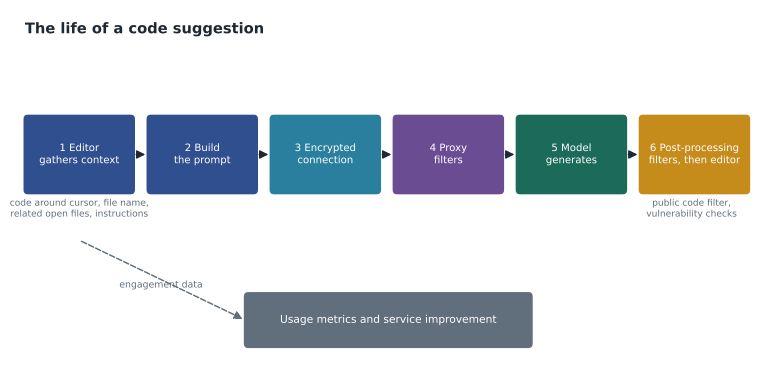
The life of a code suggestion
A code completion begins when you type or pause in a supported editor. The Copilot extension gathers context: the code before and after the cursor, the file's name and language, other open files that look relevant, and, where enabled, custom instructions. It builds a prompt from that context. The prompt is sent over an encrypted connection to GitHub's Copilot service, which passes it through a proxy before it reaches the model hosted for GitHub. The model returns one or more candidate completions, which pass back through filters, and the extension shows the result as gray ghost text. You accept, cycle, edit or dismiss it. The extension also records engagement data, such as whether a suggestion was accepted, which GitHub uses to measure and improve the service and which feeds usage metrics.
Chat follows the same shape with a different prompt. The prompt combines GitHub's own system instructions, any custom instructions, the context you add explicitly with references or selections, context Copilot gathers automatically, earlier turns of the conversation, and your message. Agent mode adds tool calls: the model can ask to read a file, search the workspace or run a command, the editor carries out the approved action, and the result is added to the next prompt. The coding agent does the same in a cloud environment.
How prompts are built
The study guide asks you to explain how Copilot builds prompts. The key idea is that the model sees only what the prompt contains. For completions, Copilot uses the text before and after the cursor, a technique often called fill-in-the-middle, so it can suggest code that fits both what came before and what follows. It ranks snippets from other open files by how similar they look to what you are working on and includes the most relevant ones while they fit. That is why closing unrelated tabs and opening a related file can improve suggestions, and why a good function name and a comment describing intent help so much.
Every model has a context window, a limit on how many tokens of prompt and response it can handle at once. When the available context is larger than the window, something is left out. Copilot's prompt builder prioritizes, so the most relevant content goes in first. A rough picture helps answer exam questions about missing context:
window = 8000
reserve = 1000
items = [("custom instructions", 600), ("current file", 3200),
         ("open tab: parse.py", 2100), ("open tab: report.md", 1800), ("earlier chat", 1500)]
used = 0
for name, size in items:
    if used + size <= window - reserve:
        used += size
        print("include", name, size)
    else:
        print("drop   ", name, size)
print("tokens used:", used, "of", window - reserve)include custom instructions 600 include current file 3200 include open tab: parse.py 2100 drop open tab: report.md 1800 drop earlier chat 1500 tokens used: 5900 of 7000
What this code does
The example uses invented sizes: a window of 8,000 tokens with 1,000 kept free for the answer, and five pieces of context listed from most to least important. It goes down the list adding each piece if it still fits and dropping it if it does not. The output shows the instructions, the current file and one related tab getting in, while the report note and the earlier chat are left out, which is exactly how a rule in a long-ago chat message or an unopened file can be "forgotten".
Real windows are much larger than this, and Copilot does not use a simple first-come list, but the lesson holds: context competes for space, and what matters most should be closest at hand. Custom instructions, an explicit reference such as #file, or a selection make sure important context is included.
The proxy and its filters
Between the editor and the model, GitHub's service applies filters. The exam names several. Prompts and responses are screened for harmful or offensive content, such as hate speech, and requests that fall outside Copilot's purpose may be declined. Suggestions can be checked against common insecure coding patterns, such as hard-coded credentials and injection-prone queries, to reduce the chance of suggesting them. And the public code filter, when an administrator or user blocks matches, checks suggestions of meaningful length against public code on GitHub and suppresses those that match; when matches are allowed instead, code referencing shows where similar code appears and its license. Lesson 8 covers those two in detail.
Filters reduce risk; they do not remove it. A vulnerability filter catches common patterns, not every flaw. A content filter screens language, not correctness. That is why the responsible-use habits from lesson 3 still apply after the filters have done their work.
| Stage | What happens | Exam angle |
|---|---|---|
| Context gathering | Editor collects code, file information, related files and instructions | Why open files and good names improve suggestions |
| Prompt building | Context ranked and trimmed to fit the window | Why some context is left out |
| Transmission | Encrypted connection to the Copilot service | Data in transit is protected |
| Proxy filters | Harmful content screening and other checks | What the proxy does and does not catch |
| Model | Generates candidate suggestions | Probabilistic, can be wrong or vary |
| Post-processing | Public code filter or code referencing; vulnerability patterns | Settings change what reaches you |
| Engagement data | Accept and reject events recorded | Feeds usage metrics; not the same as prompt storage |
What is kept, and for how long
This was the part Dmitri had confused. Retention depends on where Copilot is used and on the plan. For Copilot Business and Enterprise, Microsoft Learn's summary of GitHub's policy, which Dmitri had checked in the spring, says that prompts and suggestions from code completion in the editor are discarded once the suggestion is returned; prompts and responses from chat in the editor and in the CLI are not retained; and chat on GitHub.com and in GitHub Mobile is kept for up to 28 days so that conversations can continue. Engagement data, the record of how Copilot is used, is kept longer to support metrics and service operation. GitHub also states that it does not use business customers' prompts or code to train its models. For individual plans, users can choose in their settings whether their data may be used for product improvement.
| Where Copilot is used | Prompts and suggestions on business plans |
|---|---|
| Code completion in the editor | Discarded once the suggestion is returned |
| Chat in the editor | Not retained |
| Copilot in the CLI | Not retained |
| Chat on GitHub.com and GitHub Mobile | Kept for up to 28 days |
| Engagement data | Kept to support metrics and operation |
Worked problem
Answering a retention question
A question says: "A company on Copilot Business is concerned that developers' chat conversations in VS Code are stored by GitHub. What is true?" The options were: A) they are kept for 28 days; B) they are not retained; C) they are used to train the model; D) they are kept until the seat is removed.
Show solution
- The scenario is chat in the editor, on a business plan.
- For that combination, the summary says prompts and responses are not retained.
- The 28-day period applies to chat on GitHub.com and GitHub Mobile, not the editor, so A is a distractor taken from the wrong row.
- GitHub states business data is not used for training, so C is wrong; D is invented.
Answer: B. Retention questions are usually decided by two facts in the stem: where Copilot is used and which plan.
What administrators can and cannot see
A related set of questions asks what an organization can learn about its members' Copilot use. The answer is: activity, not content. Usage metrics show counts and trends, such as how many members were active in the last 28 days, how chat is used by mode, acceptance of suggestions, lines suggested and accepted, and pull request measures, broken down by editor, language and model. The data arrives with a delay of about two days and is summarized over periods such as 28 days. Chat on GitHub.com and GitHub Mobile is not included in those metrics. The audit log shows administrative events: who assigned a seat, who changed a policy, who enabled a feature. Neither tool shows an organization the text of a developer's prompts or the code Copilot suggested to them.
That boundary matters for trust as well as for the exam. Tidewater's guidelines told staff plainly what the owners could and could not see, and that metrics would be read at team level. A question that describes a manager wanting to review "every prompt a developer sent last month" is testing whether you know that Copilot's administrative tools are not built for that; the responsible answer points to usage metrics for activity and to the organization's own policies and review practices for quality.
Data in transit between the editor and GitHub is encrypted, and the service runs on infrastructure that GitHub and Microsoft operate under their security commitments. For organizations with residency or compliance requirements, the exam may mention that GitHub publishes documentation and trust information about where and how Copilot data is processed; the practical point is to check the current terms rather than assume. Tidewater's privacy adviser had asked exactly that question before the pilot, and Rosa had kept the answer, with the date she checked it, in the admin repository.
Limitations of large language models
The architecture domain also covers what the model itself cannot do, which overlaps with responsible use. Language models are probabilistic: the same prompt can produce different suggestions, so a question that assumes identical output every time is wrong. They have a training cut-off, so they may not know the newest library versions unless the context supplies them. They have no built-in knowledge of your private code beyond what is in the prompt. They can be confidently wrong. And the quality of output depends on the language and framework: popular languages with lots of public code tend to get better suggestions than rare ones.
Model choice also matters. Copilot offers several models from different providers, and organization policies can control which are available. Different models trade speed, cost in credits and quality differently. The exam may ask why a team might pick a faster model for completions and a more capable one for complex agent tasks; the answer is matching the model to the task within the credit budget and policy.
Questions Priya used to test the arrow
Priya ended by pointing at different places on the whiteboard arrow and asking questions. Where does the public code filter act? After generation, before the suggestion reaches the editor. Why does opening the report-format note help completions? Because related open files can be included in the prompt. What happens to a completion prompt on Tidewater's Business plan after the suggestion is shown? It is discarded. Where would a chat on GitHub.com about the trailcheck repository be kept, and for how long? On GitHub, for up to 28 days. Does the vulnerability filter guarantee secure code? No. Dmitri got them all, and wrote one new card for his commute home through Portland: "Two facts decide retention questions: where, and which plan."
Common mistakes
MistakeApplying the 28-day retention period to editor chat.
InsteadOn business plans, editor chat is not retained; 28 days applies to GitHub.com and Mobile chat.
MistakeAssuming the model can see every file in the repository.
InsteadIt sees only what the prompt contains, within the context window.
MistakeTreating proxy filters as a guarantee of secure or correct code.
InsteadFilters reduce common risks; validation is still required.
MistakeConfusing engagement data with stored prompts.
InsteadEngagement data records how Copilot is used and feeds metrics.
MistakeExpecting the same prompt to give the same answer every time.
InsteadModel output is probabilistic.
Summary and key terms
- Data and architecture is worth 10 to 15 parts in 100.
- A suggestion goes from context gathering to prompt building, encrypted transmission, proxy filters, the model, post-processing and back to the editor.
- Copilot uses code before and after the cursor and ranks related open files; the context window limits what fits.
- Filters screen harmful content, common insecure patterns and, by setting, public code matches.
- On business plans, completion prompts are discarded, editor and CLI chat are not retained, and GitHub.com and Mobile chat are kept up to 28 days.
- Models are probabilistic, have training cut-offs and see only what is in the prompt.
- Prompt
- The full input sent to the model, built from context and your request.
- Context window
- The maximum amount of prompt and response, in tokens, a model can handle at once.
- Proxy
- The part of GitHub's service between the editor and the model that applies filters.
- Fill-in-the-middle
- Using code both before and after the cursor to suggest code that fits.
- Engagement data
- Records of how Copilot is used, such as accepted and rejected suggestions.
Practice problems
Work each problem on paper first, then reveal the answer to check.
Why can a related open tab improve code completions?
Show answer
Snippets from related open files can be included in the prompt.
On Copilot Business, how long are GitHub.com chat conversations kept?
Show answer
Up to 28 days.
Name two filters applied between the model and the editor.
Show answer
For example, the public code filter and checks for common insecure patterns.
Lesson quiz · 5 questions
Score 60% or more to complete this lesson.
Create a free account to save your progress, take quizzes and earn a certificate.