
MSBA-301 · Lesson 9 of 12 · 19 min
Publishing to GitHub Marketplace
▶ Video coming soon A video version of this lesson is on the way.
Two hiking clubs had asked Malik whether they could run his trail report generator in their own workflows. One club kept its trail logs in a public repository, the other in a private one, and neither wanted to copy his scripts. In late October, with trail-report tested and versioned, Malik decided to publish it on GitHub Marketplace, the directory where people find actions and apps to use in their workflows. Priya used the occasion to settle a question the team had been avoiding: how should Tidewater's own private actions be shared between its repositories, given that none of them would ever be public?
This lesson covers the distribution models for actions, public, private and shared inside an organization or enterprise, and then the Marketplace requirements and publishing steps in detail. The GH-200 outline lists selecting distribution models and publishing actions to the Marketplace as two separate objectives.
Distribution models
Where an action's repository lives and how it is configured decide who can use it.
A public action is in a public repository. Any workflow on GitHub can use it by owner, repository and ref, whether or not it is listed on Marketplace. Listing it on Marketplace adds discoverability: a listing page, search, categories and a badge. Malik's trail-report would be public.
A private action lives in the same repository as the workflows that use it, typically under .github/actions. Nobody outside that repository can use it, and it needs no sharing setting. markdown-guard started this way.
A shared private or internal action lives in its own private or internal repository and is made available to other repositories in the same organization or enterprise through the repository's Actions settings. Its Access setting offers three choices: not accessible from other repositories; accessible from repositories in the same organization; or accessible from repositories in the same enterprise. Workflows in those repositories then use the action by owner, repository and ref, exactly as they would a public one, but nobody outside can. This was the answer for Tidewater's internal actions.
| Model | Repository | Who can use it | Tidewater example |
|---|---|---|---|
| Local private action | The same repository, under .github/actions | That repository only | The first version of markdown-guard |
| Shared private or internal action | Its own private or internal repository with Access set | Other private (or, for internal, enterprise) repositories | pdf-proof |
| Public action | A public repository | Any workflow on GitHub | markdown-guard and trail-units, unlisted |
| Public action listed on Marketplace | A public repository with a Marketplace release | Anyone, and findable by search | trail-report after this lesson |
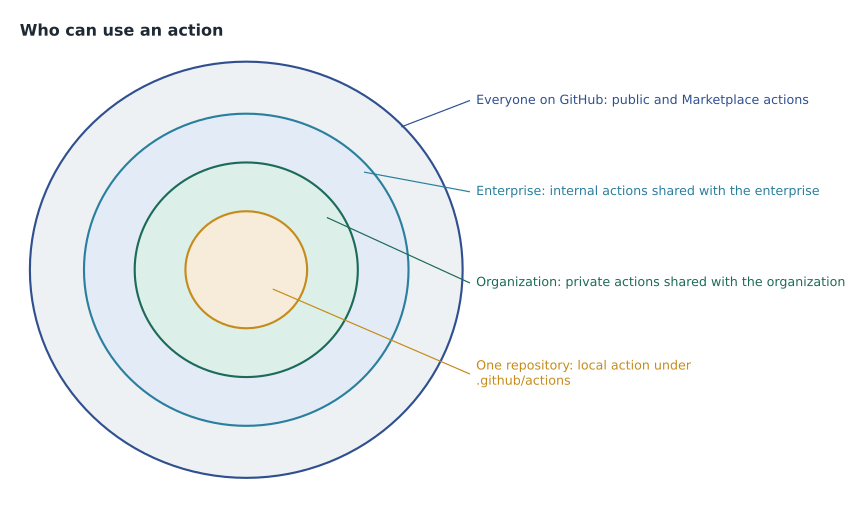
Sharing a private action does not bypass anything else. Organization and enterprise Actions policies still decide whether a repository may use actions from inside the organization at all, and an allowed-actions policy that permits only enterprise actions, as MSBA-291 described, is satisfied by shared internal actions. The person sharing the action is also giving every repository that uses it a dependency on their code, which is why shared actions need the same versioning and testing discipline as public ones.
For GitHub Enterprise Server, actions from GitHub.com, including Marketplace actions, are reached through GitHub Connect or by syncing them to the server; that is an administrator's decision covered in the GH-200 enterprise domain and in MSBA-302.
What Marketplace requires
GitHub's documentation sets out a short list of requirements for publishing an action to Marketplace. Actions that meet them are published immediately; GitHub does not review them first.
| Requirement | What it means in practice |
|---|---|
| Public repository | Private and internal actions cannot be listed |
| A single metadata file at the root | action.yml or action.yaml at the top level; files in subfolders are not listed |
| A unique name | Not an existing listing, a Marketplace category, a GitHub user or organization you do not own, or a reserved GitHub feature name |
| Only the action in the repository | The metadata file, code and files the action needs; not unrelated application code |
| Marketplace Developer Agreement accepted | The owning account must accept it before the publish option can be selected |
| Two-factor authentication | Required to publish the release |
The name rule is the one most likely to cause a problem. Malik's first choice, Trail Report, was close to an existing listing, so he chose Open Trail Report, which matched his project. The name lives in the metadata file's name key, so the check happens when you try to publish.
The Developer Agreement is accepted by the account that owns the repository. For a personal repository that is its owner; for an organization's repository, an organization owner must accept it. Until then the option to publish to Marketplace is disabled on the release page. Malik's repository was in his personal account, so he could accept it himself.
Publishing a release to Marketplace
Publishing to Marketplace is part of creating a release. Opening the action's metadata file in the repository shows a banner inviting you to draft a release. On the release page, a section for releasing the action contains a checkbox to publish the action to GitHub Marketplace. When it is checked, GitHub validates the metadata file and shows any errors or warnings, such as a missing description or branding, until the file passes and the page shows that everything looks good. You then choose a primary category and, optionally, a secondary one, enter the version tag and release title, write the release notes and publish the release, confirming with two-factor authentication.
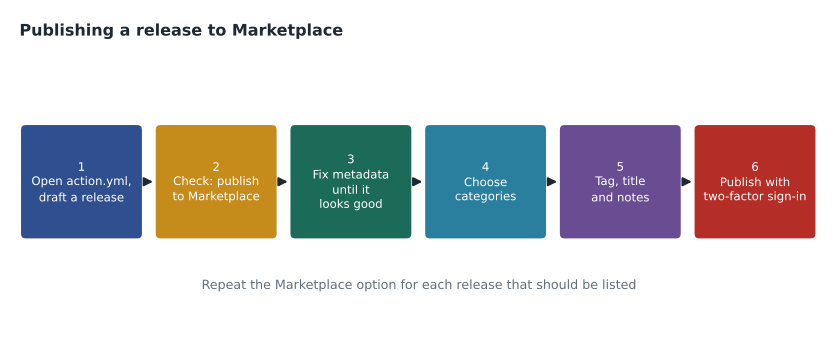
Each release is published to Marketplace separately. Publishing v1.0.0 to Marketplace does not automatically publish v1.0.1; the maintainer checks the box on each release that should appear. The listing shows the latest published release, its README as the description, and the branding icon and color. Because the listing is built from the README, Malik spent more time on the README than on the release itself, which is the subject of lesson 10.
name: Open Trail Report
description: Turn hiking log files into a trail condition report and post it to the pull request
author: Malik Osei
inputs:
  logs:
    description: Folder of hiking log files
    default: logs
  token:
    description: Token used to comment on the pull request
    default: ${{ github.token }}
outputs:
  report-path:
    description: Path to the generated Markdown report
runs:
  using: node24
  main: dist/index.js
branding:
  icon: map
  color: green
Worked problem
Why the publish checkbox was grayed out
Before Malik moved trail-report to his own account, Priya tried to publish a test version from a public repository in the tidewater organization. The checkbox to publish to Marketplace was disabled. The metadata file was at the root and the name was unique. What was missing?
Show solution
- The checkbox stays disabled until the owning account accepts the Marketplace Developer Agreement.
- The repository belonged to the tidewater organization, so an organization owner had to accept it; Priya was an owner and could accept it through the link on the release page.
- Two-factor authentication would then be required to publish the release.
Answer: The organization had not accepted the Marketplace Developer Agreement. An organization owner accepts it, then the release can be published with two-factor authentication.
Verified creators and trust
Some Marketplace listings carry a verified creator badge. GitHub grants it to partner organizations that it has verified; it is not the same as the verified badge an organization can show on its profile for its domain, and it does not carry over from one to the other. A partner that wants the badge contacts GitHub's partnerships team. If a verified creator transfers an action's repository to an account that is not verified, the listing loses the badge.
The badge says who published the action, not that the code is safe. Marketplace actions are not reviewed before they are listed. A caller should judge a Marketplace action the same way as any dependency: who maintains it, how active it is, whether its releases are immutable, what permissions it asks for, and whether its source is readable. Malik's README listed exactly what trail-report needed: read access to contents and write access to pull requests for comments.
Changing or removing a listing
Because each release is published to Marketplace individually, removing an action from Marketplace means editing each published release and clearing the publish option, then updating the release. The action itself, in its public repository, remains usable by anyone who refers to it directly; only the listing goes. A listing is tied to the action's name, so a repository transferred to another account can keep publishing releases under the same listing. Deleting the repository deletes the listing and frees the name for someone else.
Renaming a published action by changing its name in the metadata file affects the listing too, and callers who search by the old name will not find it. Malik settled on Open Trail Report before the first Marketplace release so that he would not have to rename it later.
Where Tidewater ended up
By the end of October, Tidewater's actions were distributed in two ways. markdown-guard and trail-units lived in public repositories in the tidewater organization, unlisted, because public repositories such as TrailCheck and open-trail-report call them. pdf-proof stayed in a private repository with Access set so that the private guidebook repository could use it, since its image contains licensed fonts. The organization's Actions policy allowed actions from the organization plus a short list of GitHub's own actions. trail-report lived in Malik's public repository with immutable releases on, and its v1.0.0 release was published to Marketplace in the Utilities category, with Continuous integration as its secondary category.
Within two weeks both hiking clubs were using it, one from a public repository and one from a private one. The private club had to do one thing first: its organization only allowed actions from a list, so its administrator added Malik's action to the list, pinned to the commit of v1.0.0. That is exactly the kind of caller lesson 7 described, and it is why Malik kept every release immutable.
Sharing private actions: what the setting does and does not do
The Access setting on a private or internal action repository controls whether workflows in other repositories can use the actions and reusable workflows it contains. GitHub's documentation describes it as granting access to other private repositories in the organization. It does not add anyone to the repository: runners receive a short-lived token, valid for one hour, that can read the repository so they can download the action. GitHub warns that people with access to the calling repositories, including outside collaborators, may still reach the shared repository's contents indirectly, for example through workflow logs, so nothing truly secret should live in a shared action repository. Limiting who can change the action is a separate matter, handled by branch protection or a ruleset on the action repository and a CODEOWNERS file.
For internal repositories in an enterprise, sharing with the enterprise lets every organization use the action. Enterprises with many organizations often keep a central organization for shared automation, with one repository per action, each shared with the enterprise and each with a named owning team. Skerry Outdoor Group, which MSBA-291 followed, planned exactly that for its platform team's actions.
Marketplace categories and discoverability
Marketplace groups listings into categories such as Code quality, Continuous integration, Deployment, Publishing, Security, Testing and Utilities. A listing has one primary category and may have a secondary one. Choosing them well helps people browsing a category find the action, and searching by keywords in the name and description does the rest. The README's first lines matter most for search results, because they are what people see before clicking. Malik rewrote his opening sentence three times, ending with one that named the problem the action solved, turning hiking logs into a trail condition report, rather than describing how it worked.
Publishing from an organization
An action published by an organization rather than a person is often more trusted by other organizations, because it does not depend on one individual's account. Publishing from an organization works the same way, except that an organization owner accepts the Developer Agreement and anyone who publishes releases needs write access to the repository and two-factor authentication. If Malik's action grew, the team agreed, it could move to an organization for the open-trail-report project, keeping the same listing because listings follow the action's name.
Common mistakes
MistakeTrying to list an action from a private or internal repository on Marketplace.
InsteadMarketplace requires a public repository; share private actions through the repository's Access setting instead.
MistakePutting the metadata file in a subfolder of a Marketplace repository.
InsteadKeep a single action.yml or action.yaml at the root.
MistakeAssuming the verified creator badge means the code was reviewed.
InsteadMarketplace actions are not reviewed; evaluate them as dependencies.
MistakeExpecting one unpublish action to remove every version.
InsteadClear the Marketplace option on each published release.
Summary and key terms
- Actions can be local to one repository, shared from private or internal repositories with the organization or enterprise, public, or public and listed on Marketplace.
- A private or internal action repository's Access setting controls whether other repositories in the organization or enterprise can use it.
- Marketplace requires a public repository, a single metadata file at the root, a unique name and only the action's files.
- The owning account must accept the Marketplace Developer Agreement, and publishing requires two-factor authentication.
- Each release is published to Marketplace separately; listings are not reviewed before publication.
- Verified creator badges identify partner publishers, not reviewed code.
- GitHub Marketplace
- GitHub's directory of actions and apps that people can find and use.
- Distribution model
- How an action is made available: local, shared in an organization or enterprise, or public.
- Access setting
- The Actions setting on a private or internal repository that shares its actions with the organization or enterprise.
- Marketplace Developer Agreement
- The terms the owning account accepts before publishing to Marketplace.
- Verified creator
- A Marketplace badge GitHub grants to verified partner organizations.
- Primary category
- The main Marketplace category chosen for a listing.
Practice problems
Work each problem on paper first, then reveal the answer to check.
How can a private action be used by other repositories in the same organization?
Show answer
By setting the action repository's Access to allow repositories in the organization.
Who must accept the Marketplace Developer Agreement for an organization's repository?
Show answer
An organization owner.
What happens to a listing if the action's repository is deleted?
Show answer
The listing is deleted and the name becomes available.
Lesson quiz · 5 questions
Score 60% or more to complete this lesson.
Create a free account to save your progress, take quizzes and earn a certificate.