
MSBA-301 · Lesson 4 of 12 · 20 min
JavaScript actions
▶ Video coming soon A video version of this lesson is on the way.
Dmitri's job was the trail data check. Tidewater keeps the route data behind TrailCheck in JSON files, one per trail: segment lengths in kilometers, elevation gain and loss, the coordinates of trailheads, and a difficulty rating. Errors in those files had caused two embarrassing corrections in 2026. One trail had a segment entered in miles, which made a 9-kilometer walk look like a 15-kilometer one, and another had an elevation gain larger than the height of the hill it climbed. A shell script had caught some of these, but its messages were hard to read and it could not point at the line in the file that was wrong.
That made the check a good fit for a JavaScript action: real logic, clear messages and annotations that appear right on the changed file in a pull request. This lesson covers how JavaScript actions run, the Node.js runtime they use, the actions toolkit, how the code is packaged, and the pre and post scripts that let an action do work before and after the rest of the job.
How a JavaScript action runs
When a step calls a JavaScript action, the runner downloads the action's repository at the requested ref, reads its metadata file, and runs the file named by main with the Node.js runtime named by using. There is nothing to install or build first; the runner already has the Node.js runtimes it supports. That is why JavaScript actions start in a fraction of a second and why they work on Linux, Windows and macOS runners alike.
Two consequences follow. First, the action's code must already be ready to run when the runner downloads it. The runner does not run npm install, so the action's dependencies have to be inside the repository, normally bundled into a single file. Second, the action runs with the Node.js version the runner provides, not the one the workflow sets up with actions/setup-node. setup-node affects the commands the workflow runs; it does not change the runtime that JavaScript actions use.
The Node.js runtime: node24
The using value in a JavaScript action's metadata names the runtime. GitHub's runners have moved through several: node12, node16 and node20 have each been retired in turn. The latest move happened during 2026. GitHub announced in September 2025 that Node 20 would be deprecated, runners switched to running JavaScript actions on Node 24 by default on June 16, 2026, and Node 20 was removed from GitHub's runners on September 23, 2026. Since then, JavaScript actions run on Node 24, and the temporary setting that let workflows keep using the old runtime, ACTIONS_ALLOW_USE_UNSECURE_NODE_VERSION, no longer works.
For an action maintainer the instruction from GitHub was simple: change runs.using to node24 and publish a new release. Node 24 brought two platform limits that matter for self-hosted runners: it does not support macOS 13.4 and earlier, and it does not officially support 32-bit ARM. Lesson 11 returns to runtime migrations as a maintenance task, because they recur every couple of years and every JavaScript action has to follow them.
| Date | Event |
|---|---|
| September 19, 2025 | GitHub announces the deprecation of Node 20 on Actions runners |
| June 16, 2026 | Runners run JavaScript actions on Node 24 by default; a temporary opt-out allows Node 20 |
| September 23, 2026 | Node 20 is removed from runners on GitHub.com; the opt-out stops working |
The actions toolkit
GitHub publishes the actions toolkit, a set of npm packages under the @actions scope that do the routine work every action needs. Using the toolkit is not required, since an action could read environment variables and write files itself, but it handles the details correctly and keeps the code short.
| Package | What it does | Typical functions or objects |
|---|---|---|
| @actions/core | Inputs, outputs, logging, annotations, secrets masking, summaries, state | getInput, getBooleanInput, setOutput, setFailed, info, warning, error, notice, group, setSecret, summary, saveState, getState |
| @actions/github | Workflow run context and an authenticated API client | context, getOctokit |
| @actions/exec | Runs command-line programs and captures their output | exec, getExecOutput |
| @actions/io | Cross-platform file operations | mkdirP, cp, mv, rmRF, which |
| @actions/tool-cache | Downloads, extracts and caches tools on the runner | downloadTool, extractTar, cacheDir, find |
| @actions/glob | Matches files by pattern | create |
| @actions/http-client | HTTP requests that respect the runner's proxy settings | HttpClient |
The most important package is @actions/core. Its getInput function reads an input by its id, handling the INPUT_ environment variable naming for you, and with the required option set it fails with a clear message when the input is missing. getBooleanInput reads a true-or-false input and rejects values that are neither, which avoids the classic mistake of treating the string false as true. setOutput sets an output. setFailed logs an error and marks the step as failed. The logging functions info, warning, error and notice write to the log, and the last three can attach an annotation to a file and line, which is exactly what Dmitri needed.
@actions/github provides context, an object describing the event that triggered the workflow, the repository, the commit and the actor, and getOctokit, which returns an authenticated client for GitHub's REST and GraphQL APIs given a token. Dmitri's action did not need the API, but Malik's trail-report action later used it to comment on pull requests.
Writing trail-units
Dmitri's action reads every JSON file under a path, checks each segment, and reports problems as annotations on the file. It has two inputs, path and max-gain-ratio, and two outputs, files and problems. The core of it is a short loop.
import * as core from '@actions/core';
import { readFile } from 'node:fs/promises';
import { globSync } from 'node:fs';

async function run() {
  const pattern = core.getInput('path', { required: true });
  const maxRatio = Number(core.getInput('max-gain-ratio') || '0.25');
  const files = globSync(`${pattern}/**/*.json`);
  let problems = 0;

  for (const file of files) {
    const trail = JSON.parse(await readFile(file, 'utf8'));
    trail.segments.forEach((seg, i) => {
      if (seg.unit !== 'km') {
        problems++;
        core.error(`Segment ${i + 1} uses ${seg.unit}; route data must be in km`, { file, title: 'Wrong unit' });
      }
      if (seg.gain_m / (seg.length_km * 1000) > maxRatio) {
        problems++;
        core.warning(`Segment ${i + 1} climbs more steeply than the limit allows`, { file, title: 'Check elevation' });
      }
    });
  }

  core.setOutput('files', String(files.length));
  core.setOutput('problems', String(problems));
  if (problems > 0) core.setFailed(`${problems} problem(s) found in ${files.length} file(s)`);
}

run().catch(err => core.setFailed(err.message));
Three habits in that code are worth copying. The whole program runs inside one asynchronous function, and any error that escapes it is caught and turned into setFailed, so the step fails with a readable message instead of an unhandled rejection. Outputs are set as strings, because outputs are always strings. And the action reports every problem before failing, rather than stopping at the first, so a pull request shows the whole list at once.
The annotation properties need a little care. The file path in an annotation should be relative to the repository root so that GitHub can attach the message to the file in the pull request's changed files view. Annotations can also carry a line number, which the JSON parser in Dmitri's first version could not provide; he added it later with a small parser that records positions. There is also a limit to how many annotations a step can show, so an action that might find hundreds of problems should summarize the rest in the job summary rather than annotate every one.
Packaging: why dist is committed
Because the runner does not install dependencies, a JavaScript action has three ways to ship its code. It can have no dependencies at all and run its source file directly, which works only for the simplest actions. It can commit its node_modules folder, which works but bloats the repository and makes every pull request noisy. Or it can bundle its code and dependencies into a single file, usually dist/index.js, with a tool such as Rollup or @vercel/ncc, and commit that file. Bundling is what GitHub's templates do and what the Tidewater team chose.
A committed bundle brings its own discipline. Every change to the source must be followed by rebuilding dist, or the action runs old code. The templates GitHub publishes, actions/javascript-action and actions/typescript-action, include a workflow that rebuilds dist on each pull request and fails if the committed bundle differs from a fresh build. Dmitri copied that check on the first day, after Lena asked why her change to a message had not appeared: she had edited the source and forgotten to rebuild.
{
  "name": "trail-units",
  "version": "1.0.0",
  "type": "module",
  "private": true,
  "scripts": {
    "build": "rollup --config rollup.config.js",
    "test": "node --test",
    "all": "npm run build && npm test"
  },
  "dependencies": {
    "@actions/core": "^1"
  },
  "devDependencies": {
    "rollup": "^4",
    "@rollup/plugin-node-resolve": "^16",
    "@rollup/plugin-commonjs": "^28"
  }
}
TypeScript is a popular choice for actions because the toolkit ships with type definitions and type checking catches mistakes in inputs and outputs early. A TypeScript action compiles to JavaScript and is then bundled in the same way; the metadata file still points at the bundled JavaScript file. Tidewater stayed with plain JavaScript because the team was small and the actions were short, but the typescript-action template is the starting point GitHub recommends for larger actions.
pre and post scripts, and saved state
A JavaScript action can name a pre script, which the runner runs at the very start of the job before any steps, and a post script, which runs at the end of the job after all the steps, including when earlier steps failed. pre-if and post-if set conditions, written without expression syntax, such as runner.os == 'Linux'. Many well-known actions rely on post: actions/checkout removes the credentials it configured, and caching actions save the cache at the end of the job.
The main script and the post script are separate runs of Node.js, so they cannot share variables in memory. To pass information from main to post, the toolkit offers saveState and getState, which write and read values through the GITHUB_STATE file. Dmitri used this in a later version of trail-units to time how long the check took: main saved the start time, and post wrote the duration to the job summary.
runs:
  using: node24
  main: dist/index.js
  post: dist/post.js
  post-if: success()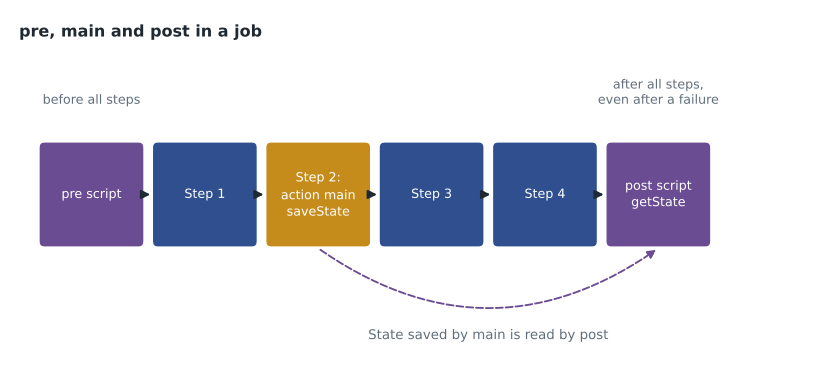
Worked problem
Why the action ran the old code
After Dmitri changed trail-units to report the segment number, a test workflow in the TrailCheck repository still showed the old message. The workflow called tidewater/trail-units at a branch named main, and Dmitri had pushed his source change to main. What went wrong?
Show solution
- The runner runs dist/index.js, the file named by main in the metadata, not the source file Dmitri edited.
- He had not rebuilt and committed dist, so the bundle on main still contained the old code.
- The fix is to run the build, commit the new dist, and add the check that fails a pull request when dist is out of date.
Answer: The committed bundle was stale. Rebuild dist, commit it, and enforce the check in the action's own workflow.
Errors, exit codes and logs
A JavaScript action's step succeeds if the Node.js process exits with code zero and fails otherwise. setFailed sets the exit code to one and logs the message as an error annotation. An action that throws an uncaught error also fails, but with a stack trace that is less useful to the person reading the log. Logging with core.group and core.endGroup, or the group function that wraps an asynchronous block, folds long output into collapsible sections. And core.debug writes messages that appear only when step debug logging is turned on, which lesson 8 uses for troubleshooting.
Inputs that contain secrets need one more call. If an action receives a token and might log it, even by accident in an error message, it should call core.setSecret on the value so the runner masks it in the log. Secrets that a workflow passes from the secrets context are masked automatically, but values an action derives, such as a short-lived token it fetches, are not until the action registers them.
Choosing between JavaScript and TypeScript, and between module styles
Node.js supports two styles of module: the older CommonJS style, which loads packages with require, and ECMAScript modules, which use import and export and are marked by type set to module in package.json or by the .mjs extension. Either works in an action, because the bundler resolves the imports and produces one file the runner can run. What matters is consistency: the package manifest, the bundler configuration and the source files must agree on the style, or the build fails with errors about import statements outside a module. GitHub's current templates use ECMAScript modules, and Dmitri followed them. When a toolkit package changes its own module style between major versions, the bundler usually absorbs the difference, which is one more reason to rebuild and test dist after every dependency update rather than assuming an update is harmless.
Common mistakes
MistakePointing main at the source file of an action that has dependencies.
InsteadBundle the code and dependencies into dist and point main at the bundle.
MistakeEditing the source and forgetting to rebuild dist.
InsteadRebuild and commit dist, and add a workflow that fails when the bundle is out of date.
MistakeExpecting actions/setup-node to change the runtime a JavaScript action uses.
InsteadJavaScript actions run on the runtime named by runs.using, which the runner provides.
MistakeLeaving runs.using at node20 after September 2026.
InsteadUse node24 and publish a new release.
Summary and key terms
- JavaScript actions run the file named by main with the runner's Node.js runtime, start quickly and work on all hosted runner operating systems.
- Runners default to Node 24 since June 16, 2026, and Node 20 was removed on September 23, 2026; actions should use node24.
- The actions toolkit handles inputs, outputs, logging, annotations, masking, API access, commands and files.
- The runner does not install dependencies, so actions bundle their code into dist and commit it.
- pre and post scripts run before and after all steps, and saveState and getState pass values between main and post.
- Catch errors and call setFailed, and register derived secrets with setSecret.
- actions toolkit
- GitHub's npm packages for writing actions, such as @actions/core and @actions/github.
- getInput
- The toolkit function that reads an input by its id.
- setFailed
- The toolkit function that logs an error and fails the step.
- Bundle
- A single file containing an action's code and dependencies, usually dist/index.js.
- Annotation
- A message attached to a file and line that appears in the pull request and run summary.
- saveState
- The toolkit function that stores a value for the action's post script to read.
Practice problems
Work each problem on paper first, then reveal the answer to check.
Why does a JavaScript action commit its bundled dist folder?
Show answer
The runner does not install dependencies, so the code and its dependencies must be in the repository ready to run.
Which runtime should a JavaScript action name in runs.using after September 2026?
Show answer
node24.
How does a post script get a value calculated by the main script?
Show answer
The main script saves it with saveState and the post script reads it with getState.
Lesson quiz · 5 questions
Score 60% or more to complete this lesson.
Create a free account to save your progress, take quizzes and earn a certificate.