
MSBA-301 · Lesson 10 of 12 · 19 min
Documentation for actions
▶ Video coming soon A video version of this lesson is on the way.
When Malik showed the first draft of trail-report's README to the team, it was four lines long: the action's name, a sentence about what it did, a usage example and his name. Owen, who had edited guidebooks for years before moving into content operations, read it and asked the question every reader of a guidebook asks: "Where do I start, and what happens if it goes wrong?" The README for an action is its guidebook. For a Marketplace action it is also the listing page, the first thing a stranger reads before deciding whether to let your code run inside their job.
This lesson covers what an action's documentation must contain: the README's sections, documenting inputs, outputs and permissions, usage examples, a changelog and release notes, security and contribution policies, and keeping the documentation true as the action changes. It is the part of building actions that is easiest to skip and most noticed by the people who use them.
Who reads an action's documentation
Three kinds of reader come to an action's documentation, with different questions. A potential user wants to know quickly what the action does, whether it fits their case and whether it is trustworthy. A current user wants the exact input names, defaults and outputs while writing a workflow, and later wants to know what changed in a new version. An administrator in a locked-down organization wants to know what permissions the action needs, what it sends over the network and who maintains it before allowing it. A good README answers all three in that order, from the top down.
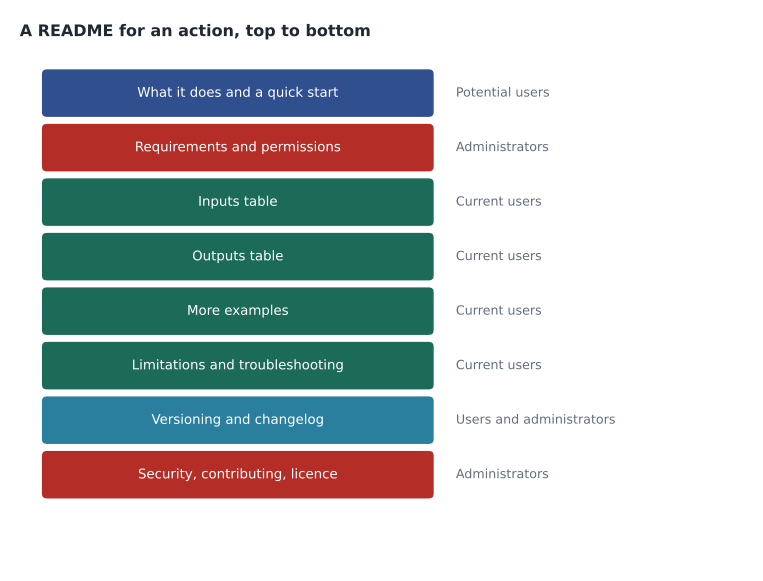
The sections of a good README
Malik rewrote the README using a structure the team then adopted for every action. It begins with one sentence on what the action does and one minimal example that works if copied as it is. Then come requirements, including the runner operating systems the action supports and the permissions it needs. Then the inputs and outputs, each in a table. Then fuller examples for the common cases, limitations and troubleshooting, a note on versioning, links to the changelog, the security policy and contribution guidelines, and the license.
| Section | What it contains | Who needs it most |
|---|---|---|
| Title and summary | The action's name and one sentence on what it does | Potential users |
| Quick start | A minimal workflow step that works as written | Potential users |
| Requirements and permissions | Supported runners and the token permissions needed | Administrators and users |
| Inputs | Each input's id, description, whether required, and default | Current users |
| Outputs | Each output's id and what it contains | Current users |
| Examples | Full workflows for common cases | Current users |
| Limitations and troubleshooting | Known limits and fixes for common errors | Current users |
| Versioning and changelog | How versions are tagged and where changes are listed | Current users and administrators |
| Security, contributing, license | How to report problems, how to contribute, the terms of use | Administrators and contributors |
Documenting inputs and outputs
The inputs table should match the metadata file exactly: the same ids, the same defaults, the same required flags. A mismatch between README and metadata is worse than no table, because users trust the README and then get an error. The cleanest way to keep them in step is to generate the table from action.yml. Several community tools do that, and some teams write a short script that reads the metadata file and rewrites the table between two markers in the README, then run it in the test workflow and fail if the README is out of date. Dmitri wrote such a script for the team in an afternoon.
| Input | Description | Required | Default |
|---|---|---|---|
| logs | Folder of hiking log files | No | logs |
| token | Token used to comment on the pull request | No | The job's GITHUB_TOKEN |
| comment | Post the report as a pull request comment | No | true |
| min-entries | Minimum log entries per trail before reporting its condition | No | 3 |
Outputs need the same care, plus a note on their format. Every output is a string, so the README should say what the string contains: a count, a path, a JSON document. trail-report's report-path output, for example, is the path of the generated file relative to the workspace, which a later step can pass to an upload step.
Deprecated inputs belong in the table with a note saying what replaces them and in which major version they will be removed, matching the deprecationMessage in the metadata file. When markdown-guard deprecated link-check, the README's table kept the row for two minor versions with the word deprecated and a pointer to check-links.
Examples that work
The examples are what most people copy. Each should be a complete step, or a complete small workflow, that works if pasted as it is, with the action referenced at its current major version or, for security-minded readers, at a full SHA with the version in a comment. Examples should include the permissions block whenever the action needs more than read access, because a user who copies the step without it will hit a permissions error and blame the action.
# Quick start
name: Trail report
on:
  pull_request:
    paths: ['logs/**']
permissions:
  contents: read
  pull-requests: write   # needed to post the report as a comment
jobs:
  report:
    runs-on: ubuntu-latest
    steps:
      - uses: actions/checkout@v5
      - uses: mosei/open-trail-report@v1
        with:
          logs: logs
Lena suggested one more habit that the team adopted: every example in the README is also run by the action's test workflow. The examples are copied into a test file, and the integration tests run them against the fixtures. If an input is renamed and the README is not updated, the test fails.
Permissions, network and data
An administrator deciding whether to allow an action reads the requirements section first. It should list every permission the action needs on the job's token and why, any other credentials it can use, any network destinations it contacts apart from GitHub's API, and what data it reads or sends. trail-report reads the repository's log files, sends nothing anywhere except the GitHub API, and needs pull-requests write only when its comment input is true. Saying so plainly answered the private club administrator's questions before he had to ask them.
An action that needs more, such as a deployment action that exchanges an OpenID Connect token with a cloud provider, should say exactly which permission that requires, id-token write, and what the cloud side must trust. Lesson 12 writes that section for the team's deployment action.
Limitations and troubleshooting
Every action has limits, and documenting them saves users time. Container actions should say that they run only on Linux. Actions that comment on pull requests should explain what happens on pull requests from forks, where the job's token is read-only. Actions that annotate files should mention the limit on annotations per step. trail-report's troubleshooting section listed the three questions the clubs actually asked in its first two weeks, each with its answer, and Malik added to it whenever a new question came in more than once.
Worked problem
Writing the fork limitation into the README
Lesson 8 found that trail-report cannot comment on pull requests from forks because the token is read-only. How should the README describe this?
Show solution
- State the behavior: on pull requests from forks the action still generates the report and writes it to the job summary, but cannot post a comment.
- Explain why in one sentence: workflows triggered by pull_request from forks receive a read-only token.
- Give the supported alternative: read the report in the job summary, or have a separate workflow on a trusted trigger post comments from an uploaded artifact, with a link to GitHub's guidance on doing that safely.
- Avoid recommending pull_request_target with a checkout of the fork's code, which would run untrusted code with write access.
Answer: A short Limitations entry that states the behavior, the reason and a safe alternative, with a warning against the unsafe workaround.
Changelog and release notes
Users of an action need to know what changed between versions, especially before moving to a new major version. Many maintainers keep a CHANGELOG file in the repository, listing changes under each version, newest first, grouped as added, changed, deprecated, removed, fixed and security. The release notes for each GitHub release then summarize the same entry. Others rely on release notes alone. Either works if it is consistent; the important part is that breaking changes are impossible to miss and come with instructions.
For a major version, a short migration section helps more than a list. When markdown-guard reached 2.0.0, Lena wrote three lines: the link-check input is removed, use check-links instead; the default path is now the docs folder if it exists; and the action needs Node 24 on self-hosted runners. Every caller could tell in under a minute whether they needed to change anything.
Security, contributing and license files
A public action should have a SECURITY.md file explaining how to report a vulnerability privately rather than in a public issue. GitHub shows it on the repository's security tab, and with private vulnerability reporting turned on, researchers can report directly through GitHub. A CONTRIBUTING.md file tells people how to propose changes: run the tests, rebuild dist, follow the commit style. A LICENSE file states the terms under which others can use the code; without one, others have no clear right to use it at all, which matters for anything published on Marketplace. Malik chose the MIT license, which open-trail-report already used.
Internal actions need less of this, but not nothing. Tidewater's private actions each have a README with the same sections, a short CONTRIBUTING note and an owner named in a CODEOWNERS file, so that anyone in the organization knows who to ask and who reviews changes.
| File | Purpose | Public action | Internal action |
|---|---|---|---|
| README.md | What the action does and how to use it; the Marketplace page | Required | Required |
| CHANGELOG.md or release notes | What changed in each version | Strongly recommended | Recommended |
| SECURITY.md | How to report vulnerabilities privately | Strongly recommended | Optional |
| CONTRIBUTING.md | How to propose changes | Recommended | Short note |
| LICENSE | Terms of use | Required in practice | Not needed |
| CODEOWNERS | Who reviews changes | Recommended | Recommended |
Keeping documentation true
Documentation decays faster than code because nothing fails when it is wrong. The team relied on three checks to keep it true: the generated inputs table, the examples run as tests, and a line in the pull request template asking whether the README or changelog needed changing. None of them is clever; together they meant that in the autumn of 2026 the README of every Tidewater action matched its metadata file.
Writing for people who skim
Most readers skim a README before they read it. Short paragraphs, descriptive headings, tables for reference information and code blocks for anything to be copied all help skimmers find what they need. The first screen of the README should answer three questions: what does this do, how do I try it, and what does it need. Long explanations of design decisions belong further down or in a separate document, linked from the README. Owen's advice from editing guidebooks applied directly: put the information a reader needs to decide at the top, and the information a reader needs to act where they will be when they act.
Documenting behavior, not just interface
An inputs table tells a reader what they can pass; it does not tell them what the action will do with it. Good documentation also describes behavior: what files the action reads and writes, what it does when it finds nothing, how it decides to fail, whether it changes the environment for later steps and what it writes to the job summary. For markdown-guard, the README's behavior section explained that the action fails only on errors unless fail-on-warning is true, that it writes a summary table of problems by file, and that it never changes the files it checks. Those three sentences answered most of the questions the guidebook editors asked in the first month.
Common mistakes
MistakeA README whose inputs table no longer matches action.yml.
InsteadGenerate the table from the metadata file and check it in the test workflow.
MistakeExamples without the permissions block the action needs.
InsteadInclude the permissions block and explain each permission.
MistakeLeaving out a LICENSE file on a public action.
InsteadChoose and include a license so others have the right to use the code.
MistakeBurying breaking changes in a long list of release notes.
InsteadLead with breaking changes and give short migration steps.
Summary and key terms
- An action's README serves potential users, current users and administrators, and is the Marketplace listing page.
- Lead with a summary and a working quick start, then requirements and permissions, inputs and outputs tables, examples and limitations.
- Keep the inputs table in step with action.yml by generating it, and run README examples as tests.
- Document permissions, network destinations and data use so administrators can approve the action.
- Record changes in a changelog or release notes, with migration steps for major versions.
- Public actions need SECURITY.md, CONTRIBUTING.md and a LICENSE; internal actions need at least a README and an owner.
- README
- The main documentation file of a repository, shown on its front page and on a Marketplace listing.
- Quick start
- A minimal example that works if copied as written.
- CHANGELOG
- A file listing the changes in each version, newest first.
- SECURITY.md
- A file explaining how to report security vulnerabilities privately.
- CODEOWNERS
- A file naming the people or teams who review changes to parts of a repository.
- Migration notes
- Short instructions for moving from one major version to the next.
Practice problems
Work each problem on paper first, then reveal the answer to check.
Why should an action's inputs table be generated from action.yml?
Show answer
So it always matches the real input ids, defaults and required flags.
What should an example include when the action needs write permissions?
Show answer
The workflow's permissions block, with a comment on why each permission is needed.
What does SECURITY.md tell people?
Show answer
How to report a vulnerability privately rather than in a public issue.
Lesson quiz · 5 questions
Score 60% or more to complete this lesson.
Create a free account to save your progress, take quizzes and earn a certificate.