
MSBA-301 · Lesson 11 of 12 · 18 min
Maintaining actions
▶ Video coming soon A video version of this lesson is on the way.
Three weeks after trail-report went onto Marketplace, Malik had eleven open issues, two pull requests from people he had never met, a Dependabot pull request for the toolkit, and a message from one of the hiking clubs asking whether the action would keep working on their self-hosted runner, an old Mac mini in the club secretary's office. Publishing an action had been a week's work. Keeping it healthy, he realized, was a commitment with no end date.
This lesson covers that commitment: keeping dependencies current, following runtime and runner changes such as the move to Node 24, handling issues and contributions, responding to security problems, supporting old major versions, and retiring or handing over an action when the time comes. The GH-200 outline folds these into its objectives on distributing and maintaining actions and on troubleshooting, and they are what separates an action people trust from one they pin once and abandon.
Keeping dependencies current
An action has two kinds of dependency. A JavaScript action has npm packages, starting with the toolkit and including everything bundled into dist. A composite action, and any action whose test workflow uses other actions, depends on those actions. Both need updating, for bug fixes, for security fixes and to keep up with changes in GitHub itself.
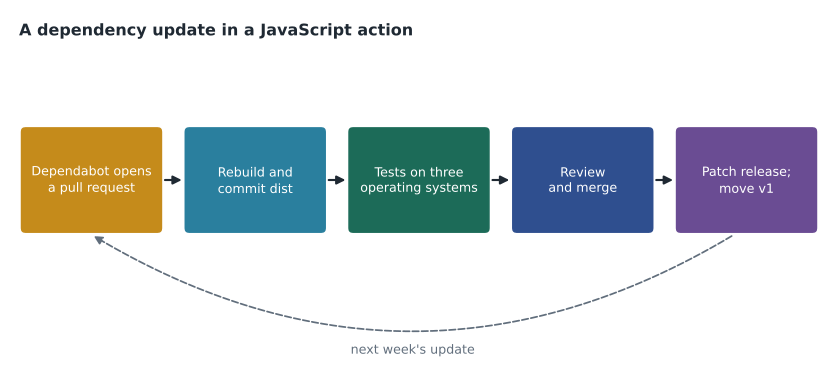
Dependabot handles both. A dependabot.yml file in the action's repository can list the npm ecosystem, for the package manifest, and the github-actions ecosystem, for the actions referenced in workflow files and in composite action metadata. Dependabot then opens pull requests on a schedule when new versions appear. For actions pinned to full SHAs with a version comment, it updates the SHA and the comment together. Grouping related updates into one pull request a week keeps the noise down.
version: 2
updates:
  - package-ecosystem: npm
    directory: /
    schedule:
      interval: weekly
    groups:
      actions-toolkit:
        patterns: ['@actions/*']
  - package-ecosystem: github-actions
    directory: /
    schedule:
      interval: weekly
For a JavaScript action, a dependency update is not finished when the package manifest changes. The bundle in dist must be rebuilt and committed, or the update has no effect on what users run. The bundle check from lesson 8 catches a Dependabot pull request that changed the lock file without rebuilding, and many maintainers add a small workflow that rebuilds dist on Dependabot's branches automatically and pushes the result for review.
Following runtime and runner changes
Every few years GitHub retires a Node.js runtime and every JavaScript action has to follow. The most recent change happened during 2026: runners ran JavaScript actions on Node 24 by default from June 16, and Node 20 was removed on September 23. After that date runners run JavaScript actions on Node 24 even if their metadata still says node20, and the opt-out variable stopped working. Most actions kept running, but code that relied on behavior changed between the two Node.js versions could break, and every maintainer was asked to update runs.using to node24 and publish a new release.
The runtime change also changed what runners can host the action. Node 24 does not support macOS 13.4 and earlier and does not officially support 32-bit ARM, so self-hosted runners on those platforms can no longer run JavaScript actions at all. That was the answer to the hiking club's question about the old Mac mini: its version of macOS was too old, and the club would have to update it or move to GitHub-hosted runners. Malik added a line to the README's requirements.
Runner image changes are the other recurring change. GitHub regularly retires old images and moves labels such as ubuntu-latest, windows-latest and macos-latest to newer versions, announcing each in its changelog in advance. An action that depends on a tool preinstalled in the image, or on a particular version of one, can break when the label moves. Testing against the new image while it is in preview, by adding its label to the test matrix, finds those problems before users do.
| Kind of change | Where it is announced | What a maintainer does |
|---|---|---|
| Node.js runtime retirement | GitHub changelog, months ahead | Update runs.using, test, release, document runner limits |
| Runner image label moves | GitHub changelog and the runner images repository | Add the new image to the test matrix during preview |
| Deprecated workflow commands | GitHub changelog | Switch to environment files and current toolkit versions |
| Toolkit major versions | Toolkit releases and changelogs | Upgrade, rebuild dist, check for changed behavior |
| Actions policy and security changes | GitHub changelog and blog | Check the action still works under stricter defaults |
Security defaults change too. From December 2, 2026, workflows triggered by pull_request_target are blocked by default in public repositories, a change MSBA-291 described from the administrator's side. Malik checked that none of trail-report's documented examples relied on that trigger; the README already advised against it for fork pull requests, so nothing needed to change.
Issues and contributions
A public action attracts issues, and most of them are questions. Templates for issues help: a bug report template that asks for the action version, the runner operating system, the relevant part of the workflow and the log, and a separate template for feature requests. Labels for bug, question, enhancement and good first issue make the list manageable. Malik turned on GitHub Discussions for questions so that issues stayed for problems.
Contributions need the same review discipline as the maintainer's own changes, and a little more caution. A pull request from someone outside the project runs in the action's test workflow, and by default pull requests from forks run with a read-only token and no access to secrets, which is the safe behavior. The maintainer reviews the change, the tests must pass, and the contributor must have rebuilt dist; if they have not, the bundle check fails with a message telling them how. Malik also checked every contribution that changed the bundle by rebuilding it himself, because a dist file is too large to review by eye and could hide code that is not in the source.
Worked problem
Reviewing an outside pull request
A contributor opened a pull request adding a min-elevation input to trail-report. It changed the source, the tests, the README and dist/index.js. The tests passed. What should Malik check before merging?
Show solution
- Check the change itself: is the new input optional with a safe default, so it can ship in a minor release?
- Check the README table and the metadata file agree on the new input.
- Rebuild dist from the contributor's source and confirm it matches the committed bundle exactly; a mismatch could hide code not present in the source.
- Check whether the change adds any dependency, and if so, review it and its license.
Answer: Confirm compatibility and documentation, verify the bundle matches a fresh build, and review any new dependency before merging and releasing a minor version.
Security problems
An action runs inside other people's jobs with whatever access those jobs have, so a vulnerability in an action is a vulnerability in every workflow that uses it. Common problems include script injection, where an input or event field reaches a shell command unescaped; leaking tokens into logs; unsafe handling of pull requests from forks; and vulnerable dependencies.
Several features help a maintainer find problems before attackers do. Code scanning with CodeQL examines JavaScript code and workflow files for known vulnerability patterns, including injection in workflows. Dependabot alerts report vulnerable npm packages. Secret scanning catches credentials committed by accident. For a public repository these are available without a paid license; for private repositories they are part of GitHub Code Security and Secret Protection, which MSBA-360 and MSBA-361 cover.
When someone reports a vulnerability, through the process in SECURITY.md or GitHub's private vulnerability reporting, the maintainer can work on the fix in a repository security advisory. The advisory lets the maintainer discuss the problem privately, develop the fix in a temporary private fork, request a CVE identifier and publish the advisory when the fixed release is out. Published advisories reach users through Dependabot alerts for repositories that use the action. Malik had not needed one yet, but he read the documentation in advance, which is the right time.
| Tool | What it finds or does |
|---|---|
| Code scanning with CodeQL | Vulnerability patterns in JavaScript and in workflow files |
| Dependabot alerts and security updates | Vulnerable dependencies, with pull requests to fix them |
| Secret scanning and push protection | Credentials committed or about to be pushed |
| Private vulnerability reporting | A private channel for researchers to report problems |
| Repository security advisories | Private fixing, CVE requests and public disclosure |
| Immutable releases and attestations | Released versions that cannot be altered, and proof of what was released |
Supporting old major versions
When an action releases a new major version, users of the old one do not move at once. A maintainer should decide, and say in the README, how long the previous major version will receive fixes. Popular actions often fix security problems in the previous major version for some months, while new features go only into the current one. The important thing is to make the policy explicit so users can plan.
Malik's policy for trail-report was modest, as suits a one-person project: the current major version gets all fixes, the previous one gets security fixes for six months after a new major version is released, and older versions get nothing. He wrote it in the README's versioning section, where administrators could find it.
Retiring or handing over an action
Actions are retired when they are replaced or no longer needed. The kind way to retire one is gradual. Announce the deprecation in the README and in a final release, say what to use instead, and, for Marketplace actions, clear the Marketplace option on the releases if the listing should go. Keep the repository readable, and once nothing more will change, archive it, which makes it read-only. Do not delete it: deleting breaks every workflow that still refers to it and frees its name, which someone else could then register.
Handing an action over to a new maintainer is usually done by transferring the repository. GitHub redirects references to the old owner and repository name to the new location, and a Marketplace listing can continue under the same name. Users should still be told, and should update their references, because a redirect is not a long-term guarantee: if someone later creates a repository with the old name, the redirect stops. Lesson 9 noted that a transferred listing loses any verified creator badge unless the new owner is a verified creator.
Tidewater's maintenance routine
For its internal actions, Tidewater wrote down a maintenance routine that took the team about an hour a week. Dependabot pull requests are reviewed and merged on Mondays, with a patch release for each action that changed. The GitHub changelog is read on Fridays for runtime, image and policy changes, and anything relevant becomes an issue. Each action has a named owner in CODEOWNERS and a named backup, so a holiday does not stop a security fix. Every six months the team asks whether each action is still used, and archives any that are not.
Measuring whether an action is used
Maintenance effort should follow use. For a public action, the repository's dependency graph shows public repositories that use it, and Marketplace shows a count of users of the listing. For internal actions, the enterprise or organization audit log and code search across the organization's repositories show which workflows refer to an action. Tidewater's six-monthly review used code search for each action's name in workflow files. An action nobody had referred to for six months was a candidate for archiving; an action referred to by forty workflows was a candidate for more tests.
Common mistakes
MistakeMerging a Dependabot update to a JavaScript action without rebuilding dist.
InsteadRebuild and commit dist for every dependency change, and let the bundle check enforce it.
MistakeLeaving runs.using at an old Node.js version after a runtime change.
InsteadUpdate to node24, test, release and document any runner platform limits.
MistakeMerging an outside pull request whose dist was not rebuilt and checked.
InsteadRebuild dist yourself and confirm it matches the committed bundle.
MistakeDeleting the repository of an action that is no longer maintained.
InsteadAnnounce deprecation, point to a replacement and archive the repository.
Summary and key terms
- Dependabot keeps npm dependencies and referenced actions current; JavaScript actions must rebuild dist for each update.
- Runtime changes, such as Node 24 becoming the default on June 16, 2026 and Node 20 being removed on September 23, 2026, require updating runs.using and releasing.
- Node 24 does not support macOS 13.4 and earlier or 32-bit ARM, which limits self-hosted runners.
- Test against new runner images during preview, and use issue templates, labels and careful review for contributions.
- Use code scanning, Dependabot alerts, secret scanning, private vulnerability reporting and security advisories for security problems.
- State a support policy for old major versions, and retire actions by deprecating and archiving, not deleting.
- Dependabot version updates
- Scheduled pull requests that bring dependencies up to date.
- Runtime retirement
- GitHub removing an old Node.js version from runners.
- Repository security advisory
- A private workspace for fixing a vulnerability, requesting a CVE and publishing a disclosure.
- Private vulnerability reporting
- A GitHub feature that lets people report security problems privately.
- Archived repository
- A read-only repository that keeps its history and remains usable by reference.
- Support policy
- A statement of how long each major version receives fixes.
Practice problems
Work each problem on paper first, then reveal the answer to check.
Which Dependabot ecosystem updates actions referenced in workflows and composite metadata?
Show answer
github-actions.
Why can an old Mac running macOS 13.4 no longer run JavaScript actions?
Show answer
Node 24, the runtime JavaScript actions now use, does not support macOS 13.4 and earlier.
Why archive rather than delete a retired action's repository?
Show answer
Deleting breaks workflows that still refer to it and frees the name for someone else.
Lesson quiz · 5 questions
Score 60% or more to complete this lesson.
Create a free account to save your progress, take quizzes and earn a certificate.