
MSBA-252 · Lesson 6 of 12 · 20 min
Agent flows
▶ Video coming soon A video version of this lesson is on the way.
Once suppliers learned that Lumenvale had a new invoice system, they wanted to ask it things. "Has invoice 4471 been approved?" "When will I be paid?" "Did you receive my credit note?" Ysaline's clerks were still answering those questions by phone and email, about 35 hours a week of it according to the baseline. Rupert's Center of Excellence hub had already built an internal agent in Copilot Studio, the Registrar Helper, for the transcript project. The obvious next step was a Finance Helper agent that staff could ask about invoices, and later perhaps one for suppliers. But an agent that answers questions from documents is one thing. An agent that looks up a particular invoice, checks the person is allowed to see it and returns its exact status needs a dependable piece of automation behind it. In Copilot Studio that piece is an agent flow.
Agent flows are not part of the AB-410 skills outline, which focuses on cloud flows and on consuming prompts and models. They matter here because they are how Microsoft now connects agents to business processes, and because choosing between an agent flow and a Power Automate cloud flow is a decision every automation team at Lumenvale's scale has to make.
What an agent flow is
Microsoft's documentation, updated in November 2026, describes agent flows as automations that handle repetitive tasks and connect apps and services. Each agent flow has a trigger, which can be instant, scheduled or event-driven, and at least one action. Agent flows are deterministic: the same input follows the same rule-based path and produces the same output. That predictability is the point. An agent built on a large language model reasons and chooses what to do; when it needs something done exactly, every time, it calls a flow.
Agent flows are built in Copilot Studio, in a designer that will feel familiar to anyone who has used the Power Automate cloud flow designer, with triggers, actions, conditions and loops arranged by drag and drop. In Copilot Studio's 2026 layout they are created from the Workflows page, under the option to build with standard orchestration. Agent flows can be included in solutions, which gives them drafts, versions, export and import like other components.
Harnesses: where agent flows fit
In 2026 Microsoft began describing Copilot Studio in terms of two harnesses, meaning the runtimes that agents and automations run on. The standard harness runs rule-based agents and agent flows: you define topics, prompts and paths, and you get consistent, predictable behavior for well-understood requests. The Microsoft Copilot harness runs reasoning-heavy agents and the newer workflows: it can take a goal, break it into steps, call tools across connectors, knowledge, MCP servers and other agents, and adjust when a step fails. Agent flows belong to the standard harness. A cloud flow can be converted into an agent flow, but Microsoft's documentation notes that it cannot be converted into the newer workflow format.
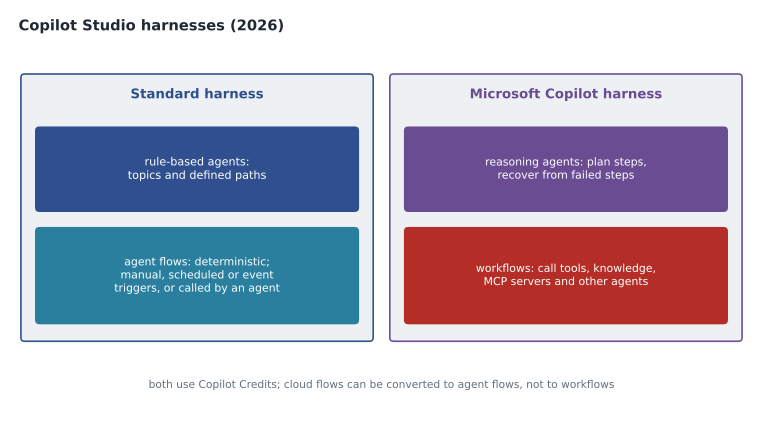
You do not need to master the harness model to build agent flows, but you do need to know it exists, because it affects which tools can call which. For example, as lesson 8 explains, a Power Automate cloud flow can call a standard harness agent through the Copilot Studio connector, but not an agent built on the Microsoft Copilot harness.
How agents call agent flows
An agent flow that starts with the When an agent calls the flow trigger can be added to an agent as a tool. The trigger defines inputs, such as an invoice number, and the flow ends with an action that returns outputs to the agent, such as a status and a payment date. Inside, the flow can do anything a flow can do: query Dataverse, call a custom connector, run a condition, start an approval. The agent then uses the outputs to answer the user in natural language.
How the agent decides to call the flow depends on its orchestration. In an agent using generative orchestration, the language model reads the descriptions of the agent's tools and topics and chooses which to call, filling in the inputs from the conversation. That makes the tool's name and description as important as its logic: "Get invoice status. Use when a staff member asks about the approval or payment status of a specific supplier invoice. Requires the invoice number." is far more useful to the model than "Flow 3". In a topic-based design, an author places the flow in a topic explicitly.
Agent flow: Finance Helper - Get invoice status
  Trigger: When an agent calls the flow
    Inputs: InvoiceNumber (text), RequesterEmail (text)
  List rows (Dataverse: Invoice)  filter: lv_invoicenumber eq InvoiceNumber
  Condition: no rows found
    Yes: Respond to the agent  Status = "Not found"
  Condition: requester is the budget holder, an AP clerk, or in the supplier's contact list
    No:  Respond to the agent  Status = "Not authorized"
  Respond to the agent
    Outputs: Status, ApprovedOn, ExpectedPaymentDate, NextStep
Look closely at the authorization check. The agent flow, not the agent's instructions, decides whether the person asking may see the invoice. Instructions such as "only tell people about their own invoices" guide a language model but do not guarantee anything. A deterministic check in a flow does. This is one of the strongest reasons to put lookups behind agent flows: the rules are enforced the same way every time.
What agent flows can do
Agent flows can use the same kinds of actions as cloud flows: built-in tools such as loops, branching, data operations, date and time functions and child flows, and connectors, including Microsoft 365, third-party and custom connectors. Microsoft also highlights two groups of actions that make agent flows distinctive.
AI capabilities use large language models inside the flow: generating text, processing documents, running a prompt on a model, calling an agent, or creating a natural-language reply for the calling agent. These are the same building blocks covered in lessons 7 and 8, available directly in the agent flow designer.
Human-in-the-loop actions pause the flow for a person, such as an approval request or a request for information, in which the flow asks a person a question and waits for the answer. At Lumenvale, a second agent flow, "Request invoice copy", let the Finance Helper ask a clerk to send a supplier a copy of a remittance advice: the agent collected the details, the flow created a request for information for the clerk on duty, and the clerk's reply was returned to the agent.
Billing: Copilot Credits, not Power Automate
The biggest practical difference between an agent flow and a Power Automate cloud flow is how it is paid for. Microsoft's documentation states that agent flows consume Copilot Studio capacity, measured in Copilot Credits, for each action, while Power Automate cloud flows are billed through Power Automate licenses. The details are worth knowing because they shape design decisions.
| Situation | What is consumed |
|---|---|
| Testing in the flow designer or the agent's test chat | No capacity |
| An agent flow run from a topic | One classic answer plus the flow's actions |
| An agent flow run through generative orchestration | One autonomous action plus the flow's actions |
| A run started by a user who has a Microsoft 365 Copilot license, while interacting with an agent | Not affected by the environment running out of credits |
| Autonomous runs, such as event-triggered agent flows | Charged; can be blocked if the environment has no credits |
| An environment that runs out of Copilot Credits | New runs are blocked; runs in progress finish |
Administrators monitor consumption in the Power Platform admin center, under Copilot Studio licensing, where agent flow actions are reported separately. Microsoft suggests pay-as-you-go billing as a way to avoid interruptions when prepaid capacity runs out. Lumenvale's finance office already had an Azure subscription linked through a billing policy for Maribeth's transcript advisers, so Rupert extended it to the finance environment with a monthly budget alert.
Agent flow or cloud flow?
Because a cloud flow can be converted into an agent flow, teams sometimes ask whether they should convert everything. The answer is no. The conversion changes billing and is one-way: Microsoft's documentation says it cannot be reversed. The flow must be in a solution and in an environment with prepaid or pay-as-you-go Copilot Studio capacity, and after conversion it is managed in Copilot Studio, although still visible from Power Automate. Choose by purpose.
| Choose an agent flow when | Choose a Power Automate cloud flow when |
|---|---|
| An agent needs to call it as a tool | It is background automation with no agent involved |
| It is built and owned by the team that owns the agent | It is owned by an automation or business team in Power Automate |
| Its volume fits Copilot Credit budgets | It runs thousands of times a day and Power Automate licensing is already in place |
| It needs AI and human-in-the-loop actions closely tied to the agent | It needs desktop flows, work queues or process licenses |
Lumenvale kept its five invoice flows as Power Automate cloud flows: they ran thousands of times a month, had nothing to do with an agent, and were covered by Process license capacity. The Finance Helper's two tools, Get invoice status and Request invoice copy, were built as agent flows, because they existed only to serve the agent and their volume, a few hundred calls a week, fitted the credit budget.
Worked problem
Designing the invoice status tool
A budget holder asks the Finance Helper, "Where is the Brennan Electrical invoice from last week?" without an invoice number. The agent flow requires an invoice number. How should the solution handle this?
Show solution
- Give the agent flow a second, optional input such as SupplierName and a date range, and let the flow search for matching invoices that the requester is allowed to see.
- If one match is found, return its status. If several are found, return a short list of numbers and dates so the agent can ask the user which one they mean.
- Write the tool description to say both inputs are accepted, so the orchestrator fills in whichever the user gave.
- Keep the authorization check in the flow, applied to every match before anything is returned.
Answer: Design tools around how people actually ask questions, let the agent handle the conversation and clarification, and keep rules such as authorization in the deterministic flow.
Agent flows also benefit from the habits used for cloud flows: descriptive action names, Try and Catch scopes, and outputs that always return something meaningful. An agent flow that fails without responding leaves the agent with nothing to say, so the Finance Helper's tools returned a Status of "Unavailable" from their Catch scopes, and the agent's instructions told it to apologize and suggest contacting accounts payable when it saw that value.
Testing and releasing agent flows
Agent flows are tested twice: on their own and through the agent. On their own, the designer's test runs the flow with sample inputs and shows each action's inputs and outputs, just as for cloud flows, and Microsoft's documentation notes that these test runs do not consume capacity. Through the agent, the test chat in Copilot Studio shows whether the orchestrator calls the tool when it should, fills the inputs correctly and uses the outputs sensibly in its answer. Many problems appear only in the second kind of test: a tool that works perfectly but is never called because its description is vague, or one that is called with the supplier name in the invoice number input.
Lumenvale kept a short list of test conversations for the Finance Helper, such as "Is invoice 4471 approved?", "When will Brennan Electrical be paid?" and "Show me every invoice for the Lakeshore welding shop", including some the agent should refuse, such as a budget holder asking about another campus's invoices. Every change to an agent flow or to the agent's instructions was followed by a run of those conversations, using the agent evaluation features where possible. Because the agent flows lived in the same solution as the agent, they moved through Finance Dev, Test and Prod together, with the same connection references and environment variables as the cloud flows.
Common mistakes
MistakeRelying on agent instructions to enforce who may see data.
InsteadEnforce authorization in the agent flow, where the rule is applied the same way every time.
MistakeConverting high-volume background cloud flows into agent flows.
InsteadConvert only flows that serve agents; conversion changes billing and cannot be reversed.
MistakeGiving tools vague names and descriptions.
InsteadDescribe what the tool does, when to use it and what inputs it needs, so orchestration chooses well.
MistakeIgnoring credit consumption until runs are blocked.
InsteadMonitor agent flow actions in the admin center and set up pay-as-you-go or alerts.
Summary and key terms
- Agent flows are deterministic automations built in Copilot Studio, with instant, scheduled or event triggers.
- Agents call agent flows as tools when the flow uses the When an agent calls the flow trigger, passing inputs and receiving outputs.
- Agent flows run on the standard harness; the Microsoft Copilot harness runs reasoning agents and newer workflows.
- They offer AI actions and human-in-the-loop actions such as approvals and requests for information.
- Agent flows consume Copilot Credits per action; cloud flows are billed through Power Automate.
- Converting a cloud flow to an agent flow is one-way and changes billing; choose by purpose and volume.
- Put rules such as authorization in the flow, not in the agent's instructions.
- Agent flow
- A deterministic automation built in Copilot Studio that agents can call as a tool.
- Tool
- A capability an agent can call, such as an agent flow, connector action or MCP server.
- Generative orchestration
- Agent behavior in which a language model chooses tools and topics from their descriptions.
- Standard harness
- The Copilot Studio runtime for rule-based agents and agent flows.
- Microsoft Copilot harness
- The Copilot Studio runtime for reasoning-heavy agents and workflows.
- Copilot Credits
- The capacity unit consumed by Copilot Studio agents and agent flows.
- Request for information
- A human-in-the-loop action that asks a person a question and waits for the reply.
Practice problems
Work each problem on paper first, then reveal the answer to check.
Which trigger makes an agent flow available to an agent as a tool?
Show answer
When an agent calls the flow.
Why did Lumenvale put the authorization check inside the agent flow?
Show answer
A deterministic check is enforced every time; agent instructions only guide the model.
What happens to new agent flow runs when an environment runs out of Copilot Credits?
Show answer
They are blocked; runs already in progress finish.
Why were the five invoice flows not converted to agent flows?
Show answer
They were high-volume background flows with no agent involved, already covered by Power Automate licensing; conversion is one-way and changes billing.
Lesson quiz · 5 questions
Score 60% or more to complete this lesson.
Create a free account to save your progress, take quizzes and earn a certificate.