
MSBA-252 · Lesson 11 of 12 · 20 min
Governance for automation
▶ Video coming soon A video version of this lesson is on the way.
By mid-November word had spread. The library wanted a flow to chase overdue interlibrary loans. Athletics wanted a bot to update its booking system. A Ridgeview instructor had already built a flow that copied student marks from a form into a personal OneDrive spreadsheet and emailed them to a teaching assistant's personal email address. Rupert found that one in the default environment's inventory on a Thursday morning, and it changed the agenda of that afternoon's Center of Excellence meeting. Success creates demand, and demand without guardrails creates risk. This lesson is about governing automation so that it can grow safely.
AB-410's foundation objectives include recommending environment types and deploying a solution and ALM strategy, and its audience profile describes collaborating with environment and security administrators and governance teams. The deeper administration of environments and ALM belongs to the companion course on Power Platform environments, governance and ALM. This lesson concentrates on what governance means specifically for flows, desktop flows and agent flows.
Why automation needs its own guardrails
Automation is different from an app in three ways that matter for governance. It acts without a person watching, so mistakes repeat quietly. It moves data between systems, so a single flow can carry information somewhere it should never go. And it runs on identities and capacity, connections, licenses, machines and credits, that someone has to own and pay for. Good governance answers four questions for every automation: where may it run, what may it connect to, who owns it, and how do we know it is working?
Where automation runs: environments
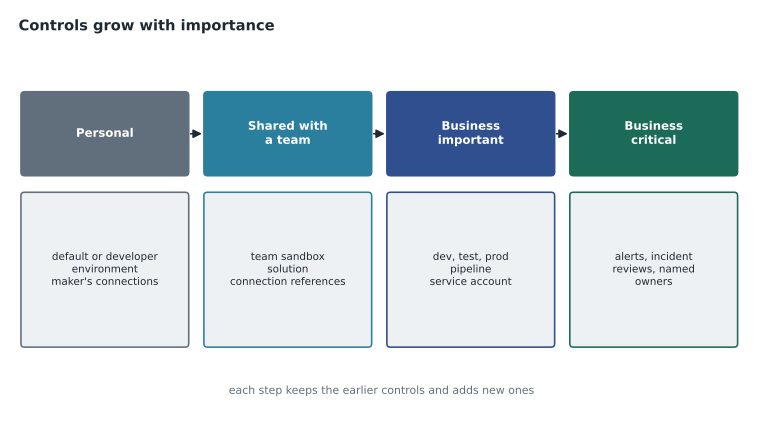
Environments are the first guardrail. Every tenant has a default environment, where anyone with a license can create flows; it is useful for personal productivity and easy to overuse. Lumenvale's strategy, set out when Maribeth's transcript solution began, gave business solutions their own development, test and production environments, and used environment groups and default environment routing so that new makers landed in personal development environments rather than in the default environment.
For automation, the strategy added two rules. Business-critical flows, such as the invoice flows, live only in production environments and arrive there only through pipelines. And desktop flows that run unattended are registered only to machines in environments that IT manages, so a bot cannot be pointed at a machine under someone's desk.
| Environment type | Use for automation | Lumenvale example |
|---|---|---|
| Default | Personal productivity flows only | A staff member's flow that saves email attachments to their OneDrive |
| Developer | A maker's own building and learning space | Signe's and Maribeth's developer environments |
| Sandbox | Development and test of team solutions | Finance Dev and Finance Test |
| Production | Business-critical solutions, deployed by pipeline | Finance Prod with the invoice solution |
What automation connects to: data policies
The most important automation guardrail is the data policy, also called a data loss prevention or DLP policy. A data policy sorts connectors into three groups: Business, Non-business and Blocked. A flow or app can use connectors from the Business group together, or from the Non-business group together, but not from both, and it cannot use Blocked connectors at all. Data policies can apply to the whole tenant, to particular environments, or to all environments except some. When several policies apply, the most restrictive combination wins.
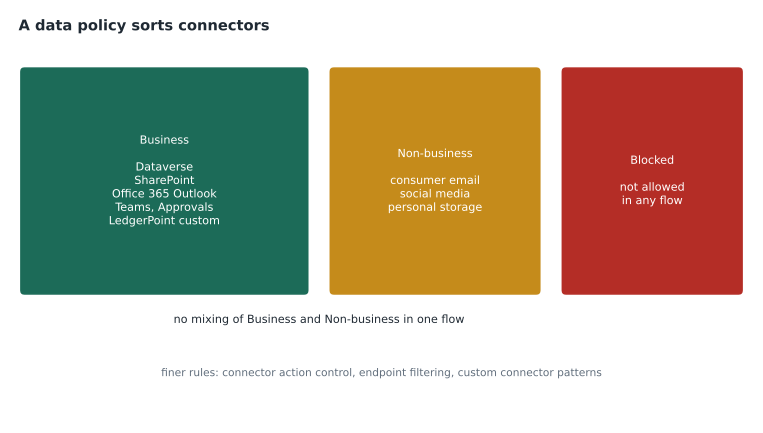
Data policies can be finer than whole connectors. Connector action control allows or blocks particular actions within a connector, such as allowing SharePoint reads but not deletions. Endpoint filtering limits which endpoints certain connectors can reach, such as allowing the HTTP connector to call only the college's own API addresses. And custom connector patterns let administrators classify custom connectors by their host addresses.
Rupert's Thursday discovery, the flow emailing marks to a personal address, was possible because the default environment's data policy put Outlook.com, a consumer email connector, in the same group as OneDrive for Business. The fix that afternoon was to move consumer connectors to Non-business across the tenant, contact the instructor kindly, and help her rebuild the flow properly in her developer environment with the teaching assistant's college account.
Managed Environments
Managed Environments add a set of governance features to an environment, and Microsoft requires them for some capabilities. They include limits on how widely makers can share apps and agents, weekly usage insights emailed to administrators, solution checker enforcement so solutions with critical issues are blocked or warned on import, IP firewall and other security controls, maker welcome content that explains local rules, and pipelines for deployment. Lumenvale's production and test environments were managed from the start; in November Rupert extended Managed Environments to the personal developer environment group as well, so that every maker saw the welcome message with the college's automation rules.
Who owns automation: ownership and inventory
Every automation needs an owner who can answer for it. Lumenvale's rule for business solutions was a named business owner, such as Ysaline for the invoice solution, a named technical owner, such as Signe, and ownership in Power Platform by a security group plus a service account, never by a single person. Flows in the default and developer environments belonged to their makers, but the Center of Excellence watched for flows that crossed into business territory: high run counts, premium connectors, sharing with many people or connections to finance and student systems.
Inventory is how you find them. The Power Platform admin center offers inventory and usage views across environments, including flows, apps and agents, with their owners and connectors. Microsoft has moved many capabilities that once required the Center of Excellence (CoE) Starter Kit into the admin center, and it describes the kit as no longer actively maintained. Lumenvale, which had used parts of the kit, now relied on the admin center's inventory for discovery and kept only a small Power BI report of its own for trends.
Orphaned automation deserves special attention. When a maker leaves, their flows keep running on their connections until those connections fail. Lumenvale's leaver process now included a step for IT to list the leaver's flows, contact the manager, and either reassign ownership and connections or turn the flows off.
Paying for automation: licenses and capacity
Automation consumes licenses and capacity, and governance includes keeping that visible. Power Automate Premium licenses a person to build and run premium flows; Power Automate Process licenses a flow or a machine for unattended and high-volume automation, and since July 2026 its capacity can be shared across workflows. Hosted Process covers Microsoft-hosted machines. Agent flows and AI actions consume Copilot Credits, as lessons 6 and 7 explained, while existing AI Builder credits run down. Lumenvale's monthly governance report listed licenses assigned and used, Process capacity by solution, Copilot Credit consumption by environment against budget alerts, and machine utilization.
Rules for agent flows and AI
Agent flows and AI actions inherit everything above, because they live in the same environments and use the same connectors and data policies. They also add a few rules of their own. Lumenvale's list was short: every agent tool that reads data enforces authorization in the flow; no agent called with outside content has tools that change data; every prompt and AI model change is tested against its test set before release; generated content sent outside the college is reviewed by a person until the business owner signs off on automatic sending; and Copilot Credit budgets are set per environment with alerts at 75 percent.
Supporting makers, not just stopping them
Governance that only says no drives makers to spreadsheets and personal tools, which is where the problems started. Lumenvale's Center of Excellence balanced controls with help: a maker community channel in Teams, monthly drop-in clinics, templates for common flows such as approvals and reminders, the release checklist from the transcript project, and a simple path from personal flow to supported solution. A flow that grew important got a conversation, not a shutdown: what does it do, who depends on it, and shall we move it to a team environment with a service account?
Worked problem
Governing the athletics booking bot
Athletics wants an unattended desktop flow to update its third-party booking website, which has no API, every evening from a list in a SharePoint site. A coach has started building it in the default environment on her laptop. What guidance should the Center of Excellence give?
Show solution
- Environment: move the build to a developer environment now and to an athletics sandbox and production pair if it proceeds, deployed by pipeline.
- Machine: unattended runs need a registered machine in a managed environment, such as IT's machine group or a hosted machine group, not a laptop.
- Credentials: the booking site account goes into Azure Key Vault as a credential; the bot account gets only booking rights.
- Data policy: confirm the connectors used are in the Business group and that browser automation of the booking site is acceptable to the vendor.
- Ownership and licensing: name a business owner in athletics and a technical owner, use a service account, and assign Process capacity.
- Monitoring: add a Catch scope, a daily absence check and a weekly summary to the athletics channel.
Answer: Treat the request as a supported project rather than a rule violation: move it to the right environment, machine and identities, apply data policies and ownership, and add monitoring, so the coach gets her automation and the college keeps control.
Making the rules visible
Rules that nobody can find are rules that nobody follows. Lumenvale published its automation rules on one page of the Center of Excellence site in plain language: which environment to build in, which connectors are business connectors, when a flow needs a service account, how to request Process capacity or a machine for a desktop flow, what testing is expected before production and whom to ask. The Managed Environments welcome message linked to the page, so every maker saw it the first time they opened a team or developer environment. When a rule changed, such as the move of consumer connectors to the Non-business group, the page, the welcome message and the maker community channel all said so on the same day, with the reason.
Rupert also reported to the college's IT steering committee each term: how many makers were active, how many flows ran in each environment type, how many business solutions had moved through pipelines, the main incidents and what had changed because of them. Seeing automation as a managed portfolio, with risks and benefits reported together, was what persuaded the committee, at its November meeting, to approve funding for a second professional developer in the Center of Excellence from 2027.
Environment settings for AI and agents
Several environment and tenant settings decide which AI and agent features makers can use, and they are part of governing automation. Administrators can turn Copilot and generative AI features on or off for environments, decide whether data may move across geographic regions for AI features where that applies, and control who can create and share agents. Lumenvale turned on the AI features in Finance Dev, Test and Prod deliberately, after the privacy review, rather than leaving them at whatever default applied. In the personal developer environments, makers could experiment with AI features, but agent sharing was limited to small groups until an agent moved into a team environment.
Tenant isolation is another setting worth knowing. It restricts connections to other Microsoft Entra tenants, so a flow cannot, for example, connect to a SharePoint site in another organization's tenant and copy data there. Lumenvale enabled tenant isolation with a short list of allowed partner tenants, such as the provincial shared services organization for payroll. Combined with data policies, it closes one of the less obvious paths by which data can leave an organization through automation.
Finally, governance includes retiring automation. Every quarter the Center of Excellence listed flows with no successful runs in 90 days, contacted their owners and turned off or deleted those no longer needed. Fewer flows meant less to monitor, fewer connections to maintain and less confusion when someone searched for the flow that did a particular job.
Common mistakes
MistakeLeaving the default environment's data policy open.
InsteadKeep consumer connectors out of the Business group across the tenant and route makers to developer environments.
MistakeGoverning only with blocks.
InsteadPair controls with templates, clinics and a clear path from personal to supported solutions.
MistakeLetting flows depend on one person.
InsteadUse group ownership, service accounts and a leaver process for automation.
MistakeTreating AI and agent flows as outside existing governance.
InsteadApply the same environments and data policies, plus rules for authorization, testing and credit budgets.
Summary and key terms
- Automation acts unattended, moves data and consumes identities and capacity, so it needs specific guardrails.
- Use environments by purpose: default for personal flows, developer and sandbox for building, production for critical solutions.
- Data policies group connectors into Business, Non-business and Blocked, with action control and endpoint filtering for finer rules.
- Managed Environments add sharing limits, usage insights, solution checker enforcement and maker guidance.
- Name business and technical owners, use group ownership and service accounts, and handle orphaned flows.
- Use the admin center for inventory; the CoE Starter Kit is no longer actively maintained.
- Track licenses, Process capacity, Copilot Credits and machines, and support makers as well as controlling them.
- Data policy
- A rule set that groups connectors into Business, Non-business and Blocked for environments.
- Connector action control
- A data policy setting that allows or blocks particular actions of a connector.
- Endpoint filtering
- A data policy setting that limits which endpoints certain connectors may call.
- Managed Environments
- A set of governance features enabled on an environment.
- Default environment routing
- A setting that places new makers in personal developer environments.
- Orphaned flow
- A flow whose owner has left, often still running on that person's connections.
- Power Automate Process
- A license that gives a flow or machine capacity for unattended, high-volume automation.
Practice problems
Work each problem on paper first, then reveal the answer to check.
Why could the instructor's flow send marks to a personal email address?
Show answer
The default environment's data policy put a consumer email connector in the same group as business connectors.
What happens when a flow tries to use a Business connector and a Non-business connector together?
Show answer
The data policy prevents it; connectors from the two groups cannot be combined.
Where should makers now look for inventory, given the CoE Starter Kit's status?
Show answer
The Power Platform admin center, where Microsoft has moved many CoE capabilities.
What did Lumenvale add to its leaver process?
Show answer
Listing the leaver's flows and reassigning ownership and connections or turning the flows off.
Lesson quiz · 5 questions
Score 60% or more to complete this lesson.
Create a free account to save your progress, take quizzes and earn a certificate.