
MSBA-250 · Lesson 8 of 12 · 19 min
Business units and hierarchy security
▶ Video coming soon A video version of this lesson is on the way.
Rupert's last open question was about boundaries. Lumenvale has three campuses, each with its own facilities supervisor, and the privacy office wanted each campus's inspection data visible to that campus's staff and to the college-wide facilities director, but not to the other campuses' supervisors. Inspection reports sometimes mention staff incidents and lab accidents, and the supervisors had asked for the same boundary themselves. "We need walls between the campuses," Rupert said, "with a window for the director."
Dataverse builds walls with business units and windows with hierarchy security. This lesson explains how business units divide data, how access levels from lesson 7 use them, the newer matrix model in which users hold roles in several business units and own rows across them, and how manager and position hierarchies let managers see their people's work. Together with lesson 7 they cover what AB-410 means by configuring security for a data model.
Business units
A business unit is a security boundary in Dataverse. Every environment has one root business unit, created with the environment, and you can add child business units under it, and children under those, to mirror the parts of the organization that need separate data. Every user belongs to exactly one business unit, and every user- or team-owned row has an owning business unit, normally the business unit of its owner. Access levels from lesson 7 use this structure: business unit level reaches the rows owned in your unit; parent: child business units level reaches your unit and everything below it.
Signe designed Lumenvale's structure to match the boundary the privacy office wanted, not the org chart. The root, Lumenvale Community Colleges, has three children: Downtown Campus, Lakeshore Campus and Ridgeview Campus. Facilities staff belong to their campus's unit. The facilities director and the college's central teams belong to the root.
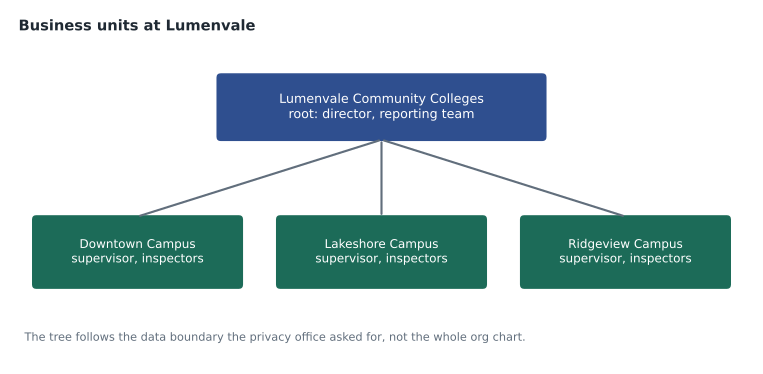
How access levels use the tree
With this structure, the Campus Supervisor role from lesson 7 grants Read and Write on Inspection at business unit level. A supervisor in Lakeshore Campus therefore sees every inspection owned by anyone in Lakeshore Campus, and none from Downtown or Ridgeview. The facilities director, in the root, holds a role with parent: child business units level, which reaches the root and every campus beneath it. Inspectors keep user level, so they see their own work and what is shared with them. The privacy office's wall and window are both expressed by one choice: the access level in each role.
| Person | Business unit | Role and level on Inspection | Can read |
|---|---|---|---|
| Lakeshore inspector | Lakeshore Campus | Inspector, user level | Their own inspections and shared ones |
| Lakeshore supervisor | Lakeshore Campus | Supervisor, business unit level | All Lakeshore inspections |
| Facilities director | Root | Director, parent: child business units level | All inspections on every campus |
| Report reader | Root | Report Reader, organization level | All inspections |
Designing business units well
Business units are powerful and easy to overuse. Each unit is a boundary that must be administered: users must be placed in it, teams created in it, and some features such as default teams and role assignments work per unit. Signe's rules: create a business unit only where there is a real requirement to separate data; keep the tree shallow; do not mirror every department; and remember that a business unit cannot be deleted while it contains users, teams or rows, and that disabling one blocks its users from signing in. Use teams, not business units, for groups that only need to share work.
Changing a user's business unit is a significant event. By default, Dataverse removes the user's security role assignments when their business unit changes, because roles are tied to a business unit, so the user must be given roles again. Lumenvale's group teams soften this: a moved user keeps their team memberships, but the roles they hold through a team in their old unit apply in the context of that team, so Signe documented a short checklist for moves between campuses.
The matrix model: roles in several business units
Older Dataverse security was strictly hierarchical: a user had roles only in their own business unit. Real organizations are more tangled. Lumenvale's lab safety officer works for the Ridgeview Campus but also reviews every chemistry lab inspection on the other campuses. In the matrix model, sometimes called modernized business units, a user can be assigned a security role from another business unit, and that role's access levels then apply to the other unit's data. The safety officer belongs to Ridgeview Campus and also holds the Lab Safety Reviewer role from Downtown Campus and from Lakeshore Campus.
Record ownership across business units
A related feature lets a row's owning business unit differ from its owner's business unit. With record ownership across business units turned on, in the Power Platform admin center under the environment's settings, Product, Features, a user can own rows in another business unit if one of their roles grants Read on the table, and the Owning Business Unit column on a row can be changed directly. That suits cases like Lumenvale's shared services: a central inspector who belongs to the root can own an inspection whose owning business unit is Lakeshore Campus, so the Lakeshore supervisor sees it.
The feature has administrative details worth knowing. Changing the Owning Business Unit column requires a local-level Append To privilege on the Business Unit table. Organization settings control whether ownership is recalculated across existing rows, and whether a row should always move to its owner's business unit when the owner changes; Microsoft documents these settings, and recalculation can lock the system briefly, so it is scheduled outside working hours. Users running model-driven apps still need a role in their own business unit with the basic user settings privileges. Signe turned the feature on in the test environment first and ran the security test script from lesson 7 before enabling it in production.
Worked problem
A central inspector working on a campus
Tobiah Rennart, a fire safety specialist in the root business unit, inspects buildings on all three campuses. Each campus supervisor must see the inspections Tobiah does on their campus, and only those. How can the design support this?
Show solution
- Tobiah Rennart belongs to the root business unit and holds the Inspector role, so Tobiah sees their own inspections.
- With record ownership across business units on, each inspection Tobiah Rennart creates can have its Owning Business Unit set to the campus where the building is.
- A flow or a default on the form can set Owning Business Unit from the building's campus, so nobody has to remember.
- Each campus supervisor's business-unit-level Read then reaches Tobiah Rennart's inspections in their campus only.
Answer: Keep Tobiah Rennart in the root, turn on record ownership across business units, and set each inspection's owning business unit from the building's campus.
Hierarchy security
Business units decide which part of the organization can see rows. Hierarchy security adds access based on who reports to whom. It is useful when managers need to see and help with their people's work without being given broad business unit or organization access. Dataverse offers two models, and an environment uses one of them.
The manager hierarchy uses the Manager column on each user row. A manager gets access to rows owned by their direct reports, and read access to rows of people further down the chain, to a configured depth. By default the depth is three levels, and administrators can change it. Managers gain read, write and related access to their direct reports' rows and read-only access below that, and they still need at least user-level privileges on a table for hierarchy access to apply to it. In the manager model, the manager is generally expected to be in the same business unit as the report or in a parent unit.
The position hierarchy uses a Position table instead of the Manager column. Administrators define positions, such as Facilities Director, Campus Facilities Supervisor and Inspector, arrange them in a tree, and assign each user a position. People in higher positions get access to rows owned by people in positions beneath them, with fuller rights over the level directly below and read-only access further down, to the configured depth. Because positions are separate from business units, the position hierarchy can cross business unit boundaries, which suits organizations where reporting lines do not follow business units.
| Feature | Manager hierarchy | Position hierarchy |
|---|---|---|
| Based on | The Manager column on each user | Positions assigned to users |
| Crosses business units | Generally within the same or a parent business unit | Yes |
| Typical access | Direct reports: read and write; further down: read-only | Position below: read and write; further down: read-only |
| Depth | Configurable; three levels by default | Configurable; three levels by default |
| Best when | Reporting lines in the directory are accurate | Roles matter more than individual managers |
Turning on hierarchy security
Hierarchy security is turned on in the Power Platform admin center, in the environment's settings under Users and permissions, Hierarchy security. There you choose the model, set the depth, and choose which tables take part: by default many tables are included, and you can exclude tables where hierarchy access is not wanted. Hierarchy access applies on top of roles; it never removes access a role grants.
Lumenvale chose not to turn on hierarchy security for facilities. The business unit design already gave each supervisor their campus and the director everything, and adding the manager hierarchy would have given every manager in the college, including those outside facilities, read access to their reports' inspections through the Manager column, which nobody had asked for. Signe documented the decision and the reason. The registrar's office, where Maribeth works, uses a position hierarchy in its own environment, because advisers there change managers often and positions are more stable.
Choosing the right tool
By now Rupert had a toolbox with many tools, and Signe drew the decision on the whiteboard so nobody would reach for the wrong one.
| Requirement | Tool |
|---|---|
| Separate the data of parts of the organization | Business units, with access levels in roles |
| A person needs access in another part of the organization | A role from that business unit (matrix model) |
| Rows owned by central staff must belong to a local unit | Record ownership across business units |
| Managers see their people's work | Hierarchy security, manager or position |
| A group works on the same rows | An owner team that owns the rows |
| A few people need access to one row | Sharing or an access team |
| Some columns are more sensitive than the row | Column-level security (lesson 9) |
The security test script grew from 30 checks to 44, covering the campus walls, the director's window, Tobiah Rennart's cross-campus inspections and the safety officer's matrix roles. All 44 passed in the test environment. Rupert crossed off his last question and signed the privacy office's form.
Business units and solutions
Business units, unlike roles, do not travel in solutions. Roles, column security profiles and the tables they protect move from development to production in the Lumenvale Facilities solution, but the business unit tree, the teams and the user assignments are created in each environment. Rupert keeps a short configuration script for each environment that lists the business units, the group teams with their linked Microsoft Entra groups, and the roles each team holds, so the test environment can be set up to match production and a rebuilt environment can be restored quickly. The script is reviewed whenever a campus reorganizes.
Common mistakes
MistakeCreating a business unit for every department.
InsteadCreate business units only for real data boundaries; use teams for working groups.
MistakeMoving a user to another business unit without reassigning roles.
InsteadPlan role reassignment, because roles are removed by default when a user's business unit changes.
MistakeGiving cross-campus staff organization-level roles.
InsteadUse matrix role assignments or record ownership across business units to grant only what is needed.
MistakeTurning on hierarchy security without checking who becomes a manager of whom.
InsteadReview the Manager column or position design and exclude tables where hierarchy access is not wanted.
MistakeAssuming hierarchy security can restrict access.
InsteadHierarchy security only adds access on top of roles.
Summary and key terms
- Business units are security boundaries; every user belongs to one and every owned row has an owning business unit.
- Access levels in roles use the business unit tree: business unit and parent: child business units levels.
- Keep the tree small and aligned to real data boundaries.
- In the matrix model a user can hold roles from other business units; record ownership across business units lets rows belong to a unit other than the owner's.
- Manager and position hierarchy security give managers access to their people's rows, with a configurable depth.
- Hierarchy security and roles add up; neither takes away access the other grants.
- Business unit
- A security boundary in Dataverse that groups users and the rows they own.
- Root business unit
- The top business unit, created with the environment.
- Owning business unit
- The business unit a row belongs to, used by business-unit-level access.
- Matrix model
- A security design in which users hold roles from several business units.
- Manager hierarchy
- Hierarchy security based on the Manager column of each user.
- Position hierarchy
- Hierarchy security based on positions assigned to users, able to cross business units.
- Hierarchy depth
- How many levels below a person hierarchy access reaches.
Practice problems
Work each problem on paper first, then reveal the answer to check.
Which access level lets a campus supervisor see every inspection on the campus?
Show answer
Business unit level, with the supervisor in the campus business unit.
A lab safety officer in Ridgeview Campus must review Downtown Campus lab inspections. What is the narrowest way to allow it?
Show answer
Assign them a role from the Downtown Campus business unit (the matrix model).
What happens to a user's roles by default when their business unit changes?
Show answer
Their security role assignments are removed and must be assigned again.
Why did Lumenvale decide not to turn on the manager hierarchy?
Show answer
Business units already met the requirement, and the hierarchy would have given managers outside facilities unwanted access.
Lesson quiz · 5 questions
Score 60% or more to complete this lesson.
Create a free account to save your progress, take quizzes and earn a certificate.