
MSBA-250 · Lesson 3 of 12 · 20 min
Relationships and behaviors
▶ Video coming soon A video version of this lesson is on the way.
The trouble started with a test. Signe had loaded a few sample buildings, rooms and inspections into the development environment, and Kwabena, testing a report, deleted a sample building to see what would happen. Nothing seemed to happen. The building disappeared, but its rooms were still there, pointing at nothing, and two inspections now had a blank building. "That," Signe said, "is what we were going to talk about this morning."
Relationships connect rows in different tables. Creating one is easy; deciding what it should do when a row is deleted, reassigned or shared is the part that matters. This lesson explains the kinds of relationships Dataverse supports, how lookups create them, and the relationship behaviors that control what happens to related rows. AB-410 lists configuring table relationships as a core data modeling skill, and nearly every exam scenario about relationships turns on behavior.
One-to-many and many-to-one
The most common relationship is one-to-many: one Building has many Rooms. Seen from the other side, it is many-to-one: many Rooms belong to one Building. These are the same relationship; Dataverse shows it under both tables, as a one-to-many on Building and a many-to-one on Room. The relationship is stored as a lookup column on the many side: each Room row has a Building column holding a reference to one Building row.
You create the relationship either by adding a lookup column to the child table, or from the Relationships area of either table by choosing a new one-to-many or many-to-one relationship. Both create the same thing: a lookup column on the child and a relationship definition with a name and a behavior. On forms, the parent side can show a subgrid of related children, so the Building form lists its rooms, and the child side shows the lookup.
Many-to-many
A many-to-many relationship links rows where each side can have many of the other: a Checklist Item such as Eyewash station applies to several Room Types (chemistry lab, biology lab, workshop), and each Room Type has several checklist items. Dataverse offers two ways to build it.
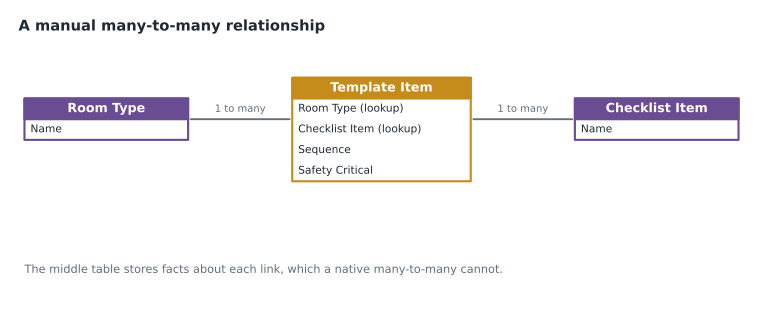
A native many-to-many relationship is created directly between two tables. Dataverse creates a hidden intersect table that stores pairs of related rows, and both forms can show a subgrid of the other side. It is quick and works well when the link itself carries no information. A manual many-to-many uses a table you create yourself, with two lookups, one to each side. It takes more work, but the intersect rows are ordinary rows, so they can have their own columns, security, business rules and auditing.
For Lumenvale the choice was clear once Octavia explained the template. Each item on a room type's checklist has a display order and a flag saying whether a failure is safety critical. Those are facts about the link, not about either side. So Signe built a manual table called Template Item with lookups to Room Type and Checklist Item and columns for Sequence and Safety Critical. A native relationship could not have stored them.
| Option | How it is built | Choose it when |
|---|---|---|
| Native many-to-many | Created directly; Dataverse manages a hidden intersect table | The link has no data of its own |
| Manual many-to-many | A custom table with two lookups | The link needs its own columns, security, rules or auditing |
Self-referential and hierarchical relationships
A table can relate to itself. A Room can be inside another Room, such as a lab with a separate chemical store inside it, so Room could have a Parent Room lookup that points to another Room. A self-referential relationship like this is an ordinary one-to-many whose both ends are the same table. If you mark one self-referential relationship on a table as hierarchical, Dataverse can show the rows as a tree and supports query operators such as "under" and "above" in views, so a view can show every room under a given parent. A table can have only one hierarchical relationship.
Lookups that point to more than one table
Most lookups point to a single table. A few point to several. The Customer column type points to either Account or Contact. The Regarding column on activity tables can point to many tables. Makers can also create multi-table lookups, sometimes called polymorphic lookups, that point to a chosen set of tables. Lumenvale's inspections are sometimes done by staff and sometimes by contracted elevator inspectors, who are Contact rows, so the Inspector column could be a multi-table lookup to User and Contact. Signe noted the option and chose a simpler design: an Inspector lookup to User and a separate Contractor lookup to Contact, because security and reporting are simpler when each lookup has one target.
Relationship behaviors
Every one-to-many relationship has a behavior that tells Dataverse what to do with child rows when something happens to the parent row: when it is deleted, assigned to a new owner, shared or unshared, reparented, or merged, and how its children appear in rollup views. Dataverse offers four relationship types that bundle these settings.
| Type | What it means | Delete behavior |
|---|---|---|
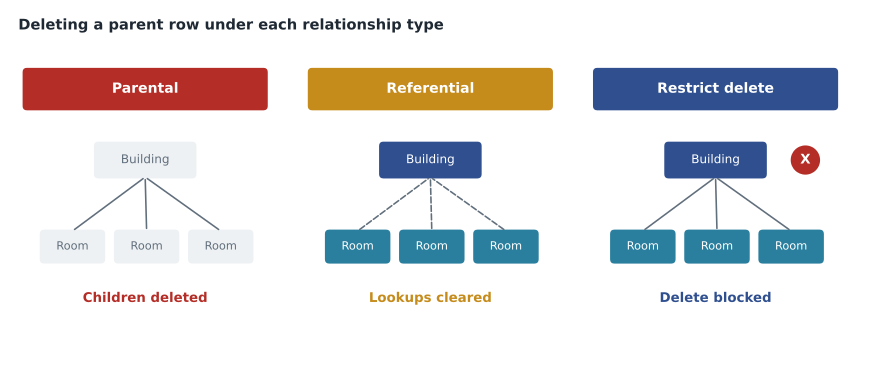
| Parental | Children belong to the parent; actions on the parent flow to its children | Deleting the parent deletes its children |
| Referential | Children only refer to the parent; actions do not flow | Deleting the parent clears the lookup on its children (remove link) |
| Referential, restrict delete | Children refer to the parent and protect it | The parent cannot be deleted while children exist |
| Custom | You choose the behavior for each action | Any of the delete options |
Kwabena's deleted building had a referential relationship to its rooms, the default for a new lookup. So when the building went, Dataverse simply cleared the Building lookup on each room, leaving orphans. That is sometimes what you want. Here it was not: a room without a building makes no sense, and inspections of a deleted building should not quietly lose their building.
The actions a behavior controls
When you choose Custom, you set each action separately. Delete has three options: Cascade All deletes the children, Remove Link clears the lookup on them, and Restrict blocks the delete. The ownership and sharing actions, Assign, Share, Unshare and Reparent, have four options: Cascade All applies the action to every child, Cascade Active applies it only to active children, Cascade User-Owned applies it only to children owned by the same user as the parent, and Cascade None does nothing to the children. Reparent happens when a child row's parent lookup changes to a different parent; with cascade, the child's own children follow its ownership and sharing. Merge matters for tables that support merging duplicates, such as Account and Contact, and decides whether children move to the surviving row. Rollup View decides which children appear when a view rolls up related rows, such as all activities of an account and its children.
| Action | Options | Example in the inspection model |
|---|---|---|
| Delete | Cascade All, Remove Link, Restrict | Deleting an inspection deletes its findings |
| Assign | Cascade All, Active, User-Owned, None | Reassigning an inspection to a new inspector reassigns its findings |
| Share and Unshare | Cascade All, Active, User-Owned, None | Sharing an inspection with a contractor shares its findings |
| Reparent | Cascade All, Active, User-Owned, None | Moving a finding to another inspection updates who can see it |
| Merge | Cascade All, None | Relevant for tables that support merge, such as Contact |
| Rollup View | Cascade All, Active, User-Owned, None | Which children appear in rolled-up views of the parent |
There is one structural limit to remember. A table can be the child in only one parental relationship: cascading delete and assign from two different parents would conflict, so Dataverse allows only one. Every other relationship on that table must be referential, restrict delete or custom with non-parental settings. Plan which parent truly owns each child.
Worked problem
Choosing behaviors for the inspection model
Decide the behavior for three relationships: Building to Room, Inspection to Finding, and Room to Finding.
Show solution
- Building to Room: a room cannot exist without its building, but deleting a building should be rare and deliberate. Restrict delete protects buildings that still have rooms; facilities must move or remove rooms first.
- Inspection to Finding: findings exist only as part of an inspection, and when an inspection is reassigned its findings should follow. Make it parental: deleting an inspection deletes its findings, and assigning or sharing it cascades.
- Room to Finding: a finding refers to the room it was found in, but the finding belongs to its inspection. Finding can have only one parental relationship, and that is Inspection, so Room to Finding is referential with restrict delete, which stops a room with findings from being deleted and destroying history.
- Record the reasoning in the design record so the next developer understands why.
Answer: Restrict delete for Building to Room, parental for Inspection to Finding, and restrict delete for Room to Finding.
Behavior and security work together
Cascading assign and share are not just convenience; they are part of security. Lesson 7 explains that users with user-level privileges can see rows they own or that are shared with them. If findings did not cascade with their inspection, reassigning an inspection to another inspector would give them the inspection but leave its findings owned by the first inspector, invisible to the new one. Parental behavior keeps the parent and its children together for ownership and sharing, which is usually what security needs.
Cascading has a cost. Assigning a parent with thousands of children runs a background job that updates every child, and it can take time and touch many rows. For very large hierarchies, Signe checks whether cascading is really needed or whether a team-owned design (lesson 7) avoids frequent reassignment altogether.
Relationship names and lookup columns
Each relationship has a schema name, such as lcc_building_lcc_room, and creates a lookup column on the child with its own display and logical names. The relationship name is what developers use in queries and in the Web API to navigate between tables, and like other schema names it cannot be changed. When two relationships connect the same pair of tables, such as Inspection to User through Inspector and through Reviewed By, give them clear names so nobody confuses them in a query or a flow.
GET /api/data/v9.2/lcc_buildings(lcc_buildingcode='OSC')?$select=lcc_name
    &$expand=lcc_building_lcc_room($select=lcc_roomcode,lcc_floor)
Connections: relationships without a schema change
Sometimes people need to record that two rows are related in a way nobody planned: this contractor is the backup inspector for that building. Connections let users link almost any two rows with a named connection role, such as Backup inspector, without a new relationship in the schema. They are flexible and useful for informal links, but they are harder to report on and do not carry behaviors or security cascades. Use them for occasional, varied links; use real relationships for anything the process depends on.
Configuring a relationship step by step
To create the Inspection to Finding relationship in Power Apps, open the Finding table in the solution, go to Relationships, select New relationship and Many-to-one, and choose Inspection as the related table. Name the lookup column Inspection and give it a description. Under the advanced options, set the relationship type, here Parental, or choose Custom and set each action. Save, then add the Inspection lookup to the Finding form and a Findings subgrid to the Inspection form. If you create the relationship by adding a lookup column instead, open the relationship afterwards to set its behavior, because a new lookup starts as referential.
After Kwabena's experiment, Signe changed the Building to Room relationship to restrict delete and tried again. This time the delete failed with a message that the building still had rooms. "Good," said Octavia, who had been watching. "That's exactly the message I want my staff to see."
Common mistakes
MistakeAccepting the default referential behavior for every lookup.
InsteadChoose a behavior for each relationship from the process: parental, referential, restrict delete or custom.
MistakeUsing a native many-to-many when the link needs data such as a sequence.
InsteadBuild a manual many-to-many with an intersect table that has its own columns.
MistakeTrying to give a table two parental relationships.
InsteadA table can have only one parental parent; make the others referential or restrict delete.
MistakeForgetting that assign and share can cascade.
InsteadUse cascading so children follow their parent's ownership and sharing when security needs it.
MistakeUsing connections for links the process depends on.
InsteadUse real relationships for structural links; connections suit occasional, informal ones.
Summary and key terms
- A one-to-many relationship is stored as a lookup column on the child; the same relationship is many-to-one from the child's side.
- Many-to-many can be native, with a hidden intersect table, or manual, with your own table that can hold data about each link.
- Relationship behaviors control delete, assign, share, unshare, reparent, merge and rollup view for child rows.
- Parental cascades actions, referential removes the link on delete, restrict delete blocks deleting a parent with children, and custom lets you choose.
- A table can be the child in only one parental relationship.
- Cascading ownership and sharing keeps parents and children together for security.
- Lookup column
- A column that stores a reference to a row in another table and defines a many-to-one relationship.
- Intersect table
- A table that stores pairs of related rows for a many-to-many relationship.
- Parental relationship
- A relationship whose actions cascade from the parent to its children, including delete.
- Restrict delete
- A behavior that prevents deleting a parent row while child rows refer to it.
- Cascade User-Owned
- An option that applies an action only to children owned by the same user as the parent.
- Hierarchical relationship
- A self-referential relationship marked so rows can be shown and queried as a tree.
- Connection role
- A named role used to link two rows without a schema relationship.
Practice problems
Work each problem on paper first, then reveal the answer to check.
Where is a one-to-many relationship physically stored?
Show answer
As a lookup column on the child (many) table.
When would you choose a manual many-to-many over a native one?
Show answer
When the link itself needs columns, such as a sequence or a flag, or needs its own security, rules or auditing.
Which delete option leaves child rows but clears their lookup?
Show answer
Remove Link, the delete behavior of a referential relationship.
Why does cascading assign matter for security?
Show answer
If children do not follow their parent's owner, a user given the parent may not be able to see its children.
Lesson quiz · 5 questions
Score 60% or more to complete this lesson.
Create a free account to save your progress, take quizzes and earn a certificate.