
MSBA-250 · Lesson 6 of 12 · 20 min
Business rules and validation
▶ Video coming soon A video version of this lesson is on the way.
The first week of the pilot produced 212 findings and a lesson. Thirty-one failed findings had no priority. Nine had a priority but no note. Four said Not applicable for a fire extinguisher in a lab that certainly had one, and two inspections were marked complete with a completion date before the scheduled date. None of it was malicious. Inspectors were working from phones in noisy corridors, tapping through quickly. "The app should have stopped me," one of them said, and Octavia agreed.
Signe's answer was validation: rules that keep bad data out and guide people to the right entry. This lesson covers the tools Dataverse offers for that job, centered on business rules, the no-code rules AB-410 asks you to configure, and it compares them with the other ways to add logic, such as Power Fx in apps, Power Automate flows and plug-ins, so you can choose sensibly, which the exam calls evaluating use cases for business logic.
Layers of validation
Good validation comes in layers. The column definition is the first: a whole number column cannot hold text, a choice can only hold its options, a minimum and maximum value can be set on number columns, and a maximum length on text. Requirement levels make columns business required on forms. Alternate keys from lesson 5 block duplicates. Business rules add conditional logic without code. App logic in canvas apps and model-driven form scripts shapes the experience of one app. Server-side logic in plug-ins and low-code plug-ins runs whenever data changes, from any source. Each layer catches what the one before cannot.
What a business rule is
A business rule is conditional logic defined on a table with a visual designer: if these conditions are true, do these actions; otherwise, do those. Business rules can set or clear column values, change whether a column is required, show or hide a column, enable or disable a column, show an error message that blocks saving, and show a recommendation that offers to apply a suggested value. They are built in the table designer, under Business rules, by dragging conditions and actions onto a canvas, and they must be activated before they run.
| Action | What it does | Inspection example |
|---|---|---|
| Show error message | Marks a column with an error and prevents saving | Completed On cannot be before Scheduled Date |
| Set column value | Puts a value in a column | Set Priority to High when a safety-critical item fails |
| Clear column value | Empties a column | Clear Priority when Result changes to Pass |
| Set business required | Changes the requirement level | Note is required when Result is Fail |
| Show or hide column | Changes visibility on forms | Show Photo only when Result is Fail |
| Enable or disable column | Makes a column editable or read-only on forms | Disable Result once the finding is resolved |
| Recommendation | Suggests a value the user can accept | Suggest Not applicable is unusual for extinguishers in labs |
Scope: where a rule runs
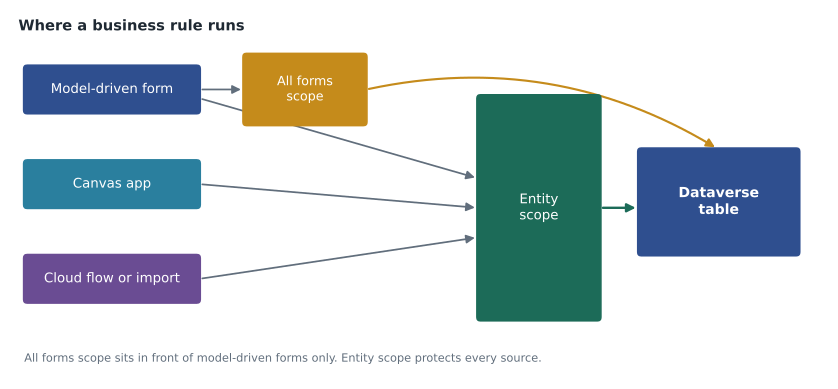
The most important setting on a business rule is its scope. A rule scoped to a specific form runs only on that model-driven form. A rule scoped to All forms runs on every model-driven form of the table. A rule scoped to Entity (shown as the table) runs on every model-driven form and also on the server whenever a row is created or updated, so it applies to data from canvas apps, flows, imports and the API as well.
Not every action makes sense on the server. Showing or hiding a column, enabling or disabling it and recommending a value are form behaviors; there is no form when a flow updates a row. So with Entity scope, the server applies only the actions that change or validate data: setting and clearing values, and showing error messages, which on the server cause the save to fail with that message. The form-only actions still run on model-driven forms. Requirement levels set by a rule are enforced on forms; to require a value for every source of data, use an error-message condition with Entity scope.
| Scope | Runs on model-driven forms | Runs on the server for all sources | Use it for |
|---|---|---|---|
| Specific form | That form only | No | Behavior that belongs to one form's design |
| All forms | Yes | No | Consistent behavior on every form |
| Entity (table) | Yes | Yes, for set value, clear value and error actions | Rules that must hold for every source of data |
This is why the pilot's bad data got in. The inspectors used a canvas app on their phones, and the only validation was a business rule scoped to All forms, which never runs for canvas apps. Changing the scope to Entity made the date rule apply everywhere.
Building the inspection rules
Signe built four rules with Maribeth watching. The first validates dates: if Completed On contains data and is earlier than Scheduled Date, show the error "Completed On cannot be before the scheduled date" on Completed On. Its scope is Entity, so the canvas app, the nightly import and any flow all respect it.
The second makes failures complete: if Result equals Fail, set Note and Priority to business required and show the Photo column; otherwise make them optional, hide Photo and clear Priority. Because requirement levels are enforced on forms, she added a third rule with Entity scope: if Result equals Fail and Priority does not contain data, show the error "Choose a priority for a failed item." Now no source of data can save a failure without a priority.
The fourth sets a default: if the checklist item is safety critical and Result equals Fail, set Priority to High. Safety Critical lives on the Template Item table, so the finding copies it into its own Safety Critical column when it is created; business rules can read columns of the row itself, and a flow or formula supplies values from elsewhere.
Rule: Failed findings need a priority          Scope: Entity
IF   Result equals Fail
AND  Priority does not contain data
THEN Show error message on Priority:
     "Choose a priority for a failed item."

Rule: Safety-critical failures are High         Scope: Entity
IF   Safety Critical equals Yes
AND  Result equals Fail
THEN Set Priority to High
Worked problem
Fixing a rule that seemed to do nothing
Maribeth built a rule: if Result equals Fail, set Note as business required. In the canvas app, inspectors can still save failures without a note. Why, and how should it be fixed?
Show solution
- Requirement levels set by business rules are enforced by model-driven forms, not by the server.
- The canvas app does not run form-level behavior, so the rule has no effect there.
- Add a rule with Entity scope: if Result equals Fail and Note does not contain data, show an error message.
- In the canvas app, also mark the field required in the app for a better experience, so the inspector sees the requirement before saving.
Answer: Enforce the requirement on the server with an Entity-scoped error rule, and add the requirement in the app for a friendly experience.
Limits of business rules
Business rules are deliberately simple, which is their strength and their limit. They work with the columns of the row being saved; they cannot query other rows, such as checking whether an inspection has open findings. They have a limit on how many if-else branches one rule can contain, so very complex logic becomes several rules or moves to code. Some column types, such as multi-select choices, file and image columns, are not fully supported in conditions. And they run when a row is saved or a form changes, not on a schedule. When a rule needs any of those things, use another tool.
Other places for logic
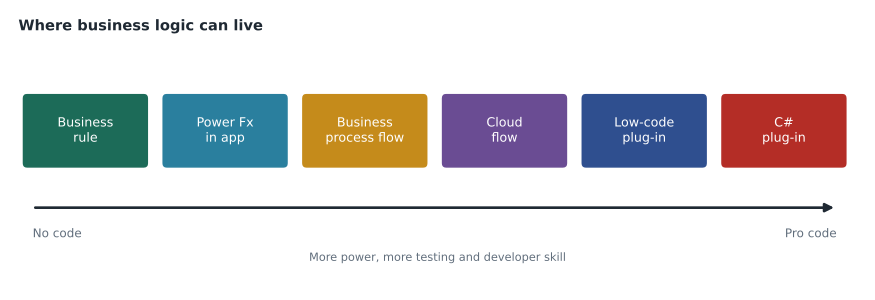
AB-410 asks you to evaluate use cases for business logic: which tool fits which job. The main options form a spectrum from no-code to pro-code.
| Tool | Runs | Good for | Not for |
|---|---|---|---|
| Business rule | Forms, and the server with Entity scope | Simple conditions on one row: required, defaults, errors | Queries over other rows, schedules, complex branching |
| Power Fx in a canvas app | In that app | Rich interaction, validation messages as people type | Rules that must apply to every source |
| Business process flow | Model-driven forms | Guiding people through stages of a process | Enforcing data rules on the server |
| Power Automate cloud flow | Asynchronously after an event, on a schedule or on demand | Notifications, approvals, updates to related rows, integrations | Blocking a save immediately |
| Low-code plug-in (Power Fx) | On the server | Server-side logic in Power Fx without C# | Very complex or high-performance logic |
| Plug-in (C#) | On the server, synchronously or asynchronously | Complex validation, logic across rows, high performance | Simple rules that a business rule can handle |
For Lumenvale, the "cannot close an inspection with open failures" rule needs to look at related rows, so it cannot be a business rule. Signe wrote it as a small server-side plug-in that runs before an inspection is set to Completed and fails with a clear message if any finding on it is failed and open. A cloud flow sends the trades crew a message when a high-priority failure is saved, which is an asynchronous job that should not slow the inspector down. A business process flow guides supervisors through the stages of following up a failed inspection: Review, Assign repairs, Verify and Close.
Synchronous or asynchronous
A useful question for any rule is whether it must stop a save. Synchronous logic runs as part of the save: business rules with Entity scope, synchronous plug-ins and low-code plug-ins can reject the change with a message, and the user sees it immediately. Asynchronous logic runs after the save: cloud flows and asynchronous plug-ins can update other rows, send messages and call other systems, but they cannot undo the save that triggered them. Validation belongs in synchronous logic; follow-up work belongs in asynchronous logic.
Writing good error messages
An error message is part of the user interface. Lumenvale's inspectors read them on phones, wearing gloves, so Signe set a standard: say what to do, not just what is wrong; name the column; keep it under 15 words; avoid codes. "Choose a priority for a failed item" passes. "Validation failed: lcc_priority null" does not.
Testing rules
Every rule needs a test for each branch and each source of data. Signe tested the date rule on a model-driven form, in the canvas app, with a flow and with an import of a spreadsheet row that broke the rule, and confirmed that each was rejected with the same message. She also tested the valid cases, because a rule with a reversed condition blocks good data as effectively as it lets bad data in. After the rules went live, the second week of the pilot produced 240 findings and no failed finding without a priority.
Business rules and the canvas app
Entity-scoped rules protect the data, but they speak only when a save fails, which on a phone means filling in a whole screen and then reading an error. So Signe repeated the most common rules in the canvas app as well: the Priority control is marked required when Result is Fail, the Save button explains what is missing, and the Photo control appears only for failures. The app gives the friendly experience; the Entity-scoped rule guarantees the result even if someone uses a different app, a flow or an import. Keeping both in step is part of the maintenance checklist: when a rule changes in Dataverse, the matching app logic is checked in the same release.
Rules also need owners. Each of Lumenvale's business rules has a description that names the requirement it implements and the person who asked for it, so a developer who finds "Failed findings need a priority" two years from now knows that Octavia asked for it after the pilot and can ask facilities before changing it. Business rules are solution components, so they move from development to test to production with the rest of the model and are never edited directly in production.
Common mistakes
MistakeScoping a rule to All forms and expecting it to protect canvas apps and imports.
InsteadUse Entity scope for rules that must apply to every source of data.
MistakeRelying on a rule's business required setting for server-side enforcement.
InsteadRequirement levels apply on forms; add an Entity-scoped error rule to enforce on the server.
MistakeTrying to check other rows in a business rule.
InsteadUse a plug-in, a low-code plug-in or a flow for logic that needs related rows.
MistakePutting validation in an asynchronous flow.
InsteadFlows run after the save; validation that must block a save needs synchronous logic.
MistakeWriting technical error messages.
InsteadTell people what to do, in plain words, and name the column.
MistakeForgetting to activate the rule.
InsteadBusiness rules are created as drafts and run only after activation.
Summary and key terms
- Validation comes in layers: column definitions, requirement levels, keys, business rules, app logic and server-side logic.
- Business rules set or clear values, change requirement, visibility and editability, show errors and make recommendations.
- Scope decides where a rule runs: a specific form, all forms, or the Entity, which also runs on the server.
- On the server only set value, clear value and error message actions apply; form behaviors apply only on forms.
- Business rules work on one row; use plug-ins or flows for logic across rows, schedules or integrations.
- Put validation in synchronous logic and follow-up work in asynchronous logic.
- Business rule
- No-code conditional logic on a table that sets values, changes column behavior or shows errors.
- Scope
- The setting that decides whether a business rule runs on one form, all forms or the table, including the server.
- Entity scope
- Business rule scope that applies on all model-driven forms and on the server for every source of data.
- Recommendation
- A business rule action that suggests a value the user can accept.
- Synchronous logic
- Logic that runs as part of a save and can reject it.
- Asynchronous logic
- Logic that runs after a save and cannot undo it.
- Plug-in
- Server-side code that runs in response to Dataverse events such as create and update.
Practice problems
Work each problem on paper first, then reveal the answer to check.
Why did the pilot's canvas app allow failures without a priority?
Show answer
The rule was scoped to All forms, which runs only on model-driven forms, and requirement levels are not enforced on the server.
Which business rule actions apply on the server with Entity scope?
Show answer
Set column value, clear column value and show error message.
Where should "an inspection cannot close while it has open failures" be implemented, and why?
Show answer
In server-side logic such as a plug-in, because it must check related rows and block the save.
Name one job that belongs in an asynchronous cloud flow.
Show answer
Any of: notifying the trades crew, starting an approval, updating related rows, sending data to another system.
Lesson quiz · 5 questions
Score 60% or more to complete this lesson.
Create a free account to save your progress, take quizzes and earn a certificate.