
MSBA-211 · Lesson 5 of 12 · 20 min
Compliance policies and Conditional Access
▶ Video coming soon A video version of this lesson is on the way.
Configuration profiles tell a device how to behave. Compliance policies ask a different question: is this device healthy enough to be trusted with the organization's data? A compliance policy lists requirements, such as an encrypted disk, a supported operating system version or a screen lock, and Intune evaluates every assigned device against them. On its own, a compliance result only labels the device. Its real power comes from Conditional Access in Microsoft Entra ID, which can refuse access to email, Teams, SharePoint or VisitWise from any device that is not compliant. That pairing was the condition the board had set for the Copilot pilot, and it was the center of Ama's October.
What a compliance policy checks
Each platform has its own compliance settings, because each platform can report different facts about itself.
| Platform | Typical requirements |
|---|---|
| Windows | BitLocker on, Secure Boot on, code integrity on, minimum operating system version, firewall on, Microsoft Defender Antivirus on and up to date, device at or below a Defender for Endpoint risk level, password rules |
| macOS | Minimum version, FileVault encryption, firewall, password rules, System Integrity Protection |
| iOS and iPadOS | Minimum version, no jailbreak, passcode rules, device at or below a Defender risk level |
| Android Enterprise | Minimum version and security patch level, Google Play Integrity verdict, no rooting, encryption, screen lock rules |
A few settings need care. Windows encryption and Secure Boot results come from the device's health attestation, which is reported after a restart, so a newly enrolled laptop can take a while to show them as compliant. The Play Integrity verdict on Android, which replaced Google's older SafetyNet attestation, checks that the device runs a genuine, unmodified Android build. And the Defender for Endpoint risk setting only works once Defender for Endpoint is connected to Intune, which the next course covers; Ama left it out of the first version.
Corvallin's compliance policies
Ama wrote one compliance policy per platform and ownership type, kept them short and named them in the same pattern as her configuration profiles.
| Policy | Requirements | Assigned to |
|---|---|---|
| COMP-WIN-Corporate | BitLocker, Secure Boot, code integrity, Windows 11 24H2 or later, firewall, Defender Antivirus with real-time protection | All Windows devices |
| COMP-MAC-Corporate | macOS one version behind current or later, FileVault, firewall | All Macs |
| COMP-IOS-Corporate | Supported iOS version, no jailbreak, six-digit passcode | Corporate iPhones |
| COMP-AND-FullyManaged | Android 13 or later, security patch no older than 90 days, Play Integrity check passed, screen lock | Fully managed Samsung phones |
| COMP-AND-Dedicated | Android 13 or later, Play Integrity check passed | Reception tablets |
Before setting minimum versions, Ama checked the device inventory. Seventeen Samsung phones were still on Android 12 because a branch had turned off automatic updates years earlier; she updated them first, then set the minimum. A compliance policy that would mark a third of the fleet noncompliant on day one is not a security improvement, it is an outage.
Actions for noncompliance
Each compliance policy has actions for noncompliance, a schedule of what happens when a device fails. The first action, Mark device noncompliant, is required. By default it happens immediately, but a grace period of some days can be set, during which the device shows as In grace period and still counts as compliant for Conditional Access. Later actions can send the user an email from a template, send a push notification, remotely lock a mobile device or add the device to a retire list for an administrator to review.
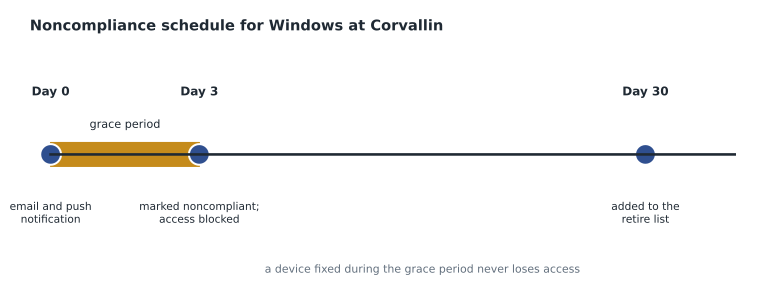
Ama chose a three-day grace period for Windows and Macs, so a nurse whose laptop missed an update over a weekend would be warned before being blocked, and one day for phones, which update more easily. The email template, written with Dr. Ostrander-Bey's help, told staff in plain language what was wrong and how to fix it, and gave the help desk number. Devices still noncompliant after 30 days went on the retire list, which Ama reviewed weekly rather than retiring anything automatically.
Worked problem
When does a device lose access?
A laptop's BitLocker protection is suspended on a Friday afternoon at 4 p.m. during a firmware update and not resumed. The Windows policy has a three-day grace period. The laptop checks in that evening. When will Conditional Access start blocking it, and what does the user see before then?
Show solution
- At the Friday evening check-in, Intune evaluates the policy and finds BitLocker off.
- The email and push notification go out, and the device enters the grace period.
- Three days later, on Monday evening, the device is marked noncompliant at its next evaluation.
- Conditional Access blocks the next sign-in from that device to the protected apps.
Answer: The user is warned on Friday and keeps access through the weekend. If BitLocker is still off by Monday evening, access is blocked until the device is fixed and checks in again.
Tenant-wide compliance settings
Two settings in the admin center apply to every device. Mark devices with no compliance policy assigned as decides how Intune treats a device that no policy targets. The default is Compliant, which is convenient and dangerous: a device that slips out of every group passes Conditional Access with no checks at all. Microsoft recommends setting it to Not compliant, and Ama did so after confirming every device had a policy. The compliance status validity period decides how long a device can go without reporting before it is marked noncompliant; the default is 30 days.
| Compliance state | Meaning |
|---|---|
| Compliant | The device met every requirement at its last evaluation |
| In grace period | The device failed but is within the grace period; treated as compliant |
| Not compliant | The device failed and the grace period has passed, or no policy is assigned and the tenant setting says not compliant |
| Not evaluated | The device has not yet been evaluated, for example just after enrollment |
| Error or conflict | Evaluation failed, or two policies disagree about a setting |
Extending compliance with custom settings
Built-in settings don't cover everything. Custom compliance on Windows, macOS and Linux lets an administrator write a discovery script, in PowerShell for Windows, that returns facts about the device as JSON, and a rules file that says which values are compliant. Ama used it for one rule that the agency's insurer had asked for: the VisitWise offline cache folder must be inside the user's encrypted profile and not on a removable drive. The discovery script reports the folder's location, and the rule checks it.
# Discovery script for a custom compliance rule (Windows PowerShell)
$cache = "$env:LOCALAPPDATA\VisitWise\Cache"
$onFixedDrive = (Test-Path $cache) -and ((Get-Item $cache).PSDrive.Name -eq "C")
$result = @{ VisitWiseCacheOnSystemDrive = $onFixedDrive }
return $result | ConvertTo-Json -Compress
Conditional Access: requiring a compliant device
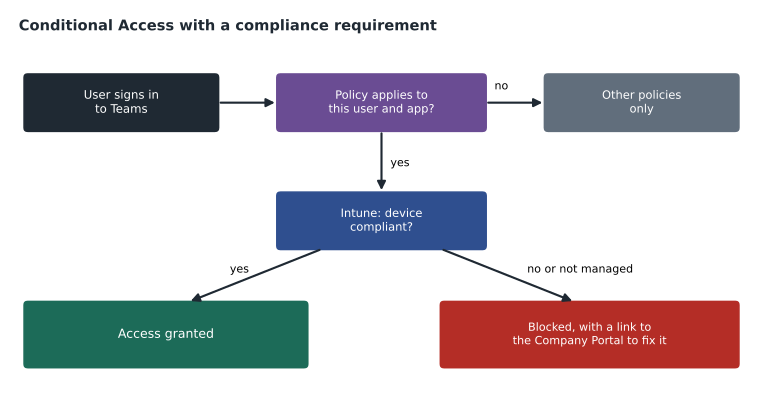
Conditional Access policies in Microsoft Entra ID decide whether a sign-in is allowed. A policy has assignments, which say which users, apps and conditions it covers, and access controls, which say what is required. The grant control Require device to be marked as compliant uses Intune's compliance result: the sign-in is allowed only from a device that Intune manages and currently reports as compliant. For Windows, the device must be Entra joined or registered so Entra ID can identify it. For phones, the user signs in through a broker app, Microsoft Authenticator or the Company Portal, which passes the device's identity to Entra ID.
Teodor had rebuilt Corvallin's Conditional Access in the identity phase, cutting 11 old policies down to 5. The new device requirement became a sixth. It covered all users except the two emergency access accounts and applied to Exchange Online, SharePoint Online, Teams and the VisitWise app. Because personal phones were not yet enrolled and would be handled with app protection, the policy targeted Windows, macOS, iOS and Android, and the personal-phone rules were left for lesson 12.
Rolling out safely: report-only first
A Conditional Access policy can be set to Report-only, in which it is evaluated at every sign-in and the result is logged, but nothing is blocked. Teodor turned the device policy on in report-only mode on October 19 and left it for three weeks. The sign-in logs and the Conditional Access insights workbook showed which sign-ins would have failed. Most came from three sources: the nine desktops with personal records found in lesson 2, which Ama had not yet reset; staff signing in on personal phones, which the policy would block until app protection was ready; and a printer-scanning service account that did not need the policy at all. The What If tool, which tests a hypothetical sign-in against all policies, helped confirm each fix.
Worked problem
Reading report-only results
In three weeks of report-only mode, the device policy recorded 41,200 sign-ins that would have passed and 1,850 that would have failed. Of the failures, 1,230 came from personal phones, 470 from the nine desktops and 150 from the service account. What share of sign-ins would have failed, and what was left after fixing the desktops and excluding the service account?
Show solution
- Total sign-ins: 41,200 + 1,850 = 43,050.
- Failure share: 1,850 / 43,050 = about 4.3 percent.
- After fixing the desktops and excluding the service account: 1,850 - 470 - 150 = 1,230 failures, all from personal phones.
Answer: About 4.3 percent would have failed at first. Once the desktops and service account were dealt with, every remaining failure was a personal phone, so Ama and Teodor could turn the policy on for corporate devices and solve the phone problem separately.
On November 9 the policy was switched on for Windows and Macs, and on November 16 for corporate phones. For phones, Teodor added a Conditional Access filter on device ownership, so that personal phones were excluded from enforcement, and watched through a report-only copy of the policy, until the app protection rollout described in lesson 12. The help desk took 14 calls in the first week, almost all from staff whose laptops had pending restarts. Each one was fixed by restarting, letting the device check in and pressing Check access in the Company Portal.
Windows Hello for Business
The MD-102 skills place Windows Hello for Business in the same area as compliance, because it changes how people prove who they are on a Windows device. Windows Hello for Business replaces the password at sign-in with a PIN or biometric gesture tied to a key held in the device's TPM. The PIN never leaves the device, so a stolen PIN is useless without the laptop. Intune can configure it in two places: a tenant-wide setting that applies when devices enroll, and account protection policies under Endpoint security, which can target groups and set PIN complexity and biometric options. As with other settings, choosing one place avoids conflicts.
Corvallin had turned on Windows Hello for Business during the Autopilot project. Ama checked its status in the compliance work because Conditional Access now assumed that sign-ins on laptops were strong. A compliance policy can require a password or PIN on the device, but it is Windows Hello for Business that makes the sign-in itself phishing-resistant, which the identity phase had made a goal for every staff member.
| Where Windows Hello for Business is configured | Scope | Use |
|---|---|---|
| Windows enrollment setting for Windows Hello for Business | Tenant-wide, at enrollment | Simple default for all new devices |
| Account protection policy in Endpoint security | Assigned groups | Different PIN rules or options for different groups |
Compliance on the user's side
Staff see compliance through the Company Portal app on Windows, Macs and iPhones, and the Intune app on fully managed Android phones. Each shows the device as compliant or lists what needs fixing, with a short explanation and a link where a fix is possible, such as installing an update. Ama reviewed every message staff would see before the policies were enforced, and the help desk wiki gained a page with a screenshot of each one and the fix. That page answered most of the 14 calls in the first week before anyone needed to look at the admin center.
Common mistakes
MistakeLeaving devices with no compliance policy marked as compliant.
InsteadSet the tenant setting to mark them not compliant, after confirming every device has a policy.
MistakeTurning a new device requirement straight on.
InsteadRun the Conditional Access policy in report-only mode, read the sign-in logs and fix the causes before enforcing it.
MistakeSetting minimum versions without checking the inventory.
InsteadUpdate the stragglers first, then raise the minimum, so the policy does not cause an outage.
MistakeExcluding whole groups of staff from the device policy to stop help desk calls.
InsteadExclude only emergency access accounts and justified service accounts, and fix the devices instead.
Summary and key terms
- Compliance policies define the health a device must have; Intune evaluates every assigned device against them.
- Actions for noncompliance include marking the device noncompliant after a grace period, emailing the user, locking mobile devices and adding devices to a retire list.
- Set devices with no compliance policy to Not compliant; the compliance validity period defaults to 30 days.
- Custom compliance uses a discovery script returning JSON and a rules file.
- Conditional Access can require a compliant device; report-only mode and the What If tool make the rollout safe.
- Compliance policy
- An Intune policy listing the health requirements a device must meet.
- Grace period
- Days after a failure during which a device is still treated as compliant.
- Actions for noncompliance
- The schedule of steps Intune takes when a device fails its compliance policy.
- Play Integrity
- Google's check that an Android device runs a genuine, unmodified system.
- Custom compliance
- Compliance rules based on a discovery script and a JSON rules file.
- Report-only mode
- A Conditional Access setting that logs what a policy would do without enforcing it.
Practice problems
Work each problem on paper first, then reveal the answer to check.
A device is in its grace period. Does Conditional Access treat it as compliant?
Show answer
Yes, until the grace period ends and it is marked not compliant.
What is the default compliance status validity period?
Show answer
30 days.
Which tool tests a hypothetical sign-in against Conditional Access policies?
Show answer
The What If tool.
Lesson quiz · 5 questions
Score 60% or more to complete this lesson.
Create a free account to save your progress, take quizzes and earn a certificate.