
MSBA-211 · Lesson 4 of 12 · 20 min
Configuration profiles and the settings catalog
▶ Video coming soon A video version of this lesson is on the way.
With every device enrolled, Ama could start shaping how they behaved. Intune does that with configuration profiles: collections of settings assigned to groups of users or devices. A profile might set the Microsoft Edge home page, connect laptops to the branch Wi-Fi, stop phones from installing unapproved apps or turn on OneDrive's folder backup. Corvallin had almost none, apart from what the Autopilot project needed. Ama's goal for October was a small, well-named set of baseline profiles for each platform, built so that anyone on the IT team could tell at a glance what each one did.
How configuration reaches a device
On Windows, most configuration settings are delivered through configuration service providers (CSPs), interfaces built into Windows that the MDM client uses to read and write settings. Each CSP exposes settings as a path, such as a setting under the Policy CSP for Microsoft Edge. Intune hides most of this, but it explains why some settings apply to the device and others to the signed-in user, why some need a restart, and why a few older Group Policy settings have no MDM equivalent. On Apple devices, profiles are delivered as configuration profiles and, increasingly, through Apple's declarative device management, in which the device applies settings and reports its own status. On Android Enterprise, Intune sends policies through Google's management APIs, and device makers add extra settings through OEMConfig apps, such as Samsung's Knox Service Plugin.
Kinds of profiles
| Profile kind | What it offers | When to use it |
|---|---|---|
| Settings catalog | A searchable list of thousands of individual settings for Windows, macOS, iOS and iPadOS, Microsoft Edge, Microsoft 365 Apps and more | The first choice for new Windows and Apple configuration |
| Templates | Grouped settings for one purpose, such as Wi-Fi, VPN, email, certificates, device restrictions, kiosk or domain join | Network, certificate and kiosk profiles, and settings not yet in the catalog |
| Administrative templates and imported ADMX files | Group Policy-style settings for Windows and apps; third-party ADMX files can be imported | Line-of-business apps that ship ADMX files |
| Custom | Raw OMA-URI paths for Windows CSP settings, or custom profiles for Apple devices | Rare settings with no other way in |
| Platform-specific profiles | Android Enterprise device restrictions, OEMConfig, and Apple features such as declarative software updates | Mobile devices |
The settings catalog has become the center of Windows and Apple configuration. It lists settings by category, each with a description and the CSP or payload it uses, and lets administrators search across everything, add settings to a profile and see at once whether a setting applies to the device or the user. Microsoft adds settings to it most months. When a setting exists in both the catalog and an older template, the catalog is usually the better place for it, because the template may be retired later and because the catalog makes conflicts easier to see.
Naming and structure
Ama's first decision was about names, not settings. She had seen tenants with 300 profiles called things like "Test 2 - final" and did not want to build another. Her convention used a platform prefix, a purpose and, where needed, a target: WIN-Baseline-Edge, WIN-Baseline-OneDrive, WIN-Network-BranchWiFi, IOS-Baseline-Restrictions, AND-FM-Baseline for fully managed Android and AND-DED-Reception for the dedicated tablets. Each profile's description said who asked for it and why, and linked to the change ticket.
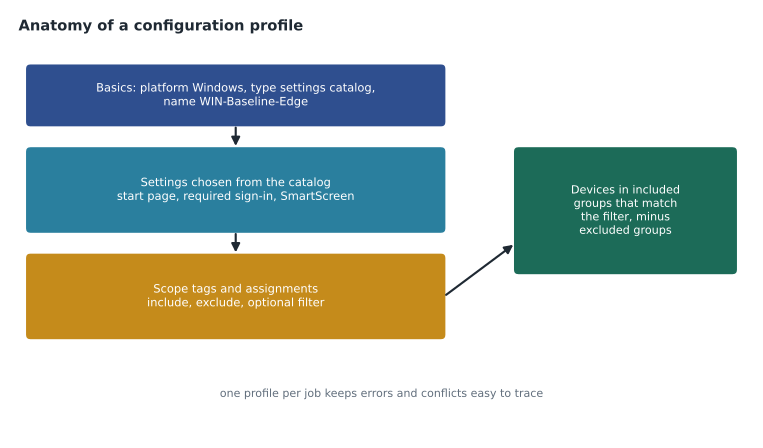
She also decided how big each profile should be. One giant profile with every Windows setting is hard to troubleshoot, because a single bad setting makes the whole profile show an error. A hundred tiny profiles are hard to manage. She settled on one profile per job, such as all Edge settings in one profile and all OneDrive settings in another, which kept each under about 40 settings.
Corvallin's Windows baseline
| Profile | Main settings | Why |
|---|---|---|
| WIN-Baseline-Edge | Start page set to the staff intranet; Edge sign-in required with the work account; password manager left on; SmartScreen on | Consistent browser setup and protection against harmful sites |
| WIN-Baseline-OneDrive | Sign in silently with the Windows account; move Desktop, Documents and Pictures to OneDrive; Files On-Demand on | Protects work files if a laptop is lost |
| WIN-Baseline-Experience | Turn off consumer features and suggested apps; lock screen after 10 minutes idle | Fewer distractions; client records not left on an open screen |
| WIN-Network-BranchWiFi | Branch staff Wi-Fi profile, connecting automatically | Laptops connect at any branch without help |
| WIN-Network-DeliveryOptimization | Peer sharing of updates within each office's network | Saves bandwidth on the branches' slower links, which Felix had asked for |
Security settings such as BitLocker, Microsoft Defender Antivirus and the firewall do not go in these profiles. Intune has a separate Endpoint security area for them, with focused policy types, and the next course in the program covers it. Keeping security settings out of general configuration profiles also avoids conflicts, because the same setting configured in two places is the most common cause of trouble described in lesson 10.
Migrating from Group Policy
Corvallin had left Active Directory behind in 2022, so it had no Group Policy to migrate. Ama still learned the tool, because the exam expects it and because many organizations rely on it. Group Policy analytics lets an administrator export a Group Policy Object as an XML backup, import it into Intune and see a report of which settings have a matching MDM setting, which are deprecated and which have no equivalent. Supported settings can be migrated into a settings catalog profile from the same page. Ama tried it with a sample backup from the partner network she had advised in the deployment course: 78 percent of the settings were supported, and most of the rest were obsolete settings for Internet Explorer and older Windows features that nobody needed any more.
Assignments and scope
A profile does nothing until it is assigned. Assignments name included groups and, optionally, excluded groups. Device groups contain devices and user groups contain users; a profile assigned to a user group applies to the devices those users sign in to, while a profile assigned to a device group applies regardless of who signs in. Settings also have a scope of their own: device-scoped settings apply to the whole device, while user-scoped settings apply only to the signed-in user. Assigning a device-scoped setting to a user group still works, but the setting follows the user to every device they use, which is not always what was meant.
Ama used device groups for most baselines, because Corvallin's laptops belong to branches rather than to people, and a laptop moved between staff should keep its configuration. She used user groups only where the setting is about the person, such as OneDrive's folder backup.
Worked problem
Device group or user group?
A shared laptop in the North Branch office is used by four schedulers. Ama wants the lock screen timeout to apply whoever signs in, and she wants OneDrive folder backup to follow each scheduler to whichever laptop they use. Which kind of group should each profile be assigned to?
Show solution
- The lock screen timeout is about the device; assign WIN-Baseline-Experience to a device group containing the laptop.
- OneDrive folder backup is about each person's files; assign WIN-Baseline-OneDrive to a user group containing the schedulers.
- Check that no exclusion removes the shared laptop from the device group.
Answer: Device group for the lock screen, user group for OneDrive. Assignment filters, covered in lesson 6, can narrow either assignment further, for example to Windows 11 devices only.
Profiles for Apple and Android devices
For the corporate iPhones, Ama created a device restrictions profile that blocks moving data from managed apps into unmanaged ones, blocks installing configuration profiles by hand, and requires the device to stay supervised. A separate profile delivers the Wi-Fi network. Software updates on iPhones and Macs are now best handled with Apple's declarative software update settings, which tell devices which version to install and by when; the next course covers update management for all platforms.
For the fully managed Samsung phones, the Android device restrictions profile sets a screen lock requirement, limits the apps available in managed Google Play to the ones Corvallin approves, blocks installing apps from unknown sources and allows the user to factory reset only with a Google account that IT controls, so a lost phone can't be reset and reused by someone else. A Knox Service Plugin profile, delivered as an OEMConfig app configuration, adds Samsung-specific options. The reception tablets get a kiosk profile that runs Managed Home Screen with three apps: the visitor sign-in form, the branch directory and Microsoft Edge locked to the agency's website.
| Platform | Profiles at Corvallin |
|---|---|
| Windows | Edge, OneDrive, experience, Wi-Fi, Delivery Optimization |
| macOS | Restrictions, Wi-Fi, FileVault handled under Endpoint security |
| iOS and iPadOS | Restrictions, Wi-Fi, home screen layout for managers |
| Android fully managed | Device restrictions, Wi-Fi, Knox Service Plugin |
| Android dedicated | Kiosk with Managed Home Screen, Wi-Fi |
Specialty devices
The MD-102 skills also include profiles for specialty devices such as Microsoft Teams Rooms, HoloLens 2 and Zebra devices. Corvallin's head office has two Teams Rooms systems, installed by Northlight AV, the agency's audiovisual consultant. Teams Rooms on Windows can be enrolled in Intune and given a profile that keeps the device in its kiosk account and controls updates; a later course in the Teams program covers them in detail. Ama enrolled the two rooms and gave Northlight scoped access to them only, a technique lesson 6 explains.
Testing before assigning widely
Every profile went first to a ring of six IT devices for two days, then to the 20-device pilot group from the deployment project, and only then to everyone. Ama checked the profile's device status report at each stage, watching for errors and conflicts. A profile can be edited after assignment, but every edit reaches every assigned device, so she treated edits to live profiles with the same care as new ones and recorded them in the change log.
Security baselines
Intune includes security baselines: groups of Windows, Microsoft Edge, Microsoft 365 Apps and Defender settings that Microsoft recommends, published as versions. An administrator creates a baseline profile, reviews or changes the defaults, and assigns it. When Microsoft publishes a new version, the profile can be updated to it after comparing the differences. Baselines are a quick way to a sound starting point, but they overlap with ordinary profiles, so lesson 10 shows how one caused a conflict at Corvallin. The safe rule is that when a baseline sets something, the baseline owns that setting.
Applicability rules
Windows profiles can also have applicability rules, which make a profile apply only to devices running particular editions or versions of Windows. A setting that exists only in Enterprise edition, for example, can be given a rule so it applies to Enterprise devices and is reported as not applicable on others. Applicability rules are older than assignment filters and work only on Windows; filters, covered in lesson 6, do the same job across platforms and with more properties, and are usually the better choice for new work.
Worked problem
Finding the right place for a setting
Dr. Ostrander-Bey asked for laptops to show a short privacy notice before sign-in, reminding staff that client information is confidential. Ama searched the settings catalog for "logon message" and found two settings, one for the title and one for the text, under the local policies security options category. Where should they go, and how should she test them?
Show solution
- Both settings are device-scoped, so they belong in a profile assigned to a device group.
- They are about the experience before sign-in, so Ama added them to WIN-Baseline-Experience rather than creating a new profile.
- She assigned the change to the IT ring first, restarted a test laptop and confirmed the notice appeared with the agreed wording.
Answer: Add both settings to the existing experience profile, test on the IT ring, then let the change reach the pilot and everyone. The notice text was approved by the privacy officer before it went wider.
Common mistakes
MistakePutting every Windows setting into one large profile.
InsteadUse one profile per job, so an error or conflict points to a small, understandable set of settings.
MistakeConfiguring BitLocker or Defender both in a configuration profile and in Endpoint security.
InsteadKeep security settings in Endpoint security policies, so each setting has one owner.
MistakeAssigning device-scoped settings to user groups without thinking about shared devices.
InsteadChoose device groups for settings about the device and user groups for settings that should follow the person.
MistakeReaching for a custom OMA-URI profile first.
InsteadSearch the settings catalog first; custom profiles are for the few settings with no other route.
Summary and key terms
- Configuration profiles deliver settings through Windows CSPs, Apple configuration profiles and declarative device management, and Android Enterprise APIs.
- The settings catalog is the first choice for Windows and Apple settings; templates handle Wi-Fi, VPN, certificates and kiosks.
- Group Policy analytics shows which Group Policy settings have MDM equivalents and can migrate them into the settings catalog.
- Profiles apply only when assigned to included groups; device-scoped and user-scoped settings behave differently on shared devices.
- Clear naming, one profile per job and staged rollout make profiles easier to troubleshoot.
- Configuration profile
- A set of device or user settings assigned to groups in Intune.
- Settings catalog
- Intune's searchable list of individual settings for building profiles.
- Configuration service provider (CSP)
- A Windows interface the MDM client uses to read and write a group of settings.
- Group Policy analytics
- An Intune tool that compares Group Policy settings with available MDM settings.
- OEMConfig
- A way for Android device makers to expose extra management settings through an app.
- Managed Home Screen
- Microsoft's Android launcher app for kiosk and dedicated devices.
Practice problems
Work each problem on paper first, then reveal the answer to check.
Where should a new Windows setting be looked for first?
Show answer
In the settings catalog.
What does Group Policy analytics produce from an imported GPO backup?
Show answer
A report of which settings are supported in MDM, deprecated or unsupported, with the option to migrate supported ones.
Why did Ama keep BitLocker out of the Windows baseline profiles?
Show answer
Security settings belong in Endpoint security policies, and configuring a setting in two places causes conflicts.
Lesson quiz · 5 questions
Score 60% or more to complete this lesson.
Create a free account to save your progress, take quizzes and earn a certificate.