
MSBA-211 · Lesson 12 of 12 · 20 min
Case study: bringing personal phones under management
▶ Video coming soon A video version of this lesson is on the way.
One group of devices was still outside the project in mid-November: about 150 personal phones that staff used for Outlook and Teams. Some belonged to the roughly 60 home-care staff who had no work phone; the rest belonged to office staff and managers who preferred to carry one phone. The report-only results in lesson 5 showed that every remaining failure of the new device requirement came from these phones. Corvallin could not leave them as they were, because client names and visit notes reached them through email and Teams. It also could not simply block them, because for the home-care staff without work phones, their own phone was how the office reached them during the day.
This case study follows the decision from the first meeting, on November 2, 2026, to the end of the pilot on November 23. It brings together almost everything in the course: enrollment choices, compliance, Conditional Access, filters, remote actions and reporting.
The question and the people
Ines framed the question for the meeting: how do we protect work data on staff-owned phones without taking control of the phones? Around the table were Ama, Teodor, Dr. Ostrander-Bey and two staff representatives, a home-care worker from the East Branch and a scheduler from head office. Dr. Ostrander-Bey had asked for the representatives to be there. Her view was that staff would accept protection for client data but would resist anything that felt like the agency watching their personal lives, and that the second outcome would cost more in trust than the first gained in security.
The representatives asked three questions that Ama wrote on the whiteboard and answered in writing afterwards. Can the agency see my photos, messages or location? Can it erase my phone? What happens if I leave?
Three options
| Option | What Intune manages | What staff give up | Fit for Corvallin |
|---|---|---|---|
| Full device enrollment | The whole phone | IT can set the passcode, see installed apps and wipe the phone | Rejected: too much control over a personal device |
| User enrollment or Android personal work profile | A separate work area on the phone | A managed work area, some device information; no full wipe | Possible, but more setup and support than needed for email and Teams |
| App protection policies without enrollment (MAM) | Only Outlook, Teams, OneDrive, Edge and other protected apps | A PIN for work apps and limits on moving work data out of them | Chosen |
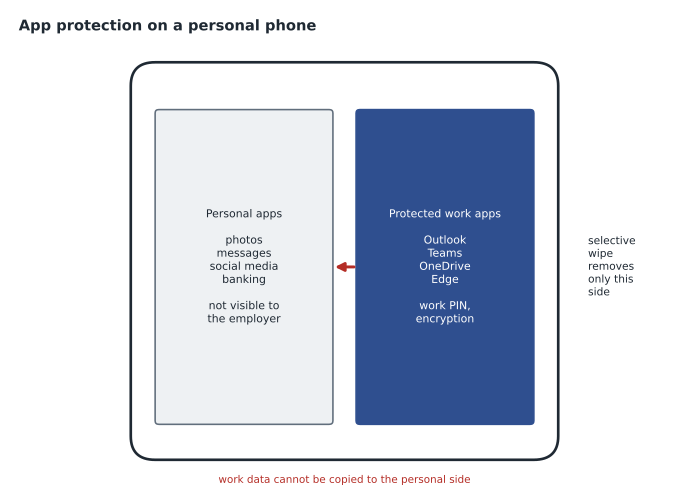
Ama recommended the third option. App protection policies protect data inside apps that support Intune, such as the Microsoft 365 mobile apps, whether or not the device is enrolled. They can require a PIN or biometric sign-in to open work apps, encrypt work data, stop it being copied or saved into personal apps, require a minimum operating system and app version, block jailbroken or rooted phones and remove work data from the apps if the user is gone too long or the agency asks. They can't touch anything outside those apps.
One app could not be included. VisitWise, the scheduling and visit-recording app, is made by a third party and does not support Intune app protection, so on a personal phone its data could not be protected in the same way. The meeting agreed that VisitWise would stay on corporate phones only. The 60 home-care staff without work phones would get one of the corporate Samsung phones for VisitWise over the next budget cycle, and would use their personal phones only for email and Teams. That decision went to Ines's budget list for 2027.
The app protection policies
Microsoft publishes a data protection framework for app protection with three levels: basic, enhanced and high. Ama started from the enhanced level, which Microsoft describes for users with access to sensitive information, and adjusted it with Dr. Ostrander-Bey.
| Setting | Corvallin value | Effect for staff |
|---|---|---|
| Send organization data to other apps | Policy-managed apps only | Work email can't be shared into a personal messaging app |
| Save copies of organization data | Block, except OneDrive and SharePoint | Attachments can be saved to work OneDrive, not the phone's files |
| Copy and paste | Between policy-managed apps, paste in allowed | Can paste a phone number from a text into Outlook; can't copy client details out |
| Screen capture (Android) | Blocked in work apps | No screenshots of work data |
| Access PIN | Six digits or biometrics, after 30 minutes inactive | One PIN for all work apps |
| Offline grace period | Block after 12 hours offline; wipe work data after 90 days | Work apps stay usable on a day without signal |
| Minimum OS and app versions | Supported versions; warn first, then block | Prompt to update |
| Jailbroken or rooted devices | Block access | Work apps won't open on such phones |
To make sure the policies applied only to personal phones, and not to corporate phones that already had full management and their own rules, Ama used a managed app filter from lesson 6 that matches unmanaged devices. On Android, app protection needs the Company Portal app to be installed even when the phone is not enrolled, because it handles the protection in the background; staff did not have to sign in to it. On iPhones, Microsoft Authenticator acts as the broker for sign-in.
Conditional Access for personal phones
App protection only helps if a phone can't simply use an unprotected app instead, such as the phone's built-in mail app. Teodor added a Conditional Access policy for iOS and Android sign-ins to Exchange Online, SharePoint and Teams that uses the grant control Require app protection policy. A sign-in is allowed only from an app that has received an Intune app protection policy. Microsoft announced the retirement of the older grant that required an approved client app and recommends app protection instead. The device-compliance policy from lesson 5 was changed so that, on iOS and Android, a sign-in passes if the device is compliant or the app is protected. Corporate phones meet the first condition and personal phones the second.
Worked problem
Checking the policy logic
For iOS and Android, the Conditional Access grant is "Require device to be marked as compliant OR Require app protection policy". Work out the result for each phone: a corporate iPhone that is compliant, using Outlook; a personal Android phone with Outlook protected by policy; a personal iPhone using the built-in Mail app; a corporate Samsung phone that is noncompliant because of an old security patch, using Teams with no app protection applied.
Show solution
- Corporate iPhone, compliant: the first condition is met, so access is granted.
- Personal Android with protected Outlook: the second condition is met, so access is granted.
- Personal iPhone with built-in Mail: not compliant and not a protected app, so access is blocked.
- Corporate Samsung, noncompliant, Teams unprotected because the filter limits app protection to unmanaged devices: neither condition is met, so access is blocked until it is updated.
Answer: Granted, granted, blocked, blocked. The last case is intended: corporate phones are expected to be compliant, and the fix is the security update, not an exception.
Answering the three questions
Ama answered the representatives' questions in a one-page notice that Dr. Ostrander-Bey reviewed and the privacy officer approved. With app protection and no enrollment, Corvallin can see the phone's model and operating system version, the names and versions of the protected work apps and whether the policy is applied. It can't see personal apps, photos, messages, browsing or location, and it can't wipe the phone. If a staff member leaves, or loses the phone, the help desk uses app selective wipe, which removes Corvallin's data from the protected apps the next time they open, and the 90-day offline rule removes it anyway if the apps are never opened again. Personal data is never touched.
| Staff question | Answer in the notice |
|---|---|
| Can Corvallin see my photos, messages or location? | No. Corvallin sees only the phone model, operating system version and the protected work apps. |
| Can Corvallin erase my phone? | No. It can remove only work data from the work apps. |
| What happens if I leave? | Work data is removed from Outlook, Teams, OneDrive and Edge; your own data stays. |
| What do I have to do? | Install Outlook, Teams and, on Android, the Company Portal app; set a work PIN. |
The pilot
The pilot ran at the North Branch from November 16 to November 23, with 37 staff who used personal phones. Ama assigned the app protection policies to a pilot group, Teodor set the Conditional Access policy to report-only for everyone and enforced it for the pilot group, and the help desk scheduled two drop-in sessions at the branch.
Worked problem
Pilot results
Of the 37 pilot users, 29 set up their phones without help, 6 needed help at a drop-in session and 2 decided to stop reading work email on their phones. The help desk logged 9 calls in the week. If the full rollout covers about 150 staff and the same rates hold, how many staff should be expected to need help, and how many calls?
Show solution
- Help needed in the pilot: 6 / 37 = about 16 percent.
- For 150 staff: 150 x 6 / 37 = about 24 people.
- Calls per pilot user: 9 / 37 = about 0.24.
- For 150 staff: 150 x 9 / 37 = about 36 calls.
Answer: About 24 people needing help and about 36 calls, spread over the rollout. Ama planned drop-in sessions at each branch rather than relying on phone calls, because most of the help was showing someone where to set the PIN.
Two problems came up. Three Android users had an old version of the Company Portal app that did not apply protection until it was updated. And one scheduler's phone ran an operating system version that its maker no longer updated, so the policy blocked it after the warning period; she chose to stop using it for work. Both were handled by the policy working as designed.
What came next
At the review on November 23, the meeting agreed to extend the policies to all staff with personal phones in December, branch by branch, with the drop-in sessions. Ama updated the Monday page with three new lines: the number of protected personal devices, app protection failures in the week, and selective wipes performed. Teodor recorded that Conditional Access now covered every way staff reached work data: compliant corporate devices, protected apps on personal phones and nothing else. And Ines wrote to the board that the device condition for the Copilot pilot was met for corporate devices, with personal phones on track for the end of the year.
Looking back, Ama thought the most important decision was not technical. It was inviting the staff representatives to the first meeting, so that the answer to "can the agency see my phone?" was settled before the rollout instead of argued about during it.
Measuring success
Ines asked how the agency would know the change had worked, beyond the absence of complaints. Ama proposed four measures for the December rollout: the number of staff with protected work apps on personal phones, compared with the 150 expected; Conditional Access blocks from unprotected mobile apps, which should fall to almost zero once staff had moved; app protection failures by reason, such as an outdated operating system; and help desk calls about personal phones. All four came from reports already in place: the app protection status report in Intune, the Entra ID sign-in logs and the help desk system.
She also wrote down what would make the agency revisit the decision. If staff later needed a protected app that could not use app protection, or if an insurer or regulator required device-level controls on any phone that reached client data, the next step would be Android personally owned work profiles and Apple account-driven user enrollment, with the same consultation with staff that this decision had. Neither was needed for email and Teams.
Common mistakes
MistakeEnrolling personal phones fully because it gives the most control.
InsteadUse app protection, or user enrollment where needed, so the organization protects work data without controlling the person's device.
MistakeAssuming every work app can be protected by Intune app protection.
InsteadOnly apps built with Intune app protection support can be protected; others, like VisitWise here, need a corporate device.
MistakeApplying app protection without a Conditional Access requirement.
InsteadRequire app protection in Conditional Access, or users can switch to an unprotected app.
MistakeForgetting the Company Portal on Android personal phones.
InsteadAndroid app protection needs the Company Portal installed, even without enrollment.
Summary and key terms
- App protection policies protect work data inside supported apps on unenrolled personal phones, without managing the device.
- Microsoft's data protection framework offers basic, enhanced and high levels as starting points.
- A managed app filter can target app protection at unmanaged devices only.
- Conditional Access can require a compliant device or an app protection policy, so corporate and personal phones each meet one condition.
- App selective wipe and offline grace periods remove work data from apps without touching personal data; clear communication about privacy is part of the design.
- App protection policy
- An Intune policy that protects organization data inside supported apps.
- MAM without enrollment
- Using app protection on devices that are not enrolled in Intune.
- Data protection framework
- Microsoft's recommended app protection settings at three levels.
- Managed app filter
- A filter for app policies, for example matching unmanaged devices.
- Require app protection policy
- A Conditional Access grant that allows sign-in only from protected apps.
- App selective wipe
- Removing organization data from protected apps on a device.
Practice problems
Work each problem on paper first, then reveal the answer to check.
Why couldn't VisitWise be used on personal phones?
Show answer
It doesn't support Intune app protection, so its data couldn't be protected on an unmanaged phone.
What can Corvallin see on a personal phone with app protection only?
Show answer
The phone model, operating system version and the protected work apps, not personal data or location.
What removes work data if the apps are never opened again after someone leaves?
Show answer
The offline grace period setting that wipes work data after 90 days offline.
Lesson quiz · 5 questions
Score 60% or more to complete this lesson.
Create a free account to save your progress, take quizzes and earn a certificate.