
MSBA-210 · Lesson 2 of 12 · 23 min
Planning a deployment strategy
▶ Video coming soon A video version of this lesson is on the way.
With the inventory in hand, Ama had three groups of devices to deal with: 96 Windows 10 laptops that could be upgraded in place, 44 that had to be replaced, and a steady flow of new hires and broken laptops that would need new devices every month after the project ended. Ines asked for a plan on one page. Ama's first draft listed tools: Autopilot, Intune, a USB stick with a provisioning package. Ines sent it back with a note: start with the outcomes, then choose the methods, and only then the tools.
This lesson follows the second draft. It covers the deployment methods available in 2026, how to choose between them, what to check before upgrading or replacing a device, how to stage the rollout in rings, and how to measure whether it worked.
Start with the outcome
A deployment is finished when the right person has a device that is secure, managed, licensed and ready to use, with their apps and data. Ama wrote Corvallin's target state as five sentences that every later decision had to serve.
The last sentence matters most to Corvallin. Its branch offices have no IT staff, and many clinical staff start work from home. A plan that needs a technician to image every laptop at head office would cost a courier trip each way and a day of the technician's time per batch.
The deployment methods
Windows deployment methods fall into two families. Provisioning takes the Windows installation that is already on the device, usually the manufacturer's, and transforms it into a business-ready device by joining it, enrolling it and applying policies and apps. Imaging replaces what is on the disk with an image the organization built, and then configures it. Microsoft's direction for years has been provisioning, because it avoids maintaining images and works anywhere there is an internet connection.
| Method | Family | Best for | Needs |
|---|---|---|---|
| Windows Autopilot (profiles) | Provisioning | New or reset devices registered with the organization; user-driven, pre-provisioned or self-deploying setups | Device registration (hardware hash), Intune, Microsoft Entra ID |
| Windows Autopilot device preparation | Provisioning | New or reset devices with Microsoft Entra join, without registering hardware hashes first | Intune, Microsoft Entra ID, a device group and policy |
| In-place upgrade | Upgrade | Existing Windows 10 devices that meet Windows 11 requirements | Intune feature update policy, Configuration Manager or Windows Update |
| Provisioning package | Provisioning | Offline sites, bulk Entra join of a batch of devices, lab or kiosk setup | Windows Configuration Designer, a USB drive or file share |
| Imaging (wipe and load) | Imaging | Devices that must be rebuilt from bare metal, hardware with unusual drivers, isolated networks | Windows ADK, Configuration Manager task sequences |
| Windows 365 Cloud PC | Cloud | Contractors, short-term staff, staff on personal or shared devices | Windows 365 licenses, Intune provisioning policies |
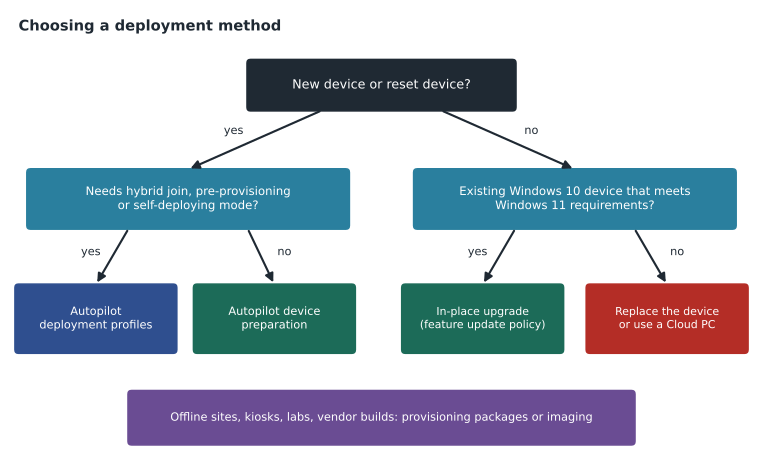
A plan usually mixes methods. Corvallin's plan used Autopilot for new and replaced laptops, an in-place upgrade for the 96 compatible Windows 10 devices, a provisioning package for a handful of shared tablets in the training room, and imaging only for the two pharmacy LTSC devices, which the cabinet vendor rebuilds from its own certified image.
In-place upgrade or replace?
An in-place upgrade from Windows 10 to Windows 11 keeps the user's files, apps and most settings, and runs from the cloud in one restart cycle of about an hour. It is the least disruptive option for compatible hardware. Intune handles it with a feature update policy, which tells devices which Windows version to install and when. Before using one, administrators check readiness. Intune's Windows feature update device readiness report, which needs Windows diagnostic data to be enabled for the tenant, lists each device's eligibility and any known risks, such as an app or driver with a compatibility hold.
Replacement is the right answer when hardware fails the Windows 11 requirements, when a device is old enough that its battery and warranty are spent, or when the device has been heavily customized in ways nobody wants to preserve. A replacement is also a chance to start clean: a new device that goes through Autopilot arrives in the target state with nothing carried over except what the user stores in OneDrive and the settings that Windows Backup for Organizations restores, covered in lesson 7.
Worked problem
Sorting the Windows 10 laptops
Ama's readiness report showed 140 Windows 10 laptops. 44 failed the processor or TPM requirement. Of the remaining 96, the report flagged 9 with a compatibility hold from an old fingerprint reader driver; the manufacturer had published a fixed driver. How many laptops can go into the first upgrade wave without extra work, and what should happen to the rest?
Show solution
- Replace the 44 that fail the hardware requirements.
- Upgrade the 96 - 9 = 87 eligible laptops with no flags in the first wave.
- Deploy the fixed fingerprint reader driver to the 9 flagged laptops through Intune, confirm the hold clears in the report, then upgrade them in a later wave.
Answer: 87 laptops can be upgraded straight away; 9 need the driver first; 44 are replaced.
Preparing the cloud side
Before any device goes through setup, the services it will talk to must be ready. Teodor took this list, because most of it lives in admin centers he already manages.
| Area | What to prepare | Covered in |
|---|---|---|
| Microsoft Entra ID | Who may join devices; device settings; groups for users and devices; Conditional Access that requires compliant devices | Lesson 9 |
| Intune enrollment | Automatic enrollment (MDM user scope) for Windows; enrollment restrictions; device platform limits | Lesson 9 |
| Licensing | Intune, Microsoft Entra ID P1 and Windows Enterprise licenses assigned to users | Lesson 8 |
| Autopilot | Device registration, deployment profiles or device preparation policies, Enrollment Status Page | Lessons 3 and 4 |
| Policies and apps | Compliance, security baselines, configuration profiles, required apps assigned to device or user groups | MSBA-211 and MSBA-213 |
| Network | Internet access to Microsoft endpoints during setup, including from home networks; proxy and firewall exceptions at the office | Lesson 11 |
Network access is easy to forget. During setup a device must reach Microsoft Entra ID, Intune, Windows Update, the Microsoft Store and content delivery networks. At home this is rarely a problem, but an office proxy that requires users to sign in will block a device that has no user signed in yet. Microsoft publishes the list of endpoints each service needs, and Felix Okonkwo-Reyes, who runs Corvallin's network, added them to the firewall allow list at each branch before the pilot.
Rings and pilots
No deployment goes to everyone at once. A deployment ring is a group of devices or users that receives a change at a planned time, so that problems show up in a small group before they reach the large one. Rings are used for the first rollout and again for every feature update afterwards.
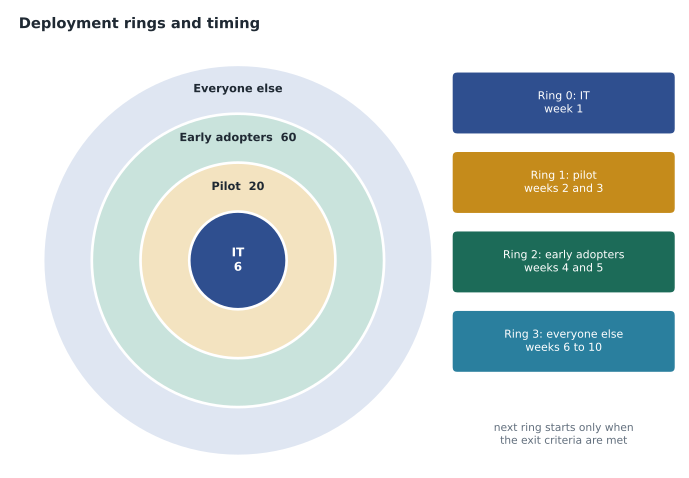
Each ring needs exit criteria: the measurable conditions that let the next ring start. Ama's were simple. At least 95 percent of devices in the ring must complete setup without a help desk call, every required app must install within an hour, and no new problem may remain open at severity two or higher. If a ring misses its criteria, the next ring waits.
The pilot ring should be chosen for variety, not convenience. Ama included a nurse who works mostly from her car, a scheduler with three monitors, two staff who use screen readers, a branch office with a slow connection and one of the training room tablets. A pilot made up only of enthusiastic IT staff on fast networks would have told her very little.
Communication and support
Users judge a deployment by the first hour with their new device. Corvallin's plan included a one-page guide mailed with every replacement laptop, with photographs of the screens the user would see, a reminder to plug in the power supply and use a wired or reliable network, the help desk number, and what to do if setup stopped. Ama also asked the manufacturer to place a sticker with the help desk number on the lid of every laptop shipped to Corvallin.
Ines insisted on one more item: a rollback plan. For in-place upgrades, Windows keeps the previous version for ten days by default so that a user can go back if something breaks, and the setting can be extended. For replacements, the old laptop is kept, powered off, for two weeks before it is wiped and recycled. Neither was used often, but both made it easier to say yes to the plan.
Measuring success
A plan needs numbers that prove it worked. Intune provides most of them: the Windows Autopilot deployments report shows each device's setup time and result, the device preparation deployment report does the same for device preparation, feature update reports show upgrade progress, and compliance reports show whether devices reached the target state. Ama added two numbers of her own from the help desk system: calls per hundred deployments and the average time from unboxing to first patient visit recorded on the new device.
Worked problem
Did the pilot pass?
The 20-device pilot finished with 19 devices completing setup without a help desk call. One device stopped at the Enrollment Status Page because a required app timed out on a slow branch network; the fix was to make that app install after setup instead of blocking it. All other apps installed within an hour. Does the pilot meet Ama's first exit criterion of 95 percent, and can the next ring start?
Show solution
- Success rate: 19 / 20 = 0.95, which is 95 percent.
- The criterion is at least 95 percent, so it is met.
- The one problem has a fix, so there is no open problem of severity two or higher once the change is made.
Answer: Yes. The pilot meets the criterion exactly. Ama applies the app change first, then opens the early adopter ring.
The one-page plan
Ama's final plan fitted on one page, as Ines had asked. It named the outcome, the methods for each device group, the prerequisites with an owner for each, the rings with dates and exit criteria, the communications and the measures. It also listed what was out of scope: the pharmacy LTSC devices and the two Windows Server machines in the head office comms room. That list was as useful as the rest, because it stopped scope creep in every meeting that followed.
Budget and timeline
Ines asked for one more thing before signing: what the project would cost in people's time, not just in hardware. Ama estimated the help desk effort from the pilot. Each device needed about 15 minutes of help desk time on average: a call for some, nothing for most, and an hour or more for the few that failed. Adding project management, testing and communications, she estimated the whole project at about 220 hours of IT time spread over ten weeks, roughly a fifth of one person's working time. That was small enough to run alongside normal work, which mattered to an IT office of four people.
Worked problem
Estimating help desk time
The project covers 140 Windows 10 laptops (87 upgraded in the first wave, 9 after a driver fix, 44 replaced). At an average of 15 minutes of help desk time per device, how many hours of help desk time should Ama budget?
Show solution
- Devices: 87 + 9 + 44 = 140.
- Minutes: 140 x 15 = 2,100 minutes.
- Hours: 2,100 / 60 = 35 hours.
Answer: About 35 hours of help desk time, which Ama spread across the rings so that no week needed more than five or six hours.
Timelines also depend on things outside IT. Clinical staff cannot lose their laptops on a day full of client visits, so Ama asked each branch manager which days were quietest and scheduled replacements for those. Laptops were shipped to arrive on a Monday, never a Friday, so that problems could be fixed during the working week. And the in-place upgrades were scheduled for evenings through the Intune feature update policy, with users told in advance to leave their laptops on and plugged in.
Accessibility and the first hour
Two of Corvallin's schedulers use screen readers. Windows setup supports Narrator from the very first screen, and Autopilot does not change that: pressing the Windows logo key, Ctrl and Enter together starts Narrator during OOBE. Ama confirmed in the pilot that the Enrollment Status Page and the sign-in screens worked with Narrator, and that the third-party screen reader the two staff used could be installed through Intune as a required app so that it was ready at their first sign-in. A plan that leaves out accessibility usually discovers the gap on the day a user cannot get past the first screen.
Common mistakes
MistakeStarting with a tool and working out the goal later.
InsteadWrite the target state first, then choose methods for each device group, then tools.
MistakeImaging every new laptop out of habit.
InsteadUse provisioning with Autopilot for new devices; keep imaging for the few cases that need it.
MistakeUpgrading every Windows 10 device without checking readiness.
InsteadCheck the Windows feature update device readiness report and fix compatibility holds first.
MistakePicking a pilot group of IT staff on fast networks.
InsteadChoose a pilot that represents real users, devices, locations and accessibility needs.
Summary and key terms
- A deployment plan starts with the target state of each device, then chooses methods, then tools.
- Provisioning transforms the installed Windows; imaging replaces it. Microsoft's direction is provisioning.
- In-place upgrades suit compatible Windows 10 devices; replacements suit hardware that fails Windows 11 requirements.
- Prepare Entra ID, Intune enrollment, licenses, Autopilot, policies, apps and network access before the first device arrives.
- Roll out in rings with measurable exit criteria, and measure the result with Intune reports and help desk data.
- Provisioning
- Turning the Windows installation already on a device into a business-ready device.
- Imaging
- Replacing the contents of a device's disk with an image the organization maintains.
- Feature update policy
- An Intune policy that sets which Windows version devices install and when.
- Deployment ring
- A group of devices or users that receives a change at a planned stage.
- Exit criteria
- Measurable conditions a ring must meet before the next ring starts.
Practice problems
Work each problem on paper first, then reveal the answer to check.
Which method suits a Windows 10 laptop that meets every Windows 11 requirement?
Show answer
An in-place upgrade, for example through an Intune feature update policy.
Why should a pilot group include staff on slow networks?
Show answer
Problems such as app timeouts appear on slow networks; the pilot should reveal them before the large rings.
What does Intune need before it can show the Windows feature update device readiness report?
Show answer
Windows diagnostic data enabled for the tenant, with devices sending the required data.
Lesson quiz · 5 questions
Score 60% or more to complete this lesson.
Create a free account to save your progress, take quizzes and earn a certificate.