
MSBA-210 · Lesson 10 of 12 · 23 min
Hybrid join and co-management
▶ Video coming soon A video version of this lesson is on the way.
Corvallin is a cloud-only organization today, but it had not always been. Until 2022 its head office ran an on-premises Active Directory domain, and its desktops were managed with Group Policy. When the agency moved to Microsoft 365, it turned off directory synchronization in December 2022 and replaced its domain-joined desktops with Entra joined devices. Many organizations are still in the middle of that journey, and during the project a much larger home-care network that partners with Corvallin asked Ama for advice on exactly that stage. Two ideas carry most of that stage: hybrid join, which gives domain-joined devices an identity in Entra ID, and co-management, which lets Configuration Manager and Intune manage the same device together.
How hybrid join works
A hybrid joined device is first joined to the Active Directory domain in the usual way. Microsoft Entra Connect Sync, the synchronization service that copies objects from Active Directory to Entra ID, then synchronizes the computer object to Entra ID, and the device completes its registration by itself the next time a user signs in. The organization configures this once, with the hybrid join settings in Entra Connect, which publish information about the tenant in Active Directory so that devices know where to register.
Hybrid join lets a domain-joined device use Conditional Access policies that require a hybrid joined or compliant device, and gives users single sign-on to cloud apps. It does not by itself enroll the device in Intune. Enrollment needs either automatic enrollment through a Group Policy setting, the MDM user scope, or co-management through Configuration Manager.
Hybrid join with Windows Autopilot
Autopilot deployment profiles can produce hybrid joined devices, a scenario called user-driven hybrid join. During OOBE, the device enrolls in Intune, then receives a Domain Join configuration profile that names the domain and the organizational unit, and an Intune Connector for Active Directory, installed on a server in the domain, creates the computer account. The device must reach a domain controller during setup, so this scenario normally runs on the corporate network.
| Component | Role in hybrid Autopilot |
|---|---|
| Autopilot deployment profile | Set to join as Microsoft Entra hybrid joined, user-driven or pre-provisioning |
| Domain Join configuration profile | Gives the domain name, organizational unit and computer name prefix |
| Intune Connector for Active Directory | Creates the computer object in the domain on the device's behalf |
| Line of sight to a domain controller | Needed during setup and at first user sign-in |
The connector was updated in 2025: newer versions run under a managed service account with only the permissions they need, and Microsoft stopped accepting enrollments through older connector versions after the change. Organizations that kept old connectors found their hybrid Autopilot deployments failing until they upgraded.
Microsoft's documentation is direct about hybrid Autopilot: it is supported, but Microsoft recommends Entra join for new devices, because hybrid Autopilot is more complex, depends on the network during setup and is harder to troubleshoot. Autopilot device preparation does not support hybrid join at all. Corvallin never used hybrid Autopilot; by the time it adopted Autopilot, its domain was gone. The partner network, which still had a domain, chose Entra join for every new device and kept hybrid join only for existing desktops until they were replaced.
Configuration Manager and co-management
Microsoft Configuration Manager is the on-premises management server that many organizations have used for decades to deploy software, operating systems and updates. Co-management is the state in which a Windows device has the Configuration Manager client and is also enrolled in Intune, so both can manage it. Microsoft positions co-management as the bridge from on-premises to cloud: an organization keeps Configuration Manager for what it does well and moves workloads to Intune one at a time.
A device becomes co-managed in one of two ways. An existing Configuration Manager client can be enrolled in Intune by turning on co-management in the Configuration Manager console, which uses automatic enrollment for devices that are hybrid joined. Or a new device provisioned by Intune, for example through Autopilot, can receive the Configuration Manager client as an app and connect to the site through a cloud management gateway, which lets clients on the internet reach Configuration Manager.
Workloads
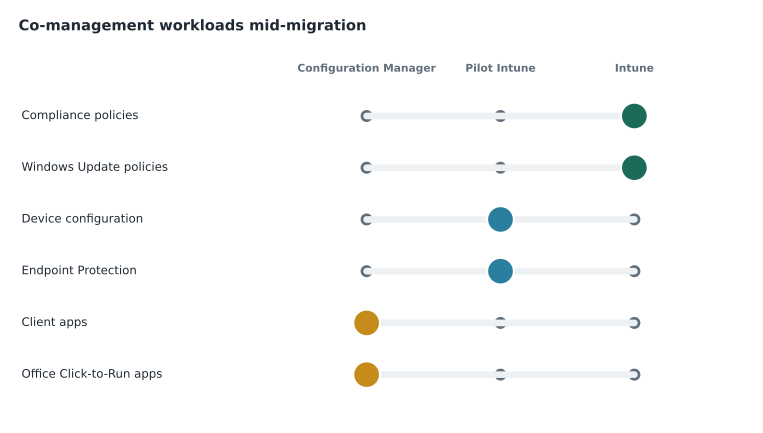
Co-management divides management into workloads. For each workload, an administrator sets a slider to Configuration Manager, Pilot Intune or Intune. Pilot Intune moves the workload to Intune only for devices in a pilot collection, which lets organizations test the change before it applies to everyone.
| Workload | What moves to Intune when switched |
|---|---|
| Compliance policies | Device compliance evaluation, used by Conditional Access |
| Device configuration | Configuration profiles and settings |
| Endpoint Protection | Microsoft Defender Antivirus, firewall, BitLocker and related security settings |
| Windows Update policies | Update rings and feature update policies |
| Client apps | App deployment from Intune |
| Office Click-to-Run apps | Microsoft 365 Apps deployment and updates |
Compliance policies are usually the first workload to move, because Conditional Access in Entra ID reads compliance from Intune. An organization that wants to require compliant devices for Microsoft 365 can switch that workload alone and leave everything else in Configuration Manager.
Worked problem
Planning the workload moves
A large home-care network that partners with Corvallin, with 6,000 devices, asked Ama for advice. It wanted Conditional Access requiring compliant devices within a month, new update rings within three months, and app deployment left in Configuration Manager for at least a year because of 400 packaged apps. In what order should it move workloads, and how far?
Show solution
- Month one: move Compliance policies to Pilot Intune for a pilot collection, then to Intune for all devices, so Conditional Access works.
- Month two and three: move Windows Update policies to Pilot Intune, then Intune, replacing Configuration Manager software update deployments.
- Later: move Device configuration and Endpoint Protection when Intune profiles have replaced the Group Policy and Configuration Manager settings.
- Leave Client apps and Office Click-to-Run apps in Configuration Manager until the app packages are rebuilt for Intune.
Answer: Compliance first, then Windows Update policies, then configuration and endpoint protection, and apps last. Each move goes through Pilot Intune before Intune.
Cloud attach and tenant attach
Microsoft uses the term cloud attach for connecting Configuration Manager to the cloud: co-management, the cloud management gateway, Endpoint analytics and tenant attach. Tenant attach uploads Configuration Manager devices to the Intune admin center so that administrators can see them and run some actions, such as viewing inventory or running scripts, without enrolling them in Intune. It is a useful first step for organizations that want one console before they are ready for co-management.
Group Policy and the move to Intune
Hybrid joined devices usually still receive Group Policy from the domain. When Intune policies and Group Policy set the same thing, the result can be confusing. Windows has a policy that makes MDM settings win over Group Policy for the settings that both control. Intune's Group Policy analytics imports an exported Group Policy object and shows which of its settings have an Intune equivalent in the settings catalog, which ones are deprecated and which ones are not supported, so that administrators can rebuild the policy in Intune. The MD-102 outline lists importing ADMX files and using Group Policy analytics under device configuration profiles.
Ama helped the partner network run Group Policy analytics against its main workstation policy, which had grown over a decade to 214 settings. It reported 171 settings with settings catalog equivalents, 26 deprecated settings that no longer did anything on Windows 11, and 17 that were not supported in Intune. She rebuilt the 171 as one settings catalog profile, dropped the 26, and found that 15 of the 17 were for software the partner no longer used.
Worked problem
How much of the Group Policy carries over?
Using Ama's numbers, what percentage of the 214 settings could be rebuilt in Intune directly, to the nearest whole percent?
Show solution
- Settings with equivalents: 171.
- 171 / 214 = 0.799.
- Rounded: 80 percent.
Answer: About 80 percent could be rebuilt directly. Most of the rest turned out not to be needed.
When hybrid join is still needed
Microsoft's recommendation for Entra join does not mean every organization can drop the domain tomorrow. The common reasons organizations keep hybrid join for a while are concrete: an app that authenticates only with Windows integrated authentication against a domain and cannot be updated; a large set of Group Policy settings that have not been rebuilt in Intune; certificates issued by an on-premises certificate authority through Group Policy autoenrollment; or devices that must be managed by Configuration Manager task sequences for operating system deployment. Each of these has a cloud alternative, such as Kerberos with Entra ID for apps, settings catalog profiles for policy, Intune certificate profiles or Microsoft Cloud PKI for certificates, and Autopilot for deployment, and an organization can move each one in turn.
When Corvallin left its domain in 2022, the last obstacle had been its payroll app, which used Windows integrated authentication against the domain. The vendor released a version that supported sign-in with Entra ID, the finance desktops were replaced with Entra joined devices, and only then was directory synchronization turned off. The partner network had dozens of such dependencies, and Ama suggested listing them one by one with an owner and a target date for each.
Co-management prerequisites
Co-management has prerequisites on both sides. In Configuration Manager the site must be on a current branch version that supports the workloads being moved. Devices must run a supported version of Windows with the Configuration Manager client. On the cloud side, users need Intune licenses and Entra ID P1, and devices must be hybrid joined or Entra joined. Automatic enrollment must be configured so that Configuration Manager clients can enroll in Intune. For devices that leave the corporate network, a cloud management gateway lets the Configuration Manager client keep in touch with the site.
| Path to co-management | Starting point | How the device becomes co-managed |
|---|---|---|
| Existing Configuration Manager clients | Domain-joined devices with the Configuration Manager client | Hybrid join, then co-management enrollment from the Configuration Manager console |
| New Internet-based devices | New devices provisioned with Autopilot and Entra joined | Intune installs the Configuration Manager client, which connects through a cloud management gateway |
Moving off co-management
Co-management is meant to be a stage, not a destination, though some large organizations stay co-managed for years. When every workload has moved to Intune and nothing still needs Configuration Manager, the client can be removed from devices and the site retired. The partner network's plan ended with exactly that step: retire the Configuration Manager site once the last workload has moved and nothing else depends on it.
Worked problem
Counting the remaining work
The partner network from the earlier example had six workloads. After a year, compliance, Windows Update policies, device configuration and Endpoint Protection were in Intune, and client apps and Office Click-to-Run apps were still in Configuration Manager. What fraction of workloads had moved, and what must happen before the site can be retired?
Show solution
- Moved: 4 of 6 workloads, two-thirds.
- Remaining: client apps and Office Click-to-Run apps.
- Before retiring the site: rebuild app deployments in Intune, move both app workloads, confirm nothing else depends on Configuration Manager (such as operating system deployment), then remove the client.
Answer: Two-thirds of the workloads had moved. App deployment is the last and largest step, after which the site can be retired.
Why the slider includes Pilot Intune
The Pilot Intune position exists because moving a workload changes who controls a setting on every co-managed device. If compliance moves to Intune for 6,000 devices at once and the Intune compliance policy has a mistake, thousands of devices could be marked non-compliant and blocked by Conditional Access within an hour. With Pilot Intune, only devices in a pilot collection in Configuration Manager switch, so a mistake affects a few dozen devices. The pilot collection is usually the same set of devices used as the first deployment ring, which keeps the organization's testing discipline consistent across projects.
For the exam and for practice, remember the shape of the decision rather than every detail. Entra join is the default for new devices. Hybrid join is a bridge for devices that still need the domain. Co-management is a bridge for devices that still need Configuration Manager. Both bridges are crossed one workload or one dependency at a time, and both end with devices managed by Intune alone.
Common mistakes
MistakeAssuming hybrid join enrolls a device in Intune.
InsteadHybrid join gives the device an Entra identity; enrollment needs automatic enrollment or co-management.
MistakeBuilding new deployments on hybrid Autopilot.
InsteadMicrosoft recommends Entra join for new devices; hybrid Autopilot is supported but complex.
MistakeMoving every co-management workload to Intune at once.
InsteadMove workloads one at a time, through Pilot Intune first.
MistakeLeaving conflicting Group Policy and Intune settings on the same device.
InsteadUse Group Policy analytics to rebuild settings in Intune and retire the old policy.
Summary and key terms
- Hybrid joined devices are domain-joined and synchronized to Entra ID by Microsoft Entra Connect Sync.
- Hybrid Autopilot needs a Domain Join profile, the Intune Connector for Active Directory and line of sight to a domain controller; Microsoft recommends Entra join instead.
- Co-management lets Configuration Manager and Intune manage the same device, with workloads moved one at a time.
- Each workload is set to Configuration Manager, Pilot Intune or Intune; compliance is usually first.
- Tenant attach shows Configuration Manager devices in Intune; Group Policy analytics helps move Group Policy into Intune.
- Microsoft Entra Connect Sync
- The service that synchronizes Active Directory objects to Entra ID.
- Intune Connector for Active Directory
- The on-premises connector that creates computer objects for hybrid Autopilot.
- Co-management
- Managing a device with both Configuration Manager and Intune.
- Workload
- An area of management, such as compliance, that can be moved between Configuration Manager and Intune.
- Cloud management gateway
- A service that lets Configuration Manager clients on the internet reach the site.
- Group Policy analytics
- An Intune tool that maps Group Policy settings to Intune equivalents.
Practice problems
Work each problem on paper first, then reveal the answer to check.
What are the three positions of a co-management workload slider?
Show answer
Configuration Manager, Pilot Intune and Intune.
Which co-management workload is usually moved first, and why?
Show answer
Compliance policies, because Conditional Access reads compliance from Intune.
What does tenant attach give an organization without co-management?
Show answer
Visibility of Configuration Manager devices in the Intune admin center and some remote actions.
Lesson quiz · 5 questions
Score 60% or more to complete this lesson.
Create a free account to save your progress, take quizzes and earn a certificate.