
MSBA-210 · Lesson 1 of 12 · 21 min
Windows editions, servicing channels and lifecycle
▶ Video coming soon A video version of this lesson is on the way.
In the autumn of 2026 Corvallin Home Care had a deadline that nobody in its IT office could ignore. The agency's 450 staff, from the home health aides who drive between clients' homes to the schedulers at head office in Hartford, used about 520 Windows devices. Most were already on Windows 11, but 140 laptops in the four branch offices were still running Windows 10, kept safe by a paid year of Extended Security Updates that ended on October 13, 2026. Ines Duvernay-Sato, the IT manager, had bought a second year for the stragglers as insurance, but she wanted every one of them replaced or upgraded before spring. She asked Ama Owusu-Pratt, who leads the help desk and owns the endpoints, to run the project, and she asked Teodor Klimaszewski, the Microsoft 365 administrator, to make sure the cloud side was ready.
Ama started where every deployment project should start: with what Windows actually is in 2026, which edition each device needs, how long each version is supported and what that means for planning. This lesson follows her notes. The rest of the course builds on them: how to plan a deployment, how Windows Autopilot and Autopilot device preparation work, when provisioning packages and images still make sense, how user data moves, how activation and joining work, and how to troubleshoot when a device stops halfway through setup.
Windows 11 editions
An edition is a version of Windows sold for a particular kind of customer, with its own set of features and licensing terms. All editions share the same core, so a Windows 11 Pro device and a Windows 11 Enterprise device run the same kernel and the same apps. What differs are the management and security features that are turned on, and the way the device is licensed.
| Edition | Typical buyer | Points that matter to an administrator |
|---|---|---|
| Windows 11 Home | Consumers | Can't join Active Directory or Microsoft Entra ID through normal business setup; not suitable for managed business devices |
| Windows 11 Pro | Small and medium businesses; most business laptops ship with it | Microsoft Entra join, Intune management, BitLocker, Windows Autopilot; the starting point for subscription activation to Enterprise |
| Windows 11 Pro for Workstations | High-end workstations | Pro features plus support for more processors and memory and the ReFS file system |
| Windows 11 Enterprise | Organizations with Windows Enterprise E3 or E5 or Microsoft 365 E3 or E5 | Adds features such as Credential Guard on by default, App Control for Business options, Windows Autopatch, Hotpatch and 36 months of servicing per feature update |
| Windows 11 Education and Pro Education | Schools and universities | Education is functionally close to Enterprise; Pro Education is Pro with education defaults |
| Windows 11 Enterprise LTSC | Fixed-function devices such as medical equipment controllers and kiosks | No feature updates for years at a time; limited inbox apps; licensed through volume licensing |
| Windows 11 IoT Enterprise | Device makers building dedicated devices | Licensed through device makers; an LTSC version has a 10-year support life |
Corvallin buys laptops with Windows 11 Pro preinstalled, because that is what manufacturers ship for business models. Its licenses, Microsoft 365 E3 for office staff and managers and Microsoft 365 F3 for the home-care staff, both include Windows Enterprise rights, so each laptop steps up to Windows 11 Enterprise automatically when a licensed user signs in. Lesson 8 explains how that step-up, called subscription activation, works. For now the important point is that Ama does not need to install Enterprise media on anything: she deploys Pro as shipped and lets the license do the rest.
A small group of devices is different. Corvallin's pharmacy at head office has two machines that drive a medication dispensing cabinet. The cabinet's vendor certifies its software only on Windows 11 Enterprise LTSC 2024 and asks customers not to apply feature updates. Those two devices are the only LTSC machines in the agency, and Ama keeps them out of everything else she builds.
Hardware requirements
Windows 11 has stricter hardware requirements than Windows 10, and they explain most of the devices that cannot be upgraded. A device needs a compatible 64-bit processor from a supported list (roughly Intel 8th generation, AMD Ryzen 2000 series and Qualcomm Snapdragon 7c or newer), 4 GB of memory, 64 GB of storage, UEFI firmware with Secure Boot capability, and a Trusted Platform Module (TPM) version 2.0. The TPM is a security chip, or firmware equivalent, that stores keys for BitLocker, Windows Hello and device attestation. Several Autopilot features covered later in this course rely on TPM 2.0 attestation, so a device without one is a poor candidate for modern deployment even before Windows 11 enters the picture.
Of Corvallin's 140 Windows 10 laptops, Ama's inventory showed that 96 met the Windows 11 requirements and could be upgraded in place. The other 44 were six or seven years old, with processors that are not on the supported list. Those would be replaced.
Feature updates and quality updates
Windows changes through two kinds of updates. A feature update delivers a new version of Windows with new capabilities, such as the move from Windows 11 version 24H2 to version 25H2. A quality update is the monthly cumulative update that fixes security problems and bugs within a version. Each version name tells you when it was released: 25H2 means the second half of 2025.
Quality updates follow a monthly rhythm. The security update arrives on the second Tuesday of each month, often called Patch Tuesday. Later in the month Microsoft publishes an optional non-security preview update that lets administrators test the fixes and features that will be included in the next month's release. Out-of-band updates are released outside this schedule when an urgent problem needs fixing. Intune's update rings and Windows Autopatch, covered in later courses, control how quickly devices receive each of these.
Feature updates now come once a year, in the second half of the calendar year. Windows 11 version 25H2 was released on September 30, 2025, and version 26H2 on September 29, 2026. Both were delivered to devices already on version 24H2 as an enablement package: a small update that switches on features already present in the code base, so the upgrade takes about as long as a monthly update and one restart. Microsoft's KB5121794 article for 26H2 lists Windows 11 version 24H2 and 25H2 as the versions that can install it, once a September 2026 cumulative update or later is in place.
There is one exception to the annual pattern worth knowing. Windows 11 version 26H1, released on February 10, 2026, is not a general feature update at all. It ships only preinstalled on certain new devices, starting with laptops built on Qualcomm Snapdragon X2 processors, and it is built on a different Windows core from 24H2, 25H2 and 26H2. It is not offered through Windows Update, it cannot be installed on existing devices and, for now, devices running it cannot move to 26H2. Microsoft continues to recommend 24H2 and 25H2 for broad enterprise deployment. When Ama orders new laptops, she checks which version they ship with, because a laptop that arrives on 26H1 will follow a different update path from the rest of the fleet.
Servicing channels
A servicing channel decides how often a device receives feature updates. Windows 11 has three that matter to administrators.
| Channel | Feature update cadence | Use it for |
|---|---|---|
| General Availability Channel | One feature update a year, in the second half of the year | Almost every business device: laptops, desktops, Cloud PCs |
| Long-Term Servicing Channel (LTSC) | A new LTSC release about every three years; devices can stay on one release for its whole support life | Fixed-function devices whose software must not change: medical, industrial, kiosks |
| Windows Insider Program for Business | Preview builds weekly or monthly, depending on the channel chosen | A few IT devices that test what is coming |
LTSC is tempting to people who are tired of feature updates, and Microsoft is clear that it is not meant for general-purpose devices. It leaves out apps such as the Microsoft Store and some inbox apps, it does not receive new features between releases, and Microsoft 365 Apps support on it is limited. Corvallin's pharmacy machines fit the intended use; a scheduler's laptop does not.
The lifecycle policy
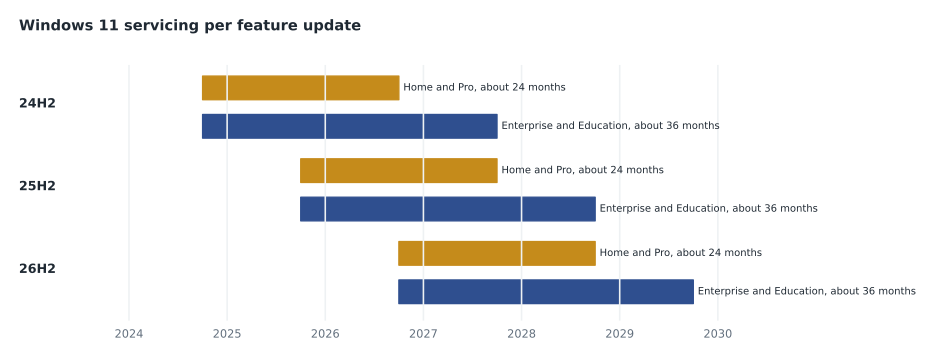
Microsoft publishes the support dates for every product under its Modern Lifecycle Policy. For Windows 11 in the General Availability Channel, each feature update is serviced for 24 months on Home, Pro and Pro for Workstations editions and for 36 months on Enterprise and Education editions, counted from the release date. Microsoft's lifecycle page for Home and Pro, for example, lists the end of servicing for version 24H2 as October 2026, for 25H2 as October 2027 and for 26H2 as October 2028. Enterprise and Education editions get one more year for each.
That extra year is one of the most practical reasons organizations license Enterprise. A company that skips one feature update entirely can stay supported, because a device on 25H2 Enterprise is serviced until the autumn of 2028, by which time the next feature updates have been tested. On Pro, the same device would have to move to a new version every year or two.
Worked problem
Reading a support window
Corvallin's scheduling laptops run Windows 11 Enterprise version 24H2, released in October 2024. Using the 36-month rule, in which month does servicing for that version end, and what should Ama plan before then?
Show solution
- Start from the release: October 2024.
- Add 36 months for Enterprise: October 2027.
- Plan the move to a newer version, 25H2 or 26H2, during the first half of 2027 so there is time to pilot it.
Answer: Servicing ends in October 2027. Ama schedules the feature update for spring 2027 and confirms the exact date on Microsoft's lifecycle page before setting it in an Intune feature update policy.
LTSC releases have their own, longer dates. Windows 11 Enterprise LTSC 2024, released in October 2024, has five years of support, and Windows 11 IoT Enterprise LTSC 2024 has ten. The pharmacy devices will stay on LTSC 2024 until the cabinet vendor certifies a newer release.
Windows 10 after end of support
Windows 10 reached its end of support on October 14, 2025. Version 22H2 was the last version, and after that date it receives no security updates, no bug fixes and no technical assistance unless the device is enrolled in Extended Security Updates (ESU). ESU delivers security updates only; it adds no features and fixes no non-security bugs.
For organizations, ESU is sold per device for up to three years, and the price doubles each year. Published prices were 61 US dollars per device for the first year, which ran to October 13, 2026, then 122 dollars for the second year to October 12, 2027, and 244 dollars for the third year to October 10, 2028. Years cannot be skipped: an organization that joins in the second year pays for the first year too. Windows 10 running in Windows 365 Cloud PCs or Azure Virtual Desktop receives ESU at no extra charge. A separate consumer program, which Microsoft later extended to October 2027, does not apply to business devices.
Worked problem
Is ESU cheaper than replacement?
Ines asked Ama to compare keeping the 44 unsupported laptops on ESU for years two and three with replacing them now. Each laptop would cost about 1,150 US dollars to replace. Use the published US dollar ESU prices and ignore exchange rates for a rough comparison.
Show solution
- ESU year two: 44 x 122 = 5,368 dollars.
- ESU year three: 44 x 244 = 10,736 dollars.
- Two more years of ESU: 5,368 + 10,736 = 16,104 dollars, after which the laptops still need replacing.
- Replacement now: 44 x 1,150 = 50,600 dollars.
Answer: ESU looks cheaper in the short run, about 16,000 dollars against 50,600, but it only postpones the replacement, leaves old hardware without TPM-based features and keeps a second operating system in the fleet. Ines kept ESU only as cover until the replacements arrived.
Why this matters for deployment
Everything in this lesson shapes the decisions in the rest of the course. The edition determines which features Ama can rely on and whether devices step up to Enterprise. The servicing channel decides how often devices need feature updates. The lifecycle dates set the deadline for every project. And the Windows 10 end of support explains why so many organizations spent 2025 and 2026 replacing hardware and upgrading devices in place.
Ama ended her notes with a short rule set that she pinned in the help desk channel: business devices run Windows 11 Pro or better and step up to Enterprise through subscription activation; everything is on the General Availability Channel except the two pharmacy devices; every device stays on a supported version; and nothing new is bought without checking that it meets the Windows 11 requirements and supports TPM 2.0 attestation.
Common mistakes
MistakeChoosing LTSC for ordinary office laptops to avoid feature updates.
InsteadLTSC is meant for fixed-function devices. General-purpose devices belong on the General Availability Channel.
MistakeAssuming every Windows 11 version is supported for the same length of time.
InsteadHome and Pro get about 24 months per feature update; Enterprise and Education get about 36. LTSC releases have their own dates.
MistakeTreating Windows 11 version 26H1 as a normal upgrade target for existing devices.
Instead26H1 ships only on certain new devices and is not offered to existing ones; 24H2 and 25H2 remain the recommended enterprise versions.
MistakeThinking ESU keeps Windows 10 fully maintained.
InsteadESU provides security updates only, costs more each year and ends in October 2028 at the latest.
Summary and key terms
- Windows 11 editions share one core; they differ in management and security features and in licensing.
- Feature updates arrive once a year in the second half; quality updates arrive monthly, with security fixes on the second Tuesday.
- Enablement packages move devices from 24H2 to 25H2 or 26H2 with a quick update and one restart.
- Home and Pro editions get about 24 months of servicing per feature update; Enterprise and Education get about 36.
- Windows 10 support ended on October 14, 2025; commercial ESU runs at most to October 2028 and doubles in price each year.
- Edition
- A version of Windows for a particular kind of customer, with its own features and licensing.
- Feature update
- An annual release that brings a new version of Windows, such as 25H2.
- Quality update
- A monthly cumulative update with security and reliability fixes for a version.
- Enablement package
- A small update that turns on features already present, moving a device to a new version quickly.
- Long-Term Servicing Channel (LTSC)
- A servicing channel with no feature updates for years at a time, meant for fixed-function devices.
- Extended Security Updates (ESU)
- A paid program that provides security updates for Windows 10 after its end of support.
Practice problems
Work each problem on paper first, then reveal the answer to check.
How long is each Windows 11 feature update serviced on Enterprise edition?
Show answer
About 36 months from its release date.
Which devices should run LTSC?
Show answer
Fixed-function devices, such as medical or industrial controllers, whose software must not change.
Why can't a laptop with an eighth-generation processor but no TPM 2.0 move to Windows 11?
Show answer
TPM 2.0 is a Windows 11 hardware requirement, used for BitLocker, Windows Hello and attestation.
Lesson quiz · 5 questions
Score 60% or more to complete this lesson.
Create a free account to save your progress, take quizzes and earn a certificate.