
MSBA-205 · Lesson 8 of 12 · 19 min
Copilot analytics and adoption reporting
▶ Video coming soon A video version of this lesson is on the way.
The board's decision in August 2027 will turn on one question: did the pilot help? Dr. Ostrander-Bey's version of the question is sharper: did it help without harming anyone? The eighth chapter of Teodor's runbook is about the reports that will answer both, and about reading them honestly. AB-650 lists four monitoring skills: managing and monitoring costs (lesson 9), monitoring usage reports for Copilot in the Microsoft 365 admin center 'including workload-level adoption details', monitoring usage and adoption 'by using the Copilot Control System', and monitoring service health the same way.
Three layers of reporting
Microsoft's Copilot reporting comes in layers, each with different detail, audience and licensing.
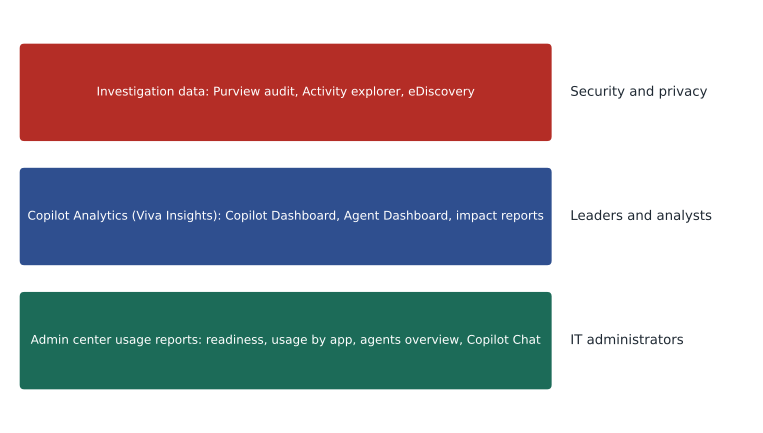
Microsoft 365 admin center usage reports are the administrator's layer. The Copilot readiness report shows eligibility, and the Copilot usage report shows enabled and active users and activity by app: Teams, Outlook, Word, Excel, PowerPoint, OneNote, Loop, Copilot Chat and the Microsoft 365 Copilot app. This is what AB-650 means by workload-level adoption details: a pilot user who uses Copilot only in Outlook is a different adoption story from one who uses it in every app. The agents overview page adds active users and run time per agent.
Copilot Analytics is the leadership layer. Microsoft describes it as six parts, delivered mostly through Viva Insights: the Copilot Dashboard, which shows readiness, adoption, impact and sentiment; an Agent Dashboard for agent use; advanced reporting for analysts; business impact reports that connect Copilot use to business measures; and the underlying data that analysts can query. Microsoft documents that licensed Copilot users are given a Viva Insights service plan automatically, that data appears within about seven days, and that some views, including the Agent Dashboard, need at least 50 licenses in the tenant.
Investigation data, such as the Purview audit log and Activity explorer from lesson 6, is not an adoption report at all. It answers specific questions about specific interactions, and access to it is limited to the people who investigate.
Privacy in adoption reports
Adoption reports are about people, and in a small organization it is easy to identify individuals from supposedly aggregate data. The Microsoft 365 admin center has an org-wide setting to conceal user, group and site names in reports, which replaces names with identifiers. The Copilot Dashboard applies minimum group sizes, so it does not show results for groups smaller than a set number of people.
Corvallin turned on concealed names in the admin center reports in 2026. Teodor's runbook adds a rule: adoption reports are discussed by team, never by person, and the IT team does not use them to evaluate individual staff. Dr. Ostrander-Bey asked for that rule in writing, because staff trust in the pilot depends on it.
A pilot of 40 in a tenant of 460
Corvallin's size creates a practical problem. With 44 Copilot licenses during the pilot (40 users and the four IT staff), the tenant is below the 50-license threshold Microsoft documents for some Copilot Analytics views, including the Agent Dashboard. Minimum group sizes in the Copilot Dashboard also make small branch-level groups invisible. Teodor's plan adapts:
- Admin center usage reports carry most of the weight: active users by app and by week, and the agents overview for agent use.
- Copilot Dashboard views that work at Corvallin's size are used for the whole pilot group rather than by branch.
- A short survey at weeks 2, 6 and 12, built in Microsoft Forms, asks pilot users what they used Copilot for, how much time it saved and whether anything went wrong. The survey gives the qualitative detail the dashboards cannot.
- Two outcome measures chosen with the business before the pilot starts, described below.
Measuring outcomes, not activity
Active users is an activity measure. It shows that people tried Copilot, not that it helped. The runbook asks each pilot team to name one outcome measure before May 2027, with a baseline taken in March and April:
| Team | Outcome measure | Source |
|---|---|---|
| Intake and care coordinators | Time from referral to first visit booked | Scheduling system report |
| Branch managers | Hours a week spent on weekly reports | Survey and calendar sample |
| Finance and payroll | Time to close month-end | Finance calendar |
| HR and training | Time to answer common policy questions | HR request log |
| Quality and clinical leadership | Complaints or corrections linked to AI-drafted content | Quality incident log |
The last row is the clinical director's safety measure, and it counts in the other direction: the pilot succeeds only if AI-drafted content does not increase corrections or complaints. The November 12 care-plan letter complaint from the MSBA-102 course, which involved a case manager using Copilot Chat, is the reason it exists.
Reading adoption reports well
Teodor's runbook lists the patterns to look for, and the mistakes that reports invite:
- Week-two drop. Many pilots see a burst of use in the first week and a fall in the second. That is normal; what matters is the level weeks six to twelve settle at.
- One-app users. A user active only in Outlook may need training on Word or Teams, or may simply work mostly in email. Check before assuming.
- Agent run time without users. An agent with high run time and few users may be stuck in a loop or used by a scheduled process; investigate it in the registry.
- Survivorship. Satisfied users answer surveys more often. Read survey results alongside the non-response rate.
Service health for Copilot
AB-650 also asks administrators to 'monitor service health by using the Copilot Control System'. Copilot is a set of services, and they have incidents like any others. The Service health page in the Microsoft 365 admin center lists current incidents and advisories for Microsoft 365 Copilot alongside the other services, and the Message center announces changes such as new features, retirements and setting changes. Copilot pages in the admin center also surface health information relevant to Copilot.
Corvallin's help desk already checks Service health first for any report of a broken service, as the MSBA-101 course set out, and the Monday message center triage now includes a Copilot filter. During the pilot, the runbook adds one step: when several pilot users report that Copilot is slow or wrong on the same day, the help desk checks Service health before opening a ticket with anyone, and records the incident number on the internal ticket.
# Weekly Copilot usage summary from the admin center report export (illustrative).
# The report is exported as CSV from Reports > Usage > Microsoft 365 Copilot.
$rows = Import-Csv '.\CopilotUsage.csv'
$rows | Group-Object { $_.'Last activity date (UTC)' -ne '' } |
    Select-Object @{n='Active';e={$_.Name}}, Count

# Count active users per app column (column names vary by report version).
'Teams','Outlook','Word','Excel','PowerPoint' | ForEach-Object {
    $col = "Last activity date of Copilot in $_ (UTC)"
    [pscustomobject]@{ App = $_; Active = ($rows | Where-Object { $_.$col }).Count }
}
Worked problem
A report that seems to show failure
In a test run of the reporting plan using the four IT licenses, the usage report shows Felix active only in Teams and only twice in a month. Ines asks whether the IT team should 'take his license back'. What should Teodor check before answering?
Show solution
- Remember that concealed names are on and the runbook says reports are discussed by team, not person; this is a test run within IT, with Felix's agreement.
- Check the workload detail: Felix's work is network and voice, much of it in admin consoles and on calls, where Copilot in Teams meetings is the most likely use.
- Ask Felix what he would use Copilot for, rather than inferring from the report.
- Decide based on need and the pilot plan, not on one month's activity.
Answer: Low activity is a question, not an answer. Check the workload detail and ask the person; reassign a license only when the need is clearly elsewhere.
Building the pilot report
Teodor drafted the structure of the report that will go to the board in August 2027, so that the data needed for it is collected from the first day of the pilot rather than reconstructed afterwards. It has five sections:
- Who used Copilot and how. Active pilot users by week and by app, from the admin center usage report, and the share of pilot users active in week 12.
- What changed. Each team's outcome measure against its March and April baseline.
- What people said. Survey results from weeks 2, 6 and 12, with response rates and a selection of comments.
- What went wrong. AI incidents during the pilot from lesson 11, with what was done about each.
- What it cost. License costs, pay-as-you-go spending by agent and the time spent by IT on governance, from lesson 9.
The fourth and fifth sections are there because the board approved the pilot on conditions about safety and governance, not only about usefulness. A pilot report that only shows benefits would not answer the question the board actually asked.
Adoption support
Reports show where adoption is weak; they do not fix it. Corvallin's adoption plan pairs the reports with support:
- Champions. One pilot user in each team agrees to help colleagues and to collect questions. Champions meet with Teodor every two weeks during the pilot.
- Scenario training. Short sessions built around real tasks, such as drafting a weekly branch report or preparing for a case conference, rather than feature tours.
- Prompt library. The organizational prompts from the MSBA-103 course, with the four pinned prompts updated from what champions report works.
- Follow-up for low activity. When a team's active users fall in weeks four to six, its champion asks why, and the answer decides whether the team needs training, a different scenario or nothing at all.
Microsoft publishes adoption guidance and materials for Copilot on its adoption site, including templates for scenario libraries and champion programs. Teodor used them as a starting point, adapted to home care.
Agent usage reporting
Agents need their own view. The agents overview in the admin center shows active users and run time for each agent, and Copilot Studio has analytics for its agents, including conversation outcomes and the knowledge sources used. For each organization agent, the runbook records three numbers monthly: active users, run time and the share of conversations the owner judged successful from a sample. An agent with falling users and no improvement plan is a candidate for retirement under the lifecycle in lesson 4.
Sentiment and quality
Adoption numbers say nothing about whether people trust what Copilot produces. The Copilot Dashboard includes sentiment measures from Microsoft's built-in surveys, and Corvallin's own survey asks two quality questions: how often the user had to correct Copilot's output before using it, and whether they ever found a factual error that would have mattered. A rising share of corrections in a team is a reason to look at their scenarios and training, and a single serious error goes to the incident process in lesson 11.
Reporting roles
Access to reports follows least privilege. The Reports Reader role in Entra ID can view admin center usage reports without other admin rights, and Viva Insights has its own roles for the Copilot Dashboard and advanced reporting. At Corvallin, Lorna and the quality lead have Reports Reader for the pilot, Teodor holds the Insights roles, and nobody outside IT can see investigation data. The runbook lists every reporting role with the person who holds it, reviewed each quarter with the other role assignments from the MSBA-101 course.
When the numbers disagree
Different reports count differently. The admin center usage report counts a user as active if they used any Copilot feature in the period, the Copilot Dashboard may apply its own definitions and time windows, and agent run time is not the same as conversations. When two reports disagree, the runbook's rule is to read each report's definition before drawing a conclusion, and to quote the source and period with every number given to the board.
Common mistakes
MistakeReporting the pilot's success as the number of active users.
InsteadAgree outcome measures and baselines before the pilot, and report activity as context.
MistakeDiscussing adoption reports by named individual.
InsteadConceal names and report by team, with minimum group sizes.
MistakeExpecting every Copilot Analytics view to work in a small tenant.
InsteadCheck license thresholds such as the 50-license minimum and plan alternative measures.
MistakeOpening support cases for Copilot slowness before checking Service health.
InsteadCheck Service health and the message center first.
Summary and key terms
- Copilot reporting has three layers: admin center usage reports, Copilot Analytics in Viva Insights, and investigation data.
- Admin center reports show active users by app and agent use; this is workload-level adoption.
- Copilot Analytics includes the Copilot Dashboard, Agent Dashboard and business impact reports, with license thresholds and minimum group sizes.
- Concealed names and team-level reporting protect staff privacy and trust.
- Outcome measures with baselines show whether Copilot helped; activity alone does not.
- Service health and the message center cover Copilot incidents and changes.
- Workload-level adoption
- Copilot use broken down by app, such as Teams, Outlook or Word.
- Copilot Analytics
- Microsoft's reporting for Copilot readiness, adoption and impact, mainly through Viva Insights.
- Copilot Dashboard
- A Viva Insights dashboard of Copilot readiness, adoption, impact and sentiment.
- Agent Dashboard
- A Copilot Analytics view of agent use, available above a license threshold.
- Concealed names
- An admin center setting that replaces user, group and site names in reports.
- Outcome measure
- A business result used to judge whether a pilot helped.
- Service health
- The admin center page listing incidents and advisories for Microsoft services.
Practice problems
Work each problem on paper first, then reveal the answer to check.
What does workload-level adoption mean in a Copilot usage report?
Show answer
Copilot activity broken down by app, such as Teams, Outlook, Word or Excel.
Why might the Agent Dashboard be unavailable to Corvallin during the pilot?
Show answer
Microsoft documents a minimum of 50 licenses for it, and the pilot has 44.
Name one control that protects staff privacy in adoption reports.
Show answer
Concealed names in admin center reports, or minimum group sizes in the Copilot Dashboard.
Why should outcome measures be chosen before a pilot starts?
Show answer
A baseline is needed to compare against, and choosing afterwards invites picking whatever looks good.
Lesson quiz · 5 questions
Score 60% or more to complete this lesson.
Create a free account to save your progress, take quizzes and earn a certificate.