
MSBA-205 · Lesson 11 of 12 · 19 min
Incident response for AI services
▶ Video coming soon A video version of this lesson is on the way.
Every chapter so far has been about preventing problems. The eleventh is about what Corvallin does when prevention fails. The MSBA-203 course built the agency's incident response for email and identity attacks: triage in the Defender portal, the order of remediation for a compromised account, and an after-hours partner for high-severity incidents. AI incidents use the same foundations, but they have their own signals, their own containment levers and, at a health care agency, their own reporting duties.
Teodor wrote this chapter as a playbook, then tested it in a tabletop exercise with Ines, Ama, Felix, Dr. Ostrander-Bey and the privacy officer on Friday, November 20, 2026.
What counts as an AI incident
The runbook defines an AI incident as any event in which Copilot, an agent or another AI service causes, or could have caused, harm to people, data or operations. That includes security events, but it is broader:
| Category | Example | First owner |
|---|---|---|
| Data exposure | Copilot or an agent shows a user content they should not see | IT with the privacy officer |
| Harmful or wrong output with consequences | An AI-drafted letter to a family contains incorrect care information | Clinical director and quality team |
| Prompt injection or jailbreak | Audit records show repeated jailbreak attempts, or an agent follows hidden instructions | IT security |
| Agent misbehavior | An agent takes unexpected actions or runs far more often than expected | Agent owner and IT |
| Cost incident | A usage-billed service exceeds its estimate sharply | IT and finance |
| Service failure | Copilot or an agent is unavailable during a critical process | Help desk |
The November 12 care-plan letter complaint from the MSBA-102 course would fall into the second category. Nobody attacked anything; a case manager used Copilot Chat to draft a letter and did not check it carefully enough. It is still an incident, because a family received wrong information, and it needs the same discipline: record, contain, fix and learn.
The response cycle
The playbook follows the familiar incident response cycle, adapted for AI services.
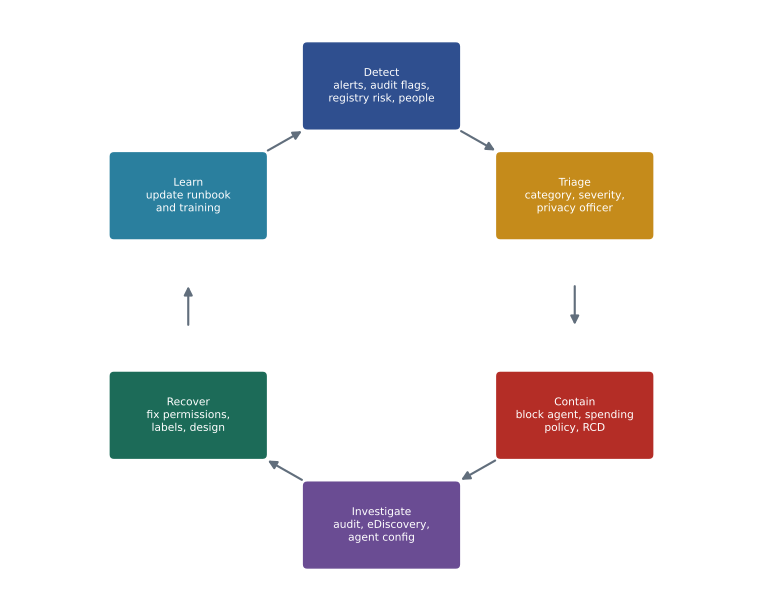
Detect
AI incidents surface through more channels than most:
- Microsoft Defender alerts, including alerts that involve Copilot, agents or AI applications discovered by Defender for Cloud Apps.
- Microsoft Purview alerts from DLP for the Copilot location, insider risk's Risky AI usage policy and communication compliance.
- Audit records, including the JailbreakDetected flag from lesson 10, reviewed in the weekly check.
- Agent registry risk, where Agent 365 shows risk signals for each agent.
- Cost alerts from Azure budgets and spending limits, from lesson 9.
- People: staff, clients and families reporting something that looks wrong. In practice this is the most common source, which is why the use guide tells staff exactly how to report an AI problem: through the help desk, with the category 'AI or Copilot'.
Triage
Triage decides category, severity and who leads. Two rules in the playbook are specific to AI:
- Personal health information triggers the privacy officer immediately. If an incident may involve client or staff health information, the privacy officer is told at triage, not after investigation, because reporting deadlines may start from discovery.
- Output with clinical consequences triggers the clinical director. If wrong AI output reached a client, family or care decision, Dr. Ostrander-Bey decides on clinical follow-up, independently of the technical investigation.
Severity follows the MSBA-203 course's scale, with one addition: any confirmed exposure of health information to someone without a need to know is at least high severity.
Contain
Containment for AI services has levers that email and identity incidents do not. The playbook lists them in order from narrowest to broadest:
| Lever | Effect | Speed |
|---|---|---|
| Block the agent in the agent registry | Users lose access to that agent; configuration is kept | Immediate |
| Remove users from the agent's spending policy | Stops usage-billed access for those users | Minutes |
| Apply restricted content discovery to a site | Copilot and search stop surfacing the site's content | Hours |
| Disable an agent identity or block it with Conditional Access | The agent can no longer sign in to resources | Minutes |
| Revoke a user's sessions and reset credentials | For incidents involving a compromised account, as in the MSBA-203 course | Minutes |
| Turn off web search for a group | Stops web queries from that group's prompts | Up to hours, through Cloud Policy |
| Remove a user's Copilot license | User loses Microsoft 365 Copilot features | Hours to propagate |
| Disable a Copilot feature tenant-wide | Affects everyone; last resort | Varies |
The principle is to use the narrowest lever that stops the harm. Removing every Copilot license because one agent misbehaved would stop the pilot's work and destroy staff confidence, while blocking the agent in the registry would have been enough.
Investigate
Investigation reconstructs what happened. For AI incidents, the main sources are:
- Purview audit for Copilot interaction metadata: who, when, which app or agent, which files and sites were referenced, and whether a jailbreak was detected.
- eDiscovery with the Copilot activity condition for the prompt and response content, placed on hold if the incident might lead to a complaint or legal action.
- Activity explorer in data security posture management for a quick view of prompts, responses and referenced items.
- The agent's configuration: instructions, knowledge sources, tools, identity and recent changes, which the registry and Copilot Studio record.
- Defender incidents where an attack is involved, using the investigation methods from the MSBA-203 course.
Access to investigation data is limited. At Corvallin, eDiscovery and insider risk cases are restricted to the privacy officer and Ines; Teodor configures the tools but cannot see case content, as the MSBA-102 course set out.
Recover
Recovery fixes the cause, not just the symptom. If Copilot surfaced an overshared file, the fix is the file's permissions (lesson 7), not just the restricted content discovery that contained it. If an agent gave wrong answers, the fix is its knowledge sources or instructions, followed by re-review under the lesson 4 checklist and retesting before it is unblocked. If a user made a mistake with AI output, the fix includes a conversation and, where needed, training, delivered without blame.
Report
Health information incidents carry legal duties. For Corvallin, the HIPAA Breach Notification Rule sets out when individuals and regulators must be notified of a privacy breach and how quickly, and the privacy officer decides whether those duties apply. The playbook's job is to make sure the privacy officer has the facts in time: what data, how many people, who saw it and whether it could be retrieved. It does not try to make the legal decision.
Internally, every AI incident above low severity is reported at the next Thursday review and summarized for the board's quarterly risk report. During the pilot, Dr. Ostrander-Bey receives every incident report directly, because she can stop the pilot.
Learn
Each incident ends with a short review: what happened, what worked, what did not and what changes. Changes go into the runbook, the use guide or the agent review checklist. The care-plan letter complaint produced two changes before the pilot even started: the use guide now says that any AI-drafted message to a client or family must be checked against the record by its sender, and the quality team's outcome measure from lesson 8 was created.
The tabletop exercise
On November 20, Teodor ran a 90-minute tabletop exercise with an invented scenario set in June 2027, during the pilot. The Procedures Helper agent, he told the group, has started answering schedulers' questions about visit cancellations with text from an HR disciplinary letter, because someone saved the letter into the procedures library by mistake.
The group worked through the playbook. Ama proposed blocking the agent in the registry, the narrowest lever, while Ansel Marrowby, as the library's owner, found and removed the file. The privacy officer asked how many schedulers had seen the text; Teodor showed how audit records would list the interactions that referenced the file. Dr. Ostrander-Bey asked whether any schedulers had passed the text on, which audit alone could not answer, so the playbook gained a step: interview the users involved. The exercise also found a gap: nobody had the authority to unblock the agent after the fix. The playbook now gives that decision to the agent's owners together with Ines.
Worked problem
Choosing the containment lever
During the pilot, the Help Desk Triage agent starts creating duplicate tickets, about 200 an hour, after a change to its trigger. The help desk system's administrator complains, and the agent's credit consumption is climbing. What should Teodor do first, and what next?
Show solution
- Category: agent misbehavior with a cost element. Severity: medium, because no personal data is exposed but operations and costs are affected.
- Contain with the narrowest lever that stops it: block the agent in the agent registry, which stops new conversations and actions immediately.
- Check that the spending limit set in lesson 9 has capped consumption, and note the credits used.
- Investigate the trigger change in Copilot Studio with Ama, fix it in the development environment, retest, re-review under the lesson 4 checklist and unblock with the owners' and Ines's agreement.
Answer: Block the agent first. Then confirm the spending limit held, fix the trigger in development, retest and re-review before unblocking.
Roles in an AI incident
The playbook names who does what, because confusion about roles slows every incident. For AI incidents at Corvallin:
| Role | Person | Responsibilities |
|---|---|---|
| Incident lead | Teodor (Ines if Teodor is unavailable) | Runs the response, decides containment, keeps the timeline |
| Agent owner | The agent's named owners | Explains the agent's design, fixes knowledge and instructions |
| Privacy officer | Corvallin's privacy officer | Assesses privacy impact, decides on notification, runs eDiscovery |
| Clinical lead | Dr. Ostrander-Bey | Decides on clinical follow-up when output affected care |
| Communications | Ines | Tells staff, the board and, with the privacy officer, anyone affected |
| After-hours | The monitoring partner from the MSBA-203 course | Handles high-severity security alerts out of hours and can block agents |
The last row needed a decision: should the after-hours monitoring partner be allowed to block agents? Ines agreed that it should, with an AI Administrator role eligible through Privileged Identity Management, because blocking is reversible and the harm from an agent misbehaving overnight could be significant. The partner cannot unblock agents or change their configuration.
Keeping evidence
AI incidents are investigated mostly from logs that expire. Purview audit records are kept for a limited time depending on licensing, Copilot interactions follow the two-year retention policy, and agent configuration can be changed by its owners at any time. The playbook's first investigation step is therefore to preserve evidence: place relevant users' Copilot interactions on hold in an eDiscovery case, export the agent's current configuration, and record the audit search results with their date. Only then does the team start changing anything to fix the cause.
Communicating with staff
When an AI incident affects how staff should use Copilot, a short message goes out quickly, written for people who are not technical: what happened in one sentence, what staff should do differently, and where to ask questions. In the tabletop exercise, the draft message for schedulers was three sentences long, and Dr. Ostrander-Bey asked that it avoid technical terms such as 'agent registry' entirely. That became a rule for all incident messages to staff.
Testing the playbook
A playbook that has never been used is a hypothesis. Corvallin's runbook schedules a tabletop exercise every six months and after any real high-severity AI incident, each time with a new scenario. The scenarios planned for 2027 include a jailbreak attempt flagged in audit, a cost spike from a scheduled agent, and a Copilot summary in a family letter with wrong medication information. Each exercise ends with at least one change to the playbook; an exercise that changes nothing was probably too easy.
Common mistakes
MistakeUsing the broadest lever, such as removing all Copilot licenses, for a single agent's fault.
InsteadUse the narrowest lever that stops the harm, such as blocking the agent.
MistakeTelling the privacy officer only after the investigation is complete.
InsteadInvolve the privacy officer at triage when health information may be involved.
MistakeTreating wrong AI output as 'not an incident' because nobody attacked anything.
InsteadRecord and review harmful output like any other incident.
MistakeUnblocking an agent as soon as the symptom stops.
InsteadFix the cause, retest and re-review before unblocking, with a named decision-maker.
Summary and key terms
- AI incidents include data exposure, harmful output, injection, agent misbehavior, cost spikes and service failures.
- Detection sources include Defender, Purview, audit flags, registry risk, cost alerts and, most often, people.
- Triage brings in the privacy officer for health information and the clinical director for output with clinical consequences.
- Containment levers range from blocking one agent to tenant-wide changes; use the narrowest that works.
- Investigate with audit, eDiscovery, Activity explorer and the agent's configuration; recover by fixing causes.
- Report as health privacy law and internal governance require, and update the runbook after every incident.
- AI incident
- An event in which an AI service causes or could cause harm to people, data or operations.
- Containment
- Actions that stop an incident's harm from continuing or spreading.
- Tabletop exercise
- A discussion-based rehearsal of an incident using an invented scenario.
- Legal hold
- Preserving content in eDiscovery so it cannot be deleted during an investigation.
- Root cause
- The underlying reason an incident happened, which recovery must fix.
- Privacy breach
- Unauthorized access to, or disclosure of, personal information.
Practice problems
Work each problem on paper first, then reveal the answer to check.
Why is blocking an agent in the registry usually the first containment step for agent misbehavior?
Show answer
It stops access immediately while keeping the agent's configuration for investigation and repair.
When should the privacy officer be told about an AI incident involving health information?
Show answer
At triage, because reporting deadlines may start from discovery.
Which tool gives the content of Copilot prompts and responses for an investigation?
Show answer
eDiscovery with the Copilot activity condition.
What gap did Corvallin's tabletop exercise find?
Show answer
Nobody had the authority to unblock an agent after a fix; the decision now sits with the agent's owners and Ines.
Lesson quiz · 5 questions
Score 60% or more to complete this lesson.
Create a free account to save your progress, take quizzes and earn a certificate.