
MSBA-205 · Lesson 3 of 12 · 20 min
Controlling web grounding and plugins
▶ Video coming soon A video version of this lesson is on the way.
The question that took longest at the Thursday reviews was not about agents or costs. It was about the web. Dr. Ostrander-Bey had read that Copilot 'searches the internet' and wanted to know whether a care coordinator's question about a client could end up on a search engine. Teodor's third chapter answers that question precisely, then covers the other ways Copilot reaches beyond Microsoft 365: Copilot connectors, plugins and tools, and third-party AI model providers.
AB-650 includes four skills in this area: 'manage web search for Copilot and Microsoft 365 Copilot Chat', 'configure Microsoft 365 Copilot Search', 'manage third-party AI providers' and 'configure Copilot connectors'. They are grouped together here because each one changes where Copilot's information comes from, and therefore what an administrator has to trust.
What web grounding sends
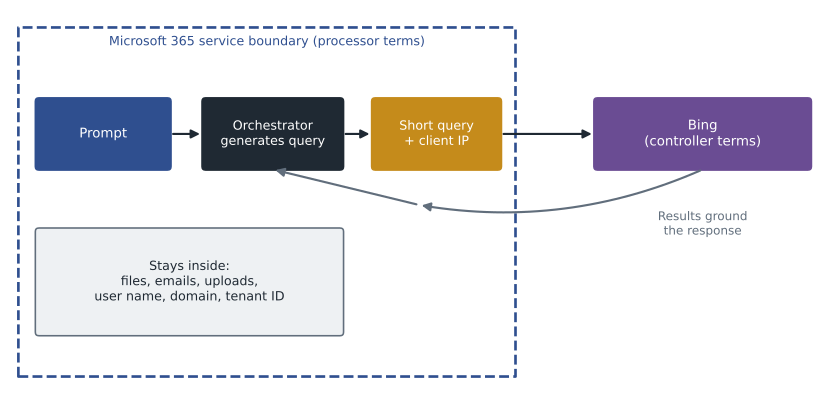
When web search is allowed and the orchestrator decides that current public information would help, Copilot generates a web query and sends it to Bing. The details are documented by Microsoft and worth knowing exactly, because they are the answer to Dr. Ostrander-Bey's question.
- Copilot does not send the full prompt, unless the prompt is very short. It generates a search query of a few words derived from the prompt.
- It does not send whole files, emails or uploaded documents, and it does not send Entra identifiers such as the user name, domain or tenant ID.
- It does send the user's client IP address, which Bing uses for localization.
- Document content can influence the query only when the user is working in a Microsoft 365 app with a relevant document open, or explicitly references a document. Only the derived search terms are sent, not the document.
The legal position is different from the rest of Copilot. Prompts and responses stay inside the Microsoft 365 service boundary, where Microsoft is a data processor under the Data Protection Addendum and the Product Terms. The generated queries sent to Bing are governed by the Product Terms with Microsoft acting as a data controller for the query data. Microsoft commits not to use them to improve Bing, build advertising profiles, share them with advertisers or train foundation models, and to treat them as confidential. But the Data Protection Addendum, Microsoft's HIPAA commitments and the EU Data Boundary do not apply to them, so the safeguards Corvallin relies on for HIPAA do not follow the query.
So the honest answer to the clinical director was: a client's full name or diagnosis is unlikely to be sent, because Copilot builds a short topical query, but a short prompt could be sent almost as written, and the protections that apply to the rest of Corvallin's data do not apply to that query. That was enough for her to ask for a policy decision rather than a reassurance.
The web search policy
Administrators control web search with the Allow web search in Copilot policy in the Cloud Policy service for Microsoft 365. It applies to both Microsoft 365 Copilot and Copilot Chat, and it can be scoped to specific users or groups, which is the key to a nuanced decision. When the policy is configured, it has three options:
| Option | Effect | When it fits |
|---|---|---|
| Enabled in Microsoft Copilot and Microsoft Copilot Chat | Web search available everywhere | General office work where current public information helps |
| Disabled in Microsoft Copilot and Microsoft Copilot Chat | No web search at all; the user toggle is grayed out | Roles handling the most sensitive information |
| Disabled in Copilot Work mode; Enabled in Copilot Web mode and Copilot Chat | No web grounding when Copilot works over work data; also disables web search in Researcher and Cowork | Staff who need web answers sometimes but whose work prompts should never leave the boundary |
If the policy is not configured, web search is available in both experiences, unless the separate policy 'Allow the use of additional optional connected experiences in Office' is disabled. Disabling that broader policy also switches off other connected experiences, so it is a blunt instrument; the dedicated web search policy is the right tool. For United States government clouds, web search is off by default and stays off unless the policy is configured.
Users have their own Web content toggle when the administrator allows web search. It is on by default, users can turn it off, and the choice follows them across devices. When the administrator disables web search, the toggle is unavailable. Researcher has its own web search toggle in the input box; Analyst and Cowork do not.
Microsoft's prompt defense guidance adds one more control: administrators can exclude up to 1,000 sites from web grounding, so that Copilot does not use them as sources. Corvallin uses this sparingly, for two health misinformation sites the clinical team flagged and for competitor job boards that kept appearing in HR answers.
Corvallin's decision
The MSBA-103 course had left web search on for the four IT licenses. For the pilot, Teodor proposed and Ines approved a scoped policy, to be confirmed at the April 2027 go/no-go meeting:
- Intake and care coordinators (12 pilot users, group Copilot-Pilot-Clinical): Disabled in Copilot Work mode; Enabled in Copilot Web mode and Copilot Chat. They can look up public information such as a pharmacy's opening hours, but prompts about clients, grounded in work data, never generate web queries.
- All other pilot users and IT: Enabled in both. Their work is mostly policy, finance and training material.
- Everyone else (Copilot Chat only): Enabled, because Copilot Chat without a license grounds on the web by design, and turning it off would leave them with little value. The use guide tells them never to type client details into Copilot Chat.
Dr. Ostrander-Bey accepted the proposal with one addition: the use guide would explain web queries in a single sentence, so that staff understand why client details stay out of prompts.
Auditing web queries
Because web queries are a distinct risk, they are recorded. Administrators can search for the exact generated queries in the Purview audit log, retrieve them through the Copilot interaction events in the Office 365 Management API, and find them with eDiscovery. Activity explorer in Purview's data security posture management shows the web search terms alongside the prompt, response and sources. In Copilot Chat, users can see the queries used in the conversation for 24 hours; the Copilot panes in the Office apps do not show them.
Teodor added a monthly task to the runbook: sample 25 web queries from the clinical group's Copilot Chat use and check that none contains a client name. The first sample, from the IT team's own use in November, found nothing of concern but showed how often a very short prompt was sent almost word for word, which became an example in the user training.
Microsoft 365 Copilot Search
Microsoft 365 Copilot Search is the AI-powered search experience in the Microsoft 365 Copilot app and Office.com. It searches across Microsoft 365 and Copilot connector content and can answer in natural language. Its configuration lives with Microsoft Search in the Microsoft 365 admin center: administrators manage bookmarks, acronyms, Q&A answers and which connectors appear in results, and those choices shape both search and Copilot answers.
Copilot Search respects the same permissions as Copilot itself, so it does not change the oversharing picture. Its value for governance is that it lets the IT team see what a typical user can find before Copilot reaches the pilot group. Teodor uses it in readiness reviews: searching for 'payroll', 'diagnosis' or 'health card' as a test user in each branch shows quickly whether a site still needs restricted content discovery.
Copilot connectors
Copilot connectors (called Graph connectors until 2025) bring content from outside Microsoft 365 into Microsoft Graph, where Copilot and Copilot Search can find it. Microsoft provides prebuilt connectors for common systems such as ServiceNow, Confluence, Salesforce and file shares, and organizations can build their own. Connectors are configured in the Microsoft 365 admin center under Copilot or Search, depending on the view, and each connection needs an administrator to grant it access to the source.
The most important connector setting for security is access control. When a connector indexes items, it can carry the source system's permissions into Graph (so that Copilot shows each item only to people who could see it in the source), or it can make the items visible to everyone in the organization. For a ticketing system or an HR knowledge base, carrying the source permissions is almost always right. Teodor's rule in the runbook: no connector goes live with 'everyone' visibility unless the source content is already public inside the organization.
Corvallin has one connector in planning: the IT knowledge base from the help desk ticketing tool, which Ama's Help Desk Triage agent also uses. Its articles are internal but not sensitive, so organization-wide visibility is acceptable. The scheduling system behind VisitWise is explicitly out of scope until the vendor's privacy review is complete.
Plugins, tools and agents
In 2024, Copilot could be extended with plugins: message extensions, API plugins and connectors that let it call outside services. Since then, Microsoft has folded most of this into agents. Agents use tools (actions such as creating a ticket or looking up an order), which can be connectors, API definitions or Model Context Protocol (MCP) servers, an open standard for connecting AI models to tools and data. Microsoft 365 App Store plugins for Cowork add skills and connectors to that system in a similar way.
For an administrator the governance questions are the same whatever the name: which tools exist, who approved them, what data they can send out and what actions they can take. AB-650 asks you to 'manage tools in Agent 365'. The Agent 365 tools registry, which Microsoft announced as generally available at Ignite in November 2026, lists the MCP servers and other tools that agents in the tenant can use and lets administrators allow or block them. The admin center's agent settings also control whether users can use agents and plugins from external publishers; Corvallin keeps external-publisher agents off.
Third-party AI providers
Microsoft 365 Copilot no longer uses a single model family. Microsoft has added models from other providers, including Anthropic, to some Copilot experiences, and the Copilot settings page lets administrators decide whether those model families are allowed. Some providers operate as independent processors under their own terms rather than as Microsoft subprocessors, which matters for privacy reviews; Microsoft labels these in the settings.
Corvallin turned off independent-processor AI providers in October 2026, pending a privacy review, as the MSBA-103 course records. For Cowork, Microsoft notes that turning off the Anthropic model family leaves users with the other allowed models and that the automatic model choice still works, so the setting does not break the experience. The runbook lists every model-family setting with its owner and its next review date.
Worked problem
Choosing a web search option for the finance team
Lorna Fitch-Adeyemi, the finance manager, asks for web search to be turned off for her six finance pilot users because 'payroll questions must never leave the building'. She still wants them to be able to ask Copilot about tax rule changes. Which option fits, and what else should Teodor check?
Show solution
- Payroll questions grounded in work data are the risk; public tax information is the benefit.
- The option 'Disabled in Copilot Work mode; Enabled in Copilot Web mode and Copilot Chat' blocks web queries when Copilot works over work data while allowing web answers in web mode.
- Scope the policy to the finance pilot group in the Cloud Policy service.
- Remind the team that Researcher's web search is also disabled under this option, and check that the payroll site's restricted access control, set in the MSBA-102 course, is still in place.
Answer: Use the Work-mode-disabled option for a finance group. It meets both needs, and the payroll site's access controls remain the main protection.
Common mistakes
MistakeTelling staff that web search 'sends nothing'.
InsteadIt sends a short generated query and the client IP address, under different terms from the rest of Microsoft 365.
MistakeDisabling all optional connected experiences to stop web search.
InsteadUse the dedicated Allow web search in Copilot policy, scoped to groups.
MistakePublishing a connector with organization-wide visibility for convenience.
InsteadCarry source permissions into Graph unless the content is already open to everyone.
MistakeAllowing new AI model providers without a privacy review.
InsteadReview independent-processor providers before enabling them, and record the decision.
Summary and key terms
- Web grounding sends a short generated query and the client IP address to Bing, not files, emails or identifiers.
- Generated queries are governed by controller terms; the Data Protection Addendum, health privacy terms and the EU Data Boundary do not apply to them.
- The Allow web search in Copilot policy has three options and can be scoped to groups; the user toggle sits underneath it.
- Web queries can be audited in Purview audit, the Management API, eDiscovery and Activity explorer.
- Copilot connectors should carry source permissions; tools and MCP servers are governed through agent settings and the Agent 365 tools registry.
- Third-party and independent-processor model providers are allowed or blocked in Copilot settings after review.
- Web grounding
- Using web search results to inform a Copilot response.
- Generated web query
- The short search query Copilot derives from a prompt and sends to Bing.
- Cloud Policy service
- The Microsoft 365 service for applying app and Copilot policies to users and groups.
- Copilot connector
- A connection that indexes outside content into Microsoft Graph for Copilot and search.
- Model Context Protocol
- An open standard for connecting AI models to tools and data sources.
- Tools registry
- The Agent 365 list of tools and MCP servers that agents can use, with allow and block controls.
- Independent processor
- A provider that processes data under its own terms rather than as a Microsoft subprocessor.
Practice problems
Work each problem on paper first, then reveal the answer to check.
What two pieces of information does Copilot send to Bing for a web search?
Show answer
A short generated query and the user's client IP address.
Which web search option also disables web search in Researcher and Cowork?
Show answer
Disabled in Copilot Work mode; Enabled in Copilot Web mode and Copilot Chat.
Where can an administrator find the exact web queries Copilot generated?
Show answer
Purview audit, the Office 365 Management API's Copilot interaction events, eDiscovery, or Activity explorer.
Why should most connectors carry source permissions into Graph?
Show answer
So Copilot shows each item only to people who could see it in the source system.
Lesson quiz · 5 questions
Score 60% or more to complete this lesson.
Create a free account to save your progress, take quizzes and earn a certificate.