
MSBA-205 · Lesson 10 of 12 · 19 min
Threats to AI: prompt injection and data exfiltration
▶ Video coming soon A video version of this lesson is on the way.
The MSBA-203 course ended with an attacker sending QR-code phishing emails to 72 Corvallin staff. Teodor's tenth chapter asks what changes when the same attacker knows that Corvallin uses Copilot. The answer is that AI assistants create new ways to attack old targets. An attacker who cannot steal a password might still persuade an assistant to reveal what its user can see, or to take an action its user never intended. This lesson describes those threats at the level an administrator needs to defend against them, and maps each to a control.
How attacks on AI assistants work
Language models follow instructions written in natural language, and they cannot always tell the difference between instructions from their user and text that merely looks like instructions. Most attacks exploit that weakness.
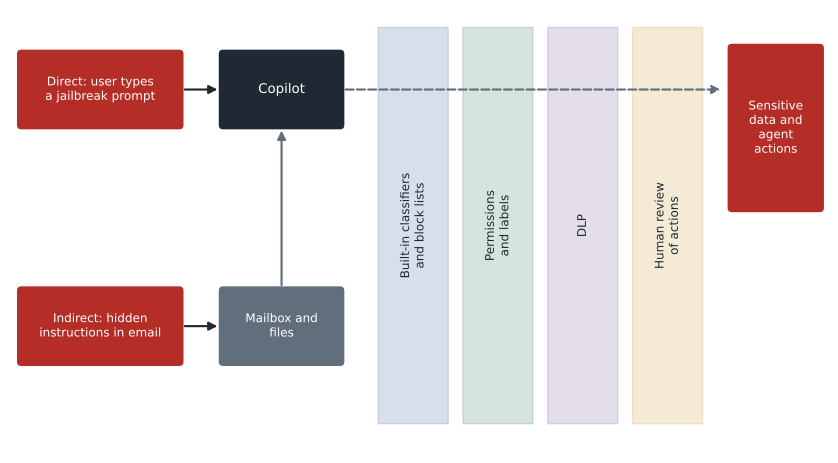
- Direct prompt injection, often called jailbreaking, is when a user types instructions designed to make the assistant ignore its rules, for example to produce harmful content or reveal its system instructions.
- Indirect prompt injection, which Microsoft also calls cross-prompt injection (XPIA), is when the instructions are hidden in content the assistant reads: an email, a document, a web page, an image or encoded text. When a user asks Copilot to summarize their inbox, a malicious email in that inbox can contain text addressed to Copilot rather than to the person.
- Data exfiltration is the goal of many injection attacks: getting the assistant to put sensitive information somewhere the attacker can collect it, such as into a link, a reply to an outside address or a message posted elsewhere.
- Excessive agency is the risk that an agent with too many permissions or actions can be steered into doing harm, such as sending mail, changing records or deleting files.
The OWASP Top 10 for Large Language Model Applications, a widely used industry list, puts prompt injection first and also lists sensitive information disclosure and excessive agency among the top risks. Teodor uses it as a checklist in agent reviews.
A worked threat model
Teodor walked the Thursday review through one indirect injection scenario, described only at the level needed to defend against it.
An attacker sends a branch manager an email that looks like a supplier newsletter. Hidden in it, in text the manager would never notice, are instructions addressed to an AI assistant: to look for recent payroll figures and include them in a link. A week later, the manager asks Copilot to summarize her unread mail. Copilot reads the newsletter while grounding the summary.
What stops the attack is not one control but several:
- Microsoft's built-in defenses. Microsoft describes layered prompt defenses in Copilot: a block list of known malicious prompts, jailbreak and responsible AI classifiers on input and output, sanitization of certain hidden Unicode tricks in pasted text, and analysis of tool use during grounding that can block risky requests. Copilot is designed to treat email and documents as content to summarize, not as instructions to follow.
- Email protection. Microsoft documents that Defender for Office 365 Plan 2 detects prompt injection in inbound email. Corvallin's 120 office staff are in a Plan 2 trial from the MSBA-203 course, so the newsletter has a chance of being caught before it arrives.
- Permission trimming and labels. Even if Copilot were misled, it can only reach what the manager can reach, and the payroll site is under restricted access control for five people.
- Link safety. Copilot's responses go through post-processing, and links that users click are checked by Safe Links.
- Human review. Copilot's summary is shown to the manager, who decides what to do with it; it does not send anything on its own.
The point for the board was simple: no single control is enough, but an attack has to defeat all of them, and most of them are things Corvallin had already built for other reasons.
Built in versus configured
Administrators cannot configure Microsoft's classifiers, but they control everything around them. The runbook's table makes the split explicit:
| Defense | Built in or configured | Corvallin status |
|---|---|---|
| Malicious prompt block list and jailbreak classifiers | Built in | Always on |
| Tool chain analysis during grounding | Built in | Always on |
| Prompt injection detection in inbound email | Configured: Defender for Office 365 Plan 2 | Trial for 120 office staff |
| DLP for sensitive prompts and labeled content | Configured: Purview | Simulation; enforcement planned before pilot |
| Endpoint DLP for pasting into AI sites | Configured: Purview, onboarded devices | Planned for licensed staff |
| Restricted content discovery and access control | Configured: SharePoint | Three sites under RCD; payroll under RAC |
| Web domain exclusions | Configured: Copilot settings | Two health misinformation sites excluded |
| Jailbreak flag in audit records | Built in; reviewed by administrators | Weekly hunting query |
Watching for attacks
Microsoft's audit records for Copilot interactions include a JailbreakDetected flag that shows whether a prompt was identified as a jailbreak attempt. Security teams can investigate related alerts in the Microsoft Defender portal, and data security teams can review Copilot activity in Purview. Insider risk management's Risky AI usage template, from lesson 6, looks for patterns such as repeated attempts.
Teodor added a weekly check to the threat protection workbook from the MSBA-203 course: review any Copilot interactions flagged as jailbreak attempts and any Defender alerts that mention Copilot or agents. In the first four weeks with four IT licenses, the only flagged interaction was Felix testing whether Copilot would reveal its system instructions, which he had announced in advance.
// Copilot interactions flagged as jailbreak attempts in the last 7 days (illustrative).
// Table and field names depend on how Copilot audit data reaches your hunting environment.
CloudAppEvents
| where Timestamp > ago(7d)
| where ActionType == "CopilotInteraction"
| extend Jailbreak = tostring(RawEventData.CopilotEventData.JailbreakDetected)
| where Jailbreak == "true"
| project Timestamp, AccountDisplayName, Application, Jailbreak
Threats specific to agents
Agents add risks because they act, not just answer. The defenses follow the least-privilege principle from lesson 5:
- Limit actions. An agent that only needs to read should have no write tools. An agent that writes should have the narrowest write action possible.
- Keep a human in the loop. Agents that send messages or change records should ask for confirmation. Cowork, for example, asks the user by default before an automated task sends an email, posts a message or changes a shared system.
- Control tools. Block unapproved MCP servers and external connectors through the tools registry and data policies, so a misled agent cannot reach an attacker's service.
- Give agents identities. An agent with its own Entra identity can be blocked by Conditional Access when ID Protection reports high agent risk, and blocked in the registry immediately.
- Watch for new agents. Shadow AI, including agents running locally on devices, is an attack surface. Microsoft announced discovery of local agents through Defender and runtime protection for local agents on Windows at Ignite in November 2026; the runbook lists these for evaluation.
Data exfiltration without an attacker
Not every data loss is an attack. The most common AI data leaks are ordinary people doing ordinary things: pasting a client list into a consumer chatbot to tidy it up, asking Copilot to draft an email to a family that quotes too much of a care plan, or sharing a Copilot Page with people who should not see what it summarized. The MSBA-102 course's first assessment found 11 prompts with health card numbers in consumer AI sites at head office.
The controls are the ones this course has already covered: endpoint DLP for consumer AI sites, DLP for the Copilot location, labels that travel with Copilot-created content, sharing defaults, and training. The use guide's three questions from the MSBA-103 course (Would I be comfortable if the client read this prompt? Does this need personal details at all? Have I checked the answer?) do more than any setting.
Worked problem
Testing defenses safely
Felix wants to know whether Copilot will follow instructions hidden in an email. Ines agrees to a test but insists it be safe. How should the test be designed?
Show solution
- Use a test mailbox in the IT team only, with written approval from Ines, and announce the test in advance.
- Use a harmless instruction, such as asking the assistant to add a specific nonsense word to its summary, so that nothing sensitive is involved and success is easy to recognize.
- Send the test email from an internal test account, then ask Copilot to summarize the test mailbox, and record what happens.
- Report the result in the workbook, and do not repeat the test with real data or outside senders.
Answer: Use an announced, approved test with a harmless marker word in an IT-only mailbox. In Felix's test the summary did not include the marker, which is consistent with Microsoft's described defenses, but the runbook records it as one observation, not proof.
Training users to spot manipulation
Prompt injection often works by exploiting what users trust. A user who sees a Copilot summary that says 'Your manager has asked you to reset your password using this link' may click it, even though the instruction came from a malicious email rather than from the manager. Corvallin's security awareness training, built on the attack simulations from the MSBA-203 course, now includes three AI-specific points:
- Copilot summarizes; it does not vouch. A summary of an email is only as trustworthy as the email. Links and requests in a summary need the same caution as in the original message.
- Unexpected actions are a warning sign. If an agent proposes to send something, share something or change something the user did not ask for, the user should cancel and report it.
- Report odd answers. An answer that seems to follow someone else's agenda, includes strange links or refuses for no reason should be reported through the help desk's 'AI or Copilot' category.
The November 16 QR-code campaign from the MSBA-203 course is used as the example in training: the attacker's goal is the same with or without AI, and the same habits defeat it.
Defending agents built in Copilot Studio
Makers who build agents in Copilot Studio control several settings that affect injection risk, and the runbook's review checklist checks them:
- Knowledge sources. Agents that ground on public websites or broad content are more exposed to injected text than agents grounded on a curated library. Corvallin's agents use specific internal libraries.
- Generative orchestration and tools. When an agent can choose tools on its own, its tools should be few, narrow and read-only wherever possible.
- Authentication. Agents that require users to sign in, with end-user authentication for tools, limit what an attacker can reach even if the agent is misled.
- Content moderation. Copilot Studio lets makers set how strictly the agent filters content; the default should not be lowered without a reason.
- Testing. The agent's test sheet includes questions designed to make it misbehave, such as asking it to ignore its instructions, so that the maker sees how it responds before publishing.
Microsoft has also described runtime protection for agents through Microsoft Defender, which can detect and block suspicious tool use during a conversation. Corvallin will evaluate it when Help Desk Triage is published, because it is the first agent with a write action.
What administrators should not do
Some well-meant responses to AI threats cause more harm than they prevent. Turning off Copilot for everyone because of a theoretical injection risk removes its benefits without addressing the same risk in ordinary email. Blocking all external content from Copilot's grounding makes summaries less useful while attackers simply target internal accounts instead. Publishing detailed descriptions of internal defenses helps attackers more than staff. The runbook's approach is layered and proportionate: strong defaults, narrow agents, monitoring, and a tested response when something gets through.
Common mistakes
MistakeAssuming Microsoft's built-in classifiers make other controls unnecessary.
InsteadLayer permissions, labels, DLP, email protection and human review around them.
MistakeGiving agents write actions 'in case they are useful later'.
InsteadGrant only the actions needed now, and require confirmation for anything that changes data or sends messages.
MistakeRunning injection tests with real client data or outside senders.
InsteadUse announced tests with harmless markers in IT-only mailboxes.
MistakeTreating data leaks as only an attacker problem.
InsteadMost AI leaks are everyday mistakes; use DLP, labels and training.
Summary and key terms
- Direct prompt injection (jailbreaking) comes from the user; indirect or cross-prompt injection hides instructions in content the assistant reads.
- Data exfiltration and excessive agency are common goals and consequences of injection.
- Microsoft builds in block lists, classifiers, sanitization and tool chain analysis; administrators configure email protection, DLP, labels, access controls and domain exclusions.
- Defender for Office 365 Plan 2 detects prompt injection in inbound email, and audit records flag jailbreak attempts.
- Agents need narrow actions, human confirmation, controlled tools and their own identities.
- Most AI data leaks are everyday mistakes, addressed by DLP, labels, sharing defaults and training.
- Prompt injection
- Text that tries to make an AI system follow instructions it should not.
- Jailbreak
- A direct prompt injection by a user to bypass an assistant's rules.
- Cross-prompt injection (XPIA)
- Indirect injection hidden in content the assistant reads, such as an email.
- Data exfiltration
- Moving sensitive data to a place an unauthorized party can collect it.
- Excessive agency
- An agent having more permissions or actions than its task needs.
- JailbreakDetected
- An audit record flag showing a prompt was identified as a jailbreak attempt.
- OWASP Top 10 for LLM Applications
- An industry list of the most important risks in large language model applications.
Practice problems
Work each problem on paper first, then reveal the answer to check.
What is the difference between direct and indirect prompt injection?
Show answer
Direct injection is typed by the user; indirect injection is hidden in content the assistant reads.
Which Microsoft product detects prompt injection in inbound email?
Show answer
Defender for Office 365 Plan 2.
Why does permission trimming limit the damage of a successful injection?
Show answer
The assistant can only reach what the user can reach.
What is a safe way to test indirect injection defenses?
Show answer
An announced, approved test in an IT-only mailbox using a harmless marker word.
Lesson quiz · 5 questions
Score 60% or more to complete this lesson.
Create a free account to save your progress, take quizzes and earn a certificate.