
MSBA-202 · Lesson 8 of 12 · 19 min
Guest access and external collaboration
▶ Video coming soon A video version of this lesson is on the way.
Corvallin does not work alone. Relief nurses come from a staffing agency. Physiotherapy students from the local university spend placements in the field. The regional health authority shares referral data, an outside pharmacist reviews medication policies, and a software vendor supports the scheduling system. All of them need some access to Corvallin's Teams, SharePoint or apps, and none of them should have Corvallin accounts with Corvallin passwords. Microsoft Entra handles this through external identities, chiefly B2B collaboration, which lets people from other organizations use their own existing identity to access the resources Corvallin shares with them.
This lesson covers the Entra ID side of external access: how guests are invited and represented, the settings that control who can invite whom, the cross-tenant settings that decide how much Corvallin trusts other organizations, and how Conditional Access and governance apply to guests. The Microsoft 365 side, such as SharePoint sharing levels and Teams guest settings, sits on top of these controls and is covered in MSBA-201 and MSBA-221; an external user needs both layers to allow access.
B2B collaboration and guest users
When a Corvallin employee invites the pharmacist, Entra ID creates a guest user object in Corvallin's directory that represents her. The object has a userType of Guest and records where she authenticates. When she redeems the invitation, she signs in with her own organization's Entra account if she has one, with a personal Microsoft account, with Google or another configured identity provider, or, if none applies, with an email one-time passcode sent to her address. Corvallin never stores her password. When her own organization disables her account, she can no longer sign in to Corvallin either.
Two properties describe an external user, and they are independent. userType (Member or Guest) controls default permissions inside the directory. External or internal describes where the user authenticates. Most B2B users are external guests, but in a multi-tenant organization, where several tenants belong to one company, cross-tenant synchronization can create external users with userType Member so that colleagues in a sister tenant look and behave like employees.
| External access type | Creates an object in your directory? | Typical use |
|---|---|---|
| B2B collaboration | Yes, a guest user | Partners, contractors and vendors using Teams, SharePoint and apps |
| B2B direct connect | No | Teams shared channels with another organization; trust is mutual and set in cross-tenant access settings |
| Cross-tenant synchronization | Yes, usually as members | Several tenants that belong to one organization, such as after a merger |
| Microsoft Entra External ID for customers | Separate external tenant | Customer-facing apps with sign-up and sign-in, not workforce collaboration |
External collaboration settings
The External collaboration settings page, under Entra ID > External Identities, sets the tenant-wide rules for guests:
| Setting | Options | Corvallin's choice and reason |
|---|---|---|
| Guest user access | Same access as members; limited access to properties and memberships of directory objects (default); restricted to their own directory objects | Most restrictive: guests should not browse the staff directory. |
| Guest invite settings | Anyone including guests; member users and users in specific admin roles; only users in specific admin roles (including Guest Inviter); no one | Only admin roles and Guest Inviter, so that guests arrive through access packages or the help desk. |
| Enable guest self-service sign-up through user flows | Yes or No | No; workforce guests are invited, not self-registered. |
| Collaboration restrictions | Allow invitations to any domain; deny listed domains; allow only listed domains | Allow any domain for now; review after a year of data. |
| External user leave settings | Allow external users to remove themselves | Yes, so a departed contractor can leave cleanly. |
Restricting who can invite does not stop collaboration; it routes it. At Corvallin, managers request guest access through an access package (lesson 7), which invites the guest automatically, sets an expiry and adds the guest to quarterly reviews. That gives the speed people want with the control the privacy officer needs.
Cross-tenant access settings
External collaboration settings control guests in general. Cross-tenant access settings control the relationship with each other Microsoft Entra organization. They have a default configuration that applies to all external organizations and organizational settings for specific tenants that override the default. For each, an administrator configures:
- Inbound access: whether users from that organization can come in through B2B collaboration or B2B direct connect, and to which applications.
- Outbound access: whether your users can go out to that organization as guests, or through direct connect.
- Trust settings: whether Conditional Access in your tenant accepts MFA, compliant device and Microsoft Entra hybrid joined device claims made by the other tenant.
- Automatic redemption and cross-tenant synchronization, for closely linked organizations.
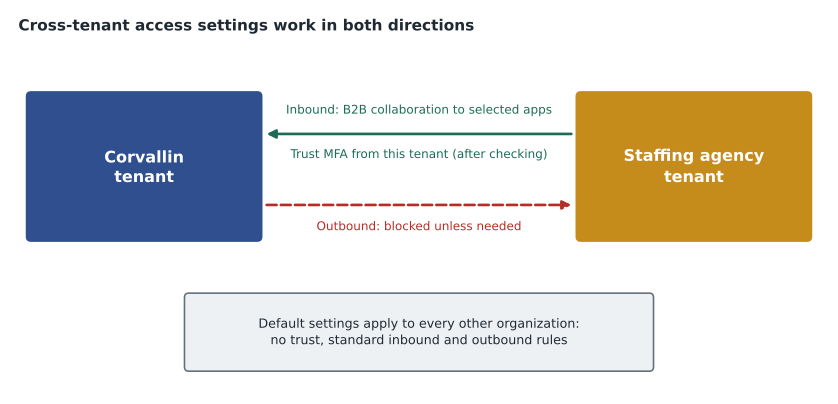
Trust settings matter for the user experience and for security. Without them, a relief nurse who already completed MFA at her staffing agency is asked to register and complete MFA again in Corvallin's tenant, with a second method. With trust multifactor authentication from Microsoft Entra tenants turned on for the agency's tenant, Corvallin's Conditional Access accepts the MFA claim from the agency instead. That is better for everyone, but only if the agency's MFA is as strong as Corvallin requires, so trust is configured per organization, after checking, not in the default.
B2B direct connect is what Teams shared channels use. Neither organization creates guest objects; instead both administrators must allow direct connect for each other, inbound and outbound, in cross-tenant access settings. Because no guest object exists, Corvallin's Conditional Access still applies to the external user's access, and trust settings decide whether their home MFA is accepted.
A related control works the other way round. Tenant restrictions (version 2) let Corvallin decide which external tenants its own users can sign in to from Corvallin devices or networks, which prevents an insider from copying data into a personal or rogue tenant with a corporate laptop.
Worked problem
Why the relief nurse is prompted twice
Relief nurses from the staffing agency sign in to Corvallin's scheduling app as guests. They complain that after completing MFA at the agency, Corvallin asks them to register a second Authenticator account. Policy CA007 requires the MFA strength for guests. What should Teodor change, and what should he check first?
Show solution
- CA007 requires MFA in Corvallin's tenant, and without trust, only MFA performed in Corvallin's tenant counts.
- Add an organizational entry for the agency's tenant in cross-tenant access settings and turn on inbound trust for multifactor authentication.
- Before trusting it, confirm with the agency that its MFA requirements are at least as strong as Corvallin's, for example that it blocks SMS for its staff.
- Keep the default inbound trust off, so other organizations' MFA is not trusted automatically.
Answer: Trust the agency's MFA in an organization-specific inbound setting, after verifying its strength. CA007 is then satisfied by the agency's MFA claim and the double prompt ends.
Conditional Access, licensing and governance for guests
Conditional Access can target guests and external users as a group, or by type (B2B collaboration guests, B2B collaboration members, B2B direct connect users, service provider users and others), and even by the external tenant they come from. Corvallin's CA007 required MFA for all guest types, and CA012 from lesson 5 blocked guests at high user risk because they cannot self-remediate in Corvallin's tenant.
Premium features for guests, such as Conditional Access, ID Protection and governance, are billed under a monthly active users (MAU) model linked to an Azure subscription, with a free allowance, rather than requiring a license per guest. An organization that links no subscription loses some premium features for guests, so the linking step belongs on the setup checklist.
Guests are the population most likely to accumulate stale access, because nobody in the organization manages their lifecycle. Three habits keep them under control: invite them through access packages with expiry; run access reviews of guests at least quarterly, with recommendations based on sign-in activity; and remove guests who have not signed in for a long period. Microsoft's inactive-user reports and reviews make the last step straightforward.
# Guests who have not signed in for 120 days (Microsoft Graph PowerShell)
Connect-MgGraph -Scopes "User.Read.All","AuditLog.Read.All"
$cutoff = (Get-Date).AddDays(-120)
Get-MgUser -All -Filter "userType eq 'Guest'" -Property displayName,mail,createdDateTime,signInActivity |
    Where-Object { -not $_.SignInActivity.LastSuccessfulSignInDateTime -or $_.SignInActivity.LastSuccessfulSignInDateTime -lt $cutoff } |
    Select-Object DisplayName, Mail, CreatedDateTime, @{n="LastSignIn";e={$_.SignInActivity.LastSuccessfulSignInDateTime}}
Corvallin's external access design
Teodor summarized the design for the privacy officer in one table:
| Partner | How they get access | Controls |
|---|---|---|
| Staffing agency relief nurses | Access package for a connected organization, manager approval, 90-day expiry | Inbound B2B to the scheduling app and nursing team only; trust agency MFA; CA007 |
| University placement students | Access package, clinical educator approval, expiry at placement end | Email one-time passcode or university account; CA007; quarterly review |
| Regional health authority | Teams shared channel for referrals | B2B direct connect allowed inbound and outbound with that tenant only |
| Scheduling software vendor | Guest with access to a support site only | Time-bound access package; vendor access reviewed monthly |
| All other organizations | Invitation only by Guest Inviters | Default inbound settings; no trust; most restrictive guest permissions |
Inviting a guest
Guests can arrive in several ways, and the method affects what an administrator can control. An administrator or Guest Inviter can invite a guest from the Users page of the Microsoft Entra admin center, entering an email address and an optional personal message; Entra ID sends an invitation email with a redemption link, or the guest can be sent a direct link to an app and redeem on first sign-in. Bulk invitations take a CSV file. Microsoft Graph and PowerShell can invite guests in scripts. Microsoft 365 also invites guests on its own behalf: when a team owner adds a guest in Teams, or a site owner shares a file with an external address, the service creates the guest object through B2B collaboration, subject to the external collaboration settings and the service's own sharing settings.
# Invite a guest and send the invitation email (Microsoft Graph PowerShell)
Connect-MgGraph -Scopes "User.Invite.All"
New-MgInvitation -InvitedUserEmailAddress "r.okafor@regionalpharmacy.example" `
    -InvitedUserDisplayName "Rachel Okafor (Pharmacist)" `
    -InviteRedirectUrl "https://myapps.microsoft.com" `
    -SendInvitationMessage:$true
Redemption follows an order of identity providers. If the invited address belongs to an Entra organization, the guest signs in with that account. Otherwise Entra ID checks for a Microsoft account, then any configured external identity providers such as Google or a SAML/WS-Fed provider, and falls back to an email one-time passcode. Administrators can reset a guest's redemption status if the guest needs to switch identity, for example after their own organization moves to Entra ID.
The Microsoft 365 layer
Even with Entra settings in place, each Microsoft 365 service has its own external sharing controls, and the most restrictive setting wins. SharePoint and OneDrive have organization-wide sharing levels (Anyone, New and existing guests, Existing guests only, or Only people in your organization) that individual sites can tighten but not loosen. Teams has guest access settings for the whole organization and for each team. Microsoft 365 groups have their own setting for allowing guests as members. When a site owner tells Teodor that sharing "doesn't work", the answer is usually one of these layers rather than Entra ID.
| Layer | Controls | Covered in |
|---|---|---|
| Entra external collaboration settings | Who can invite, guest permissions, allowed domains | This lesson |
| Entra cross-tenant access settings | Per-organization inbound and outbound access and trust | This lesson |
| SharePoint and OneDrive sharing | Sharing levels for the organization and each site | MSBA-201 |
| Teams guest access | Whether guests can join teams and what they can do | MSBA-221 |
| Conditional Access for guests | MFA, device and risk requirements for external users | Lessons 4 and 5 |
Guests and the directory
The guest user access setting decides how much of Corvallin's directory a guest can see. With the most restrictive option, guests can read only their own profile and cannot enumerate users, groups or other directory objects, which matters in a health organization where even a staff list can be sensitive. Guests still see the people they collaborate with in Teams and SharePoint, because those services show what the guest needs for the work at hand. Teodor tested the setting with a guest account of his own before enabling it, signing in as the guest to confirm that the scheduling app, the nursing team and the policies site still worked.
Guest accounts also deserve the same hygiene as staff accounts. A guest whose home organization disables them can no longer sign in, but the guest object remains in Corvallin's directory with its group memberships until someone removes it. That is harmless for access but misleading for reporting, which is another reason to remove inactive guests regularly.
Common mistakes
MistakeLetting guests invite other guests.
InsteadRestrict invitations to admins and the Guest Inviter role, and route requests through access packages.
MistakeTrusting MFA from all external tenants in the default settings.
InsteadTrust MFA per organization after checking its requirements.
MistakeExpecting B2B direct connect to work after configuring only your own tenant.
InsteadBoth organizations must allow direct connect for each other.
MistakeForgetting the Microsoft 365 sharing settings.
InsteadEntra settings and SharePoint or Teams settings must both allow the access.
MistakeInviting guests with no end date or review.
InsteadUse expiry, quarterly reviews and removal of inactive guests.
Summary and key terms
- B2B collaboration creates guest users who sign in with their own identity; Corvallin never stores their passwords.
- External collaboration settings control guest permissions, who can invite and which domains are allowed.
- Cross-tenant access settings control inbound and outbound access per organization and can trust other tenants' MFA and device claims.
- B2B direct connect powers Teams shared channels without guest objects and needs both organizations to allow it.
- Guests are covered by Conditional Access, MAU-based billing for premium features, and regular access reviews.
- B2B collaboration
- Inviting external users as guests who sign in with their own identities.
- Guest user
- A directory object with userType Guest that represents an external person.
- Cross-tenant access settings
- Per-organization rules for inbound and outbound external access and trust.
- B2B direct connect
- Mutual trust between tenants that lets users join Teams shared channels without guest objects.
- Email one-time passcode
- A sign-in method for guests who have no other supported identity.
- Tenant restrictions
- Controls that limit which external tenants your users can access from your devices or networks.
Practice problems
Work each problem on paper first, then reveal the answer to check.
Where would you configure trust in another organization's MFA?
Show answer
In the inbound trust settings for that organization in cross-tenant access settings.
What does a B2B direct connect user lack that a B2B collaboration user has?
Show answer
A guest user object in your directory.
Name two habits that keep guest access from accumulating.
Show answer
Invite through access packages with expiry, and review guests quarterly or remove inactive ones.
Lesson quiz · 5 questions
Score 60% or more to complete this lesson.
Create a free account to save your progress, take quizzes and earn a certificate.