
MSBA-202 · Lesson 2 of 12 · 19 min
Authentication methods policy
▶ Video coming soon A video version of this lesson is on the way.
With the identity map drawn, Teodor turned to the question that every later decision depends on: how do Corvallin's people prove who they are? A password alone is not enough. Microsoft's own figures have long shown that multifactor authentication blocks the overwhelming majority of automated account-takeover attacks, and the agency's cyber insurer now asked about MFA on its renewal form. But "turn on MFA" hides a dozen decisions: which methods are allowed, for whom, how people register them, and what happens when someone loses a phone at a client's house at seven in the morning. In Entra ID those decisions live in one place, the authentication methods policy.
One policy for all methods
The authentication methods policy is a tenant-wide set of settings, found in the Microsoft Entra admin center under Entra ID > Authentication methods > Policies. It lists every method Entra ID supports and, for each one, whether it is enabled, which users or groups it targets, which groups are excluded, and method-specific options. Because each method can be scoped to groups, an administrator can, for example, allow FIDO2 security keys only for administrators at first, or allow SMS only for a small group that has no smartphone.
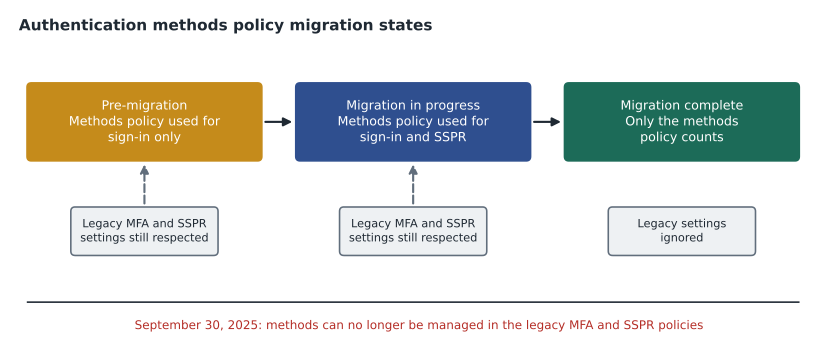
Until recently there were three separate places to manage methods: the legacy per-user MFA settings page, the legacy self-service password reset (SSPR) policy, and the newer authentication methods policy. They overlapped confusingly. Microsoft announced the consolidation in March 2023, and beginning September 30, 2025, authentication methods can no longer be managed in the legacy MFA and SSPR policies. Everything now flows from the authentication methods policy. A few non-method settings remain on the old multifactor authentication settings page (such as some additional cloud-based MFA settings), and security questions are still controlled from the SSPR policy, but the methods themselves are managed in one place.
Tenants moved through a migration to get there. The policy page shows a migration state:
| Migration state | What Entra ID uses | Legacy settings |
|---|---|---|
| Pre-migration | The authentication methods policy for authentication only | Respected |
| Migration in progress | The authentication methods policy for authentication and SSPR | Still respected, so the effective result combines both |
| Migration complete | Only the authentication methods policy, for authentication and SSPR | Ignored |
A tenant in "migration in progress" cannot go back to pre-migration, and rolling back from "migration complete" asks for a reason. The practical lesson for an administrator inheriting an older tenant is to check the state before trusting what any single page says. When Teodor opened Corvallin's policy at the start of the autumn 2026 identity review, he found it in "migration in progress", with SMS still enabled for everyone through the legacy SSPR policy even though the new policy had SMS turned off. The effective rule was the combination of both, which explained why the help desk kept seeing text-message resets it believed had been switched off. Finishing the migration was a ten-minute job once he understood it, and it removed a whole class of surprises.
The methods and how strong they are
Not all methods are equal. Microsoft groups them by how well they resist phishing, the attack in which a convincing fake sign-in page captures whatever the user types, including a one-time code, and replays it to the real service in real time.
| Method | Used for | Phishing resistant? | Notes |
|---|---|---|---|
| Passkeys (FIDO2), device-bound or synced | Sign-in and MFA | Yes | Security keys, passkeys in Microsoft Authenticator, and (where allowed) synced passkeys in platform passkey managers. Configured through passkey profiles. |
| Windows Hello for Business | Sign-in and MFA on Windows | Yes | A credential bound to the device's TPM, unlocked with a PIN or biometric. |
| Certificate-based authentication | Sign-in and MFA | Yes, with smart cards or protected certificates | Uses X.509 certificates issued by the organization's certificate authority. |
| Microsoft Authenticator (push and passwordless phone sign-in) | Sign-in, MFA and SSPR | No, but much stronger than codes | Push notifications use number matching and can show the app name and sign-in location. |
| Software or hardware OATH tokens | MFA and SSPR | No | Six-digit codes from an app or key fob. |
| SMS and voice call | MFA and SSPR | No | Weakest options; vulnerable to SIM swapping and phishing. Keep only for people who have nothing better. |
| Email one-time passcode | SSPR (and guest sign-in) | No | For password reset, not for MFA of members. |
| Temporary Access Pass | Onboarding and recovery | Not applicable | A time-limited passcode an admin issues so a user can register strong methods. |
| Security questions | SSPR only | No | Still configured in the SSPR policy; avoid where possible. |
Two settings on the Microsoft Authenticator method deserve attention. Number matching, which Microsoft made mandatory for push notifications, shows a two-digit number on the sign-in screen that the user must type into the app; it defeats "MFA fatigue" attacks in which an attacker who has the password simply sends push after push until a tired user taps Approve. The optional additional context settings show the application name and the geographic location of the sign-in in the notification, which helps the user notice that a request did not come from them.
Passkeys are the direction of travel. A passkey is a FIDO2 credential: a key pair whose private key never leaves the authenticator, and which is bound to the real sign-in domain, so a fake page on a look-alike domain simply cannot use it. In Entra ID, passkeys are configured through passkey profiles, which Microsoft introduced so that passkey rules can be scoped to groups instead of applying to the whole tenant. Each profile has a passkey type setting: device-bound (a security key or the Authenticator app, where the key stays on one device) or synced (stored in a passkey provider such as an iCloud Keychain or Google Password Manager and available on the user's other devices). Microsoft began moving tenants to passkey profiles in 2026 and added synced passkey support; existing FIDO2 settings were carried into a default profile. Attestation settings let an organization accept only authenticators whose make and model it trusts, which in practice means device-bound keys.
Temporary Access Pass (TAP) solves the chicken-and-egg problem of strong authentication: a new nurse cannot register a passkey without first proving who she is, and she has no MFA method yet to prove it with. An administrator, or the help desk with the right role, issues a TAP that is valid for a set period (and optionally for one use only). The user signs in with it, registers a passkey or the Authenticator app, and the TAP expires. TAP is also the standard recovery path when someone loses every method they had.
Registration and system-preferred MFA
Allowing a method does not make anyone use it. Entra ID uses combined security information registration: users visit My Sign-Ins (mysignins.microsoft.com) or are interrupted at sign-in to register methods for both MFA and SSPR in one experience. Several features nudge them toward strong methods:
- A registration campaign (in the authentication methods policy under registration settings) prompts users who still rely on weaker methods to set up the Microsoft Authenticator app, and Microsoft-managed campaigns can now include passkeys. Users can snooze the prompt a limited number of times.
- System-preferred MFA tells Entra ID to ask for the strongest method a user has registered, instead of whichever method the user chose as default. Someone who has both SMS and a passkey is asked for the passkey.
- Conditional Access authentication strengths (lesson 4) can demand particular methods for particular resources, which is the firm enforcement that registration campaigns only encourage.
In September 2026 Teodor checked the Authentication methods activity report, which shows how many users have registered each method and how many are "capable" of MFA and SSPR. The picture was sobering: 31 percent of staff had only SMS, and about 40 home-care staff had no method at all because their accounts were created by a manager who skipped the registration step.
# Users who have not registered any MFA method (Microsoft Graph PowerShell)
Connect-MgGraph -Scopes "AuditLog.Read.All","UserAuthenticationMethod.Read.All"
Get-MgReportAuthenticationMethodUserRegistrationDetail -All |
    Where-Object { -not $_.IsMfaRegistered -and $_.UserType -eq "member" } |
    Select-Object UserPrincipalName, IsMfaCapable, MethodsRegistered |
    Sort-Object UserPrincipalName
Worked problem
Reading the effective policy
A tenant shows "Migration complete". Microsoft Authenticator is enabled for all users. FIDO2 passkeys are enabled only for the group IT-Admins. Voice call is enabled only for the group No-Smartphone, and SMS is disabled. Halima is in No-Smartphone; Kenji is in IT-Admins. Which methods can each register?
Show solution
- Because migration is complete, only the authentication methods policy counts.
- Authenticator is enabled for all users, so both can register it.
- Passkeys target IT-Admins, so only Kenji can register a passkey.
- Voice targets No-Smartphone, so only Halima can register voice; nobody can register SMS.
Answer: Halima: Authenticator and voice call. Kenji: Authenticator and passkeys. Targeting is per method, and the user gets the union of the methods whose targets include them.
Security defaults and per-user MFA
Two older ways of turning on MFA still exist, and an administrator needs to recognize them.
Security defaults is a single switch, on by default in new tenants, that requires every user to register the Authenticator app, requires MFA for administrators at every sign-in and for users when Entra ID judges it necessary, and blocks legacy authentication protocols. It costs nothing and needs no Entra ID P1 license, which makes it the right choice for a small business with no one to design policies. It cannot be customized, though, and it cannot be combined with Conditional Access: an organization that wants exceptions, device conditions or location rules turns security defaults off and replaces them with Conditional Access policies.
Per-user MFA, the original "enable MFA for this person" setting, is legacy. Microsoft recommends converting it to Conditional Access, and its methods are now governed by the authentication methods policy like everything else. When both are present, a per-user "Enforced" state can interact badly with Conditional Access exclusions. Corvallin had fourteen users still set to per-user Enforced from a pilot years earlier; Teodor reset them to Disabled once Conditional Access covered them during the autumn review.
There is also MFA that Microsoft enforces itself. Since October 2024, accounts signing in to the Azure portal, the Microsoft Entra admin center and the Intune admin center must use MFA to create, read, update or delete resources, and the Microsoft 365 admin center joined that requirement from February 2025. A second phase that began on October 1, 2025 extends the requirement to create, update and delete operations from Azure CLI, Azure PowerShell, the Azure mobile app, infrastructure-as-code tools and the REST API. Workload identities such as service principals and managed identities are not affected, which is one more reason to move scheduled scripts off user accounts (lesson 10).
Corvallin's target policy
Teodor wrote the agency's target in a short table that Ines took to the board.
| Group | Allowed methods | Why |
|---|---|---|
| IT administrators | Device-bound passkeys (security keys) and Windows Hello for Business; TAP for recovery | Highest risk accounts get phishing-resistant methods only. |
| Head office and branch staff | Passkeys in Authenticator, Windows Hello for Business, Authenticator push; TAP | Staff have managed laptops and company phones. |
| Home-care staff with work phones | Passkeys in Authenticator, Authenticator push; TAP | Phones are managed by Corvallin. |
| Home-care staff without work phones (about 60) | FIDO2 security keys; TAP | A key on a lanyard works on any device they use. |
| Everyone | SMS and voice disabled; email OTP for SSPR only | Removes the weakest methods once registration is complete. |
"Why not just require passkeys for everybody tomorrow?" Dr. Marguerite Ostrander-Bey asked at the board meeting. As clinical director she cared most about the nurse locked out at a client's door. Teodor's answer was the theme of the final lesson in this course: strong methods only help if people can register them and recover when something goes wrong, so the order is registration first, enforcement second, removal of weak methods last.
Who can manage methods
Managing other people's methods is a privileged act, because whoever can register a method on an account can sign in as that person. Entra ID splits it across roles. An Authentication Administrator can view, add, delete and require re-registration of methods for non-administrators, and issue Temporary Access Passes to them. A Privileged Authentication Administrator can do the same for any user, including Global Administrators. The Authentication Policy Administrator configures the authentication methods policy itself but cannot touch individual users' methods. At Corvallin, help desk leads were eligible for Authentication Administrator through PIM (lesson 6), and only Ines and Teodor were eligible for Privileged Authentication Administrator. That split means a compromised help desk account cannot be used to plant a method on an administrator.
Common mistakes
MistakeAssuming a method is off because it is disabled in the new policy.
InsteadCheck the migration state; until migration is complete, legacy settings still apply.
MistakeTreating Authenticator push as phishing resistant.
InsteadPush with number matching is strong but not phishing resistant; passkeys, Windows Hello for Business and certificate-based authentication are.
MistakeRemoving SMS before people have registered something else.
InsteadRun a registration campaign and check the activity report first, then remove weak methods.
MistakeUsing security defaults and Conditional Access together.
InsteadThey cannot be combined; replace security defaults with Conditional Access policies.
MistakeIssuing a Temporary Access Pass with a long lifetime.
InsteadKeep TAP short and, for onboarding, one-time use.
Summary and key terms
- The authentication methods policy is the single place to enable, scope and configure methods; legacy MFA and SSPR policies stopped managing methods on September 30, 2025.
- Only "migration complete" ignores legacy settings.
- Passkeys, Windows Hello for Business and certificate-based authentication are phishing resistant; SMS and voice are the weakest methods.
- Temporary Access Pass bootstraps and recovers strong methods; registration campaigns and system-preferred MFA steer users toward them.
- Security defaults suit small tenants but cannot be combined with Conditional Access; per-user MFA is legacy.
- Authentication methods policy
- The Entra ID policy that enables each sign-in method and scopes it to users and groups.
- Phishing-resistant method
- A method bound to the real sign-in domain so captured credentials cannot be replayed.
- Passkey profile
- A group-scoped set of passkey rules, including which passkey types users may register.
- Temporary Access Pass
- A time-limited passcode issued by an administrator so a user can sign in and register methods.
- Number matching
- Authenticator push requirement to type the number shown on the sign-in screen.
- System-preferred MFA
- A setting that prompts users for the strongest method they have registered.
Practice problems
Work each problem on paper first, then reveal the answer to check.
A tenant is in "migration in progress". SMS is off in the authentication methods policy but on in the legacy SSPR policy. Can users reset passwords with SMS?
Show answer
Yes; legacy settings are still respected until migration is complete.
Name three phishing-resistant methods.
Show answer
Passkeys (FIDO2), Windows Hello for Business and certificate-based authentication.
What is a Temporary Access Pass for?
Show answer
Letting a user sign in for a limited time to register strong methods, or to recover after losing them.
Lesson quiz · 5 questions
Score 60% or more to complete this lesson.
Create a free account to save your progress, take quizzes and earn a certificate.