
MSBA-202 · Lesson 1 of 12 · 22 min
Identity models: cloud-only, synchronized and federated
▶ Video coming soon A video version of this lesson is on the way.
Corvallin Home Care sends about 450 nurses, home health aides and therapists into clients' homes from a head office in Hartford and four branch offices. Every one of those people signs in to Microsoft 365 several times a day: to read the visit schedule in Teams, to open a care plan in SharePoint, to answer email from a family member. When Ines Duvernay-Sato, the IT manager, asked Teodor Klimaszewski to take charge of identity and access for the whole agency, she put the job in one sentence. "Every sign-in should be the right person, on a device we trust, getting only what they need, and we should be able to prove it afterwards." The HIPAA Security Rule expects exactly that kind of control over who can see health records, and Corvallin's board had started asking for evidence.
This course, MSBA-202, is about that job. It covers how Microsoft Entra ID, the identity service behind Microsoft 365, proves who someone is (authentication), decides what they may do (authorization and Conditional Access), detects when a sign-in looks wrong (ID Protection), keeps powerful roles under control (Privileged Identity Management), and governs access over time (access reviews and entitlement management). It also covers the identities that are not people at all: applications, workload identities and AI agents. The material maps to the "Implement and manage authentication and access in Microsoft Entra" and "Manage identities in Microsoft Entra" objectives of Exam AB-650, and to the agent identity objectives in its AI services domain. MSBA-101 introduced Entra ID; this course goes to administrator depth.
Before Teodor could change a single sign-in setting, he needed to answer a more basic question: where do Corvallin's identities actually live, and which system is in charge of them? That is the subject of this first lesson.
The tenant and its directory
Every Microsoft 365 organization has a Microsoft Entra tenant, a dedicated instance of Entra ID that holds the organization's directory. The directory contains objects: users, groups, devices, applications, service principals, administrative units and, since 2025, agent identities. Each tenant has a unique tenant ID (a GUID) and at least one domain name. A new tenant starts with an initial domain ending in onmicrosoft.com, such as corvallincare.onmicrosoft.com; the administrator then verifies custom domains such as corvallincare.example with DNS records so that people can sign in with addresses they recognize.
A user object has a user principal name (UPN), which looks like an email address and is the name people type at the sign-in page. It also has an object ID, a display name, a userType of Member or Guest, and many optional attributes such as department, job title and manager. Microsoft 365 services read those attributes: Exchange builds the address book from them, Teams shows them on profile cards, and dynamic groups use them to decide membership. Clean attributes are not a cosmetic detail. If the department field says "Nursing" for some nurses and "RN" for others, a dynamic group for nursing staff will quietly miss half of them, and every policy aimed at that group will miss them too.
The question that shapes everything else is the source of authority for those objects. A user can be created and managed directly in the cloud, or created in an on-premises Active Directory Domain Services (AD DS) forest and copied into Entra ID by a synchronization tool. The answer determines where an administrator changes a name, where a password lives, which sign-in method is possible and what happens when the on-premises network goes down.
Three identity models
Microsoft describes three broad models for an organization's identities. Most real tenants are a mix, but each user account follows exactly one of them.
| Model | Where accounts are managed | Where the password is checked | Typical fit |
|---|---|---|---|
| Cloud-only | Entra ID (admin centers, Graph, PowerShell) | Entra ID | New organizations, small businesses, organizations with no on-premises servers |
| Synchronized (hybrid) | On-premises AD DS, copied to Entra ID | Entra ID, using a hash of the password hash (password hash synchronization) or on-premises agents (pass-through authentication) | Organizations that still need AD DS for file servers, older apps or Windows domain sign-in |
| Federated | On-premises AD DS, copied to Entra ID | An external identity provider such as AD FS or a third-party service | Organizations with requirements an external provider handles, such as certain smart card or third-party MFA setups |
Cloud-only identities
In the cloud-only model, Entra ID is the only directory. Administrators create users in the Microsoft 365 admin center or the Microsoft Entra admin center, import them in bulk from a CSV file, or create them with Microsoft Graph PowerShell. Passwords, multifactor authentication methods and passkeys are all stored and checked by Entra ID. There are no servers to patch and nothing on premises that can fail. Windows devices join Entra ID directly instead of joining a domain, and Intune manages them.
Cloud-only is the simplest model and the one Microsoft recommends for new organizations. Its main limitation is that it cannot, on its own, sign users in to things that depend on AD DS: an old file server that uses Kerberos, a line-of-business application that only understands Windows domain accounts, or printers that authenticate against a domain controller. Some of those gaps can be closed with Microsoft Entra Domain Services, Entra Kerberos for Azure Files, or by replacing the old system, but each takes work.
Synchronized identities
In the synchronized model, also called hybrid identity, AD DS remains the source of authority. A synchronization service reads users, groups and (optionally) devices from AD DS and creates matching objects in Entra ID. Changes flow from on premises to the cloud: if the help desk renames a user in Active Directory Users and Computers, the change appears in Entra ID at the next synchronization cycle, and an administrator cannot edit that attribute in the cloud. A few things can flow back, such as passwords reset in the cloud (password writeback) and, with Microsoft Entra Connect Sync, some Exchange attributes.
Microsoft offers two synchronization tools:
| Tool | How it works | Points to know |
|---|---|---|
| Microsoft Entra Connect Sync | A Windows Server application with a local SQL database that runs the sync engine on premises | The older, more configurable tool. Supports complex filtering, custom attribute rules, device writeback and Exchange hybrid. Microsoft retires old versions on a published schedule, and a server on a retired version stops synchronizing, so upgrades are mandatory work. |
| Microsoft Entra Cloud Sync | Lightweight provisioning agents on premises; the sync engine and configuration live in the cloud | Easier to install and make highly available (run several agents). Handles multiple disconnected forests well. Microsoft directs new deployments here and keeps adding Connect Sync features to it. |
Synchronization tools need a way to match an on-premises object to its cloud copy. They use the source anchor, an immutable attribute (by default ms-DS-ConsistencyGuid, populated from the object GUID). When an organization that already has cloud accounts starts synchronizing, matching on the source anchor (hard matching) or on the email address and UPN (soft matching) decides whether the tool links to an existing cloud user or creates a duplicate. Getting matching wrong is the classic hybrid mistake: duplicate accounts, mailboxes that end up orphaned, or a privileged cloud account taken over by an on-premises object with the same address. That last risk is why Microsoft restricts matching onto cloud accounts that hold administrator roles; check the current behavior in the Entra Connect documentation before planning a merge of existing cloud accounts.
How synchronized users sign in
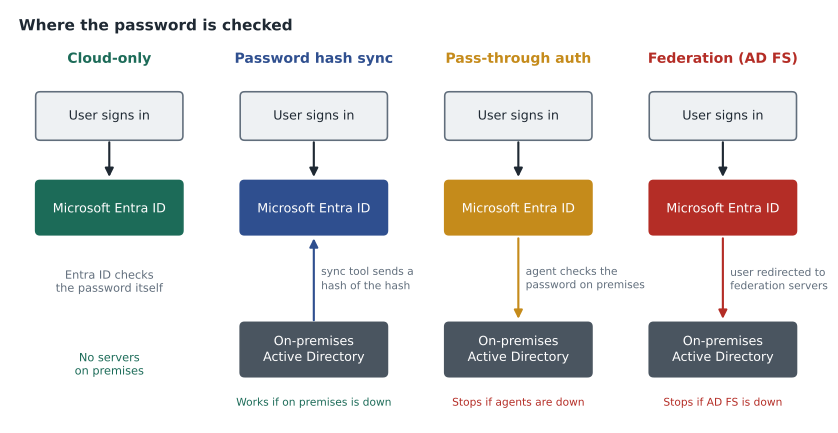
Synchronizing accounts does not by itself decide how those users authenticate. A synchronized tenant chooses one of three sign-in methods for its managed domains.
Password hash synchronization (PHS). The sync tool takes the hash that AD DS already stores for each password, hashes it again with a salt, and sends that result to Entra ID. Entra ID then checks passwords in the cloud. The real password never leaves the network and cannot be recovered from what Microsoft holds. PHS is the method Microsoft recommends, for three reasons: sign-in keeps working if the on-premises data center, internet link or sync server fails; it enables leaked credential detection in ID Protection, which compares hashes against credentials found on criminal forums; and it needs no inbound connections or extra servers.
Pass-through authentication (PTA). Entra ID receives the password at sign-in and hands it, encrypted, to a lightweight agent installed on premises, which checks it against a domain controller. Organizations choose PTA when policy forbids any form of password hash leaving the network, or when they need on-premises account states (such as logon hours) enforced at the moment of sign-in. The cost is a dependency: if every PTA agent is offline, nobody with a synchronized account can sign in. Microsoft recommends at least three agents and, even with PTA, turning on PHS as a backup.
Federation. Entra ID redirects the user to a separate identity provider, traditionally Active Directory Federation Services (AD FS) running on premises, which authenticates the user and returns a signed token. Federation was common a decade ago, when it was the only way to get features like smart card sign-in or third-party MFA. Today most of those needs are met in Entra ID itself, AD FS servers are an attractive target for attackers (the 2020 attacks on federation signing certificates showed why), and Microsoft publishes guidance for migrating from federation to managed authentication with a staged rollout that moves groups of users one at a time.
Two companion features smooth the experience. Seamless single sign-on lets domain-joined computers on the corporate network sign in to Entra ID without a prompt, using Kerberos; it is mainly useful for older, domain-joined devices, because Entra-joined and hybrid-joined Windows devices already get single sign-on through the Primary Refresh Token. Staged rollout lets an administrator test PHS or PTA on selected groups while the rest of the domain stays federated.
| Question | Password hash sync | Pass-through authentication | Federation (AD FS) |
|---|---|---|---|
| Works if on-premises network is down? | Yes | No | No |
| Extra servers on premises | None beyond the sync tool | Authentication agents (at least three recommended) | Federation servers and proxies |
| Leaked credential detection | Yes | Only if PHS is also turned on | Only if PHS is also turned on |
| Microsoft's current recommendation | Preferred | Where policy requires it | Migrate away where possible |
Corvallin's history, and Kittiwake's future
Teodor already knew the answer for Corvallin itself, because he had lived through it. Until 2022 the agency was hybrid: an AD DS domain on two domain controllers at head office, a file server for payroll exports, and Entra Connect Sync copying the office staff's accounts into Entra ID with password hash synchronization, while frontline home-care staff and service accounts were created directly in the cloud. In December 2022 Corvallin retired the file server, moved the scheduling system to its web version, stopped synchronizing and switched off the domain controllers. Since then every Corvallin account has been cloud-only. The new question came from the agency's acquisition in November 2026 of Kittiwake Physical Therapy, an 18-person clinic in New Haven with its own Microsoft 365 Business Premium tenant, which was to be merged into Corvallin's tenant in 2027.
"So the hybrid chapter is over for us," Ines said. "Why study it?" Because, Teodor explained, the lessons of 2022 were exactly the ones the Kittiwake merge would test. During Corvallin's own migration, two administrators had briefly been synchronized accounts, which meant that anyone who compromised the on-premises domain could have reset their passwords and walked into Microsoft 365 with Global Administrator rights. Matching between on-premises and cloud accounts had produced a handful of duplicates that took weeks to untangle. And the old sync server had needed an emergency upgrade when Microsoft retired its version. Every one of those risks would come back if the merge were done carelessly, and most organizations an administrator joins are still hybrid.
The first of those points is a principle worth stating on its own: administrative accounts for Microsoft 365 should be cloud-only. A cloud-only admin account cannot be taken over through an on-premises directory, and it keeps working during an on-premises outage, which is precisely when administrators need to sign in. Corvallin applied it in 2022, and it would apply to every Kittiwake administrator from the first day of the merge.
# Count cloud-only and synchronized users with Microsoft Graph PowerShell
Connect-MgGraph -Scopes "User.Read.All"
$users = Get-MgUser -All -Property "displayName,userPrincipalName,onPremisesSyncEnabled,userType"
$users | Group-Object { if ($_.onPremisesSyncEnabled) { "Synchronized" } else { "Cloud-only" } } |
Select-Object Name, CountName Count ---- ----- Cloud-only 461
Notice the module. Microsoft Graph PowerShell (the Microsoft.Graph modules, and the newer Microsoft Entra PowerShell module built on top of them) is the supported way to script Entra ID. The older MSOnline and AzureAD modules are retired, and scripts that still call Connect-MsolService or Connect-AzureAD stop working. Any example in an older blog post that uses them is out of date.
Worked problem
Choosing a sign-in method
A regional clinic keeps AD DS for a records system. Its security officer wants sign-in to Microsoft 365 to keep working during internet outages at the clinic and wants alerts when staff passwords appear in breach data. The network team would rather not run extra servers. Which sign-in method should the clinic use for synchronized users?
Show solution
- Pass-through authentication and federation both depend on servers at the clinic, so an outage there stops sign-in.
- Federation also adds AD FS servers, which the network team wants to avoid.
- Password hash synchronization checks passwords in Entra ID and needs nothing beyond the sync tool.
- Leaked credential detection in ID Protection relies on password hash synchronization.
Answer: Password hash synchronization. It meets all three requirements, which is why Microsoft recommends it as the default.
Choosing a direction
For the Kittiwake merge there were three realistic options, and the reasoning matters more than the answer, because exam questions describe a company and ask which model fits.
Option one was to leave Kittiwake in its own tenant and connect the two organizations with B2B collaboration and cross-tenant settings (lesson 8). That is the least disruptive path and the right one while two companies are still separate legal entities with separate systems, but it leaves two sets of policies to maintain.
Option two was to keep both tenants for a period and use cross-tenant synchronization, which creates Kittiwake staff as member users in Corvallin's tenant automatically, so they appear in the address book and Teams like employees. This is how many organizations handle the months between an acquisition closing and a full migration.
Option three was to move Kittiwake's 18 people into Corvallin's tenant as cloud-only accounts, migrate their mailboxes and files, and retire the Kittiwake tenant. For a small clinic with no on-premises servers and no complex applications, this is usually the cleanest end state, and it puts every user under one set of Conditional Access policies.
Ines and Teodor chose a staged plan: B2B and cross-tenant synchronization in early 2027 so the clinic could work with Corvallin straight away, then a full move of Kittiwake's accounts into Corvallin's tenant as cloud-only users later in 2027, with every administrator account created cloud-only from the start. That kind of answer, a transition with a clear end state, is typical of what Microsoft's guidance and the exam expect.
Common mistakes
MistakeTreating "hybrid" as one thing.
InsteadHybrid describes where accounts are managed; the sign-in method (PHS, PTA or federation) is a separate choice.
MistakeChoosing pass-through authentication without a backup.
InsteadRun at least three PTA agents and turn on password hash synchronization as a fallback.
MistakeSynchronizing administrator accounts from on premises.
InsteadKeep Microsoft 365 admin accounts cloud-only so an on-premises compromise or outage cannot affect them.
MistakeLeaving an old sync server running because "it still works".
InsteadTrack Microsoft's retirement schedule; servers on retired versions stop synchronizing.
MistakeUsing MSOnline or AzureAD PowerShell scripts from old articles.
InsteadUse Microsoft Graph PowerShell or Microsoft Entra PowerShell; the old modules are retired.
Summary and key terms
- Each Microsoft 365 organization has one Entra tenant whose directory holds users, groups, devices, apps and agent identities.
- Cloud-only accounts are managed in Entra ID; synchronized accounts are managed in AD DS and copied to Entra ID by Entra Connect Sync or Entra Cloud Sync.
- Synchronized users sign in with password hash synchronization (recommended), pass-through authentication or federation.
- PHS keeps sign-in working during on-premises outages and enables leaked credential detection.
- Admin accounts should be cloud-only, and old sync versions must be upgraded before Microsoft retires them.
- Source of authority
- The directory where an object is created and changed; for synchronized users, on-premises AD DS.
- Password hash synchronization
- Sending a salted hash of the AD DS password hash to Entra ID so it can check passwords in the cloud.
- Pass-through authentication
- Entra ID forwards the password to an on-premises agent, which validates it against a domain controller.
- Federation
- Redirecting sign-in to a separate identity provider, such as AD FS, that issues tokens Entra ID trusts.
- Source anchor
- An immutable attribute used to match an on-premises object to its cloud copy.
- Entra Cloud Sync
- Microsoft's cloud-managed synchronization service that uses lightweight on-premises agents.
Practice problems
Work each problem on paper first, then reveal the answer to check.
Why does Microsoft recommend password hash synchronization even for organizations that use pass-through authentication?
Show answer
It acts as a backup if the PTA agents fail and it enables leaked credential detection.
A user is synchronized from AD DS. Where must the help desk change her job title?
Show answer
In on-premises AD DS; the attribute is mastered there and flows to Entra ID at the next sync.
Give two reasons to keep Microsoft 365 administrator accounts cloud-only.
Show answer
They cannot be taken over through a compromised on-premises directory, and they work during an on-premises outage.
Lesson quiz · 5 questions
Score 60% or more to complete this lesson.
Create a free account to save your progress, take quizzes and earn a certificate.