
MSBA-202 · Lesson 7 of 12 · 19 min
Access reviews and entitlement management
▶ Video coming soon A video version of this lesson is on the way.
PIM tidied up the administrators. The rest of Corvallin's access had the same disease in a milder form. A physiotherapist who had moved from the Truro branch to head office was still a member of the Truro team in Teams, the Truro shared mailbox and the Truro scheduling group. A summer student who left in August could still open the policy library, because the guest invitation that gave her access never expired. The care quality team had shared a SharePoint site with a consultant two years ago for a one-month project. Nobody had done anything wrong; access had simply accumulated, because granting it took a request and removing it took someone remembering.
Identity governance is the discipline of making access expire by default and making the right person confirm it periodically. Entra ID provides two main tools for it: access reviews, which ask people to confirm existing access, and entitlement management, which packages access so that it can be requested, approved, granted with an end date and removed automatically. Together with lifecycle workflows they form Microsoft Entra ID Governance.
The question Ines kept asking was the auditor's question: if a HIPAA auditor asked who could see client records and why, could Corvallin answer with evidence instead of a guess?
Access reviews
An access review asks one or more reviewers to decide, for each person in scope, whether that person should keep a particular access. Reviews can cover:
- Members of groups, including Microsoft 365 groups and therefore teams.
- Users assigned to enterprise applications.
- Assignments to access packages (described below).
- Microsoft Entra roles and Azure resource roles through PIM (lesson 6).
Each review has settings that determine how useful it will be:
| Setting | Options | Advice |
|---|---|---|
| Scope | All users, or guests only; a single group or app, or all Microsoft 365 groups with guests | Start with groups and apps that hold sensitive data; review guests separately and more often. |
| Reviewers | Group owners, users' managers, selected users or groups, or the users themselves (self-review); multi-stage reviews combine them | Choose someone who knows whether the access is needed. Managers know their staff; owners know their resource. |
| Recurrence and duration | One time, weekly, monthly, quarterly, semi-annually, annually; duration in days | Quarterly for sensitive resources, annually for the rest; give reviewers enough days to act. |
| Decision helpers | Recommendations based on sign-in activity and peer access, justification required | Turn on recommendations; they flag users who have not signed in recently. |
| Upon completion | Auto-apply results; if reviewers do not respond: no change, remove access, approve access, or take recommendations | Auto-apply, and remove or take recommendations for non-response on sensitive resources. |
| Notifications and reminders | Email at start and reminders before the end | Leave on; unanswered reviews are the main failure mode. |
The "if reviewers do not respond" setting decides whether a review actually changes anything. If it is set to no change, a busy manager who ignores the email leaves every assignment in place, and the review becomes a ritual that produces a report and no improvement. Setting it to remove access, or to take recommendations, makes silence a decision: access that nobody will vouch for goes away. That is a policy choice the business must accept, so Teodor agreed it with each resource owner before turning it on.
Basic access reviews of groups and apps are available with Entra ID P2 or ID Governance. More advanced capabilities, such as reviews of inactive users, machine-learning assisted recommendations, reviews of PIM for Groups and catalog reviews, need Entra ID Governance. Reviews of guests can also involve monthly active user billing for guest governance, which is linked to an Azure subscription.
Entitlement management and access packages
Access reviews clean up access that already exists. Entitlement management changes how access is granted in the first place, so that less cleaning is needed. Its building blocks are:
| Building block | What it is | Example at Corvallin |
|---|---|---|
| Catalog | A container of resources and access packages, with its own catalog owners who can delegate management | "Clinical services", owned by the clinical director's office |
| Resources | Groups and teams, enterprise applications and their roles, and SharePoint sites that a catalog can grant | The clinical policies site, the wound care team, the scheduling app's Coordinator role |
| Access package | A bundle of resource roles granted together | "New nurse": membership of the nursing team, reader on the policies site, User role in the scheduling app |
| Policy | Who can request the package, who approves, what questions they answer, how long access lasts, and whether it is reviewed | Internal nurses can request; manager approves; access lasts while employed, reviewed annually |
| Assignment | A user's current grant of a package, with an expiry date | Each nurse's assignment, visible to managers and auditors |
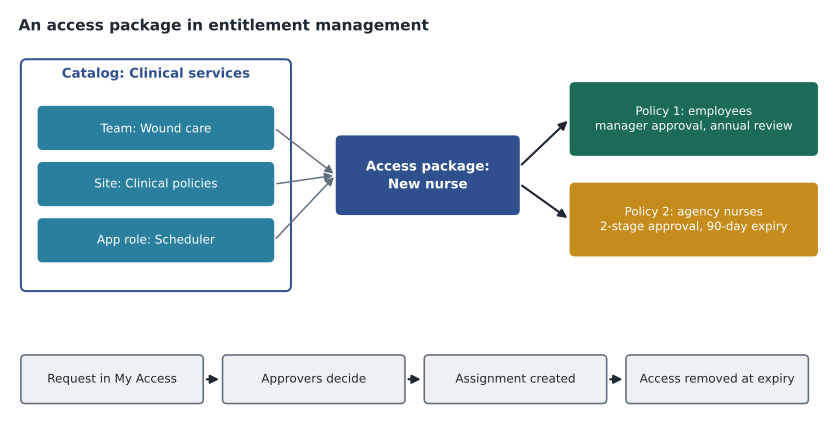
Users request access packages in the My Access portal (myaccess.microsoft.com), where they see only the packages policies allow them to request. Approvals can have one or more stages, with backup approvers and escalation if an approver does not respond. When the request is approved, entitlement management adds the user to every resource in the package; when the assignment expires or is removed, it takes them out of every resource again. That symmetry is the whole point: nobody has to remember the three or four places a nurse was added to.
Policies can also bring in people from outside. A connected organization represents a partner tenant or domain, such as the staffing agency that supplies Corvallin with relief nurses. A policy can let users from that organization request a package; when approved, entitlement management invites them as guests automatically, and when their last assignment ends it can remove their guest account as well. That closes the summer-student gap described at the start of this lesson.
Some governance features of entitlement management need Entra ID Governance rather than P2, including requests made by a manager on behalf of an employee, sponsors as approvers, and custom extensions that call a Logic App during the request process (for example, to create a ticket in a service desk system). Separation of duties rules, which stop someone with one package from requesting an incompatible one, are part of basic entitlement management.
Worked problem
Choosing between a review and a package
The payroll team says three things: their export folder on SharePoint should be open only to the four payroll clerks and their manager; clerks change roughly once a year; and an external auditor needs read access for two weeks each spring. What should Teodor build?
Show solution
- The clerks' access is stable and small, so a security group controlling the folder is enough, with an access review each quarter by the payroll manager.
- Set non-response to "remove access" so an ignored review does not leave a departed clerk in the group.
- The auditor's access is temporary and external, which is what entitlement management handles best.
- Create an access package with read access to the folder, a policy for the audit firm as a connected organization, approval by the payroll manager, and a 14-day expiry.
Answer: A quarterly access review for the clerks' group, and an access package with a 14-day expiry for the auditor. Reviews keep stable access honest; packages make temporary access end on its own.
Lifecycle workflows
The third governance tool automates what should happen when people join, move and leave. Lifecycle workflows run tasks triggered by attributes such as the employee hire date or leave date: generate a Temporary Access Pass and email it to the new hire's manager before day one, add the user to groups, send a welcome email, remove the user from groups and teams on the last day, disable the account, and later delete it. They can also run when a user's department or job changes, which is the mover case that caused the physiotherapist's leftover access. Lifecycle workflows require Entra ID Governance; tasks for reassigning agent sponsors are the exception described in lesson 10. Their value depends on the HR system feeding accurate hire and leave dates into Entra ID, through HR-driven provisioning or the sync tool.
Corvallin bought Entra ID Governance for its 120 head office and branch staff first, because they had the most varied access, and kept field staff on simple access packages, which P2 covered.
# Find groups that contain guests and list how many each holds (Microsoft Graph PowerShell)
Connect-MgGraph -Scopes "Group.Read.All","User.Read.All"
Get-MgGroup -All -Property id,displayName | ForEach-Object {
    $g = $_
    $guests = Get-MgGroupMember -GroupId $g.Id -All |
        Where-Object { $_.AdditionalProperties.userType -eq "Guest" }
    if ($guests) { [pscustomobject]@{ Group = $g.DisplayName; Guests = @($guests).Count } }
} | Sort-Object Guests -Descending
Corvallin's first review cycle
The first quarterly review covered 28 groups and apps and every guest. Reviewers were managers for staff and resource owners for guests, with recommendations on and non-response set to take recommendations. The results surprised even Teodor: 214 assignments were removed, including 61 guest accounts that no one could explain, and the moved physiotherapist lost her Truro access automatically. Two managers complained that they had not had time to review, and the answer was built into the next cycle: a longer review window and a reminder from Ines, not a softer non-response rule.
"So when the commissioner asks," Ines said, "we hand over the review history and the access package assignments." That is what governance produces: evidence that access is decided, time-limited and checked, not just assumed.
Multi-stage reviews and decisions
For the most sensitive resources a single reviewer may not be enough. Multi-stage reviews run up to three stages in sequence: for example, each user's manager decides first, and then the resource owner reviews only the users the manager approved. Later stages can be set to see only the earlier stage's approvals or denials, which keeps the second reviewer's list short. Corvallin used two stages for the client records application: branch managers first, then the privacy officer.
Reviewers make decisions in the My Access portal or from the review email. For each user they choose approve or deny, can see recommendations (for example, "this user has not signed in for 45 days"), and can be required to give a reason. When the review closes, results are applied automatically if auto-apply is on, or by an administrator if it is not. Denied users are removed from the group or app; for access package assignments, the assignment is removed and the user leaves every resource in the package.
Designing access packages that last
Packages work best when they follow roles people recognize, not individual resources. "New nurse", "Branch scheduler", "Payroll clerk" and "Placement student" each correspond to a real job, and a manager knows instantly whether a person should have one. Packages built around single resources ("Wound care team membership") multiply quickly and end up recreating the mess they were meant to fix.
Each package can have several policies, which is how one package serves different populations. The "New nurse" package had one policy for Corvallin employees, who could request it with manager approval and keep it while employed, and a second for the staffing agency's relief nurses as a connected organization, with two-stage approval and a 90-day expiry. Policies can also ask requestors questions (for example, "Which branch will you work at?") whose answers approvers see, and can require verified ID credentials in advanced scenarios.
Automatic assignment policies, which grant a package to everyone whose attributes match a rule, such as all users whose job title is "Registered Nurse", turn a package into a birthright bundle that follows HR data. They pair naturally with lifecycle workflows, because the same HR attributes drive both.
| Tool | Answers | License (base) |
|---|---|---|
| Access reviews | Should this person still have this access? | Entra ID P2 or ID Governance |
| Entitlement management | How do people get access, who approves, and when does it end? | Entra ID P2 or ID Governance; some features ID Governance only |
| Lifecycle workflows | What happens automatically when people join, move or leave? | Entra ID Governance |
| PIM | Who can use privileged roles, and when? | Entra ID P2 or ID Governance |
Access reviews and packages also produce the reports that auditors ask for. The review history shows who was reviewed, by whom, with what decision and when. Access package assignments show who has which package, through which policy, approved by whom, and when it expires. Both can be exported, and both are recorded in the Entra audit logs.
Common mistakes
MistakeSetting non-response to "no change" on sensitive resources.
InsteadRemove access or take recommendations, so silence does not keep access alive.
MistakeAsking IT to review access it cannot judge.
InsteadChoose reviewers who know the need: managers for staff, owners for resources.
MistakeAdding guests directly to teams and sites with no end date.
InsteadUse access packages with connected organizations and expiry, and review guests regularly.
MistakeGranting each resource separately for new staff.
InsteadBundle resources in an access package so they are granted and removed together.
MistakeExpecting lifecycle workflows to work without good HR data.
InsteadFeed accurate hire and leave dates from the HR system before relying on workflows.
Summary and key terms
- Access reviews ask reviewers to confirm group, app, access package and role access on a schedule and can apply results automatically.
- The non-response setting decides whether reviews actually remove stale access.
- Entitlement management bundles resources into access packages with policies for requests, approval, expiry and review.
- Connected organizations let partners request access packages; their guest accounts can be removed when access ends.
- Lifecycle workflows automate joiner, mover and leaver tasks and require Entra ID Governance; basic reviews and packages work with P2.
- Access review
- A scheduled check in which reviewers confirm or deny each user's access to a resource.
- Entitlement management
- The Entra ID Governance feature that packages access for request, approval and expiry.
- Access package
- A bundle of resource roles granted and removed together under policies.
- Catalog
- A container of resources and access packages with delegated owners.
- Connected organization
- A partner tenant or domain whose users can request access packages.
- Lifecycle workflow
- An automated set of tasks run when users join, move or leave.
Practice problems
Work each problem on paper first, then reveal the answer to check.
Why set non-response to "remove access" for a review of a sensitive group?
Show answer
So access no one vouches for is removed instead of kept by default.
What happens to a connected organization guest when their last access package assignment expires?
Show answer
Entitlement management can remove their guest account automatically, depending on settings.
Which tool handles the "mover" problem of staff keeping old access after changing department?
Show answer
Lifecycle workflows triggered by attribute changes, together with access packages and reviews.
Lesson quiz · 5 questions
Score 60% or more to complete this lesson.
Create a free account to save your progress, take quizzes and earn a certificate.