
MSBA-202 · Lesson 10 of 12 · 18 min
Workload identities and agent identities
▶ Video coming soon A video version of this lesson is on the way.
Every lesson so far has been about people. But when Teodor counted the identities that signed in to Corvallin's tenant in a typical week, people were not the majority. There was the HR integration that ran every night, the scheduling connector that wrote visits into Outlook calendars, a backup service reading every mailbox, a script on a help desk PC that exported license reports under an ordinary user account, and, since the summer, two pilot AI agents: an intake assistant that the scheduling team had built in Copilot Studio to draft visit plans from referral letters, and an agent supplied by the scheduling vendor that answered staff questions about the rota. None of these had a person behind each sign-in. All of them could read or change data. And until now, none of them had been governed with anything like the care given to user accounts.
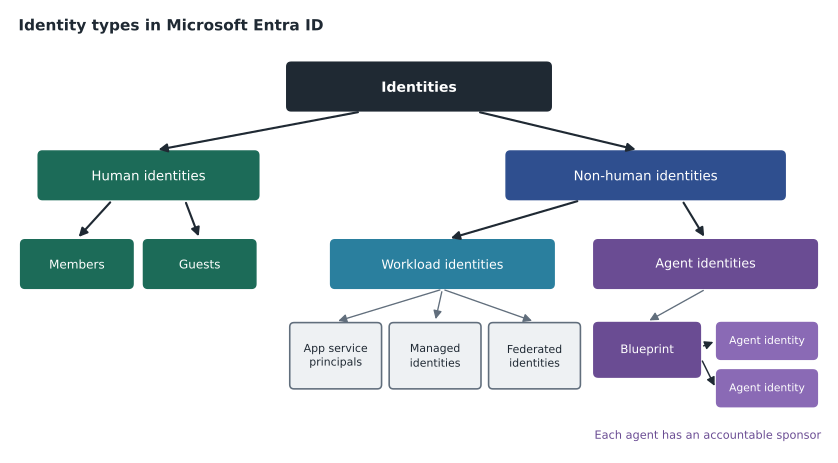
Entra ID groups non-human identities into workload identities, the identities used by software and services, and, since 2025, a distinct family of agent identities for AI agents. This lesson covers both, because the AB-650 exam expects an administrator to manage the lifecycle of agent identities, secure their access and manage their owners, and because the same principles of least privilege and lifecycle apply to every identity that is not a person.
Workload identities
A workload identity is an identity assigned to software so that it can authenticate and access resources. In Entra ID there are three kinds.
| Kind | What it is | Credential |
|---|---|---|
| Service principal of an application | The tenant-local identity of a registered app (lesson 9) that signs in as itself | Certificate, client secret, or federated credential |
| Managed identity | A service principal that Azure creates and manages for an Azure resource such as a virtual machine, function or logic app | None for the owner to handle; Azure rotates it automatically |
| Workload identity federation | A service principal or managed identity that trusts tokens from an external identity provider, such as GitHub Actions or a Kubernetes cluster | None stored; the external platform's token is exchanged for an Entra token |
Managed identities come in two flavors. A system-assigned managed identity is tied to one Azure resource and deleted with it. A user-assigned managed identity is a standalone resource that can be attached to several resources and survives them. Either way, the code running on the resource asks Azure for a token and never sees a secret. Workload identity federation brings the same benefit to workloads outside Azure: a GitHub Actions workflow presents a short-lived token that GitHub issues for that repository and branch, and Entra ID trusts it because the app registration has a federated credential naming exactly that repository and branch.
Moving a workload from a user account or a client secret to one of these is almost always worth doing. The license export script on the help desk PC is a good example. It signed in as a user called svc-reports, with a password that had not changed in four years and was excluded from MFA. Since Microsoft began enforcing MFA for Azure and admin tools (lesson 2), scripts like it break; more importantly, a user account excluded from MFA is exactly what attackers look for. Teodor replaced it with an Azure Automation runbook that used a managed identity with the single Graph permission it needed.
# Inside an Azure Automation runbook: connect with the system-assigned managed identity
Connect-MgGraph -Identity -NoWelcome
Get-MgSubscribedSku | Select-Object SkuPartNumber, ConsumedUnits,
    @{n="Enabled";e={$_.PrepaidUnits.Enabled}}
Workload identities have their own security features, licensed as Microsoft Entra Workload ID Premium: Conditional Access policies that apply to single-tenant service principals (for example, blocking a service principal from signing in outside known IP ranges), ID Protection risk detections for workload identities such as leaked credentials, and access reviews of service principals assigned to privileged roles.
Why agents need their own identity type
An AI agent looks like a workload in some ways and like a user in others. It runs as software, often without a person present. But it also acts on behalf of people, makes decisions about what to do next, can be created in large numbers by business users with low-code tools, and may be given access to mailboxes, sites and line-of-business systems. Treating agents as ordinary app registrations left gaps: nobody could tell at a glance which service principals were agents, who was responsible for each one, or what to do when the person who built an agent left the company.
Microsoft Entra Agent ID, which Microsoft introduced in 2025 and made generally available, addresses those gaps by giving agents a dedicated identity model in the directory. Its main concepts are:
| Concept | What it is |
|---|---|
| Agent identity blueprint | A template from which agent identities are created. A single-instance blueprint has one agent identity per tenant; a multi-instance blueprint can create a fleet of agent identities with distinct client IDs. The choice is fixed when the blueprint is created. |
| Agent identity | The directory identity of one agent, used to authenticate and receive tokens, either autonomously or on behalf of a user. |
| Agent user | A user account associated with an agent, for scenarios where an agent needs a user-like presence, such as a mailbox or Teams identity. |
| Owners, sponsors and managers | Owners manage the agent identity technically. A sponsor is the person accountable for the agent's purpose and lifecycle, the one asked whether it is still needed. Managers apply to agent user accounts. |
| Agent registry | A single inventory of agents, which Microsoft is converging under Microsoft Agent 365, with Entra providing the identities. |
Securing agent access
Agent identities plug into the controls the earlier lessons built.
Conditional Access for agents. Policies can target agent identities and agent users, with templates for common agent policies. Microsoft distinguishes autonomous access, where the agent acts as itself, from on-behalf-of access, where it acts for a signed-in user, and provides policy patterns for each. A typical policy blocks agent identities whose ID Protection risk is high, so a compromised or misbehaving agent is stopped automatically, just as risky users are.
Least privilege through access packages. Instead of an administrator granting an agent broad Graph permissions once and forgetting them, agent identities can receive access through entitlement management (lesson 7), with access packages for both autonomous and on-behalf-of scenarios, approvals, expiry and reviews. The intake assistant, for example, received an access package granting read access to the referrals SharePoint library and write access to a drafts folder, approved by its sponsor and reviewed quarterly.
Sponsors and lifecycle. Every agent should have a sponsor who can answer "do we still need this?" Lifecycle workflows include templates that notify managers and cosponsors and transfer sponsorship automatically when a sponsor changes role or leaves, so agents are not orphaned. Inactive agent identities can be detected and cleaned up by lifecycle policies. These agent governance capabilities are licensed through Microsoft Agent 365, which Microsoft made generally available on May 1, 2026, at 15 US dollars per user per month as a standalone license and included in Microsoft 365 E7. Governance of agents also requires the tenant to have a base Entra ID P1 subscription, such as through Microsoft 365 E3. MSBA-205 covers Agent 365 and the wider governance of AI services.
Worked problem
Giving the intake agent an identity
The scheduling team's Copilot Studio intake agent currently runs with a shared service account that has edit rights to all of SharePoint. The team lead who built it, Ravindra, is the only person who understands it. What should Teodor change?
Show solution
- Replace the shared service account with an agent identity in Entra Agent ID; Microsoft provides guidance for migrating Copilot Studio agents and custom app registrations.
- Name a sponsor (the scheduling manager, who is accountable for the agent's purpose) and keep Ravindra and Teodor as technical owners.
- Grant access through an access package limited to the referrals library and the drafts folder, with quarterly review by the sponsor.
- Add the agent to a Conditional Access policy that blocks high-risk agent identities, and set up the sponsor lifecycle workflow so sponsorship transfers if the manager leaves.
Answer: A dedicated agent identity with a sponsor, narrow time-limited access through a package, risk-based Conditional Access and lifecycle automation. The agent then has the same accountability as a staff member, with far less access.
Agents and Microsoft 365 data
One more principle connects identity to the data governance in MSBA-204. An agent acting on behalf of a user can see only what that user can see, which is why oversharing in SharePoint becomes an agent problem: an agent with on-behalf-of access will happily summarize a file that was shared with "Everyone" by mistake. An agent acting autonomously sees what its own identity has been granted, which is why its access packages must be narrow. In both cases, the identity controls in this course and the data controls in Purview work together; neither replaces the other.
Inventory first
Teodor's first step was not a policy but a list. He exported every service principal, flagged those with application permissions, those whose credentials were secrets and those with no owner, and listed every agent in the agent registry with its sponsor. The result was 63 service principals, 11 of them with no owner and 4 with secrets older than two years, and 2 agents with no sponsor. He assigned owners, rotated or replaced the secrets, named sponsors, and scheduled the list to be regenerated every month.
Agents in the sign-in logs and reviews
Because agent identities are directory objects, they appear in the places administrators already look. Their sign-ins are recorded in the sign-in logs, their changes in the audit logs, and their access in access reviews and entitlement management. That is a large part of the value of a dedicated identity type: an auditor asking "what did the intake agent read last month, and who approved its access?" can be answered from the same evidence as for a staff member.
Agents also need ordinary operational care. Their credentials, if any, should be managed like any workload's, with federation or managed identities preferred. Blueprints should be created by a small group of administrators or trusted developers, because a multi-instance blueprint can produce many agent identities quickly. And when an agent is retired, its identity should be deleted rather than left disabled, using the agent identity deletion steps Microsoft documents, so that the inventory reflects reality.
Workload identities and Conditional Access
With Workload ID Premium, Conditional Access policies can target single-tenant service principals that an organization owns. The most common policy blocks a service principal from signing in from anywhere except named locations, such as the IP ranges of the data center or cloud region where the workload runs, so that a leaked certificate or secret used from elsewhere is refused. A second common policy blocks service principals whose ID Protection risk is high. These policies cannot target managed identities in the same way, because managed identities' credentials never leave Azure, which is part of why they are preferred.
| Identity | Credential stored by the owner? | Conditional Access | Typical lifecycle owner |
|---|---|---|---|
| User | Password or passkey (by the user) | Yes | HR-driven, with lifecycle workflows |
| App service principal | Certificate or secret, unless federated | Yes, with Workload ID Premium (single tenant) | App owners |
| Managed identity | No | Not in the same way; scope its permissions instead | The Azure resource owner |
| Agent identity | Usually no; created from a blueprint | Yes, Conditional Access for agents | Sponsor, with lifecycle workflows |
Teodor's monthly inventory now included a short agent section: each agent identity, its blueprint, its sponsor, its access packages and the date of its last sign-in. Agents with no sign-in for 60 days were raised with their sponsors, and two pilot agents from a Copilot Studio trial were retired that way. Treating agents as part of the identity estate, rather than as a novelty, was the habit Ines wanted the team to keep as more teams began building them.
Common mistakes
MistakeRunning scheduled scripts under user accounts excluded from MFA.
InsteadUse managed identities or workload identity federation with least-privilege permissions.
MistakeTreating agents as just another app registration.
InsteadGive agents agent identities from blueprints, with sponsors, so they can be inventoried and governed as agents.
MistakeGranting an agent broad standing permissions.
InsteadUse access packages with approval, expiry and review for agent access.
MistakeLeaving an agent's fate to the person who built it.
InsteadAssign a sponsor and use sponsor lifecycle workflows so agents are never orphaned.
MistakeAssuming Conditional Access covers only people.
InsteadPolicies can target workload identities (with Workload ID Premium) and agent identities.
Summary and key terms
- Workload identities are app service principals, managed identities and federated identities; prefer the last two because they need no stored secret.
- Workload ID Premium adds Conditional Access, risk detection and reviews for service principals.
- Microsoft Entra Agent ID gives AI agents their own identity type, created from agent identity blueprints, with owners and accountable sponsors.
- Agent access is secured with Conditional Access for agents (including blocking high-risk agents) and access packages for autonomous and on-behalf-of scenarios.
- Sponsor lifecycle workflows and agent governance are licensed through Microsoft Agent 365, generally available since May 1, 2026.
- Workload identity
- An identity used by software or a service rather than a person.
- Managed identity
- A service principal Azure creates and manages for a resource, with no secret for the owner to handle.
- Workload identity federation
- Trusting tokens from an external platform instead of storing a credential.
- Agent identity
- A Microsoft Entra Agent ID identity representing one AI agent.
- Agent identity blueprint
- A template from which one or many agent identities are created.
- Sponsor
- The person accountable for an agent's purpose and lifecycle.
Practice problems
Work each problem on paper first, then reveal the answer to check.
What is the difference between a system-assigned and a user-assigned managed identity?
Show answer
System-assigned belongs to one resource and is deleted with it; user-assigned is a standalone resource that can be shared and outlives resources.
Who is asked whether an agent is still needed?
Show answer
Its sponsor.
Name two controls that limit what an agent can do.
Show answer
Access packages with narrow resources and expiry, and Conditional Access policies such as blocking high-risk agent identities.
Lesson quiz · 5 questions
Score 60% or more to complete this lesson.
Create a free account to save your progress, take quizzes and earn a certificate.