
MSBA-161 · Lesson 7 of 12 · 20 min
Security features overview
▶ Video coming soon A video version of this lesson is on the way.
Priya opened the March 22 session with a story rather than a slide. In February a reader had emailed to say that a link on TrailCheck's closures page sent people to a lookalike site asking for a donation. The link had been fine when it was added; the domain it pointed to had expired and been bought by someone else. Nothing in GitHub had been broken into, yet the team had published something harmful. "Security is not one feature," Priya said. "It is a set of layers, and most of them are about noticing problems early." This lesson is a map of the security features GitHub offers, from the account a person signs in with to the code and data in a repository, and of which features come free and which are paid. Lessons 8 and 9 then look closely at the two the team would use most: Dependabot and secret scanning.
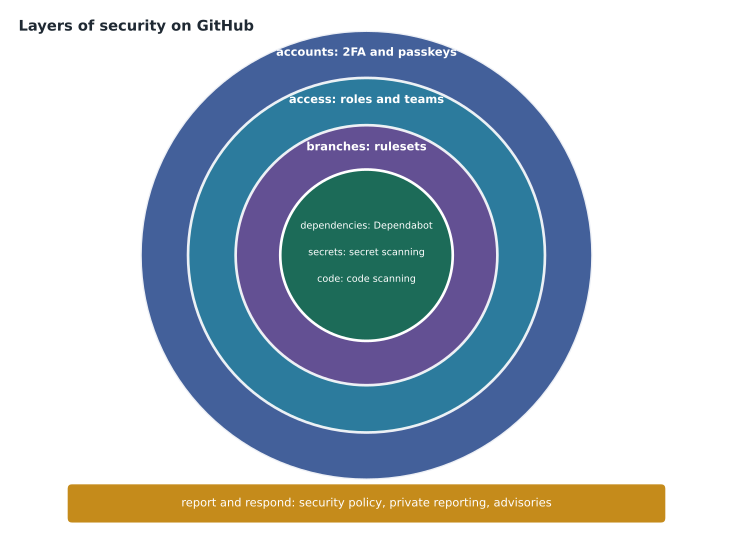
Layers of security on GitHub
It helps to group GitHub's security features by what they protect. Accounts are protected by strong sign-in. Access is protected by roles, teams and least privilege (lessons 1 and 2). Branches are protected by rules and rulesets (lesson 3). Dependencies, the outside packages a project uses, are watched by the dependency graph and Dependabot. Secrets, such as passwords and keys, are watched by secret scanning and push protection. Code is checked by code scanning. And reporting and response are handled by security policies, private vulnerability reporting and security advisories. An organization sees all of this together in security overview.
Account security
Most real-world compromises of code repositories begin with a stolen account, not with an attack on GitHub itself. Two-factor authentication (2FA) is the base: GitHub requires it for accounts that contribute code on github.com, and organizations can require it for all members, as Tidewater does. Options include an authenticator app, a hardware security key, GitHub Mobile, and passkeys, which replace the password with a key stored on a device and unlocked with a fingerprint, face or PIN. Passkeys and security keys resist phishing because they will only sign in to the real GitHub site. Text messages are allowed in some regions but are the weakest option.
Other account settings matter too. SSH keys and personal access tokens let tools act as the person; GitHub recommends fine-grained tokens with expiry dates, and people should delete keys and tokens they no longer use. Each account has a security log listing sign-ins, new keys and changed settings, which is the first place to look if something seems wrong. Sessions can be reviewed and signed out remotely. And every person should keep their recovery codes somewhere safe, because losing both the second factor and the codes can mean losing the account.
| Sign-in method | Resists phishing? | Notes |
|---|---|---|
| Password only | No | Not enough on its own |
| Authenticator app code | Partly | A fake site can trick someone into typing the code |
| GitHub Mobile prompt | Partly | Shows a number to match, which helps |
| Security key | Yes | A small device plugged in or tapped |
| Passkey | Yes | Can replace the password entirely |
Reporting and advisories
When someone finds a weakness in a project, the way it is reported matters. A security policy (SECURITY.md, lesson 5) says how to report it privately. Private vulnerability reporting, turned on in a public repository's settings, adds a button on the Security tab so a reporter can send details straight to the maintainers. The maintainers can then open a repository security advisory, a private workspace where they discuss the problem, work on a fix in a temporary private fork, and finally publish the advisory. Publishing can include requesting a CVE identifier, the standard number used worldwide to refer to a specific vulnerability; GitHub is a CVE numbering authority and can assign one.
Published advisories feed the GitHub Advisory Database, a public list of known vulnerabilities in open-source packages, collected from GitHub advisories, the National Vulnerability Database and other sources. Advisories that GitHub's security team has reviewed are the ones used to raise Dependabot alerts. This is the bridge between one project's bug and every other project that depends on it: when a weakness in a mapping library is published, every repository that uses the library can be told.
Worked problem
A weakness in the trail-report format
A university researcher finds that the open trail-report validator accepts data files that can make the TrailCheck site show text from another domain. What should happen, in order?
Show solution
- The researcher reads SECURITY.md and uses private vulnerability reporting rather than opening a public issue.
- The maintainers acknowledge the report within the two working days the policy promises and open a draft repository security advisory.
- They fix the validator in the advisory's temporary private fork and test it.
- They publish the fix and the advisory together, requesting a CVE identifier, and credit the researcher.
- Repositories that depend on the validator receive Dependabot alerts once the advisory is reviewed into the Advisory Database.
Answer: Private report, acknowledgment, private fix, then the fix and advisory published together, which alerts dependent projects.
Dependencies: the dependency graph and Dependabot
Most software is built mostly from other people's packages. The dependency graph reads a repository's manifest and lock files, such as package.json or requirements.txt, and lists the packages it depends on, directly and indirectly. Dependabot alerts compare that list with the Advisory Database and warn when a dependency has a known vulnerability. Dependabot security updates open pull requests that upgrade the vulnerable package to a fixed version, and Dependabot version updates keep dependencies current on a schedule. Dependency review shows, in a pull request, which dependencies the change adds or upgrades and whether any are vulnerable. Lesson 8 covers these in detail.
Secrets: secret scanning and push protection
Secret scanning looks through a repository's whole Git history, and its issues, pull requests, discussions and wikis, for strings that look like credentials, such as cloud access keys, payment-service keys and tokens. For many service providers, GitHub also tells the provider when one of their keys is found in a public repository, so it can be revoked. Push protection goes further and stops a push that contains a recognized secret before it reaches the repository. Lesson 9 covers both.
Code: code scanning
Code scanning analyses source code for patterns that indicate vulnerabilities and coding errors, such as building a database query directly from user input. GitHub's own engine is CodeQL, which treats code as data that can be queried; results appear as alerts in the Security tab and as annotations on pull requests. Code scanning can run with a default setup that GitHub configures automatically, or an advanced setup with a workflow file. Copilot Autofix can suggest a fix for many alerts. Third-party scanning tools can also upload their results in a standard format. Because TrailCheck is mostly a static site with a little JavaScript, Priya turned on the default setup for its public repository and left deeper work for the advanced security course, MSBA-361.
Security overview
For an organization, security overview gathers alerts and feature coverage from every repository in one place: which repositories have each feature turned on, how many open alerts of each type there are, how quickly they are being fixed, and how many secrets push protection has blocked. Organization owners and security managers can see it. Organizations can also apply security configurations, named sets of security settings, to many repositories at once, including GitHub's recommended configuration, so new repositories start protected.
What is free and what is paid
The cost of these features depends on whether a repository is public or private. For public repositories, GitHub provides the dependency graph, Dependabot alerts and updates, secret scanning, push protection and code scanning at no charge, and turns several of them on by default. For private and internal repositories owned by organizations, the dependency graph and Dependabot are available on every plan, while secret scanning and code scanning require paid products. Since April 2025 GitHub sells these as two products for GitHub Team and GitHub Enterprise Cloud: GitHub Secret Protection, which covers secret scanning, push protection, custom patterns and related features, and GitHub Code Security, which covers code scanning, Copilot Autofix, dependency review and related features. Both are priced per active committer, a person who has pushed to a covered repository in the last 90 days.
| Feature | Public repositories | Private repositories (organization) |
|---|---|---|
| Dependency graph | Included | Included |
| Dependabot alerts and updates | Included | Included |
| Secret scanning and push protection | Included | GitHub Secret Protection |
| Code scanning and Copilot Autofix | Included | GitHub Code Security |
| Dependency review in pull requests | Included | GitHub Code Security |
| Private vulnerability reporting | Available | Not applicable to private repositories |
| Security overview | Basic | Fuller with the paid products |
Worked problem
Pricing the paid products
At launch, GitHub Secret Protection was priced at 19 dollars (US) and GitHub Code Security at 30 dollars (US) per active committer per month. Tidewater's only private repository with code is trailcheck-admin, where 3 people pushed in the last 90 days. What would each product cost per month, and per year for both?
Show solution
- Secret Protection: 3 committers x 19 = 57 dollars a month.
- Code Security: 3 committers x 30 = 90 dollars a month.
- Both together: 57 + 90 = 147 dollars a month.
- Per year: 147 x 12 = 1,764 dollars.
Answer: 57 dollars a month for Secret Protection, 90 for Code Security, 1,764 dollars a year for both. Check current prices before deciding.
Rosa's conclusion was that, for now, the public repositories already had the most important protections at no cost, and that the team could reduce the need for paid scanning by keeping secrets out of private repositories altogether. GitHub Team organizations can also run a free secret risk assessment, a one-time scan that reports how many secrets are exposed across the organization, which she scheduled for April before making a final decision.
Who looks after security alerts
Alerts are only useful if someone reads them. GitHub notifies people with write access or higher who watch a repository about new Dependabot alerts, and repository administrators and security managers about secret scanning alerts, but notifications on their own tend to be ignored once there are many of them. Tidewater decided on a simple arrangement: every repository has a named security contact in its README, Priya is the organization's security manager, and alerts are reviewed in a fifteen-minute slot every Monday before the Git lunch. Anything rated critical or high is handled the same day.
| Alert type | First responder | Target time to act |
|---|---|---|
| Secret scanning alert | Repository security contact, then Priya | Same day, starting with revoking the secret |
| Dependabot alert, critical or high | Repository security contact | Within two working days |
| Dependabot alert, medium or low | Reviewed at the Monday slot | Within the month, or dismissed with a reason |
| Code scanning alert | The author of the affected code | Before the next release |
| Private vulnerability report | Maintainers named in SECURITY.md | Acknowledge within two working days |
The targets are modest on purpose. A small team that promises to fix everything within an hour will miss the promise in the first busy week, and then stop believing in the process. A promise it can keep, written down and checked at the Monday slot, does more for security than an ambitious one nobody follows. The same thinking applies to dismissals: an alert that is not relevant, such as a vulnerability in a development tool that never runs on the live site, should be dismissed with a recorded reason rather than left open, so the list of open alerts stays short enough to mean something.
Back to the broken link
None of these features would have caught the expired domain on the closures page, which was a content problem rather than a code one. The team's fix used the same thinking, though: notice early. Dmitri extended the link-check workflow to run every week against the published site, not just on pull requests, and to flag links whose domain had changed owner or started redirecting. Priya added a line to the contributing guide asking editors to prefer links to official park and government sites. Security on GitHub, she said, is mostly a matter of turning on the features that watch for you, and then actually reading what they tell you.
Common mistakes
MistakeRelying on a password and text-message codes for an account with write access.
InsteadUse an authenticator app, a security key or a passkey, and keep recovery codes safe.
MistakeReporting a vulnerability in a public issue.
InsteadUse the project's security policy or private vulnerability reporting.
MistakeAssuming secret scanning runs on private repositories on every plan.
InsteadPrivate repositories need GitHub Secret Protection; public repositories are scanned free.
MistakeTurning on security features and never looking at the alerts.
InsteadAssign owners, review security overview and track alerts to closure.
Summary and key terms
- GitHub security works in layers: accounts, access, branches, dependencies, secrets, code, and reporting and response.
- 2FA, security keys and passkeys protect accounts; passkeys and security keys resist phishing.
- Security policies, private vulnerability reporting and repository security advisories handle reports privately, and published advisories can receive CVE identifiers.
- The Advisory Database feeds Dependabot alerts; secret scanning and push protection catch credentials; CodeQL code scanning finds coding flaws.
- Security overview and security configurations manage features across an organization.
- Public repositories get the main features free; private repositories need GitHub Secret Protection and GitHub Code Security for scanning.
- Passkey
- A sign-in key stored on a device that replaces the password and resists phishing.
- Security advisory
- A private workspace for a vulnerability that can be published with a fix.
- CVE identifier
- A standard number that identifies a specific publicly known vulnerability.
- GitHub Advisory Database
- A public database of known vulnerabilities in open-source packages.
- Code scanning
- Automated analysis of source code for vulnerabilities and errors.
- CodeQL
- GitHub's code analysis engine, which queries code like data.
- Active committer
- A person who pushed to a covered repository in the last 90 days, used for pricing.
Practice problems
Work each problem on paper first, then reveal the answer to check.
Which two sign-in methods resist phishing?
Show answer
Security keys and passkeys.
Which paid product covers secret scanning in private repositories?
Show answer
GitHub Secret Protection.
Where does an organization see alerts and feature coverage for all its repositories?
Show answer
Security overview.
Lesson quiz · 5 questions
Score 60% or more to complete this lesson.
Create a free account to save your progress, take quizzes and earn a certificate.