
MSBA-161 · Lesson 5 of 12 · 21 min
Community health files
▶ Video coming soon A video version of this lesson is on the way.
MSBA-160 lesson 5 introduced the files GitHub recognizes by name, such as CONTRIBUTING.md, SECURITY.md and CODEOWNERS, and the team had written them for trail-notes and trailcheck. By March the organization had seven repositories and two more on the way, and Rosa found that four of them had no contributing guide, two had an out-of-date security policy, and the code of conduct existed in three slightly different versions. At the March 15 session the team looked at community health files as a set: what each one is for, how GitHub uses them, how one organization-wide copy can serve every repository, and how a maintainer keeps a public space healthy when people disagree.
What community health files are
Community health files are documents that tell people how to take part in a project and what to expect from it. GitHub recognizes them by name and location and links them from the right places: the contributing guide appears when someone opens an issue or pull request, the security policy appears on the Security tab, the code of conduct on the repository's front page, and the funding file adds a Sponsor button. They matter most in public repositories, where contributors are strangers, but they help any team, because they put rules where people will see them at the moment they need them.
| File | Purpose | Where GitHub shows it |
|---|---|---|
| CODE_OF_CONDUCT.md | Standards for behavior and how they are enforced | Repository sidebar and community profile |
| CONTRIBUTING.md | How to propose changes and what is expected | Link when opening an issue or pull request |
| SECURITY.md | How to report a security weakness privately | The repository's Security tab |
| SUPPORT.md | Where to get help using the project | Link when opening an issue |
| GOVERNANCE.md | How decisions are made and who makes them | Community profile |
| FUNDING.yml | Ways to support the project financially | A Sponsor button on the repository |
| Issue and pull request templates | The structure of new reports and proposals | When an issue or pull request is created |
| Discussion category forms | The structure of new discussions in a category | When a discussion is started |
Where GitHub looks for them
In a single repository, GitHub looks for each health file in three places: a folder named .github, the root of the repository, and a folder named docs. If there is more than one, GitHub uses the first it finds in that order. Issue templates and pull request templates have their own folder conventions: issue templates and forms go in .github/ISSUE_TEMPLATE, and a single pull request template can be .github/pull_request_template.md.
The organization-wide feature is what solved Rosa's problem. An organization, or a personal account, can create a public repository named .github. Health files placed in it, in its root or in its own .github or docs folder, become the default community health files for every repository in the organization that does not have its own copy of that file. If trailcheck has its own CONTRIBUTING.md, that one is used; if style-guide has none, the default from the .github repository is shown instead. Defaults appear on GitHub but are not copied into the repositories, so a clone of style-guide does not contain them.
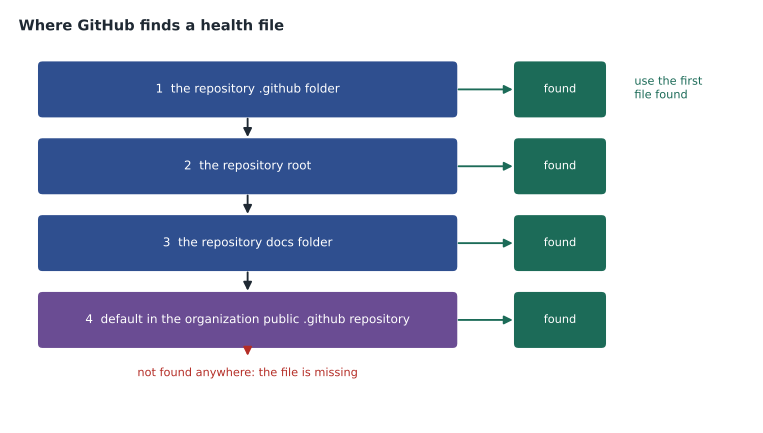
Two exceptions are worth remembering. A license file cannot be a default: every repository needs its own LICENSE file, because a license is a legal statement about that repository's contents. And defaults apply only to the files GitHub supports for this purpose; a README in the .github repository does not become every repository's README (although profile/README.md becomes the organization's profile page, as lesson 1 described).
Worked problem
Which file is shown?
The .github repository of tidewater-guides contains CODE_OF_CONDUCT.md, CONTRIBUTING.md, SECURITY.md and SUPPORT.md. The trailcheck repository has its own docs/CONTRIBUTING.md and .github/SECURITY.md. Which version of each of the four files does a visitor to trailcheck see?
Show solution
- CODE_OF_CONDUCT.md: trailcheck has none, so the organization default is shown.
- CONTRIBUTING.md: trailcheck has one in docs, so its own version is shown.
- SECURITY.md: trailcheck has one in .github, so its own version is shown.
- SUPPORT.md: trailcheck has none, so the organization default is shown.
Answer: Two of the four come from the organization defaults (code of conduct and support) and two from trailcheck itself (contributing and security).
The code of conduct
A code of conduct sets out how people are expected to treat each other, which behavior is not acceptable, how to report a problem, and what maintainers will do about it. Many projects adopt the Contributor Covenant, a widely used template that GitHub offers when you add a code of conduct through the web interface. A code of conduct only works if it names who receives reports and how they will be handled, and if maintainers follow it. Tidewater adopted the Contributor Covenant with one addition: reports go to a shared conduct mailbox read by Grace and Rosa, so nobody has to report a problem to the person they are reporting.
The contributing guide and support file
A good CONTRIBUTING.md answers the questions a newcomer has before their first contribution: what kinds of contributions are welcome, how to set up the project, how to name branches and write commit messages, what the review process is, how long a review usually takes, and which rules, such as the protections from lesson 3, will apply. A SUPPORT.md file points people who need help to the right place, such as Discussions, documentation or a help desk, so that usage questions do not arrive as bug reports. Owen wrote one organization-wide contributing guide in the .github repository, with sections that applied everywhere, and kept short repository-specific guides only where the setup differed.
| CONTRIBUTING section | What it says at Tidewater |
|---|---|
| Welcome | Corrections, trail reports and website fixes are all welcome |
| Before you start | Search existing issues; open an issue for anything large |
| Making a change | Branch from main, small commits, one pull request per change |
| Writing style | Follow the style guide; link to the relevant page |
| Review | One approval from a code owner; most reviews within three working days |
| Checks | Link check and data validation must pass |
| Conduct | Link to the code of conduct |
The security policy
A SECURITY.md file tells people how to report a security weakness without disclosing it publicly, which versions are supported, and what to expect after reporting. Publishing a weakness in a public issue gives everyone, including people who might misuse it, the details before a fix exists. GitHub also offers private vulnerability reporting, which a repository administrator can turn on so that anyone can submit a report through the Security tab and the maintainers can discuss it privately, fix it, and publish a security advisory. Lesson 7 returns to security advisories. Tidewater's policy is short: report through private vulnerability reporting or the security mailbox, expect an acknowledgment within two working days, and do not test against the live website.
Templates and FUNDING.yml
Issue templates, issue forms and pull request templates, covered in MSBA-160, are also community health files, and they can be organization defaults. The default issue forms in Tidewater's .github repository give every repository the same correction, trail-report and bug forms. Discussion category forms, stored in .github/DISCUSSION_TEMPLATE, do the same for discussions in a given category. A FUNDING.yml file lists ways to support a project, such as a GitHub Sponsors account or an external donation page, and GitHub shows them behind a Sponsor button; lesson 12 uses one for the open trail-report project.
# .github/FUNDING.yml
github: [malik-osei]
custom: ["https://example.org/support-trail-reports"]
A CITATION.cff file, also recognized by GitHub, tells people how to cite a project in research, and adds a "Cite this repository" link. The open trail-report format has one, because two university hydrology groups use its data.
Governance
A GOVERNANCE.md file answers a question that every growing project eventually faces: who decides? For a company repository the answer is usually obvious, but for an open project with outside contributors it needs writing down before the first disagreement, not during it. A governance file typically names the roles in the project, such as contributor, maintainer and lead; says how someone moves from one role to the next; explains how decisions are made, for example by consensus among maintainers with the lead deciding if consensus fails; and describes how the governance itself can be changed. Small projects often keep it to a page.
| Role in open-trail-report | Who | Can do |
|---|---|---|
| Contributor | Anyone who opens an issue or pull request | Propose changes, report problems, discuss |
| Reviewer | Contributors invited after three accepted pull requests | Triage issues and review pull requests |
| Maintainer | Malik, Priya and Owen | Merge pull requests, cut releases, moderate |
| Lead | Malik | Decide when maintainers cannot agree |
The roles in the governance file map onto GitHub roles from lesson 2: reviewers receive Triage, maintainers receive Maintain through the maintainers team, and the lead is a repository administrator. Writing the mapping down means nobody has to remember why a person has a particular level of access.
Keeping health files current
Health files go stale like any other documentation, and a contributing guide that describes last year's process does more harm than none. Rosa added the .github repository to the quarterly access review from lesson 2, with three questions: do the contacts in the code of conduct and security policy still reach real people, does the contributing guide match the current protection rules, and do the issue forms still ask for what the team actually needs? Each answer that was "no" became an issue in the .github repository, reviewed like any other change.
The community profile
Public repositories have a community profile, found under the repository's Insights tab as Community standards. It is a checklist showing which recommended files and settings the repository has, with links to add the missing ones. It includes a description, a README, a code of conduct, a contributing guide, a license, a security policy, issue templates, a pull request template, and whether the repository accepts content reports. GitHub uses the profile to help newcomers judge whether a project is welcoming, and maintainers use it as a to-do list.
Worked problem
Completing the community profile
The community profile for open-trail-report shows 9 items, of which the description, README, license and issue templates are present. Moving the organization defaults into place adds the code of conduct, contributing guide and security policy. What fraction of the checklist is complete afterward, and what remains?
Show solution
- Present before: 4 items (description, README, license, issue templates).
- Added by the organization defaults: 3 items, giving 7.
- 7 of 9 is a little under eight in ten.
- Remaining: the pull request template and turning on content reports.
Answer: 7 of 9 items are complete; the pull request template and content reporting remain.
Moderating a community
Files set expectations; moderation tools enforce them. Organization owners and people with the moderator role (lesson 1) can block a person from the organization, which stops them from opening issues, commenting or creating pull requests in its repositories. Maintainers can hide a comment as off-topic, abusive, a duplicate or spam, so it is collapsed for readers but still on record, and can lock a conversation to stop further comments. Interaction limits temporarily restrict who can comment, open issues or create pull requests in public repositories, for example to existing users, prior contributors or collaborators only, for a set period of between a day and six months; they are useful when a repository suddenly attracts a flood of hostile or low-quality activity. Anyone can report content to GitHub or, if the repository allows it, to the maintainers.
| Tool | What it does | When to use it |
|---|---|---|
| Hide a comment | Collapses it with a reason, such as off-topic or abuse | A single inappropriate comment |
| Lock a conversation | Stops new comments on an issue or pull request | A settled or heated thread |
| Interaction limits | Temporarily restricts who can participate | A sudden flood of unwanted activity |
| Block a user | Prevents someone from participating in the organization | Repeated or serious conduct violations |
| Report content | Sends it to GitHub or the maintainers for review | Content that breaks GitHub's policies |
Grace asked for one more rule: every moderation action is followed by a short, polite comment, or a private message, that explains what happened and links to the code of conduct, so people know why. In a community of volunteers across northern New England, most problems turned out to be misunderstandings, and an explanation fixed more of them than a block ever would.
Common mistakes
MistakeCopying the same contributing guide into every repository by hand.
InsteadPut shared health files in the organization's public .github repository as defaults.
MistakeExpecting an organization default license to cover every repository.
InsteadEach repository needs its own LICENSE file.
MistakeAsking people to report security problems in public issues.
InsteadPublish a SECURITY.md and turn on private vulnerability reporting.
MistakeAdopting a code of conduct without saying who handles reports.
InsteadName the contacts and the process, and follow it.
Summary and key terms
- Community health files tell people how to take part: code of conduct, contributing, security, support, governance, funding and templates.
- GitHub looks in .github, the root and docs, in that order.
- A public .github repository provides default health files for every repository without its own copy; licenses cannot be defaults.
- SECURITY.md and private vulnerability reporting keep security reports out of public issues.
- The community profile under Insights checks which recommended files a public repository has.
- Hiding, locking, interaction limits, blocking and reporting are the tools for moderating a community.
- Community health file
- A file GitHub recognizes that explains how to take part in a project.
- Default community health file
- A health file in an organization's .github repository used by repositories without their own.
- Code of conduct
- A statement of expected behavior and how it is enforced.
- Contributor Covenant
- A widely used code of conduct template.
- Private vulnerability reporting
- A way for anyone to report a security weakness privately through the Security tab.
- Community profile
- A checklist of recommended files and settings for a public repository.
- Interaction limits
- Temporary restrictions on who can participate in a public repository.
Practice problems
Work each problem on paper first, then reveal the answer to check.
What must the repository that holds an organization's default health files be called?
Show answer
.github, and it must be public.
Which file adds a Sponsor button to a repository?
Show answer
FUNDING.yml.
In what order does GitHub look for a health file in a repository?
Show answer
The .github folder, then the root, then the docs folder.
Lesson quiz · 5 questions
Score 60% or more to complete this lesson.
Create a free account to save your progress, take quizzes and earn a certificate.